1. හැඳින්වීම
The 1Mii B310Pro is a versatile Bluetooth 5.2 audio adapter designed to enhance your audio experience. It functions as a transmitter (TX), receiver (RX), and offers a bypass mode, providing flexible connectivity for various audio setups. This device supports aptX Low Latency and aptX HD codecs for high-quality, synchronized audio, and features a long-range transmission capability.
2. පැකේජ අන්තර්ගතය
සියලුම අයිතම පැකේජයේ ඇති බව තහවුරු කරගන්න:
- 1Mii B310Pro Bluetooth Transmitter Receiver
- USB බල කේබලය
- 3.5mm Male to RCA Male Cable
- 3.5mm ශ්රව්ය කේබල්
- ඔප්ටිකල් කේබල්
- DC ඇඩැප්ටරය
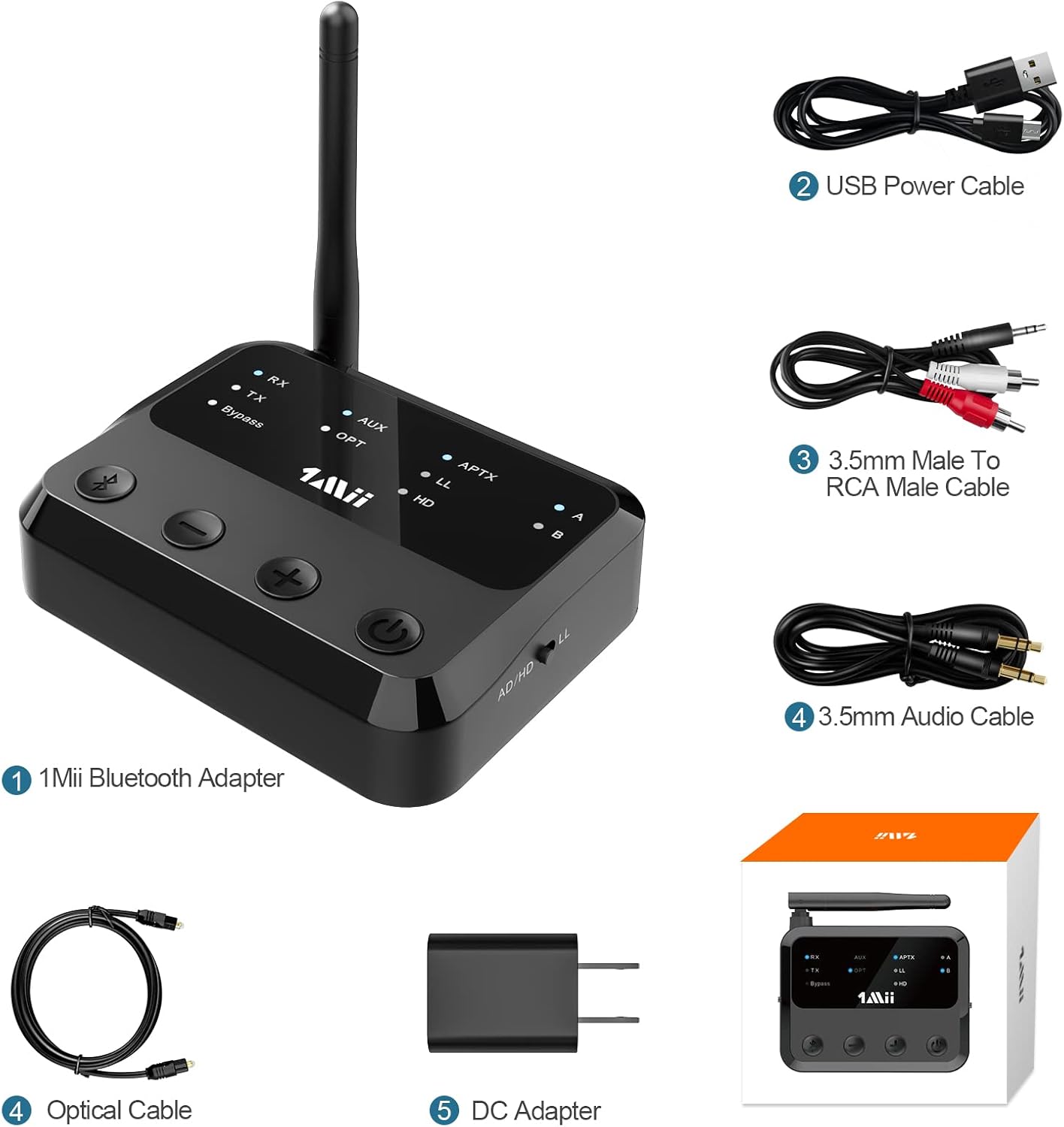
රූපය 2.1: 1Mii B310Pro Bluetooth adapter and its included accessories, showing the device, USB power cable, 3.5mm to RCA cable, 3.5mm audio cable, optical cable, and DC adapter.
3. නිෂ්පාදන අවසන්view සහ විශේෂාංග
The 1Mii B310Pro offers multiple modes and advanced features for a seamless audio experience.
3.1 මෙහෙයුම් ආකාරය
- සම්ප්රේෂක (TX) මාදිලිය: Transmits audio from non-Bluetooth devices (e.g., TV, PC) to Bluetooth headphones or speakers.
- ග්රාහක (RX) මාදිලිය: Receives audio from Bluetooth-enabled devices (e.g., smartphone) and outputs to wired speakers or home stereo systems.
- බයිපාස් මාදිලිය: Acts as a digital-to-analog converter (DAC), allowing direct audio pass-through without Bluetooth functionality.

රූපය 3.1: ඉවරයිview of the 1Mii B310Pro's three operational modes: Transmitter (TX), Receiver (RX), and Bypass.
3.2 ප්රධාන ලක්ෂණ
- බ්ලූටූත් 5.2: Ensures stable and fast wireless connections.
- දිගු පරාසය: Up to 164 feet (50 meters) barrier-free transmission.
- aptX Support: Includes aptX Adaptive, aptX Low Latency, and aptX HD for high-quality, synchronized audio. Note: Your receiving device must also support aptX LL for low-latency audio.
- පුළුල් අනුකූලතාව: Supports Optical, RCA, and 3.5mm AUX input/output. Compatible with TVs, home stereo systems, Bluetooth headphones, and speakers.
- Dual Link Function: Connects to two Bluetooth headphones or speakers simultaneously with independent volume control.
- Memory Connection: Automatically reconnects to the last paired device.

රූපය 3.2: The 1Mii B310Pro features an advanced Bluetooth 5.2 chip for enhanced connectivity.

රූපය 3.3: The 1Mii B310Pro offers an extended Bluetooth range of up to 164 feet (50m).
4. සැකසුම් උපදෙස්
4.1. උපාංගය බල ගැන්වීම
- Connect the B310Pro to a power supply using the included USB charging cable and DC adapter.
- උපාංගය ස්වයංක්රීයව ක්රියාත්මක වේ.
වීඩියෝ 4.1: This video demonstrates how to connect the 1Mii B310Pro to a power source and initiate pairing with AirPods. It shows the process of plugging in the USB cable and then pairing the device with Apple AirPods.
4.2. Connecting in Transmitter (TX) Mode
- Slide the mode switch on the B310Pro to the "TX" side.
- The B310Pro will enter pairing mode with the LED flashing blue and red. If not, press the Bluetooth button for about 2 seconds to enter pairing mode.
- Connect the B310Pro to your audio source (e.g., TV, PC) using the appropriate cable (Optical, RCA, or 3.5mm AUX).
- ඔබගේ බ්ලූටූත් හෙඩ්ෆෝන් හෝ ස්පීකර් යුගල කිරීමේ ප්රකාරයට දමන්න.
- Once paired, the "TX" LED will stop flashing, and the "A" or "B" LED will stay blue, indicating a successful connection.

රූපය 4.1: The 1Mii B310Pro supports dual link, allowing two Bluetooth headphones to connect simultaneously in TX mode.
වීඩියෝ 4.2: This video illustrates the process of pairing a second Bluetooth headphone to the 1Mii B310Pro. It shows pressing the Bluetooth button to re-enter pairing mode and connecting the second device.
4.3. Connecting in Receiver (RX) Mode
- Slide the mode switch on the B310Pro to the "RX" side.
- The B310Pro will enter pairing mode with the LED flashing blue and red.
- Connect the B310Pro to your wired speakers or home stereo system using the appropriate cable (RCA or 3.5mm AUX).
- Enable Bluetooth on your smartphone or other audio device and select "1Mii B310Pro" from the list of available devices to pair.
- Once paired, the "RX" LED will stop flashing, and the "A" LED will stay blue.
4.4. Using Bypass Mode
- Slide the mode switch on the B310Pro to the "Bypass" position.
- Connect your audio source (e.g., TV) to the B310Pro's input and your wired speakers/stereo to the B310Pro's output using the appropriate cables.
- In this mode, audio passes directly through the device without Bluetooth processing.
5. උපාංගය ක්රියාත්මක කිරීම
5.1. පාලන සහ දර්ශක
The B310Pro features intuitive controls and LED indicators for easy operation.

රූපය 5.1: Front panel controls and LED indicators of the 1Mii B310Pro.
- බ්ලූටූත් බොත්තම: යුගල කිරීමේ ප්රකාරයට ඇතුළු වීමට තත්පර 2ක් ඔබා අල්ලාගෙන සිටින්න.
- Volume - / Previous Track: Decreases volume or skips to the previous track.
- වෙළුම + / ඊළඟ ඛණ්ඩය: ශබ්දය වැඩි කරයි හෝ ඊළඟ ධාවන පථයට යයි.
- බල සක්රිය/අක්රිය බොත්තම: උපාංගය සක්රිය හෝ අක්රිය කරයි.
- Mode Switch (RX/TX/Bypass): අපේක්ෂිත මෙහෙයුම් ආකාරය තෝරා ගනී.
- LED දර්ශක: Show current mode (RX/TX/Bypass), input/output type (AUX/OPT), audio codec (APTX/LL/HD/AD), and paired devices (A/B).
5.2. Optical Audio Settings for TV
When using the optical connection with your TV, ensure the TV's audio settings are configured correctly.
- Navigate to your TV's audio settings.
- Set the sound output to "OPTICAL".
- Set the audio output format to "PCM".

රූපය 5.2: Optical fiber connection between TV and 1Mii B310Pro.
වීඩියෝ 5.1: This video demonstrates how to adjust the optical audio settings on a television to ensure proper sound output to the 1Mii B310Pro. The relevant segment shows navigating through the TV's sound menu to select 'Optical' output and 'PCM' format (from 0:39 to 0:49 in the video).
6. දෝශ නිරාකරණය
- ශබ්දයක් නැත: If there is no sound, ensure your TV's audio output is set to "OPTICAL" and the audio format is "PCM" when using an optical connection. Check all cable connections.
- යුගල කිරීමේ ගැටළු: If the device does not pair, ensure both the B310Pro and your receiving device are in pairing mode. Try resetting the B310Pro.
- ඉහළ ප්රමාදය: For aptX Low Latency to function, both the B310Pro and your Bluetooth headphones/speakers must support aptX LL.
- බාධා කිරීම්: Keep the B310Pro away from other wireless devices that might cause interference.
6.1. Resetting the B310Pro
උපාංගය කර්මාන්තශාලා සැකසුම් වෙත නැවත සැකසීමට:
- Press and hold the Bluetooth button for approximately 10 seconds.
- All indicator lights will flash once, confirming the reset.
වීඩියෝ 6.1: This video demonstrates how to perform a factory reset on the 1Mii B310Pro by pressing and holding the Bluetooth button until all indicators flash (from 0:49 to 0:59 in the video).
7. පිරිවිතර
| විශේෂාංගය | විස්තර |
|---|---|
| ආදර්ශ අංකය | B310Pro |
| බ්ලූටූත් අනුවාදය | 5.2 |
| මෙහෙයුම් මාදිලි | TX (Transmitter), RX (Receiver), Bypass |
| සහාය දක්වන ශ්රව්ය කෝඩෙක් | aptX Adaptive, aptX HD, aptX Low Latency, SBC, AAC |
| සම්බන්ධතා තාක්ෂණය | Optical, RCA, 3.5mm AUX |
| රැහැන් රහිත පරාසය | Up to 164 feet (50 meters) barrier-free |
| නිෂ්පාදන මානයන් | අඟල් 3.11 x 3.94 x 0.98 |
| අයිතමයේ බර | අවුන්ස 9.6 කි |
| බලශක්ති ප්රභවය | DC ඇඩැප්ටරය |
| විශේෂ ලක්ෂණය | පරිමාව පාලනය |
8 ආරක්ෂිත තොරතුරු
- හානිය වළක්වා ගැනීම සඳහා උපාංගය ප්රවේශමෙන් හසුරුවන්න.
- ජලය හා අධික උෂ්ණත්වයෙන් Keep ත්ව සිටින්න.
- අධික උනුසුම් වීම වැළැක්වීම සඳහා නිසි වාතාශ්රය සහතික කරන්න.
- Avoid interference with other wireless devices.
- Handle the battery with care (if applicable).
9. වගකීම් සහ සහාය
For warranty information and technical support, please refer to the official 1Mii webවෙබ් අඩවියට හෝ ඔවුන්ගේ පාරිභෝගික සේවයට සෘජුවම සම්බන්ධ වන්න. වගකීම් හිමිකම් සඳහා ඔබේ මිලදී ගැනීමේ රිසිට්පත තබා ගන්න.
Webඅඩවිය: www.1mii.com


