1. හැඳින්වීම
The Yamaha AG08 is an 8-channel live streaming loopback mixer and USB audio interface designed for a wide range of audio applications, including live streaming, podcasting, gaming, and music production. It combines essential mixing functionalities with versatile I/O and USB routing options, expanded footswitch capabilities, and a suite of DSP effects to deliver high-quality audio performance.
2 ප්රධාන ලක්ෂණ
- Two Condenser Mic Inputs with Two Headphone Outputs: Allows for class-leading sound capture and independent headphone monitoring for two individuals simultaneously.
- Three Assignable Faders for Versatile USB I/O: Supports diverse streaming applications by allowing individual assignment of multiple app signals from a USB-connected PC or analog line inputs, and three USB mixed outputs to various PC applications.
- Four Effects Preset Buttons for Channel 1: Optimize vocal processing for different streaming scenarios with physical controls.
- Five DSP Effects: Enhance and color your voice, prioritize between voice and other sound sources using effects like Voice Changer, Amp Sim, Comp & EQ, Delay & Reverb, Ducker, and Maximizer.
- Six Assignable Sound Pads: Integrate sound effects in real-time to add entertainment value to your streams.
3. Setup & Connections
Before connecting any devices, ensure the AG08 unit and all connected equipment are powered off. Connect your microphones, instruments, and speakers according to the connection examples provided below. For optimal performance, use high-quality cables.
3.1 ඉදිරිපස පුවරුව අවසන්view

Figure 1: Front panel of the Yamaha AG08 mixer, displaying all controls and inputs.
3.2 පසුපස පැනල් සම්බන්ධතා

Figure 2: Rear panel of the Yamaha AG08, detailing XLR, line, and USB connections.
3.3 USB ශ්රව්ය අතුරුමුහුණත් සම්බන්ධතාවය
To connect the AG08 to a computer for USB audio, use a USB-C cable (not included). Ensure the USB cable is securely connected to the unit and your computer. The AG08 supports high-resolution audio up to 24-bit/192kHz.
Video: A Closer Look at the Yamaha AG08. This video provides a detailed overview of the mixer's physical features and connectivity options.
4. මික්සර් ක්රියාත්මක කිරීම
The AG08 offers intuitive controls for managing your audio. Familiarize yourself with the various knobs, faders, and buttons to effectively mix and process your sound.
4.1 නාලිකා පාලන

රූපය 3: සවිස්තරාත්මක view of channel faders, gain knobs, and effect controls.
Each channel features a gain knob to adjust input sensitivity, and a fader for precise volume control. Channels 1 and 2 include +48V phantom power for condenser microphones, and dedicated buttons for compression/EQ and amp අනුකරණය.
4.2 DSP Effects and Voice Changer

Figure 4: A hand adjusting a pitch/formant knob, highlighting the voice changer and effect controls.
The AG08 integrates various DSP effects, including reverb, delay, compression, and EQ. Channel 1 also features a voice changer with pitch and formant controls. These effects can be activated and adjusted using the dedicated buttons and knobs on the mixer's surface.
4.3 ශබ්ද පෑඩ්

Figure 5: A hand interacting with the assignable sound pads, which can trigger various audio effects.
The six assignable sound pads allow you to trigger pre-loaded or custom sound effects during your live streams or performances. Use the SHIFT button to access additional functions or banks of sounds.
5. USB Audio Routing
The AG08 offers flexible USB audio routing capabilities, allowing you to manage multiple audio sources and destinations for complex streaming and recording setups.
5.1 Assignable Faders for USB Input/Output
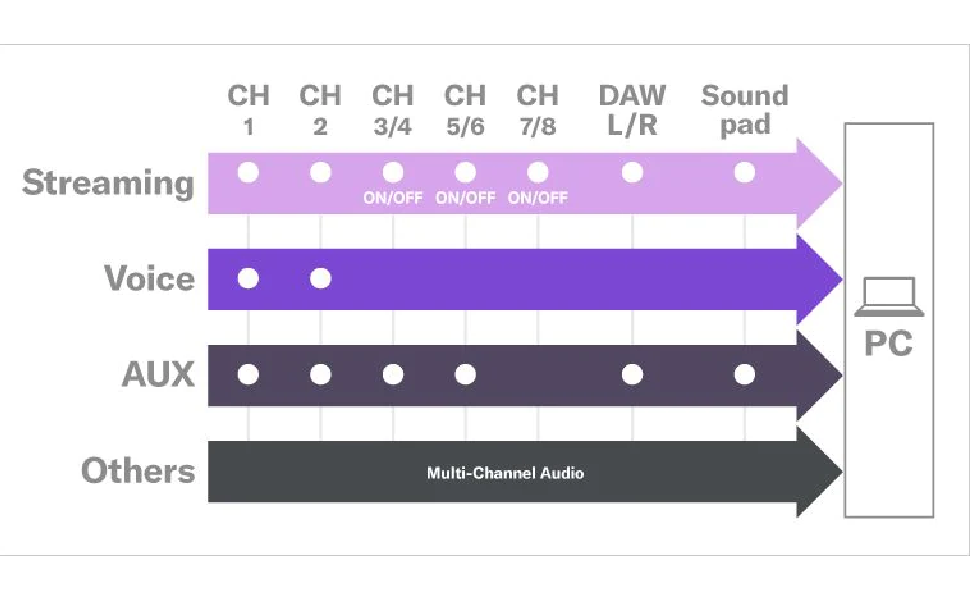
Figure 6: USB audio routing diagram, showing how different channels can be assigned for streaming, voice, AUX, and multi-channel audio to a PC.
Signals from multiple applications on a USB-connected PC or analog line inputs can be individually assigned and mixed using the faders. Conversely, three USB mixed outputs from the AG08 can be individually assigned to various applications on the PC via USB connection. This functionality facilitates real-time interaction, such as sharing mixed audio with chat partners or listeners during live streams.
5.2 Multi-Channel Recording
For ASIO-supported applications like DAW software, the direct output from each input channel (Channels 1, 2, 3/4, 5/6, and 7/8) and three mixed channels can be used in parallel. This enables multi-channel recording even during live streams, providing greater flexibility for post-production.
6. පද්ධති අවශ්යතා
To ensure proper functionality when connecting the AG08 to a computer, verify that your system meets the following minimum requirements:
- RAM: 2 GB හෝ ඊට වැඩි
- Free HDD Space: 4 GB හෝ ඊට වැඩි
- සංදර්ශක විභේදනය: 1280 x 800 recommended
- අන්තර්ජාල සම්බන්ධතාවය: Required for software downloads and registration
- USB කේබලය: Sold separately (USB-C to USB-A or USB-C to USB-C, depending on your computer's ports)
- මෙහෙයුම් පද්ධතිය: Compatible with Windows and macOS. Refer to the Yamaha website for the latest driver and software compatibility information.
7. පිරිවිතර
| විශේෂාංගය | පිරිවිතර |
|---|---|
| අයිතමයේ බර | රාත්තල් 7.43 කි |
| නිෂ්පාදන මානයන් | අඟල් 11.5 x 8.8 x 3.5 |
| අයිතම ආදර්ශ අංකය | AG08 |
| දෘඩාංග අතුරුමුහුණත | USB |
| ද්රව්ය වර්ගය | මල නොකන වානේ |
| බලශක්ති ප්රභවය | රැහැන්ගත විදුලි |
| නාලිකා ගණන | 8 |
| සම්බන්ධතා තාක්ෂණය | USB |
| ප්රතිදාන සම්බන්ධක වර්ගය | USB වර්ගය B |
8. Software Suite
The Yamaha AG08 includes a Steinberg Software Suite, which typically comprises applications like Cubase AI, WaveLab Cast, and Cubasis LE. These software tools enhance your audio production and editing capabilities, offering features for recording, mixing, mastering, and podcast creation. Ensure you download and register the software using the provided access codes and follow the instructions on the Yamaha webඅඩවිය.
9. දෝශ නිරාකරණය
- ශබ්දයක් නැත: Verify all cables are securely connected. Check volume levels on the AG08 and connected devices. Ensure the correct input/output settings are selected on your computer.
- විකෘති ශබ්දය: Reduce input gain levels on the AG08. Check for clipping indicators (PEAK LEDs). Ensure speakers/headphones are not set too loud.
- කිසිදු බලපෑමක් යොදන ලදී: Confirm the FX ON switch is engaged. Adjust the FX RTN LEVEL knob and individual channel FX knobs.
- Phantom Power Issue: Ensure +48V phantom power is enabled for condenser microphones.
- USB සම්බන්ධතා ගැටළු: Verify the USB cable is correctly connected. Check your computer's device manager or sound settings to ensure the AG08 is recognized. Reinstall drivers if necessary.
10. වගකීම් සහ සහාය
For warranty information, technical support, and additional resources, please visit the official Yamaha website or contact your local Yamaha dealer. Keep your proof of purchase for warranty claims.


