1. හැඳින්වීම
Thank you for choosing the MAGIC SELECT B2222 Portable 4-in-1 Air Pump and Vacuum Cleaner. This versatile device combines a cordless air compressor, a car and home vacuum cleaner, a tire pressure detection system, and an integrated SOS LED flashlight. Designed for convenience and efficiency, it is ideal for inflating car, motorcycle, and bicycle tires, as well as balls and other inflatables, and for quick cleaning tasks.
Please read this manual carefully before using the product to ensure safe and optimal performance. Keep this manual for future reference.
2. පෙට්ටියේ ඇති දේ
- 1 x Cordless Air Compressor / Vacuum Cleaner Unit
- 1 x Inflation Tube
- 1 x LED Emergency Light (integrated)
- 1 x USB Type-C Charging Cable
- Various inflation nozzles/adapters
- Vacuum cleaner attachments (e.g., brush nozzle)

3. නිෂ්පාදන ලක්ෂණ
- 4-in-1 ක්රියාකාරීත්වය: Air compressor, vacuum cleaner, tire pressure detection, and SOS LED light.
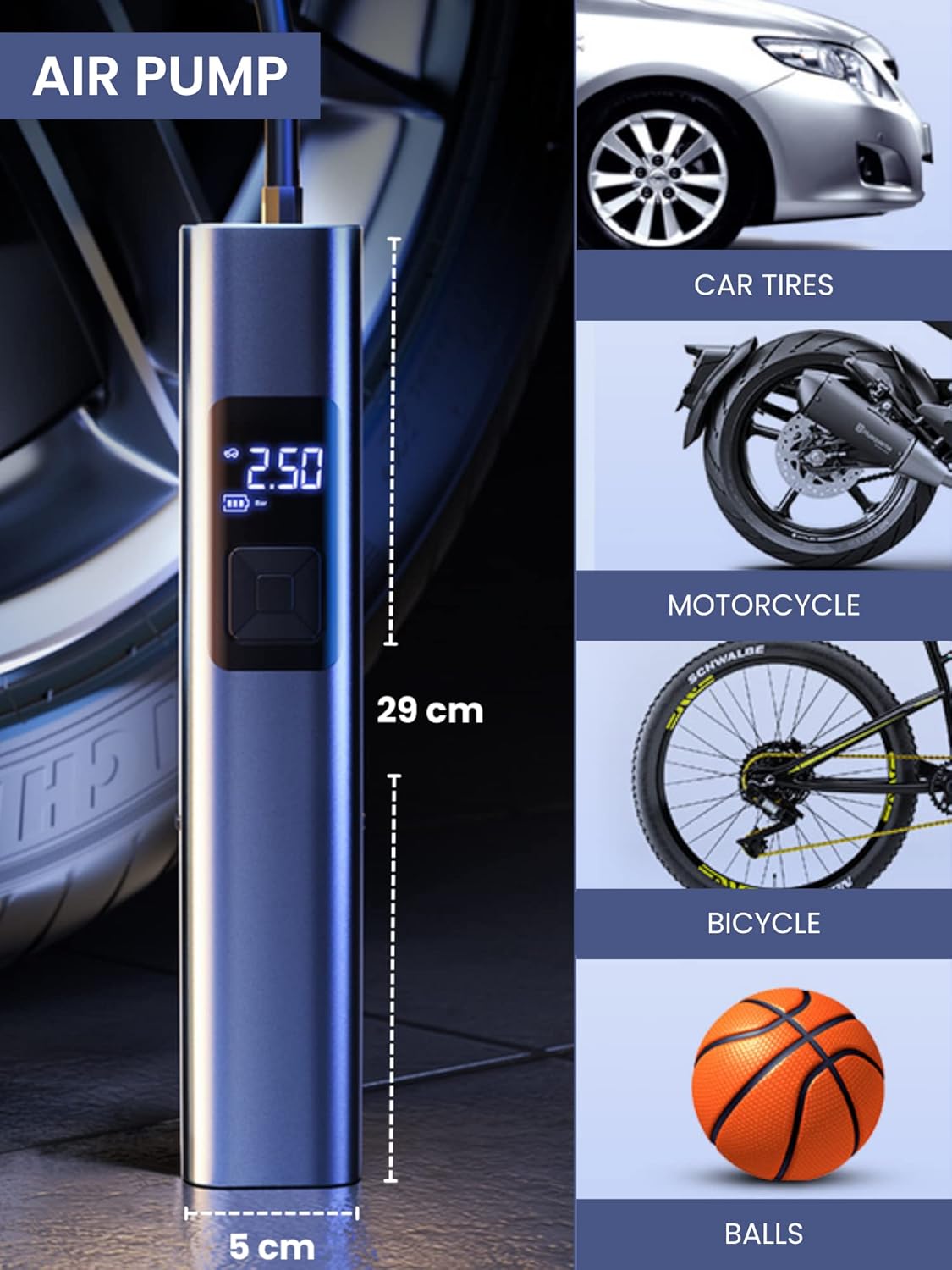
- බලවත් උද්ධමනය: Suitable for car, motorcycle, bicycle tires, and various balls/inflatables.
- Smart Induction Chip: Automatically stops inflation once the preset pressure is reached, ensuring safety and preventing over-inflation.
- ඒකාබද්ධ රික්තකය: Efficiently cleans car interiors and small areas in the home.
- LED හදිසි ආලෝකය: Features 3 lighting modes: steady light, medium-speed flashing, and alternating medium/high-speed flashing for emergency situations.
- දිගු කල් පවතින බැටරි: Equipped with a 4400mAh lithium-ion battery, rechargeable via USB Type-C.
- සංඛ්යාංක දර්ශකය: Clear digital screen to monitor tire pressure and settings.
- සංයුක්ත නිර්මාණය: අතේ ගෙන යා හැකි සහ ගබඩා කිරීමට පහසුය.


4. පිහිටුවීම
4.1 උපාංගය ආරෝපණය කිරීම
- Locate the USB Type-C charging port on the upper side of the compressor.
- සපයා ඇති USB Type-C කේබලය උපාංගයට සම්බන්ධ කරන්න.
- USB කේබලයේ අනෙක් කෙළවර අනුකූල USB බල ඇඩැප්ටරයකට (ඇතුළත් කර නැත) හෝ පරිගණකයක USB පෝට් එකකට සම්බන්ධ කරන්න.
- The digital display will indicate the charging status. Ensure the device is fully charged before first use for optimal battery life.
4.2 උපාංග ඇමිණීම
- For Inflation: Screw the inflation tube into the designated hole at the top of the unit. Attach the appropriate nozzle for your item (car tire, bicycle valve, ball needle, etc.) to the other end of the inflation tube.
- රික්ත කිරීම සඳහා: Insert the vacuum attachment into the hole located at the bottom of the unit.

5. මෙහෙයුම් උපදෙස්
5.1 පාලන පැනලය අවසන්view
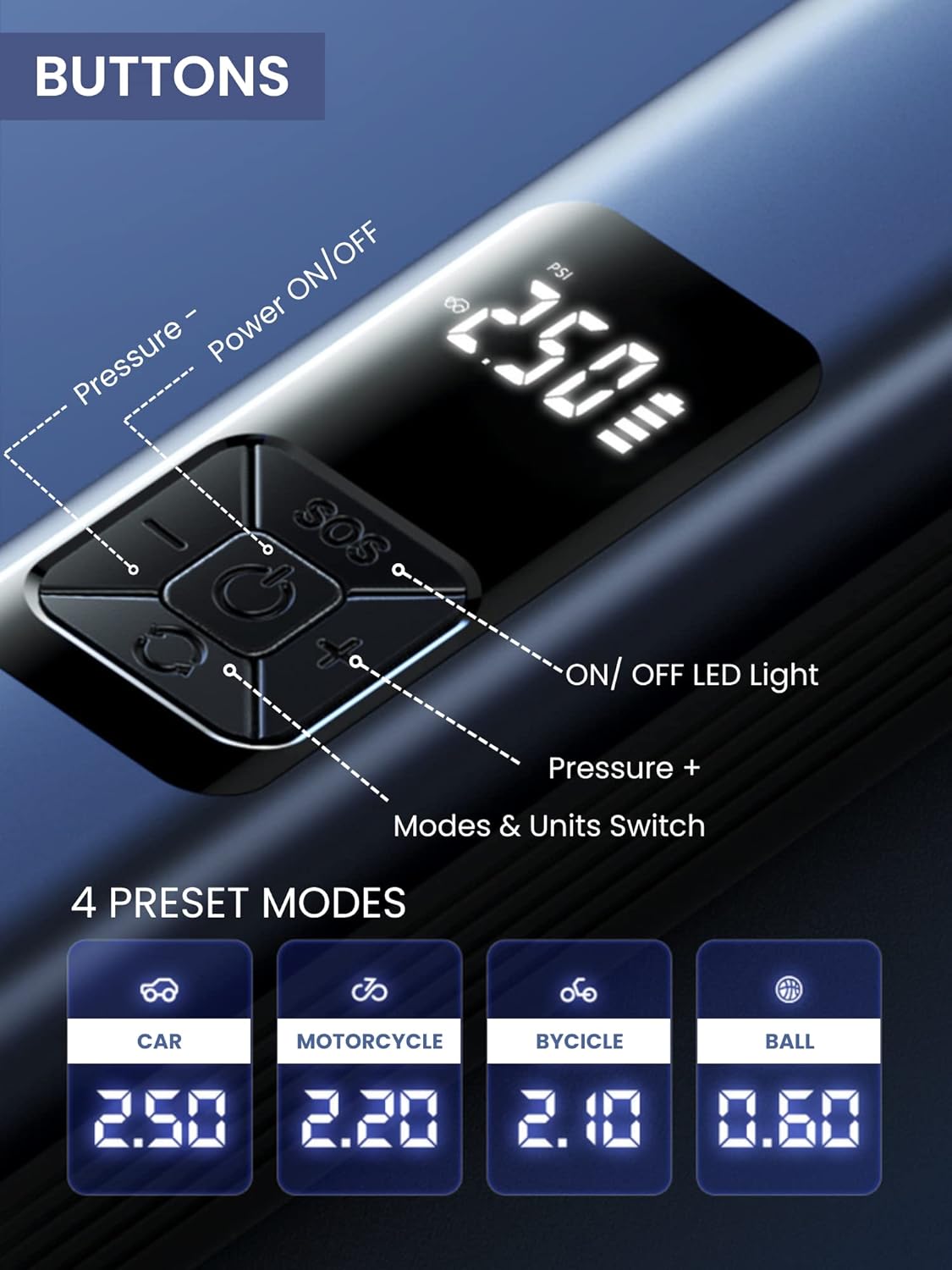
The device features a digital display and 5 control buttons:
- බලය ක්රියාත්මක/අක්රිය බොත්තම: Central button to turn the device on/off and start/stop inflation or vacuuming.
- Pressure - Button: Decreases the target pressure.
- Pressure + Button: Increases the target pressure.
- LED ආලෝකය සක්රිය / අක්රිය බොත්තම: Activates and cycles through LED light modes.
- Mode & Units Switch Button: Changes between preset inflation modes (Car, Motorcycle, Bicycle, Ball) and switches pressure units (e.g., PSI, Bar).
5.2 Using the Air Compressor (Inflation)
- සම්බන්ධ කරන්න: Screw the inflation tube onto the device and attach the correct nozzle to the item you wish to inflate.
- බල ගැන්වීම: Press the Power ON/OFF button to turn on the device. The digital display will show the current tire pressure.
- මාදිලිය තෝරන්න: Press the Mode & Units Switch button to cycle through preset modes (Car, Motorcycle, Bicycle, Ball) or to change pressure units (PSI, Bar).
- පීඩනය සකසන්න: Use the Pressure + and Pressure - buttons to set your desired target pressure.
- උද්ධමනය ආරම්භ කරන්න: Press the Power ON/OFF button again to begin inflation. The device will automatically stop when the preset pressure is reached.
- විසන්ධි කරන්න: Once inflation is complete, disconnect the nozzle from the item and then unscrew the inflation tube from the device.
5.3 වැකුම් ක්ලීනර් භාවිතා කිරීම
- අමුණන්න: Insert the desired vacuum attachment into the vacuum port at the bottom of the device.
- බල ගැන්වීම: Press the Power ON/OFF button to activate the vacuum function.
- පිරිසිදු: Use the device to vacuum dust, crumbs, and small debris from car interiors (seats, trunk, center console) or small areas in your home (sofas, lamp tables, windowsills, keyboards).
- විදුලිය විසන්ධි කිරීම: Press the Power ON/OFF button again to turn off the vacuum.

5.4 Using the LED Emergency Light
- සක්රිය කරන්න: Press the LED Light ON/OFF button to turn on the light.
- සයිකල් මාදිලි: Press the LED Light ON/OFF button repeatedly to cycle through the three lighting modes:
- First press: Steady light
- Second press: Medium-speed flashing light
- Third press: Alternating medium/high-speed flashing light (SOS signal)
- නිවා දමන්න: Continue pressing the LED Light ON/OFF button until the light turns off, or hold the button for a few seconds.
6. නඩත්තු කිරීම
6.1 උපාංගය පිරිසිදු කිරීම
- උපාංගයේ බාහිර කොටස මෘදු, ඩී සමඟ පිස දමන්නamp රෙදි. දරුණු රසායනික ද්රව්ය හෝ උල්ෙල්ඛ පිරිසිදු කරන්නන් භාවිතා නොකරන්න.
- For the vacuum function, regularly empty the dust collection bin and clean the filter to maintain optimal suction power. The filter is washable; ensure it is completely dry before reinserting.
6.2 ගබඩා කිරීම
- උපාංගය සහ එහි උපාංග සෘජු හිරු එළියෙන් සහ අධික උෂ්ණත්වයන්ගෙන් ඈත්ව සිසිල් වියළි ස්ථානයක ගබඩා කරන්න.
- Ensure the device is fully charged before long-term storage to preserve battery health.
7. දෝශ නිරාකරණය
| ගැටලුව | විය හැකි හේතුව | විසඳුම |
|---|---|---|
| උපාංගය ක්රියාත්මක නොවේ. | අඩු බැටරි. | සපයා ඇති USB Type-C කේබලය භාවිතයෙන් උපාංගය ආරෝපණය කරන්න. |
| වායු සම්පීඩකය පිම්බෙන්නේ නැත. | Inflation tube or nozzle not properly connected. Incorrect pressure setting. | Ensure all connections are secure. Check and adjust the target pressure. |
| Vacuum suction is weak. | Dust bin full. Filter clogged. | Empty the dust bin. Clean or replace the filter. |
| Device stops unexpectedly during operation. | Overheat protection activated. Battery low. | Allow the device to cool down. Recharge the battery. |
8. පිරිවිතර
| විශේෂාංගය | විස්තර |
|---|---|
| ආදර්ශ අංකය | B2222 |
| වෙළඳ නාමය | මැජික් තේරීම |
| බැටරි ධාරිතාව | 4400mAh ලිතියම්-අයන |
| Motor Speed (Vacuum) | 30000r/min |
| මානයන් (L x W x H) | 29 x 6 x 5.5 සෙ.මී. (දළ වශයෙන්) |
| බර | 850 ග්රෑම් |
| ආරෝපණ වරාය | USB Type-C |
| විශේෂ ලක්ෂණ | LED Emergency Light, Digital Display, Automatic Shut-off (Inflation) |
9. වගකීම් සහ සහාය
For warranty information and customer support, please refer to the documentation provided with your purchase or contact MAGIC SELECT customer service directly. Keep your proof of purchase for warranty claims.
For further assistance or inquiries, please visit the official MAGIC SELECT website or contact their support team through the contact details provided on their packaging or product page.


