1. හැඳින්වීම සහ අවසන්view
The Calix GigaCenter 844E-1 is a high-performance wireless router and modem designed to provide robust and reliable internet connectivity for home and small office environments. It supports dual-band Wi-Fi (2.4GHz and 5GHz) for optimal wireless performance and includes multiple Ethernet ports for wired connections. This manual provides detailed instructions for setting up, operating, maintaining, and troubleshooting your GigaCenter 844E-1 device.
2. නිෂ්පාදන ලක්ෂණ
- ද්විත්ව කලාප Wi-Fi: Supports 2.4GHz and 5GHz frequencies for flexible and high-speed wireless connections (802.11ac, 802.11n, 802.11a/g/b compatible).
- High LAN Data Rate: Capable of up to 1000 Mbps for fast wired connections.
- බහු වරාය: Includes Ethernet (RJ-45) ports (4 LAN ports), USB 2.0, and RJ-11 ports for versatile connectivity.
- Integrated Modem: Functions as both a router and a modem, simplifying network setup.
- සංයුක්ත නිර්මාණය: Designed for efficient space utilization.
3. පැකේජ අන්තර්ගතය
කරුණාකර ඔබගේ පැකේජයේ සියලුම අයිතම ඇති බව තහවුරු කරගන්න:
- Calix GigaCenter 844E-1 Wireless Router Modem
- AC ඇඩැප්ටර බල සැපයුම
- (Optional: Ethernet Cable, Phone Cable - may vary by package)
4. සැකසුම් මාර්ගෝපදේශය
Follow these steps to set up your Calix GigaCenter 844E-1:
- උපාංගය ස්ථානගත කිරීම: Place the GigaCenter 844E-1 in a central location in your home, away from obstructions and sources of interference (e.g., microwaves, cordless phones). Ensure adequate ventilation.
- සම්බන්ධක බලය: Connect the provided AC Adapter Power Supply to the "POWER" port on the back of the GigaCenter 844E-1 and then plug the adapter into a standard electrical outlet. The Power indicator light on the front panel should illuminate.

රූපය 4.1: ඉදිරිපස view of the Calix GigaCenter 844E-1 showing indicator lights and the included power adapter.
- අන්තර්ජාල මූලාශ්රයට සම්බන්ධ වන්න: Connect your internet service provider's (ISP) cable or fiber optic line to the appropriate WAN/Broadband port on the GigaCenter 844E-1. This port is typically labeled "ETH-WAN" or "Broadband". The Broadband indicator light should turn solid green once a connection is established.

රූපය 4.2: පැත්ත view of the GigaCenter 844E-1 highlighting the ETH-WAN, Power, and Phone ports.
- රැහැන්ගත උපාංග සම්බන්ධ කරන්න (විකල්ප): Use standard Ethernet cables to connect computers, gaming consoles, or other network devices to the "ETHERNET 1-4" ports on the back of the GigaCenter 844E-1. The corresponding Ethernet indicator light will illuminate when a device is connected and active.

Figure 4.3: Top/back view of the GigaCenter 844E-1 displaying the USB, Reset, Ethernet (LAN), and Phone ports.
- Connect Phone Devices (Optional): If your service includes voice, connect analog phones to the "PHONE 1" or "PHONE 2" ports using RJ-11 cables.
- මූලික Wi-Fi සම්බන්ධතාවය:
- Locate the Wi-Fi Network Name (SSID) and Password (WPA Key) on the label usually found on the bottom or back of your GigaCenter 844E-1.
- ඔබගේ රැහැන් රහිත උපාංගයේ (ලැප්ටොප්, ස්මාර්ට් ජංගම දුරකථනය, ටැබ්ලටය), පවතින Wi-Fi ජාල සොයන්න.
- Select your GigaCenter's SSID and enter the WPA Key when prompted.
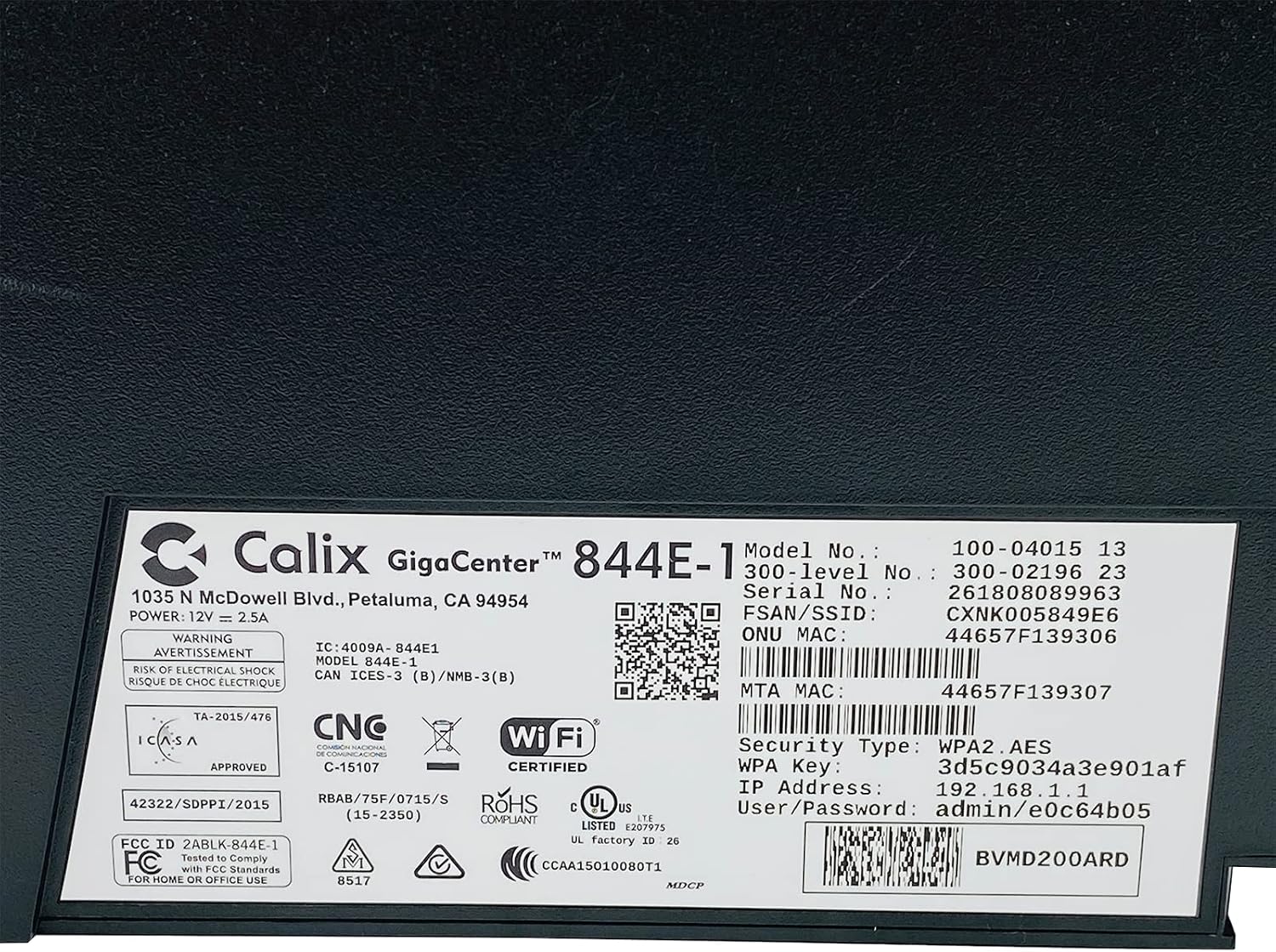
රූපය 4.4: සවිස්තරාත්මක view of the bottom label, providing essential information such as model number, serial number, Wi-Fi SSID, and WPA Key for network access.
- සම්බන්ධතාවය තහවුරු කරන්න: සම්බන්ධ වූ පසු, විවෘත කරන්න a web බ්රව්සරය සහ ප්රවේශ වීමට උත්සාහ කරන්න a webඅඩවිය (උදා., www.google.com). If successful, your GigaCenter 844E-1 is set up and ready for use.
5. මෙහෙයුම් උපදෙස්
5.1 දර්ශක පහන්
The front panel of the GigaCenter 844E-1 features several indicator lights that provide status information:
| ආලෝකය | තත්ත්වය | විස්තරය |
|---|---|---|
| බලය | ඝන කොළ | උපාංගය බලගන්වා ඇත. |
| බ්රෝඩ්බෑන්ඩ් | ඝන කොළ | අන්තර්ජාල සම්බන්ධතාවය සක්රියයි. |
| සේවාව | ඝන කොළ | Service is active and provisioned. |
| WIFI 2.4GHz | Solid Green/Flashing | 2.4 GHz Wi-Fi is active/data transfer. |
| WIFI 5GHz | Solid Green/Flashing | 5 GHz Wi-Fi is active/data transfer. |
| ඊතර්නෙට් 1-4 | Solid Green/Flashing | Wired connection active/data transfer. |
| PHONE 1-2 | Solid Green/Flashing | Phone service active/in use. |
| USB | Solid Green/Flashing | USB device connected/data transfer. |
| WPS | දැල්වෙන | WPS යුගල කිරීම සිදු වෙමින් පවතී. |
5.2 වෙත ප්රවේශ වීම Web අතුරු මුහුණත
To configure advanced settings, you can access the GigaCenter's web අතුරු මුහුණත:
- Ensure your device is connected to the GigaCenter via Wi-Fi or Ethernet.
- a විවෘත කරන්න web browser and enter the IP Address (e.g., 192.168.1.1) found on the product label into the address bar.
- Enter the User/Password (e.g., admin/e0c64b05) from the product label when prompted.
- You can now configure settings such as Wi-Fi name, password, port forwarding, and parental controls.
6. නඩත්තු කිරීම
- පිරිසිදු කිරීම: උපාංගයේ බාහිර පෙනුම පිරිසිදු කිරීම සඳහා මෘදු වියළි රෙද්දක් භාවිතා කරන්න. දියර පිරිසිදු කරන්නන් හෝ එයරොසෝල් භාවිතා නොකරන්න.
- වාතාශ්රය: Ensure the device's ventilation slots are not blocked to prevent overheating.
- ස්ථිරාංග යාවත්කාලීන කිරීම්: Periodically check with your Internet Service Provider (ISP) for available firmware updates to ensure optimal performance and security.
- නැවත ආරම්භ කිරීම: If you experience connectivity issues, try restarting the device by unplugging the power adapter for 10 seconds and then plugging it back in.
7. දෝශ නිරාකරණය
මෙම කොටසින් ඔබට මුහුණ දීමට සිදුවිය හැකි පොදු ගැටළු සාකච්ඡා කෙරේ:
7.1 අන්තර්ජාල සම්බන්ධතාවයක් නැත
- කේබල් පරීක්ෂා කරන්න: Ensure all cables (power, internet source, Ethernet) are securely connected.
- දර්ශක පහන්: Verify that the POWER, BROADBAND, and SERVICE lights are solid green. If not, refer to Section 5.1 or contact your ISP.
- උපාංගය නැවත ආරම්භ කරන්න: Power cycle the GigaCenter 844E-1 by unplugging it for 10 seconds and plugging it back in.
- අන්තර්ජාල සේවා සපයන්නා Outage: ඕනෑම සේවාවක් සඳහා ඔබේ ISP සමඟ පරීක්ෂා කරන්න හෝtagඔබේ ප්රදේශයේ.
7.2 Wi-Fi Not Working or Slow
- Wi-Fi ලයිට්: Ensure the WIFI 2.4 GHz and/or WIFI 5 GHz lights are solid green.
- මුරපදය: Double-check that you are entering the correct Wi-Fi password (WPA Key).
- සංඥා ශක්තිය: Move closer to the GigaCenter 844E-1 to improve signal strength.
- බාධා කිරීම්: අනෙකුත් ඉලෙක්ට්රොනික උපාංගවලින් ඇතිවන බාධා අඩු කරන්න.
- නාලිකා ප්රශස්තිකරණය: වෙත පිවිසෙන්න web interface to change Wi-Fi channels if experiencing congestion.
7.3 ප්රවේශ විය නොහැක Web අතුරු මුහුණත
- IP ලිපිනය: Confirm you are using the correct IP Address (e.g., 192.168.1.1).
- සම්බන්ධතාවය: Ensure your device is connected to the GigaCenter's network.
- අක්තපත්ර: Verify the User/Password from the product label.
- ෆයර්වෝල්/ප්රති-වයිරස: ඔබගේ පරිගණකයේ ප්රවේශය අවහිර කළ හැකි ඕනෑම ෆයර්වෝල් හෝ ප්රති-වයිරස මෘදුකාංගයක් තාවකාලිකව අක්රිය කරන්න.
7.4 WPS Functionality
The WPS (Wi-Fi Protected Setup) button allows for easy connection of WPS-compatible devices without manually entering the password. Press the WPS button on the GigaCenter 844E-1 and then activate WPS on your client device within two minutes. The WPS light will flash during the pairing process.
8. පිරිවිතර
| විශේෂාංගය | විස්තර |
|---|---|
| ආකෘතිය | GigaCenter 844E-1 (100-04015 13) |
| වෙළඳ නාමය | කැලික්ස් |
| සම්බන්ධතා තාක්ෂණය | Wireless-Wi-Fi 802.11ac, Ethernet (RJ-45) Hub/Switch, 5G |
| රැහැන් රහිත ප්රමිති | 802.11ac, 802.11n, 802.11a/g/b |
| සංඛ්යාත කලාප පන්තිය | ද්විත්ව කලාප (2.4 GHz, 5 GHz) |
| Maximum LAN Data Rate | 1000 Mbps |
| වරායන් | 4 x Ethernet (RJ-45), 1 x USB 2.0, 2 x RJ-11 (Phone) |
| ගැළපෙන උපාංග | පුද්ගලික පරිගණක, ජාල උපාංග |
| නිර්දේශිත භාවිතය | නිවස |
| ඇතුළත් සංරචක | බල සැපයුම |
| අයිතමයේ බර | රාත්තල් 3 කි |
9 ආරක්ෂිත තොරතුරු
- උපාංගය ජලයට හෝ තෙතමනයට නිරාවරණය නොකරන්න.
- උපාංගය විවෘත නොකරන්න casing. සියලුම සේවා සුදුසුකම් ලත් පුද්ගලයින් වෙත යොමු කරන්න.
- සපයන ලද බල ඇඩැප්ටරය පමණක් භාවිතා කරන්න.
- උපාංගය තාප ප්රභවයන්ගෙන් සහ සෘජු හිරු එළියෙන් ඈත් කරන්න.
- අධික උනුසුම් වීම වැළැක්වීම සඳහා නිසි වාතාශ්රය සහතික කරන්න.
10. වගකීම් සහ සහාය
For warranty information and technical support, please contact your Internet Service Provider (ISP) or the vendor from whom you purchased this device. The Calix GigaCenter 844E-1 is typically provided and supported by your ISP as part of your internet service package.
For general inquiries or to find more information about Calix products, you may visit the official Calix website (if available, search online for "Calix official webඅඩවිය").


