1. ආරක්ෂිත උපදෙස්
Please read all safety instructions carefully before operating the YIHUA 948DQ-II Soldering Station with Fume Extractor. Failure to follow these instructions may result in electric shock, fire, or personal injury.
- විදුලි ආරක්ෂාව: Ensure the unit is connected to a properly grounded 110-127V AC power outlet. Do not operate with wet hands or in damp conditions. Disconnect power before performing any maintenance or when the unit is not in use.
- තාප අවදානම: The soldering iron tip reaches high temperatures (up to 896°F / 480°C). Avoid direct contact with the tip or heated components. Use appropriate heat-resistant tools and surfaces. Allow the iron to cool completely before storage.
- Fume Extraction: Always use the fume extractor when soldering to minimize exposure to harmful fumes. Ensure filters are clean and properly installed for effective operation. Work in a well-ventilated area.
- පුද්ගලික ආරක්ෂක උපකරණ (PPE): Wear safety glasses to protect your eyes from solder splatter. Consider wearing gloves to protect your hands.
- වැඩ කරන ප්රදේශය: Keep your workspace clean, organized, and free of flammable materials. Ensure adequate lighting.
- ළමුන් සහ සුරතල් සතුන්: පෑස්සුම් ස්ථානය ළමයින්ට සහ සුරතල් සතුන්ට ළඟාවිය නොහැකි ලෙස තබා ගන්න.
- නඩත්තු: Only perform maintenance as described in this manual. Refer servicing to qualified personnel if needed.
2. පැකේජ අන්තර්ගතය
පහත ලැයිස්තුගත කර ඇති සියලුම අයිතම ඔබේ පැකේජයට ඇතුළත් කර ඇති බව තහවුරු කරගන්න. කිසියම් අයිතමයක් අස්ථානගත වී හෝ හානි වී ඇත්නම්, කරුණාකර පාරිභෝගික සහාය අමතන්න.
- 1 x YIHUA 948DQ-II Fume Extractor Soldering Station Main Unit
- 1 x 917GC Soldering Iron
- 1 x Integrated Soldering Iron Holder
- 1 x Integrated Solder Wire Dispenser
- 1 x Spool of Solder Wire
- 8 x Activated Carbon Filters (Front + Rear)
- 3 x පෑස්සුම් ඉඟි
- 1 x Tip Cleaner (Brass + Rosin)
- 1 x Power Cord (US-standard)
3. නිෂ්පාදන අවසන්view
The YIHUA 948DQ-II is a versatile 2-in-1 unit combining a temperature-controlled soldering station with an integrated fume extractor. It is designed to provide a compact and efficient soldering solution.
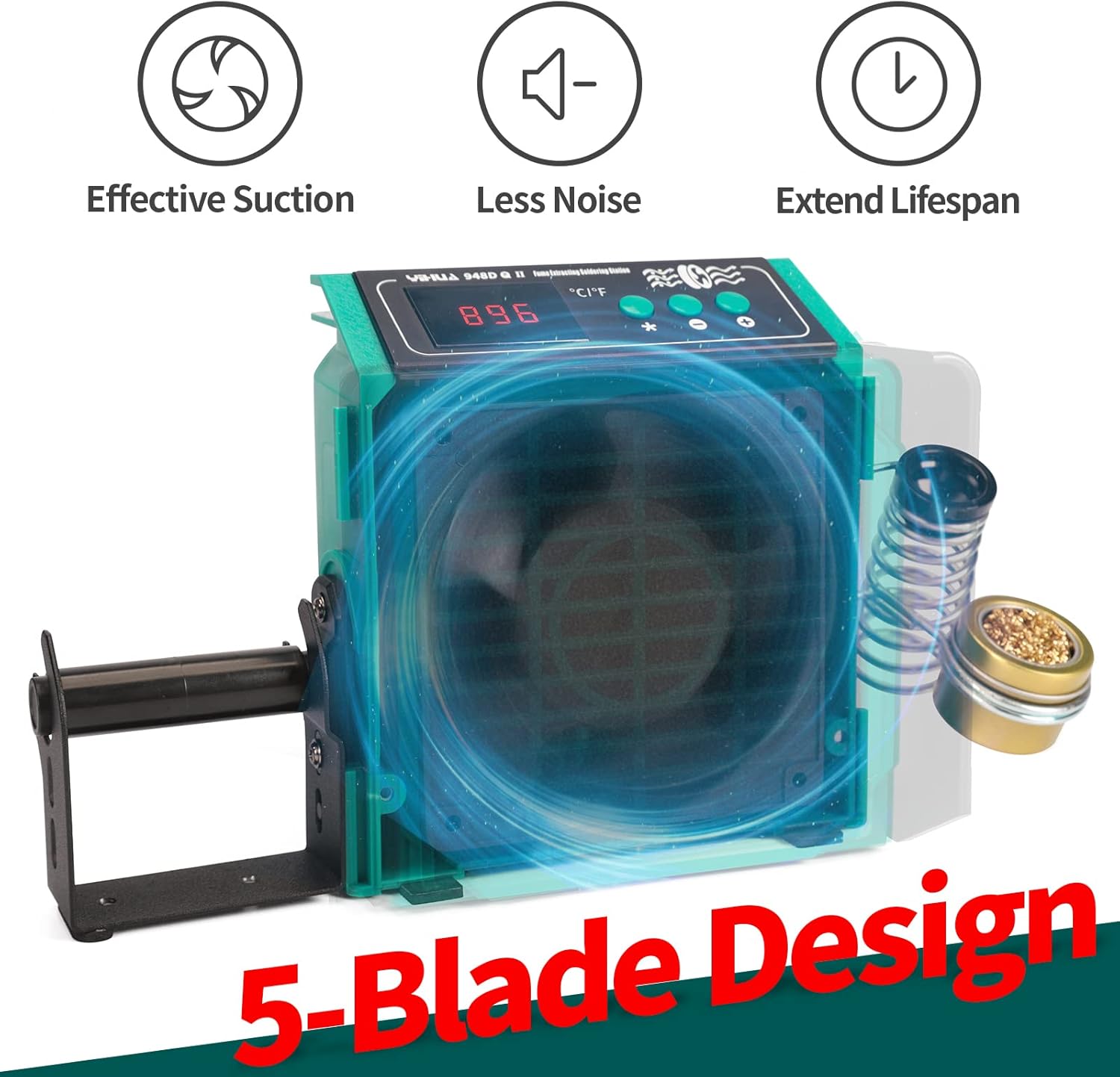
Figure 3.1: YIHUA 948DQ-II Soldering Station with Fume Extractor. This image shows the complete unit with the soldering iron, holder, and solder wire dispenser attached.
3.1 ප්රධාන ඒකක විශේෂාංග
- සංඛ්යාංක දර්ශකය: වත්මන් උෂ්ණත්වය සෙල්සියස් හෝ ෆැරන්හයිට් වලින් පෙන්වයි.
- උෂ්ණත්ව පාලන බොත්තම්: Adjusts soldering iron temperature.
- Fume Extractor Fan: Integrated fan with 5-blade design for effective smoke absorption.
- ද්විත්ව පෙරීමේ පද්ධතිය: Features activated carbon filters at the front and rear for comprehensive fume removal.
- Integrated Soldering Iron Holder: Provides a secure resting place for the soldering iron.
- Integrated Solder Wire Dispenser: Conveniently holds and dispenses solder wire.
- තනි බල ස්විච: Separate switches for the soldering station and fume extractor.

Figure 3.2: Fume Extractor Fan Design. This image highlights the 5-blade fan design for efficient fume extraction.

Figure 3.3: Double Layered Filtration System. This image illustrates the front and rear activated carbon filters for effective fume absorption.

Figure 3.4: Integrated Accessories and Switches. This image shows the integrated soldering iron holder, solder wire dispenser, individual power switches, and detachable soldering iron connection.
4. පිහිටුවීම
Follow these steps to set up your YIHUA 948DQ-II Soldering Station:
- සංරචක ඉවත් කරන්න: Carefully remove all items from the packaging and ensure all listed package contents are present.
- Attach Soldering Iron Holder and Solder Wire Dispenser:
- Slide the integrated soldering iron holder onto the designated slot on the side of the main unit.
- Attach the solder wire dispenser to the other side of the main unit.
- Insert the spool of solder wire onto the dispenser.
- පෙරහන් ස්ථාපනය කරන්න: Ensure the activated carbon filters are properly seated in both the front and rear compartments of the fume extractor.
- පෑස්සුම් යකඩ සම්බන්ධ කරන්න: Plug the soldering iron cable into the corresponding port on the main unit. Ensure it is securely connected.
- Place Tip Cleaner: Position the tip cleaner (brass wool with rosin) near your work area.
- බල සම්බන්ධතාවය: Connect the power cord to the main unit and then plug it into a grounded 110-127V AC power outlet.
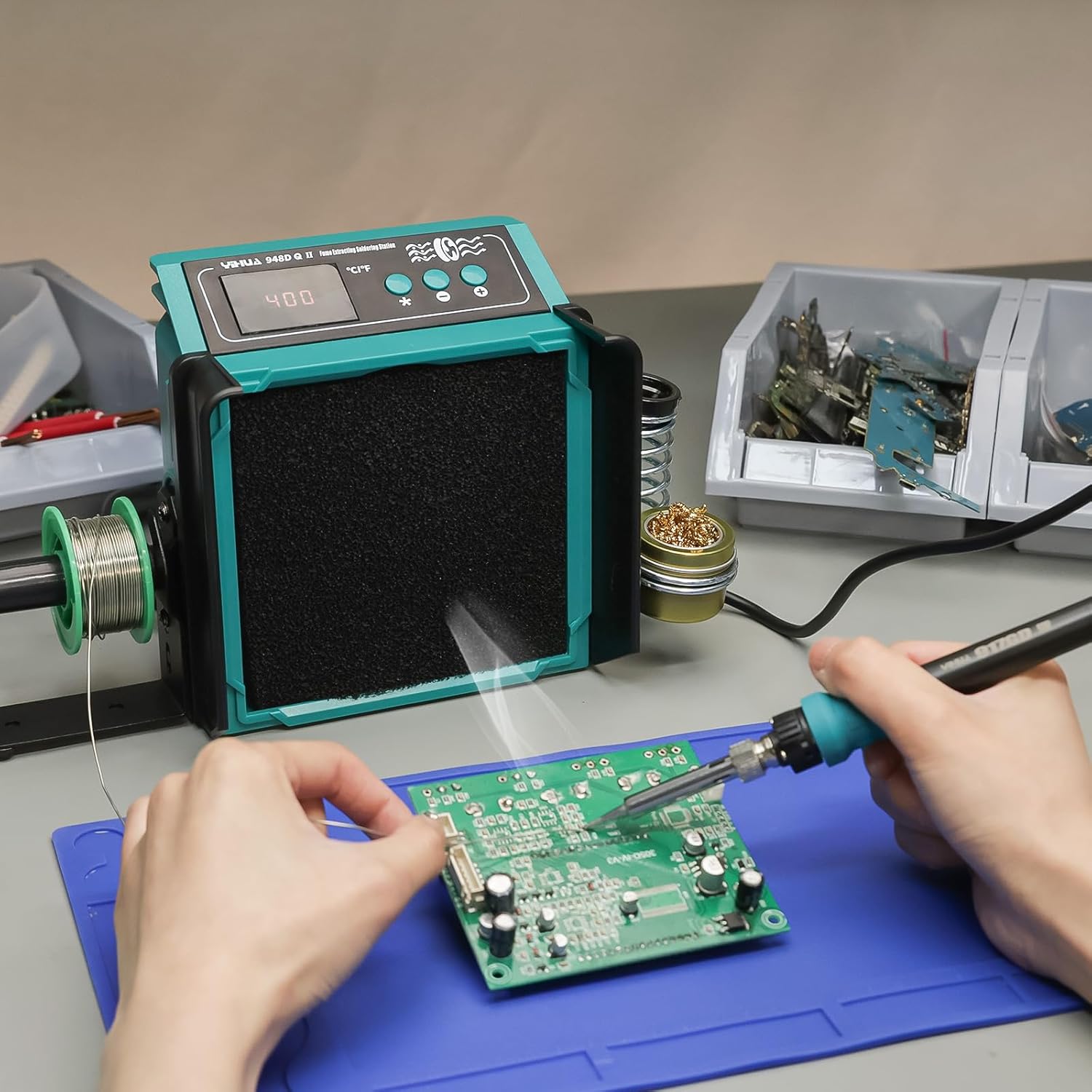
Figure 4.1: YIHUA 948DQ-II in a typical setup, ready for use.
5. මෙහෙයුම් උපදෙස්
5.1 බල ගැන්වීම සහ අක්රිය කිරීම
- ක්රියාත්මක කරන්න: Flip the individual power switches for the "SOLDERING STATION" and "FUME EXTRACTOR" to the ON position. The digital display will illuminate.
- නිවා දමන්න: Flip both power switches to the OFF position. Disconnect the power cord from the outlet when not in use for extended periods.
5.2 Adjusting Soldering Iron Temperature
- උෂ්ණත්ව පරාසය: The soldering iron temperature can be adjusted from 200°C to 480°C (392°F to 896°F).
- උෂ්ණත්වය සකස් කරන්න: භාවිතා කරන්න + සහ - buttons on the control panel to increase or decrease the desired temperature. The digital display will show the set temperature.
- Temperature Stabilization: The unit features built-in PID temperature stabilization to maintain a consistent temperature during operation.

Figure 5.1: Adjusting the soldering iron temperature using the control buttons.
5.3 Celsius/Fahrenheit Conversion
To switch between Celsius (°C) and Fahrenheit (°F) display:
- ඔබන්න ° C / ° F. button on the control panel to toggle between the two units.

Figure 5.2: Switching between Celsius and Fahrenheit temperature display.
5.4 Using the Fume Extractor
- Ensure the "FUME EXTRACTOR" power switch is ON.
- Position the fume extractor close to your soldering work, ideally within 10cm (3.93 inches) for optimal effectiveness.
- The 5-blade fan and dual filters will absorb harmful fumes and odors.

Figure 5.3: Fume extractor actively removing smoke during soldering.
5.5 Sleep Mode and Automatic Shutdown
- නින්ද ප්රකාරය: If the soldering iron is left in its holder unused for 10 minutes, it will automatically enter sleep mode to preserve tip lifespan and save energy. The display will show "SLP".
- ස්වයංක්රීය වසා දැමීම: Approximately 30 minutes after entering sleep mode, the unit will automatically shut down for safety.
- නැවත ආරම්භ මෙහෙයුම: To exit sleep mode or automatic shutdown, simply pick up the soldering iron or press any button.

Figure 5.4: Illustration of the sleep mode (top) and automatic shutdown (bottom) features.
6. නඩත්තු කිරීම
Regular maintenance ensures optimal performance and extends the lifespan of your YIHUA 948DQ-II.
- පෙරහන් ප්රතිස්ථාපනය/පිරිසිදු කිරීම:
- The activated carbon filters should be inspected regularly. Replace them when they appear saturated or if fume extraction efficiency decreases.
- Some filters can be gently cleaned or rinsed, but always refer to the filter manufacturer's instructions. Ensure filters are completely dry before reinstallation.
- Soldering Tip Care:
- Always tin the soldering iron tip before and after use to prevent oxidation.
- Clean the tip frequently using the included brass wool tip cleaner.
- Replace worn or damaged soldering tips to maintain soldering quality.
- ඒකක පිරිසිදු කිරීම:
- පිරිසිදු කිරීමට පෙර ඒකකය ක්රියා විරහිත කර විසන්ධි කර ඇති බවට වග බලා ගන්න.
- මෘදු, d සමග ඒකකයේ බාහිර පිස දමන්නamp රෙදි. උල්ෙල්ඛ පිරිසිදු කරන්නන් හෝ ද්රාවණ භාවිතා නොකරන්න.
- Keep the fan intake and exhaust clear of obstructions.
7. දෝශ නිරාකරණය
This section addresses common issues you might encounter with your soldering station.
| ගැටලුව | විය හැකි හේතුව | විසඳුම |
|---|---|---|
| ඒකකය බලය සක්රිය නොවේ. | Power cord not connected; Power switch off; Outlet malfunction. | Ensure power cord is securely plugged in. Check both power switches are ON. Test the outlet with another device. |
| පෑස්සුම් යකඩ රත් නොවේ. | Soldering iron not connected properly; Temperature set too low; Faulty heating element. | Check soldering iron connection to the main unit. Increase the set temperature. If issue persists, contact support. |
| Fume extractor not working effectively. | Fume extractor switch off; Filters clogged or improperly installed; Unit too far from work. | Ensure fume extractor switch is ON. Inspect and clean/replace filters. Position the unit closer to the soldering point (within 10cm). |
| උෂ්ණත්ව සංදර්ශකය වැරදියි. | Digital temperature calibration needed. | The unit has digital temperature calibration. Refer to the full manual or contact support for calibration procedures if necessary. |
| Unit enters sleep mode or shuts down unexpectedly. | Automatic sleep/shutdown feature activated. | This is a normal safety and energy-saving feature. Pick up the iron or press a button to resume operation. |
8. පිරිවිතර
| විශේෂාංගය | විස්තර |
|---|---|
| ආදර්ශ අංකය | 948DQ-II |
| ශ්රේණිගත කළ වෙළුමtagඊ පරාසය | 110V-127V |
| උපරිම බලය | 125W |
| ශ්රේණිගත බලය | 23W |
| ප්රධාන ඒකක මානයන් (L x W x H) | 90 x 145 x 164mm (3.54 x 5.71 x 6.46 inches) ±5mm |
| උෂ්ණත්ව පරාසය | 200 ~ 480°C / 392 ~ 896°F |
| උෂ්ණත්ව ස්ථායීතාවය | විශිෂ්ටයි |
| සංදර්ශක වර්ගය | LED ඩිජිටල් |
| ද්රව්ය | තඹ (සමහර සංරචක සඳහා) |
| අයිතමයේ බර | රාත්තල් 3.08 කි |
| නිෂ්පාදකයා | Guangzhou Yihua Electronic Equipment Co., Ltd. |

Figure 8.1: Dimensions of the YIHUA 948DQ-II main unit.
9. වගකීම් සහ සහාය
YIHUA provides comprehensive support for its products.
- වගකීම්: Enjoy 12-month US-exclusive manufacturer technical coverage from the date of purchase.
- තාක්ෂණික සහාය: For any technical questions, troubleshooting, or warranty claims, please contact YIHUA customer support. You can typically find support contact information on the official YIHUA webවෙබ් අඩවිය හෝ භාණ්ඩය මිලදී ගත් වේදිකාව හරහා.
- සබැඳි සම්පත්: Additional resources, FAQs, and product information may be available on the YIHUA official webඅඩවිය.


