1. ආරම්භ කිරීම
1.1 පැකේජයේ අන්තර්ගතය
පහත ලැයිස්තුගත කර ඇති සියලුම අයිතම ඔබේ පැකේජයට ඇතුළත් කර ඇති බව තහවුරු කරගන්න:
- ANRAN G1 4G LTE Outdoor Security Camera
- සූර්ය පැනලය
- සවිකරන වරහන
- USB ආරෝපණ කේබලය
- Installation Screws and Wall Plugs
- Pre-installed 4G SIM Card (with 100MB trial data)
- 32GB Micro SD Card (pre-installed)
- SIM Ejector මෙවලම

Image: The complete package contents for the ANRAN G1 camera.
1.2 නිෂ්පාදනය අවසන්view
The ANRAN G1 is a 4G LTE outdoor security camera designed for areas without Wi-Fi access. It features 2K QHD resolution, 360-degree pan/tilt functionality, color night vision, PIR human detection, two-way audio, and is powered by a solar panel with a built-in battery. The camera is IP66 weatherproof for outdoor use.

රූපය: ජෙනරාල්වරයෙක් view of the ANRAN G1 4G LTE Outdoor Security Camera, showcasing එහි සැලසුම සහ ද්විත්ව ඇන්ටනා.
2. පිහිටුවීම
2.1 මූලික ආරෝපණය
Before first use, fully charge the camera using a 5V1A or 5V2A power adapter. The camera only supports 5V power charging.
2.2 SIM කාඩ්පත සහ SD කාඩ්පත ස්ථාපනය කිරීම
The camera comes with a pre-installed 4G SIM card and a 32GB Micro SD card. To access the slots, gently open the protective cover at the bottom of the camera. Ensure the SIM card is correctly inserted and activated for cellular connectivity. The SD card can be upgraded to a maximum of 128GB.

රූපය: සමීප ඡායාරූපයක් view of the camera's SIM and SD card slots, indicating support for a 4G SIM card and a 32GB SD card (expandable up to 128GB).
2.3 යෙදුම් බාගත කිරීම සහ උපාංග යුගල කිරීම
Download the official ANRAN app from your smartphone's app store. Follow the in-app instructions to add your camera. This typically involves pressing and holding the device power button to start the device, ensuring the SIM card is inserted and activated, and then scanning a QR code on the camera using the app. The camera's red and blue lights will flash during connection, and a tone will be heard upon successful scanning.
3. ස්ථාපන මාර්ගෝපදේශ
3.1 කැමරාව සවි කිරීම
Install the camera in a location that provides the desired monitoring view. Use the included mounting bracket and screws to securely attach the camera to a wall or tree. Ensure the camera is positioned to capture the area of interest effectively.

Image: The ANRAN G1 camera shown mounted on a tree, highlighting its solar panel for continuous power and wireless 4G connectivity.
3.2 සූර්ය පැනල ස්ථානගත කිරීම
For optimal charging, install the solar panel in a sunny location where it receives direct sunlight for several hours each day. The solar panel provides continuous power to the camera's battery.
3.3 වැදගත් සලකා බැලීම්
- Avoid facing the camera lens directly towards the sun to prevent overexposure and image quality issues.
- Avoid installing the camera in overly crowded or high-traffic areas if you wish to minimize frequent motion alerts.
- The camera operates on 3G/4G cellular networks, making it suitable for locations without Wi-Fi, such as farms, ranches, and construction sites.

Image: Illustrates the camera's versatility, showing it can be installed in various locations without Wi-Fi, such as construction sites, farms, ranches, and stables, using 3G/4G cellular connection.
4. කැමරාව ක්රියාත්මක කිරීම
4.1 සජීවී View සහ PTZ පාලනය
Access the live video feed through the ANRAN app. Use the pan (355°) and tilt (90°) controls within the app to adjust the camera's viewing angle remotely, providing a 360-degree panoramic view අන්ධ පැල්ලම් නොමැතිව.

Image: Demonstrates the camera's 360-degree pan and tilt capabilities, providing a wide field of view for comprehensive surveillance.
4.2 චලන අනාවරණය සහ ඇඟවීම්
The camera features PIR (Passive Infrared) human detection, which accurately identifies human movement and sends instant alerts to your smartphone. This minimizes false alarms caused by animals, insects, or environmental factors. You can also set up to 6 activity zones to monitor specific areas and reduce unwanted notifications.

Image: Shows the camera's PIR human detection feature, which focuses on human movement to reduce false alarms from animals or other non-human objects.

Image: Depicts instant notifications sent to a smartphone when motion is detected, allowing real-time monitoring.
4.3 ද්වි-මාර්ග ශ්රව්ය
The integrated microphone and speaker enable two-way audio communication. You can listen to the environment around the camera and speak through the camera using the app.
4.4 රාත්රී දර්ශනය
The ANRAN G1 provides 2K QHD color night vision, enhanced by 4 spotlights, allowing for clear and detailed images even in complete darkness up to 15 meters.
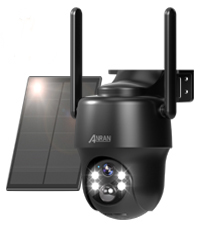
Image: Illustrates the camera's 4-spotlight color night vision, providing clear, full-color images even in low-light conditions up to 15 meters.
4.5 පටිගත කිරීම සහ ගබඩා කිරීම
Motion-triggered events are recorded and saved to the pre-installed 32GB Micro SD card (expandable to 128GB). Cloud storage options are also available through the ANRAN app for additional backup and access.
4.6 බහු-පරිශීලක ප්රවේශය
The camera supports multi-user sharing, allowing up to 5 users to view the live feed and receive alerts simultaneously. This feature enables family members or trusted individuals to monitor the property together.

Image: Illustrates the multi-user access feature, allowing up to 5 users to view the camera feed simultaneously and receive alerts.
5. නඩත්තු කිරීම
5.1 කාලගුණ ප්රතිරෝධය
The ANRAN G1 camera is rated IP66, ensuring it is resistant to dust and water jets. This allows for reliable operation in various outdoor weather conditions, including rain and snow.

Image: Shows the camera operating effectively in various weather conditions like rain and snow, demonstrating its IP66 weather resistance.
5.2 පිරිසිදු කිරීම
To maintain optimal performance, periodically clean the camera lens and solar panel with a soft, damp cloth. Avoid using harsh chemicals or abrasive materials that could damage the surfaces.
6. දෝශ නිරාකරණය
6.1 පොදු ගැටළු
- සම්බන්ධතාවයක් නැත: Ensure the SIM card is correctly inserted and activated, and that there is 4G LTE coverage in the installation area. Check the camera's power status.
- දුර්වල වීඩියෝ ගුණාත්මකභාවය: Verify the camera lens is clean and free from obstructions. Ensure adequate lighting for optimal image clarity.
- නිතර අසත්ය අනතුරු ඇඟවීම්: Adjust the PIR detection sensitivity settings in the app. Consider setting activity zones to focus monitoring on critical areas.
- බැටරිය ආරෝපණය නොවේ: Ensure the solar panel is installed in a location with sufficient direct sunlight. Check the connection between the solar panel and the camera.
6.2 උපාංගය නැවත සැකසීම
If you encounter persistent issues, you may perform a factory reset. Locate the reset button (often near the SIM/SD card slot) and press it with the SIM ejector tool for approximately 5-10 seconds until you hear a confirmation sound or see the indicator lights change. This will restore the camera to its default settings.
7. පිරිවිතර
| වෙළඳ නාමය | ANRAN |
| මාදිලියේ නම | G1 |
| සම්බන්ධතා තාක්ෂණය | Cellular (3G/4G LTE) |
| වීඩියෝ ග්රහණ විභේදනය | 2K (3MP) |
| විශේෂ ලක්ෂණය | Waterproof (IP66), Color Night Vision, PTZ, PIR Motion Detection, Two-Way Audio, Solar Powered |
| බලශක්ති ප්රභවය | සූර්ය බලශක්තිය |
| සවිකිරීමේ වර්ගය | වෝල් මවුන්ට් |
| ගබඩා කිරීම | මයික්රෝ SD කාඩ් (128GB දක්වා), වලාකුළු ආචයනය |
| වර්ණය | කළු |
| බර | කිලෝ ග්රෑම් 1.14 යි |
8. වගකීම් සහ සහාය
For warranty information, technical support, or any questions regarding your ANRAN G1 camera, please contact ANRAN customer service. Refer to the contact details provided on the product packaging or the official ANRAN webඅඩවිය.


