හැඳින්වීම
Welcome to your new TechniSat Viola CD-1. This portable stereo CD player offers versatile audio playback options including CD, FM radio, and Bluetooth streaming. Its compact design and battery operation make it suitable for both home and on-the-go use. This manual provides essential information for setting up, operating, and maintaining your device.
වැදගත් ආරක්ෂක තොරතුරු
- Read all instructions thoroughly before using the device.
- අනාගත යොමුව සඳහා මෙම අත්පොත තබා ගන්න.
- ඒකකය වර්ෂාව, තෙතමනය හෝ අධික ආර්ද්රතාවයට නිරාවරණය නොකරන්න.
- අධික උනුසුම් වීම වැළැක්වීම සඳහා වාතාශ්රය විවරයන් අවහිර නොවන බවට වග බලා ගන්න.
- නිෂ්පාදකයා විසින් නිශ්චිතව දක්වා ඇති ඇමුණුම් සහ උපාංග පමණක් භාවිතා කරන්න.
- සියලුම සේවා සුදුසුකම් ලත් සේවා පුද්ගලයින් වෙත යොමු කරන්න.
නිෂ්පාදනය අවසන්view
Familiarize yourself with the main components and controls of your Viola CD-1.

ඉදිරිපස view of the TechniSat Viola CD-1, highlighting its main controls and central display.

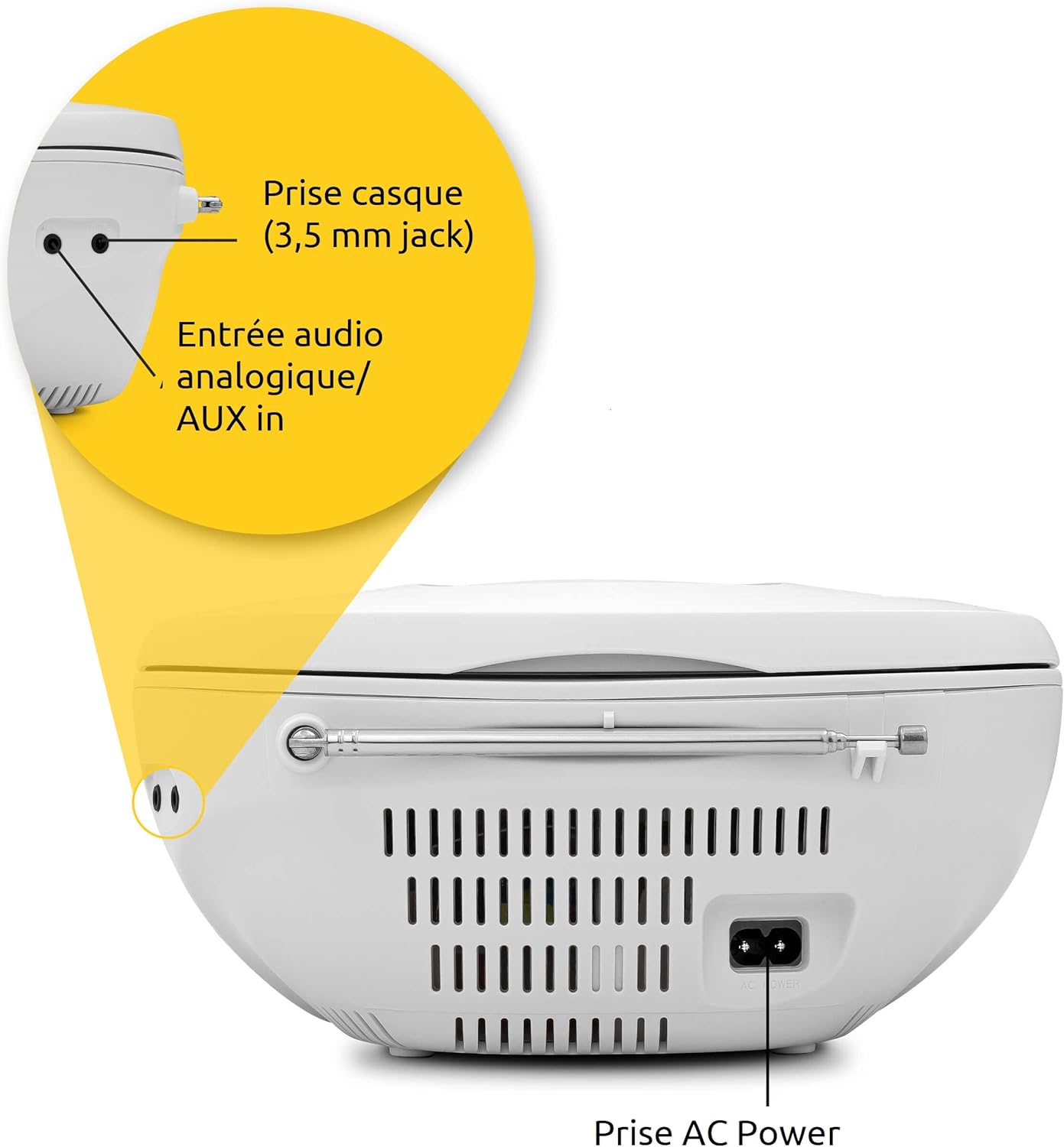
The rear panel of the Viola CD-1 features the AC power input, a 3.5mm AUX in port for external devices, and a 3.5mm headphone jack.
යතුරු පාලනයන් සහ විශේෂාංග:
- බල බොත්තම: ඒකකය සක්රිය හෝ අක්රිය කරයි.
- මාදිලි බොත්තම: Switches between CD, FM, Bluetooth, and AUX input modes.
- පරිමාව +/- බොත්තම්: ශ්රව්ය ප්රතිදාන මට්ටම සීරුමාරු කරයි.
- වාදනය/විරාම බොත්තම: Starts or pauses playback in CD and Bluetooth modes.
- Skip/Tune Buttons: Navigates tracks on a CD or tunes radio stations.
- ස්කෑන් බොත්තම: Initiates automatic station search in FM mode.
- ඇල්බම බොත්තම: For MP3 CDs, navigates between folders.
- දුරේක්ෂ ඇන්ටනාව: FM රේඩියෝ පිළිගැනීම සඳහා.
- හසුරුව රැගෙන යන්න: පහසු අතේ ගෙන යා හැකි සඳහා.
සැලසුම
බල සැපයුම
The Viola CD-1 can be powered by either AC mains or batteries.
- AC බලය: Connect the provided power cable to the AC power input on the rear of the unit and then to a standard wall outlet (230V).
- බැටරි බලය: For portable use, open the battery compartment located on the bottom of the unit. Insert 6 x 1.5V C-type batteries (R14), ensuring correct polarity (+/-). Close the compartment securely.
ඇන්ටෙනා සැකසුම
For optimal FM radio reception, fully extend the telescopic antenna.
මෙහෙයුම් උපදෙස්
CD නැවත ධාවනය
- ඒකකයේ මුදුනේ පිහිටා ඇති සීඩී මැදිරි පියන විවෘත කරන්න.
- Carefully place a CD (standard audio CD or MP3 CD) onto the spindle with the label side facing up.
- සීඩී මැදිරි පියන ආරක්ෂිතව වසා දමන්න.
- ඔබන්න මාදිලිය "CD" දර්ශනය වන තුරු නැවත නැවතත් බොත්තම ඔබන්න.
- ඔබන්න වාදනය / විරාමය නැවත ධාවනය ආරම්භ කිරීමට බොත්තම.
- භාවිතා කරන්න මඟ හරින්න ධාවන පථ අතර සැරිසැරීමට බොත්තම් (ඉදිරියට/පසුපසට).
- If playing an MP3 CD with multiple folders, use the ඇල්බමය ෆෝල්ඩර අතර මාරු වීමට බොත්තම.

To insert a CD, lift the compartment lid as shown and place the disc with the label facing upwards.

The integrated CD player supports standard audio CDs, CD-R, CD-RW, and MP3 CDs.
එෆ්එම් රේඩියෝ මෙහෙයුම
- හොඳම පිළිගැනීම සඳහා දුරේක්ෂ ඇන්ටෙනාව සම්පූර්ණයෙන්ම දිගු කරන්න.
- ඔබන්න මාදිලිය සංදර්ශකය මත "FM" දිස්වන තුරු නැවත නැවතත් බොත්තම ඔබන්න.
- ඔබා අල්ලාගෙන සිටින්න ස්කෑන් කරන්න පවතින FM මධ්යස්ථාන ස්වයංක්රීයව සෙවීමට සහ ගබඩා කිරීමට බොත්තම.
- භාවිතා කරන්න මඟ හරින්න buttons (forward/backward) to select a stored station.
The Viola CD-1 features an FM radio tuner, allowing reception of various regional radio stations. Extend the telescopic antenna for best reception.
බ්ලූටූත් ශ්රව්ය ප්රවාහය
- ඔබන්න මාදිලිය button repeatedly until "BT" appears on the display. The "BT" indicator will flash, signifying that the unit is in pairing mode.
- On your smartphone or other Bluetooth-enabled mobile device, enable Bluetooth and search for available devices.
- Select "TechniSat Viola CD-1" from the list of devices to initiate pairing.
- Once successfully paired, the "BT" indicator will stop flashing, and you can stream audio wirelessly from your device to the Viola CD-1.

Wirelessly stream music from your smartphone or tablet to the Viola CD-1 via Bluetooth.
AUX ආදානය
- බාහිර ශ්රව්ය උපාංගයක් (උදා: MP3 වාදකය, ස්මාර්ට් ජංගම දුරකථනය) සම්බන්ධ කරන්න AUX ඇතුලත jack on the rear of the unit using a 3.5mm audio cable.
- ඔබන්න මාදිලිය "AUX" සංදර්ශකය මත දිස්වන තුරු නැවත නැවතත් බොත්තම ඔබන්න.
- Control audio playback and volume directly from your external device.
හෙඩ්ෆෝන් භාවිතය
Connect headphones with a 3.5mm jack to the headphone output on the rear of the unit for private listening. When headphones are connected, sound from the speakers will be muted.

The practical carry handle makes transporting the boombox comfortable and easy.

Integrated stereo speakers provide clear audio with a total output of 2 x 1 Watt.
නඩත්තු කිරීම
පිරිසිදු කිරීම
- Wipe the exterior of the unit with a soft, dry cloth. Do not use abrasive cleaners, solvents, or chemical sprays, as these can damage the finish.
- For cleaning the CD lens, use a specialized CD lens cleaner disc according to its instructions.
බැටරි ප්රතිස්ථාපනය
When using battery power, replace all 6 C-type batteries when the unit's performance (e.g., sound quality, volume) begins to degrade. Always replace all batteries at once with new ones of the same type.
දෝෂගවේෂණය
If you encounter issues with your Viola CD-1, refer to the table below for common problems and solutions.
| ගැටලුව | විය හැකි හේතුව | විසඳුම |
|---|---|---|
| ඒකකය බලය සක්රිය නොවේ. | No power supply or dead batteries. | Check AC power connection or replace all batteries. |
| සීඩී එක වාදනය නොවේ. | CD inserted incorrectly, dirty, scratched, or unsupported format. | Ensure CD is inserted correctly (label side up). Clean the CD. Try a different CD. Ensure it's an audio CD or MP3 CD. |
| දුර්වල FM රේඩියෝ පිළිගැනීම. | ඇන්ටෙනාව දිගු වී නැත හෝ දුර්වල සංඥාවක්. | Fully extend the telescopic antenna. Try repositioning the unit for better signal. |
| බ්ලූටූත් උපාංගය යුගල කළ නොහැක. | Unit not in pairing mode, device too far, or previously paired. | Ensure Viola CD-1 is in Bluetooth pairing mode (BT flashing). Move devices closer. On your device, forget/unpair the Viola CD-1 and try pairing again. |
| ස්පීකර් වලින් ශබ්දයක් නැත. | Volume too low, headphones connected, or incorrect mode selected. | Increase volume. Disconnect headphones. Press the මාදිලිය button to select the correct input source. |
පිරිවිතර
Detailed technical specifications for the TechniSat Viola CD-1.
| විශේෂාංගය | විස්තර |
|---|---|
| වෙළඳ නාමය | TechniSat |
| ආදර්ශ අංකය | 0001/2980 |
| වර්ණය | සුදු |
| සම්බන්ධතා තාක්ෂණය | Auxiliary, Bluetooth (reception) |
| විශේෂ ලක්ෂණ | AC and Battery operation, MP3 CD Player, Convenient carry handle, Bluetooth audio streaming (reception) |
| ගැළපෙන උපාංග | හෙඩ්ෆෝන් |
| බලශක්ති ප්රභවය | AC and Battery operation |
| ස්පීකර් වර්ගය | ස්ටීරියෝ |
| ප්රතිදාන බලය | 2 x 1 වොට් ආර්එම්එස් |
| මානයන් (LxWxH) | 21.5 x 21.5 x 10 සෙ.මී |
| අයිතමයේ බර | ග්රෑම් 828 යි |
| බැටරි අවශ්යතාවය | 6 x 1.5V C-type batteries (R14) |
වගකීම් සහ සහාය
වගකීම් තොරතුරු
This product comes with a manufacturer's warranty. Please refer to the warranty card included in the product packaging for specific terms, conditions, and duration of the warranty. (Note: Specific warranty details were not available in the provided product data.)
පාරිභෝගික සහාය
For technical assistance, troubleshooting beyond this manual, or service inquiries, please visit the official TechniSat webවෙබ් අඩවියට පිවිසෙන්න හෝ ඔවුන්ගේ පාරිභෝගික සහාය කෙලින්ම අමතන්න.
නිල Webඅඩවිය: www.technisat.com


