1. හැඳින්වීම
This manual provides detailed instructions for the setup, operation, maintenance, and troubleshooting of your kinstone 10.1-inch Android Tablet. Please read this manual thoroughly before using the device to ensure proper functionality and to prevent damage.
The kinstone tablet is designed for versatile use, featuring an Octa-Core processor, 6GB RAM, 128GB ROM (expandable up to 1TB), dual-band Wi-Fi (2.4G+5G), Bluetooth 5.0, Widevine L1 support, and Face ID. It offers a 10.1-inch IPS HD display with a resolution of 1280x800 pixels and eye health mode for comfortable viewing.
2 ආරක්ෂිත තොරතුරු
- ටැබ්ලටය අධික උෂ්ණත්වයන්ට, සෘජු හිරු එළියට හෝ අධික ආර්ද්රතාවයට නිරාවරණය නොකරන්න.
- ටැබ්ලටය බිම හෙළීමෙන් හෝ දැඩි බලපෑම්වලට ලක් කිරීමෙන් වළකින්න.
- Use only the charger and accessories approved by kinstone.
- ටැබ්ලටය ඔබම විසුරුවා හැරීමට හෝ අලුත්වැඩියා කිරීමට උත්සාහ නොකරන්න. සුදුසුකම් ලත් සේවා නිලධාරීන් වෙත යොමු වන්න.
- ටැබ්ලටය ජලයෙන් සහ අනෙකුත් ද්රව වලින් ඈත් කර තබන්න.
- දේශීය රෙගුලාසිවලට අනුව වගකීමෙන් යුතුව ටැබ්ලටය සහ එහි බැටරිය බැහැර කරන්න.
3. පැකේජ අන්තර්ගතය
සියලුම අයිතම පැකේජයේ ඇති බව තහවුරු කරගන්න:
- kinstone 10.1" Android Tablet
- USB Type-C කේබලය
- බල ඇඩැප්ටරය (ඇතුළත් කර ඇත්නම්)
- පරිශීලක අත්පොත (මෙම ලේඛනය)
4. උපාංගය අවසන්view
Familiarize yourself with the tablet's physical features and ports.

රූපය: ඉදිරිපස සහ පසුපස view of the kinstone 10.1-inch Android Tablet, showcasing its blue finish and camera module.
- ඉදිරිපස කැමරාව: Located on the top bezel when held horizontally.
- පසුපස කැමරාව: Located on the back panel, typically in the upper left corner.
- බල බොත්තම: Used to turn the tablet on/off or put it to sleep/wake.
- වෙළුම් බොත්තම්: ශ්රව්ය පරිමාව සකස් කිරීමට භාවිතා කරයි.
- USB Type-C Port: අයකිරීම් සහ දත්ත හුවමාරුව සඳහා.
- MicroSD කාඩ් පත: 1TB දක්වා ගබඩාව පුළුල් කිරීම සඳහා.
- කථිකයන්: Dual smart BOX speakers for audio output.
5. පිහිටුවීම
5.1 මූලික ආරෝපණය
පළමු භාවිතයට පෙර, ටැබ්ලටය සම්පූර්ණයෙන්ම ආරෝපණය කරන්න. USB Type-C කේබලය ටැබ්ලටයේ ආරෝපණ තොටට සහ අනෙක් කෙළවර බල ඇඩැප්ටරයට සම්බන්ධ කරන්න. ඇඩැප්ටරය බිත්ති අලෙවිසැලකට සම්බන්ධ කරන්න. තිරයේ ඇති බැටරි දර්ශකය ආරෝපණ ප්රගතිය පෙන්වනු ඇත.

Image: The tablet connected to a charger, displaying a 100% charge indicator and highlighting its 6000mAh battery capacity.
5.2 බල ගැන්වීම සක්රිය / අක්රිය කිරීම
- බල ගැන්වීමට: Press and hold the Power button until the kinstone logo appears.
- බලය අක්රිය කිරීමට: බල විකල්ප මෙනුව දිස්වන තුරු බල බොත්තම ඔබාගෙන සිටින්න, ඉන්පසු "බලය අක්රිය කරන්න" තෝරන්න.
- නිදා ගැනීමට/අවදි කිරීමට: කෙටියෙන් බල බොත්තම ඔබන්න.
5.3 ආරම්භක සැකසුම් විශාරදයා
පළමු වරට බලගැන්වීමෙන් පසු, ටැබ්ලටය මූලික සැකසුම් ක්රියාවලියක් හරහා ඔබව මෙහෙයවනු ඇත. තිරයේ ඇති විමසීම් අනුගමනය කරන්න:
- ඔබේ භාෂාව තෝරන්න.
- Wi-Fi ජාලයකට සම්බන්ධ කරන්න.
- ඔබගේ Google ගිණුම සමඟින් පුරනය වන්න හෝ අලුත් එකක් සාදන්න.
- Set up screen lock (PIN, Pattern, Password, or Face ID).
- Review සහ නියමයන් සහ කොන්දේසි පිළිගන්න.

Image: A visual representation of the Google Certified Android 12 OS interface on the tablet, showing various app icons and the Google Play Store.
5.4 MicroSD කාඩ්පතක් ඇතුළු කිරීම (විකල්ප)
To expand the tablet's storage, you can insert a MicroSD card (up to 1TB). Locate the MicroSD card slot on the side of the tablet. Gently insert the card with the gold contacts facing down until it clicks into place.

Image: The tablet displaying its memory specifications: 6GB RAM, 128GB internal storage, and the option for 1TB expandable storage via MicroSD card.
6. ටැබ්ලටය ක්රියාත්මක කිරීම
6.1 සංචලනය
- ස්පර්ශ අභිනයන්: තට්ටු කිරීම, ස්වයිප් කිරීම, විශාලනය කිරීමට පින්ච් කිරීම සම්මත ඇන්ඩ්රොයිඩ් අභිනයන් වේ.
- මුල් තිරය: The main interface where you can access apps and widgets.
- යෙදුම් ලාච්චුව: මුල් තිරයේ සිට ඉහළට ස්වයිප් කරන්න view සියලුම ස්ථාපිත යෙදුම්.
- දැනුම්දීම් පැනලය: දැනුම්දීම් සහ ඉක්මන් සැකසුම් වෙත ප්රවේශ වීමට තිරයේ ඉහළ සිට පහළට ස්වයිප් කරන්න.
6.2 Wi-Fi සහ බ්ලූටූත් සම්බන්ධතාවය
The tablet supports dual-band Wi-Fi (2.4G and 5G) and Bluetooth 5.0 for stable and fast connections.
- Wifi: වෙත යන්න සැකසීම් > ජාලය සහ අන්තර්ජාලය > Wi-Fi. Wi-Fi ක්රියාත්මක කර ඔබට අවශ්ය ජාලය තෝරන්න. විමසුවහොත් මුරපදය ඇතුළත් කරන්න.
- බ්ලූටූත්: වෙත යන්න සැකසීම්> සම්බන්ධිත උපාංග> සම්බන්ධතා මනාප> බ්ලූටූත්. බ්ලූටූත් ක්රියාත්මක කර අනුකූල උපාංග සමඟ යුගල කරන්න.
6.3 දර්ශන සැකසුම්
The 10.1-inch IPS HD display offers vibrant colors and a 178-degree viewing angle. The tablet includes an Eye Health Mode to reduce blue light and eye strain.

Image: The tablet screen displaying a vibrant image, emphasizing its "Eye-Pleasing" 10.1-inch 1280x800 IPS display.
- දීප්තිය: Adjust in Quick Settings or Settings > Display > Brightness level.
- Eye Health Mode: Enable or disable in සැකසීම් > සංදර්ශකය to filter blue light.
- තිරය කල් ඉකුත්වන: Set the duration before the screen turns off automatically in සැකසීම් > සංදර්ශකය > තිර කල් ඉකුත්වීම.
6.4 ශ්රව්ය සැකසුම්
The tablet is equipped with dual smart BOX speakers for an immersive audio experience.

Image: The tablet displaying a musical performance, highlighting its "Dual Smart BOX Speakers" for stunning sound.
- ශබ්ද පාලනය: Use the physical volume buttons or adjust in සැකසීම් > ශබ්දය සහ කම්පනය.
- Sound Profiles: විවිධ ශබ්ද වෘත්තිකයන් තෝරන්නfiles (e.g., Silent, Vibrate, Ring) in සැකසීම් > ශබ්දය සහ කම්පනය.
6.5 මුහුණු හැඳුනුම්පත
The tablet supports Face ID for convenient and secure unlocking.
- Setup Face ID: වෙත යන්න සැකසීම් > ආරක්ෂාව සහ පෞද්ගලිකත්වය > උපාංග අගුළු ඇරීම > මුහුණු අගුළු ඇරීම. Follow the on-screen instructions to register your face.
- Using Face ID: Simply look at the front camera when the screen is on to unlock the tablet.
6.6 Widevine L1 සහාය
The tablet supports Widevine L1, allowing you to stream high-definition content from platforms like Netflix.
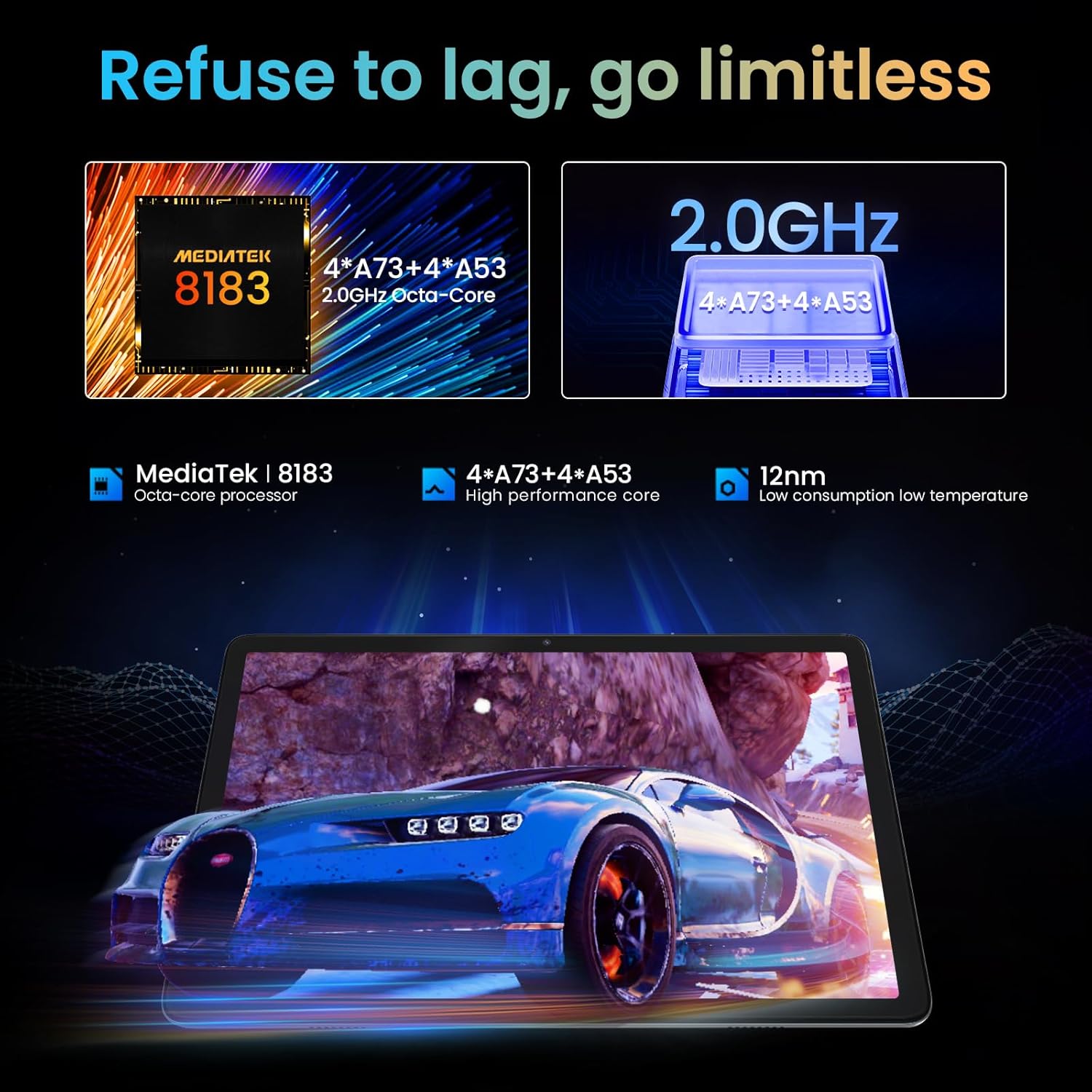
Image: A person watching a high-definition video on the tablet, illustrating its support for Netflix L1 and Widevine L1 for enhanced streaming quality.
7. නඩත්තු කිරීම
7.1 ටැබ්ලටය පිරිසිදු කිරීම
- ටැබ්ලටයේ තිරය සහ ශරීරය පිරිසිදු කිරීමට මෘදු, ලින්ට් රහිත රෙද්දක් භාවිතා කරන්න.
- මුරණ්ඩු පැල්ලම් සඳහා, තරමක් dampen ජලය සහිත රෙදි හෝ ඉලෙක්ට්රොනික උපකරණ සඳහා විෙශේෂෙයන් නිර්මාණය කර ඇති තිර පිරිසිදු කරන්නා.
- සැර රසායනික ද්රව්ය, උල්ෙල්ඛ ද්රව්ය හෝ එයරෙසෝල් ඉසින භාවිතා කිරීමෙන් වළකින්න.
7.2 බැටරි සත්කාර
- බැටරි ආයු කාලය දීර්ඝ කිරීම සඳහා, බැටරිය නිතර නිතර සම්පූර්ණයෙන්ම විසර්ජනය කිරීමෙන් වළකින්න.
- ටැබ්ලටය සම්පූර්ණයෙන්ම ආරෝපණය වූ පසු දිගු වේලාවක් චාජරයට සම්බන්ධ කර තබන්න එපා.
- දිගු කාලයක් භාවිතා නොකළහොත් ටැබ්ලටය සිසිල් වියළි ස්ථානයක ගබඩා කරන්න.
7.3 මෘදුකාංග යාවත්කාලීන
ප්රශස්ත කාර්ය සාධනය, ආරක්ෂාව සහ නව විශේෂාංග වෙත ප්රවේශය සහතික කිරීම සඳහා මෘදුකාංග යාවත්කාලීන කිරීම් නිතිපතා පරීක්ෂා කර ස්ථාපනය කරන්න.
- වෙත යන්න සැකසීම් > පද්ධතිය > පද්ධති යාවත්කාලීන කිරීම පවතින යාවත්කාලීන කිරීම් සඳහා පරීක්ෂා කිරීමට.
- Ensure the tablet has sufficient battery and a stable Wi-Fi connection before performing an update.
8. දෝශ නිරාකරණය
8.1 පොදු ගැටළු සහ විසඳුම්
| ගැටලුව | විය හැකි හේතුව | විසඳුම |
|---|---|---|
| ටැබ්ලටය සක්රිය නොවේ. | බැටරිය අඩුයි; මෘදුකාංග බිඳවැටීම. | ටැබ්ලටය අවම වශයෙන් විනාඩි 30ක් ආරෝපණය කරන්න. නැවත ආරම්භ කිරීමට බල කිරීම සඳහා බල බොත්තම තත්පර 10-15ක් ඔබාගෙන සිටින්න. |
| Wi-Fi සම්බන්ධතා ගැටළු. | වැරදි මුරපදයක්; රවුටරයේ ගැටලුවක්; ටැබ්ලට් Wi-Fi අබල කර ඇත. | නිවැරදි මුරපදය සහතික කර ගන්න. රවුටරය නැවත ආරම්භ කරන්න. ටැබ්ලටයේ Wi-Fi අක්රිය/සක්රිය කරන්න. |
| යෙදුම් බිඳ වැටෙමින් හෝ කැටි වෙමින් පවතී. | ප්රමාණවත් RAM නොමැතිකම; යෙදුම් දෝෂය; යල් පැන ගිය යෙදුම. | පසුබිම් යෙදුම් වසන්න. යෙදුම් හැඹිලිය හිස් කරන්න (සැකසීම් > යෙදුම් > [යෙදුම් නම] > ගබඩාව සහ හැඹිලිය > හැඹිලිය හිස් කරන්න). Google Play Store වෙතින් යෙදුම යාවත්කාලීන කරන්න. |
| මන්දගාමී කාර්ය සාධනය. | යෙදුම් ඕනෑවට වඩා ධාවනය වේ; අඩු ගබඩා ඉඩක්; යල් පැන ගිය මෘදුකාංග. | භාවිතයට නොගත් යෙදුම් වසන්න. අනවශ්ය ඒවා මකා දැමීමෙන් ගබඩාව නිදහස් කරන්න. files. පද්ධති යාවත්කාලීන කිරීම් සඳහා පරීක්ෂා කරන්න. |
8.2 කර්මාන්තශාලා යළි පිහිටුවීම
ගැටළු දිගටම පවතින්නේ නම්, කර්මාන්තශාලා යළි පිහිටුවීමක් මඟින් ඒවා විසඳා ගත හැකිය. අවවාදයයි: මෙය ඔබගේ ටැබ්ලටයේ ඇති සියලු දත්ත මකා දමයි. ඉදිරියට යාමට පෙර වැදගත් දත්ත උපස්ථ කරන්න.
- වෙත යන්න සැකසීම් > පද්ධතිය > යළි පිහිටුවීමේ විකල්ප > සියලු දත්ත මකන්න (කර්මාන්තශාලා යළි පිහිටුවීම).
- ඔබේ තීරණය තහවුරු කර තිරයේ ඇති විමසීම් අනුගමනය කරන්න.
9. පිරිවිතර
| විශේෂාංගය | විස්තර |
|---|---|
| මාදිලියේ නම | KST102MF |
| මෙහෙයුම් පද්ධතිය | Android 12 |
| ප්රොසෙසරය | Octa-Core (Unisoc, 1.98 GHz) |
| RAM | 6 GB |
| අභ්යන්තර ගබඩාව | 128 GB |
| පුළුල් කළ හැකි ගබඩාව | 1 TB දක්වා (MicroSD) |
| සංදර්ශක ප්රමාණය | අඟල් 10.1 |
| සංදර්ශක විභේදනය | 1280 x 800 Pixels (IPS HD) |
| ග්රැෆික් චිප්සෙට් | ARM Mali-G72 MP3 |
| Wi-Fi සම්බන්ධතාව | 802.11ac, 802.11b, 802.11g, 802.11n (2.4GHz + 5.0GHz Dual-band) |
| බ්ලූටූත් | බ්ලූටූත් 5.0 |
| අතුරු මුහුණත | USB 3.1 වර්ගය C |
| බැටරි ආයු කාලය | ආසන්න වශයෙන්. පැය 10 යි |
| බැටරි වර්ගය | ලිතියම්-පොලිමර් (ඇතුළත්) |
| මානයන් (L x W x H) | 30.48 x 17.78 x 3.56 සෙ.මී |
| බර | ග්රෑම් 500 කි |
| විශේෂ ලක්ෂණ | Stereo Speakers, USB OTG Support, Expandable Storage, Face ID, Widevine L1 |
10. වගකීම් තොරතුරු
The kinstone tablet comes with a standard manufacturer's warranty. Please refer to the warranty card included in your product packaging for specific terms, conditions, and duration. Keep your purchase receipt as proof of purchase for warranty claims.
For warranty service, contact kinstone customer support or the retailer from whom you purchased the device.
11. පාරිභෝගික සහාය
If you encounter any issues not covered in this manual or require further assistance, please contact kinstone customer support.
- නිෂ්පාදකයා: kinstone
- විකුණුම්කරු: Kinstone-直営店 (Kinstone-Direct Store)
- For the most up-to-date support contact information, please visit the official kinstone website or the seller's page on Amazon.


