1. හැඳින්වීම
Thank you for choosing the MLOVE S203 Bluetooth Speaker. This portable, waterproof audio device is designed to provide high-quality sound for various environments. Featuring advanced Bluetooth 5.3 technology for stable connectivity, IPX7 waterproofing for outdoor use, and True Wireless Stereo (TWS) pairing for an immersive audio experience, the S203 delivers deep bass and clear stereo sound with an extended playtime. Please read this manual carefully before using the speaker to ensure proper operation and to maximize its performance.
2. පැකේජ අන්තර්ගතය
කරුණාකර පහත අයිතම සඳහා පැකේජය පරීක්ෂා කරන්න:
- 1 x MLOVE S203 Bluetooth Speaker
- 1 x USB Type-C Charging Cable
- 1 x Lanyard
- 1 x උපදෙස් අත්පොත

Image: MLOVE S203 Speaker and Included Accessories
3. නිෂ්පාදන ලක්ෂණ
- Amazing & Delightful Sound: Equipped with 2x45mm full-range speakers and 2 bass radiators, delivering 15W of powerful, clear, and deep bass stereo sound.
- Excellent Waterproof & Dustproof: IPX7 rated for water resistance, allowing immersion in up to 1 meter of water for 30 minutes. Also IPX6 dustproof, making it suitable for various outdoor conditions. Operates reliably in temperatures from -20°C to +45°C.
- Powerful True Wireless Stereo (TWS): Connect two MLOVE S203 speakers wirelessly to create an immersive stereo sound experience, doubling the audio output for larger spaces or parties.
- All Day Playtime: The powerful built-in battery provides up to 24 hours of continuous music playback, ensuring your favorite songs are available whenever and wherever you are.
- පහසු සම්බන්ධතාවය: Supports Bluetooth 5.3 for fast and stable wireless connections up to 20 meters, and features an AUX input for wired connections. Compatible with most smartphones, laptops, PCs, and tablets.

Image: Internal Speaker Components and Sound Output

Image: Speaker's Waterproof and Dustproof Capabilities
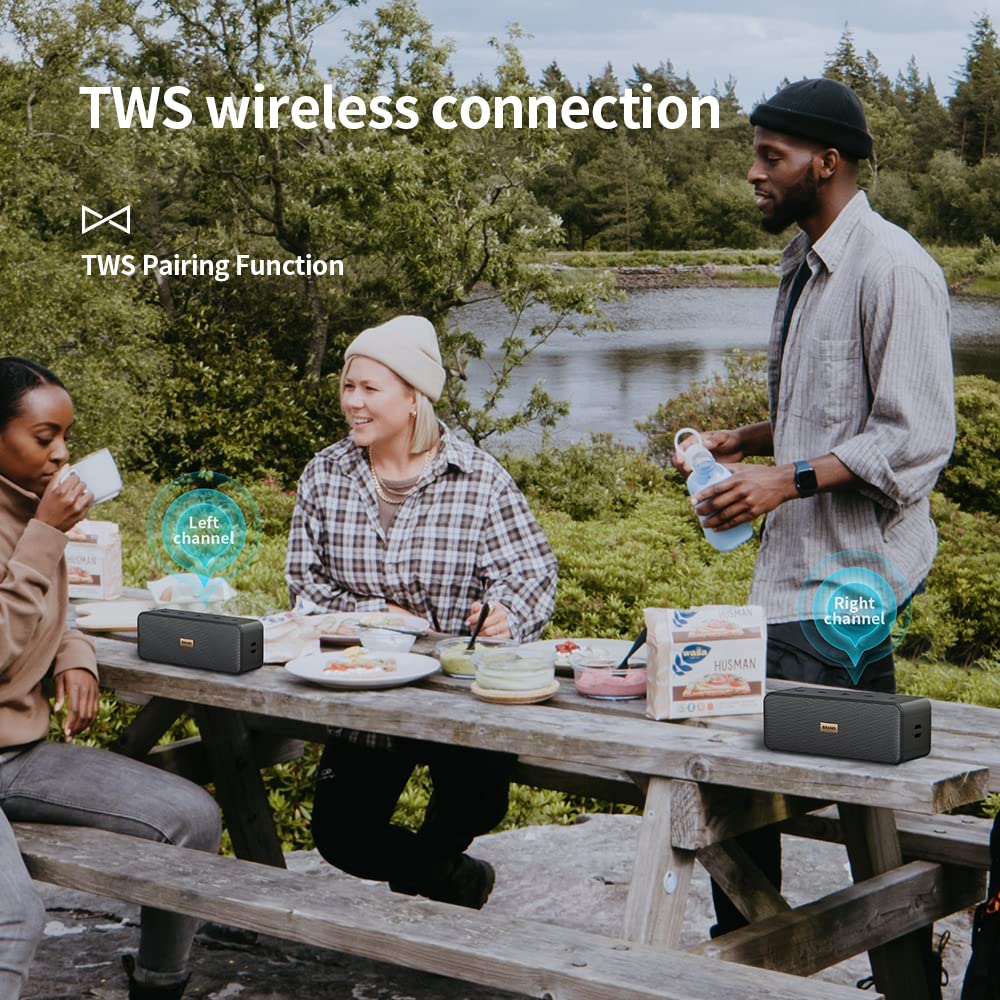
Image: True Wireless Stereo (TWS) Pairing in Use

Image: Extended Playtime Feature

Image: Bluetooth 5.3 Connectivity
4. නිෂ්පාදන පිරිසැලසුම සහ පාලනයන්
The MLOVE S203 speaker features intuitive controls located on the top panel and essential ports on the side.

Image: MLOVE S203 Speaker Top View පාලන සමඟ
පාලන බොත්තම් (ඉහළ පුවරුව):
- Power Button (⏸): Press and hold to turn the speaker On/Off. Short press to check battery status (if applicable).
- ශබ්දය අඩු කිරීම / පෙර ඛණ්ඩය (-): ශබ්දය අඩු කිරීමට කෙටි ඔබන්න. පෙර ධාවන පථයට යාමට දිගු ඔබන්න.
- වාදනය/විරාම බොත්තම (⏸): සංගීතය වාදනය කිරීමට හෝ විරාම කිරීමට කෙටි ඔබන්න.
- ශබ්දය වැඩි කිරීම / ඊළඟ ධාවන පථය (+): Short press to increase volume. Long press to go to the next track.
- මාදිලි බොත්තම (M): Short press to switch between Bluetooth and AUX input modes.
Ports (Side Panel):
- USB Type-C Charging Port: ස්පීකරයේ අභ්යන්තර බැටරිය ආරෝපණය කිරීම සඳහා.
- AUX-in port: 3.5mm ශ්රව්ය කේබලයක් හරහා බාහිර ශ්රව්ය උපාංග සම්බන්ධ කිරීම සඳහා.
5. පිහිටුවීම
5.1 කථිකයා ආරෝපණය කිරීම
- Connect the provided USB Type-C charging cable to the speaker's charging port.
- කේබලයේ අනෙක් කෙළවර USB බල ඇඩැප්ටරයකට (ඇතුළත් කර නැත) හෝ පරිගණකයේ USB පෝට් එකකට සම්බන්ධ කරන්න.
- ආරෝපණය කිරීමේදී ආරෝපණ දර්ශක ආලෝකය දැල්වෙන අතර සම්පූර්ණයෙන්ම ආරෝපණය වූ විට නිවා දමයි.
- සම්පූර්ණ ආරෝපණයක් සාමාන්යයෙන් පැය 3-4 ක් පමණ ගතවේ.
5.2 බල ගැන්වීම සක්රිය / අක්රිය කිරීම
- බල ගැන්වීමට: Press and hold the Power button (⏸) for 2-3 seconds until you hear an audible prompt and the indicator light turns on.
- බලය අක්රිය කිරීමට: Press and hold the Power button (⏸) for 2-3 seconds until you hear an audible prompt and the indicator light turns off.
6. මෙහෙයුම් උපදෙස්
6.1 බ්ලූටූත් යුගල කිරීම
- Ensure the speaker is powered on and in Bluetooth pairing mode (the indicator light will flash blue rapidly). If not, short press the 'M' (Mode) button to switch to Bluetooth mode.
- ඔබගේ ස්මාර්ට් ජංගම දුරකථනය, ටැබ්ලටය හෝ වෙනත් ශ්රව්ය උපාංගයක බ්ලූටූත් සක්රීය කරන්න.
- ඒ සඳහා සොයන්න available Bluetooth devices and select "MLOVE S203" from the list.
- Once successfully paired, you will hear a confirmation sound, and the indicator light will turn solid blue.
- The speaker will automatically reconnect to the last paired device when powered on, if the device's Bluetooth is enabled and within range.
6.2 සත්ය රැහැන් රහිත ස්ටීරියෝ (TWS) යුගලනය
TWS allows you to pair two MLOVE S203 speakers together for a true stereo sound experience.
- Ensure both MLOVE S203 speakers are powered on and not connected to any Bluetooth device.
- On one of the speakers (this will be the primary speaker), double-press the Play/Pause button (⏸). You will hear a prompt indicating it's searching for another speaker.
- The two speakers will automatically connect to each other. Once connected, you will hear a confirmation sound, and the indicator light on the primary speaker will flash blue, while the secondary speaker's light will be solid blue.
- Now, connect your audio device to the primary speaker via Bluetooth as described in section 6.1.
- දැන් ස්පීකර් දෙකම හරහා ශ්රව්ය ස්ටීරියෝ ආකාරයෙන් වාදනය වේ.
- To disconnect TWS, double-press the Play/Pause button (⏸) on either speaker.
6.3 AUX-in මාදිලිය
Use the AUX-in mode to connect devices without Bluetooth capability.
- Connect one end of a 3.5mm audio cable (not included) to the AUX-in port on the speaker.
- Connect the other end of the cable to the headphone jack or audio output port of your device.
- The speaker will automatically switch to AUX-in mode, or you may need to short press the 'M' (Mode) button to select AUX mode.
- Control volume and playback from your connected device.
7. නඩත්තු කිරීම
- පිරිසිදු කිරීම: Use a soft, dry cloth to clean the speaker. For stubborn dirt, a slightly damp cloth can be used. Do not use harsh chemicals, cleaning solvents, or strong detergents.
- ජල නිරාවරණය: While the speaker is IPX7 waterproof, ensure the charging port cover is securely closed before exposing it to water. After exposure to chlorinated or saltwater, rinse the speaker with fresh water and dry thoroughly before charging.
- ගබඩා: සෘජු හිරු එළියෙන් සහ අධික උෂ්ණත්වයන්ගෙන් ඈත්ව සිසිල් වියළි ස්ථානයක ස්පීකරය ගබඩා කරන්න.
- බැටරි සත්කාර: To prolong battery life, fully charge the speaker before first use. If not used for extended periods, charge it at least once every three months. Avoid completely draining the battery frequently.
8. දෝශ නිරාකරණය
| ගැටලුව | විය හැකි හේතුව | විසඳුම |
|---|---|---|
| ස්පීකරය ක්රියාත්මක නොවේ | බැටරිය අඩුයි; බල බොත්තම ප්රමාණවත් කාලයක් අල්ලාගෙන නොමැත. | Charge the speaker fully. Press and hold the Power button for 2-3 seconds. |
| ශබ්දයක් නැත | Volume too low; Incorrect mode; Device not connected | Increase speaker and device volume. Ensure correct mode (Bluetooth/AUX). Reconnect device. |
| බ්ලූටූත් යුගලනය කළ නොහැක | Speaker not in pairing mode; Device Bluetooth off; Too far from device | Ensure speaker is flashing blue. Turn device Bluetooth on/off. Move speaker closer to device (within 20m). |
| TWS යුගල කිරීම අසාර්ථක විය | Speakers too far apart; One speaker already paired to a device | Ensure speakers are close to each other. Disconnect any Bluetooth devices from both speakers before TWS pairing. |
| ශබ්දය විකෘති කිරීම | ශබ්දය ඉතා වැඩියි; බැටරිය අඩුයි; බාධාව | Reduce volume. Charge speaker. Move away from other electronic devices. |
9. පිරිවිතර
| විශේෂාංගය | පිරිවිතර |
|---|---|
| මාදිලියේ නම | S203 |
| ස්පීකර් වර්ගය | වූෆර් |
| සම්බන්ධතා තාක්ෂණය | Bluetooth 5.3, AUX-in |
| ස්පීකර් උපරිම නිමැවුම් බලය | වොට් 15 |
| ජල ආරක්ෂිත ශ්රේණිගත කිරීම | IPX7 |
| දූවිලි රහිත ශ්රේණිගත කිරීම | IPX6 |
| බැටරි ආයු කාලය | පැය 24 දක්වා |
| නිෂ්පාදන මානයන් (D x W x H) | 6.2 x 17 x 6.4 සෙ.මී |
| අයිතමයේ බර | කිලෝග්රෑම් 0.61 (ග්රෑම් 610) |
| ගැළපෙන උපාංග | ලැප්ටොප්, පුද්ගලික පරිගණකය, ස්මාර්ට්ෆෝන්, ටැබ්ලටය |
| ඇතුළත් සංරචක | 1* S203 Bluetooth Speaker, 1* USB Type-C Charging Cable, Lanyard, 1* Instruction Manual |

Image: MLOVE S203 Speaker Dimensions
10. වගකීම් සහ සහාය
The MLOVE S203 Bluetooth Speaker comes with a මාස 12ක වගකීමක් මිලදී ගත් දින සිට. මෙම වගකීම් සහතිකය සාමාන්ය භාවිතය යටතේ නිෂ්පාදන දෝෂ සහ වැඩ කිරීම ආවරණය කරයි. අනිසි භාවිතය, අනතුරු, අනවසර වෙනස් කිරීම් හෝ ස්වාභාවික විපත් නිසා සිදුවන හානිය එය ආවරණය නොකරයි.
For warranty claims, technical support, or any questions regarding your MLOVE S203 speaker, please contact our customer support team through the retailer's platform or the contact information provided on the product packaging.


