1. හැඳින්වීම සහ අවසන්view
The Flashpoint R2 XPro II is a state-of-the-art 2.4GHz wireless flash trigger designed specifically for Canon cameras. It provides robust and reliable control over your Flashpoint R2 and Godox X-system flashes, enabling precise lighting adjustments for professional photography. This manual details the features, setup, operation, maintenance, and troubleshooting for your R2 XPro II trigger.

Image 1.1: The Flashpoint R2 XPro II Wireless Flash Trigger, showcasing its compact design and clear LCD display.
2. පෙට්ටියේ ඇති දේ
පැකේජය විවෘත කිරීමෙන් පසු, පහත සඳහන් සියලු අයිතම ඇතුළත් කර ඇති බවට වග බලා ගන්න:
- Flashpoint R2 XPro II Wireless Flash Trigger for Canon
- පරිශීලක අත්පොත (මෙම ලේඛනය)
- USB-C Cable (for firmware updates)
Note: AA batteries are required for operation and are not included.
3. නිෂ්පාදන ලක්ෂණ
The Flashpoint R2 XPro II offers a comprehensive set of features designed to enhance your flash photography:
- Reliable 2.4GHz Radio System: Ensures consistent flash firing with minimal misfires, offering a robust connection up to 300-400 feet (90-120 meters).
- විස්තීරණ සම්ප්රේෂණ පරාසය: Control your flashes from significant distances, ideal for complex studio setups or outdoor shoots.
- Versatile Multi-Channel Control: Features 32 channels and 5 dedicated TTL groups (A-E) plus 16 manual groups (0-9, A-F), providing extensive control and customization for multiple flash units.
- සම්පූර්ණ TTL සහාය: Automatically adjusts flash power for perfectly exposed images, adapting to changing light conditions with Canon cameras.
- අධිවේගී සමමුහුර්තකරණය (HSS): Achieve sync speeds up to 1/8000s, allowing you to freeze fast motion or use wide apertures in bright ambient light.
- Large Dot Matrix LCD Display: Provides clear visibility of settings with adjustable backlight.
- බිල්ට් බ්ලූටූත්: Enables smartphone app control for convenient remote adjustments.
- ස්ථිරාංග යාවත්කාලීන කළ හැකිය: Via USB-C port for future compatibility and feature enhancements.
- Instant Flip Locking Hot Shoe: Securely attaches the trigger to your camera.
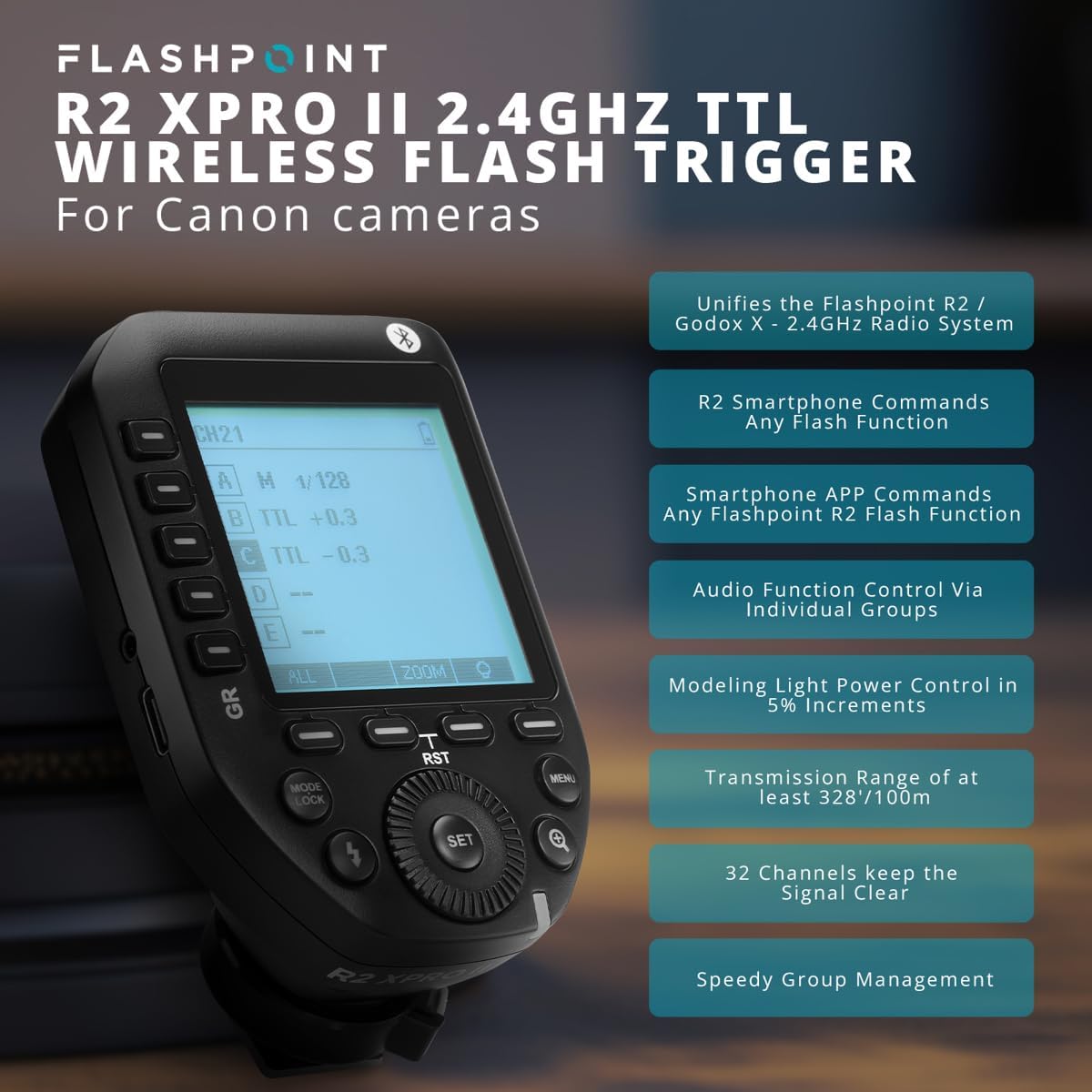
Image 3.1: Key features of the Flashpoint R2 XPro II, highlighting its capabilities.
4. පිහිටුවීම
4.1. බැටරි ස්ථාපනය
The R2 XPro II uses two AA batteries. To install:
- Locate the battery compartment cover on the underside of the trigger.
- කවරය විවෘත කරන්න.
- මැදිරිය තුළ දක්වා ඇති පරිදි නිවැරදි ධ්රැවීයතාව (+/-) සහතික කරමින්, AA බැටරි දෙකක් ඇතුළු කරන්න.
- බැටරි මැදිරි කවරය ආරක්ෂිතව වසා දමන්න.

Image 4.1: Battery compartment of the R2 XPro II, ready for AA battery insertion.
4.2. කැමරාව මත සවි කිරීම
To mount the trigger on your camera's hot shoe:
- Ensure the trigger is powered off.
- Slide the hot shoe foot of the R2 XPro II into your camera's hot shoe.
- Push the locking lever forward to secure the trigger firmly in place.
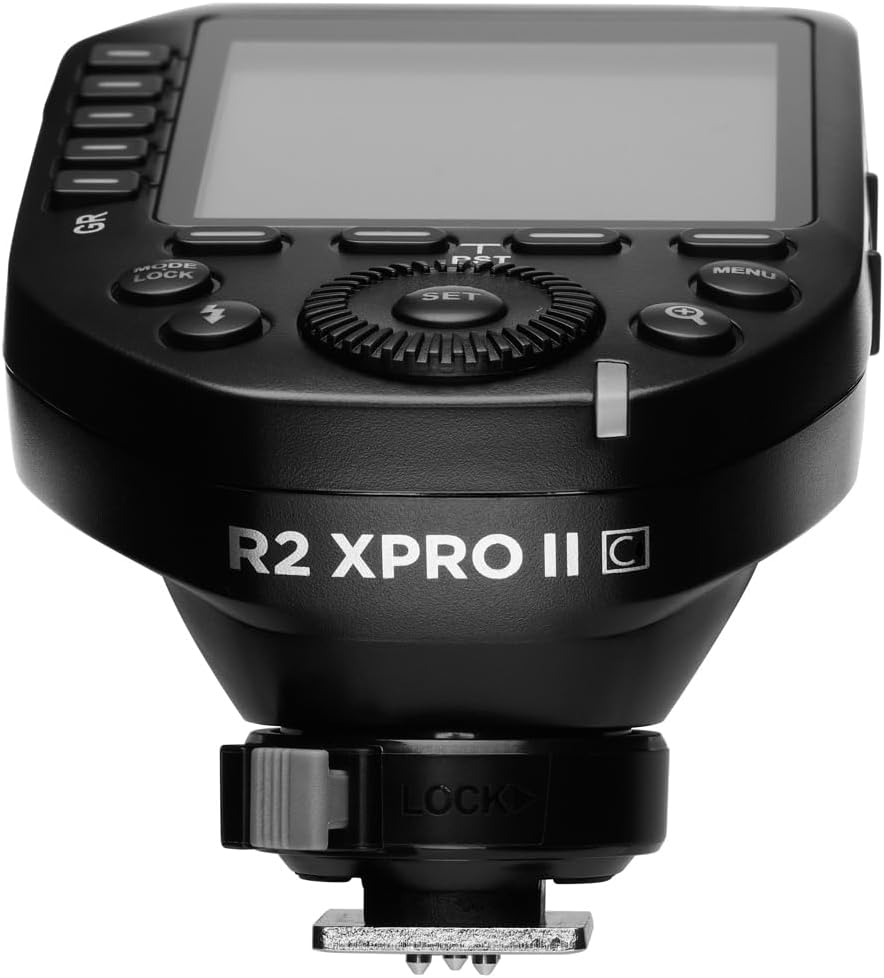
රූපය 4.2: යටි පැත්ත view of the R2 XPro II, highlighting the hot shoe and locking lever.
4.3. මූලික බල සක්රිය කිරීම සහ මූලික සැකසුම්
After mounting, power on the trigger using the ON/OFF switch located on the side. The LCD display will illuminate. You may need to set the channel and group to match your flash units. Refer to Section 5 for detailed operating instructions.
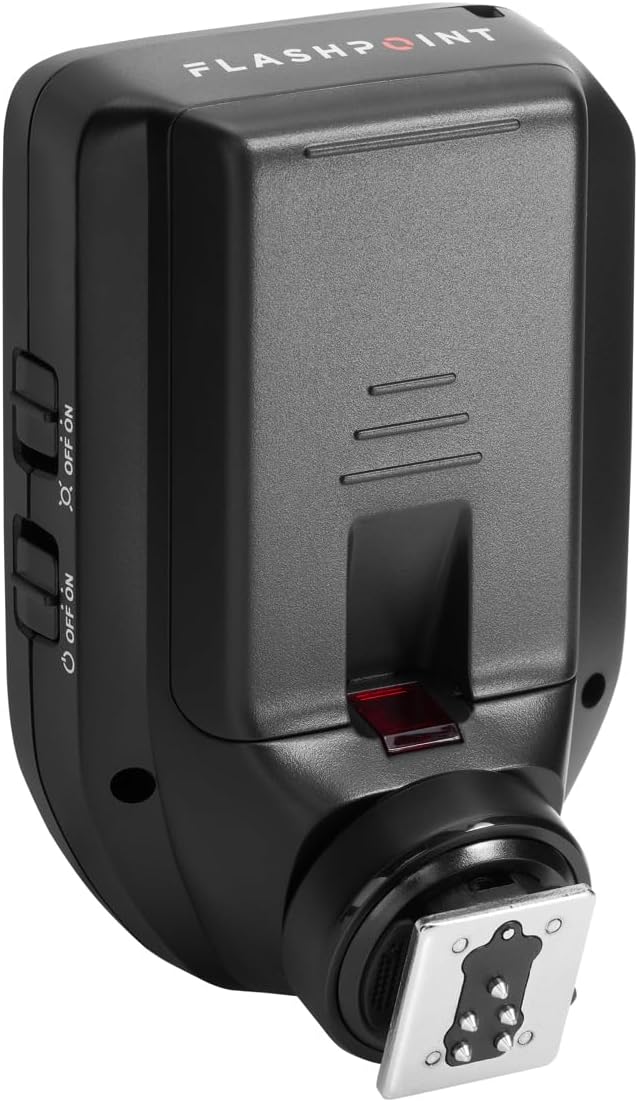
රූපය 4.3: පැත්ත view of the R2 XPro II, indicating the location of the power switch.
5. මෙහෙයුම් උපදෙස්
5.1. බල ගැන්වීම / අක්රිය කිරීම
Use the dedicated ON/OFF switch on the side of the unit to power the trigger on or off.
5.2. Navigating the Display and Controls
The R2 XPro II features a large LCD display and intuitive buttons for easy navigation.

රූපය 5.1: ඉහළ-පහළ view of the R2 XPro II display and control layout.
- LCD සංදර්ශකය: Shows current channel, group settings, flash mode (TTL/M/Multi), power output, and battery status.
- GR Buttons (Left Side): Used to select and adjust individual groups (A-E).
- SET බොත්තම: තේරීම් තහවුරු කර උප මෙනු වලට ඇතුළු වේ.
- අමතන්න: Rotates to change values (e.g., power output, channel number).
- MODE/LOCK Button: Cycles through flash modes (TTL, Manual, Multi) and locks/unlocks settings.
- ෆ්ලෑෂ් බොත්තම: Test fire button.
- මෙනු බොත්තම: පද්ධති සැකසුම් වෙත ප්රවේශ වේ.
- Magnifying Glass Button: Zoom function for detailed group view.
5.3. Setting Channels and Groups
To ensure proper communication, the trigger and your flash units must be set to the same channel and group.
- ඔබන්න මෙනුව button to access system settings.
- Navigate to the Channel (CH) setting using the dial and press සකසන්න.
- Rotate the dial to select the desired channel (1-32) and press සකසන්න තහවුරු කිරීමට.
- To adjust groups, press the corresponding GR button (A-E) on the left side.
- Use the dial to change the flash mode (TTL/M/Multi) or power output for the selected group.
5.4. TTL Mode Operation
In TTL (Through-The-Lens) mode, the trigger automatically adjusts flash power based on the camera's metering. This is ideal for fast-paced shooting where lighting conditions change frequently.
- Ensure your flash unit is also set to TTL mode.
- On the R2 XPro II, press the MODE/LOCK button until "TTL" is displayed for the desired group(s).
- The trigger will communicate with your camera to determine the appropriate flash output.
5.5. අතින් ක්රියා කරන ආකාරය
Manual mode provides precise control over flash power, allowing you to set the output from 1/1 to 1/256 in 1/3 stop increments.
- ඔබන්න MODE/LOCK button until "M" (Manual) is displayed for the desired group(s).
- Use the dial to adjust the power output for each group.
- The display will show the current power setting (e.g., M 1/128).
5.6. අධිවේගී සමමුහුර්තකරණය (HSS)
HSS allows you to use flash at shutter speeds faster than your camera's native sync speed (e.g., 1/250s), up to 1/8000s. This is useful for overpowering ambient light or using wide apertures in bright conditions.
HSS is typically enabled automatically when your camera's shutter speed exceeds the normal sync speed while the trigger is in TTL or Manual mode. Ensure your flash unit also supports HSS.
5.7. Using the Test Fire Button
කැපවූ එක ඔබන්න ෆ්ලෑෂ් button (lightning bolt icon) to test fire all active flash units. This is useful for checking flash readiness and light output before taking a picture.
5.8. Bluetooth and Smartphone App Control
The R2 XPro II features built-in Bluetooth for remote control via a smartphone application. Download the Flashpoint R2 app (or compatible Godox app) from your device's app store. Follow the app's instructions to pair your trigger and control flash settings remotely.
6. නඩත්තු කිරීම
6.1 පිරිසිදු කිරීම
To clean the trigger, use a soft, dry cloth. For stubborn dirt, a slightly damp රෙදි භාවිතා කළ හැකි නමුත් තෙතමනය උපාංගයට ඇතුළු නොවන බවට වග බලා ගන්න. රළු රසායනික ද්රව්ය හෝ උල්ෙල්ඛ පිරිසිදු කරන්නන් භාවිතා නොකරන්න.
6.2. බැටරි රැකවරණය
- Remove batteries if the trigger will not be used for an extended period to prevent leakage.
- Use high-quality AA alkaline or NiMH rechargeable batteries.
- භාවිතා කරන ලද බැටරි දේශීය රෙගුලාසිවලට අනුව වගකීමෙන් යුතුව බැහැර කරන්න.
6.3. ගබඩා කිරීම
Store the R2 XPro II in a cool, dry place, away from direct sunlight, extreme temperatures, and high humidity. Keep it in its original packaging or a protective case to prevent damage.
6.4. ස්ථිරාංග යාවත්කාලීන කිරීම්
Flashpoint periodically releases firmware updates to improve performance, add features, or ensure compatibility with new camera models. To update the firmware:
- Visit the official Flashpoint webනවතම ස්ථිරාංග සහ යාවත්කාලීන උපදෙස් සඳහා අඩවිය.
- Connect the R2 XPro II to your computer using the supplied USB-C cable.
- Follow the instructions provided on the Flashpoint website to complete the update process.

රූපය 6.1: පැත්ත view of the R2 XPro II, highlighting the USB-C port for firmware updates.
7. දෝශ නිරාකරණය
If you encounter issues with your Flashpoint R2 XPro II, refer to the following common problems and solutions:
| ගැටලුව | විය හැකි හේතුව | විසඳුම |
|---|---|---|
| Trigger not powering on. | මිය ගිය හෝ වැරදි ලෙස ස්ථාපනය කර ඇති බැටරි. | Check battery polarity, replace with fresh AA batteries. |
| Flashes not firing. | Incorrect channel/group settings; trigger not securely mounted; flash unit issues. | Ensure trigger and flashes are on the same channel and group. Check trigger is fully seated on camera hot shoe. Verify flash units are powered on and ready. |
| Inconsistent firing or limited range. | Interference; low battery; obstructions. | Change channel. Replace batteries. Reduce distance or clear line of sight between trigger and flashes. |
| TTL exposure issues. | Flash exposure compensation set incorrectly; firmware outdated. | Check flash exposure compensation settings on both camera and trigger. Update firmware. |
| Display not working or frozen. | මෘදුකාංග දෝෂයක්; බැටරිය අඩුයි. | Remove and reinsert batteries. Replace batteries. If issue persists, contact support. |
8. පිරිවිතර
| ගුණාංගය | වටිනාකම |
|---|---|
| නිෂ්පාදන මානයන් | අඟල් 5.25 x 4 x 2.8 |
| අයිතමයේ බර | අවුන්ස 9.3 කි |
| ASIN | B0BZ7PQ2PB |
| අයිතම ආදර්ශ අංකය | R2 XPro II |
| පළමු දිනය තිබේ | 21 මාර්තු 2023 |
| නිෂ්පාදකයා | ජ්වලනාංකය |
| රැහැන් රහිත සංඛ්යාතය | 2.4GHz |
| නාලිකා | 32 |
| කණ්ඩායම් | 5 TTL Groups (A-E), 16 Manual Groups (0-9, A-F) |
| සමමුහුර්ත වේගය | Up to 1/8000s (High-Speed Sync) |
| බලශක්ති ප්රභවය | 2 x AA බැටරි (ඇතුළත් කර නැත) |
9. වගකීම් සහ සහාය
For information regarding warranty coverage and technical support for your Flashpoint R2 XPro II, please refer to the official Flashpoint webවෙබ් අඩවියට හෝ ඔවුන්ගේ පාරිභෝගික සේවයට සෘජුවම සම්බන්ධ වන්න. වගකීම් හිමිකම් සඳහා මිලදී ගැනීමේ සාක්ෂියක් ලෙස ඔබේ මිලදී ගැනීමේ රිසිට්පත තබා ගන්න.
Flashpoint Official Webඅඩවිය: www.adorama.com/g/flashpoint


