1. නිෂ්පාදන අවසන්view
The FITORCH V10 is a compact and powerful Everyday Carry (EDC) flashlight designed for versatile use. It features a high-brightness main LED, multi-color side lights including UV, red, green, and blue, and a magnetic tail cap. This manual provides instructions for safe and effective operation.

Image 1.1: FITORCH V10 EDC Flashlight, showing the device, a USB-C charging cable, and a keyring. The flashlight is compact and features two main light emitters and side lights.

රූපය 1.2: ඉවරයිview of FITORCH V10 features, including high brightness, beeping warning, multi-source sidelights, USB-C charging, magnetic adsorption, and mini portable design.
2. පැකේජ අන්තර්ගතය
සියලුම අයිතම පැකේජයේ ඇති බව තහවුරු කරගන්න:
- 1 x FITORCH V10 EDC Flashlight
- 1 x USB-C ආරෝපණ කේබලය
- 1 x යතුරු මුද්ද
- 1 x පරිශීලක අත්පොත (මෙම ලේඛනය)
3. පිහිටුවීම සහ ආරෝපණය කිරීම
3.1 මූලික ආරෝපණය
Before first use, fully charge the flashlight. The FITORCH V10 features a built-in 1000mAh rechargeable battery.
- උපාංගයේ USB-C ආරෝපණ වරාය සොයා ගන්න.
- සපයා ඇති USB-C කේබලය ෆ්ලෑෂ් ලයිට් එකට සහ අනුකූල USB බල ප්රභවයකට (උදා: පරිගණකය, බිත්ති ඇඩැප්ටරය) සම්බන්ධ කරන්න.
- During charging, a red light will flash.
- Once fully charged, the indicator light will turn solid green.
Charging time is approximately 120-180 minutes (2-3 hours).

Image 3.1: Illustration of the FITORCH V10's internal 1000mAh built-in battery, highlighting its capacity for extended use.

Image 3.2: The bottom right panel shows the USB-C charging port and the indicator lights: red flashing for charging, green solid for full charge.
4. මෙහෙයුම් උපදෙස්
The FITORCH V10 features two main buttons: a Power button (left) and a Mode button (right).
4.1 Main Light Operation
The main light provides up to 1000 lumens of brightness with multiple modes.
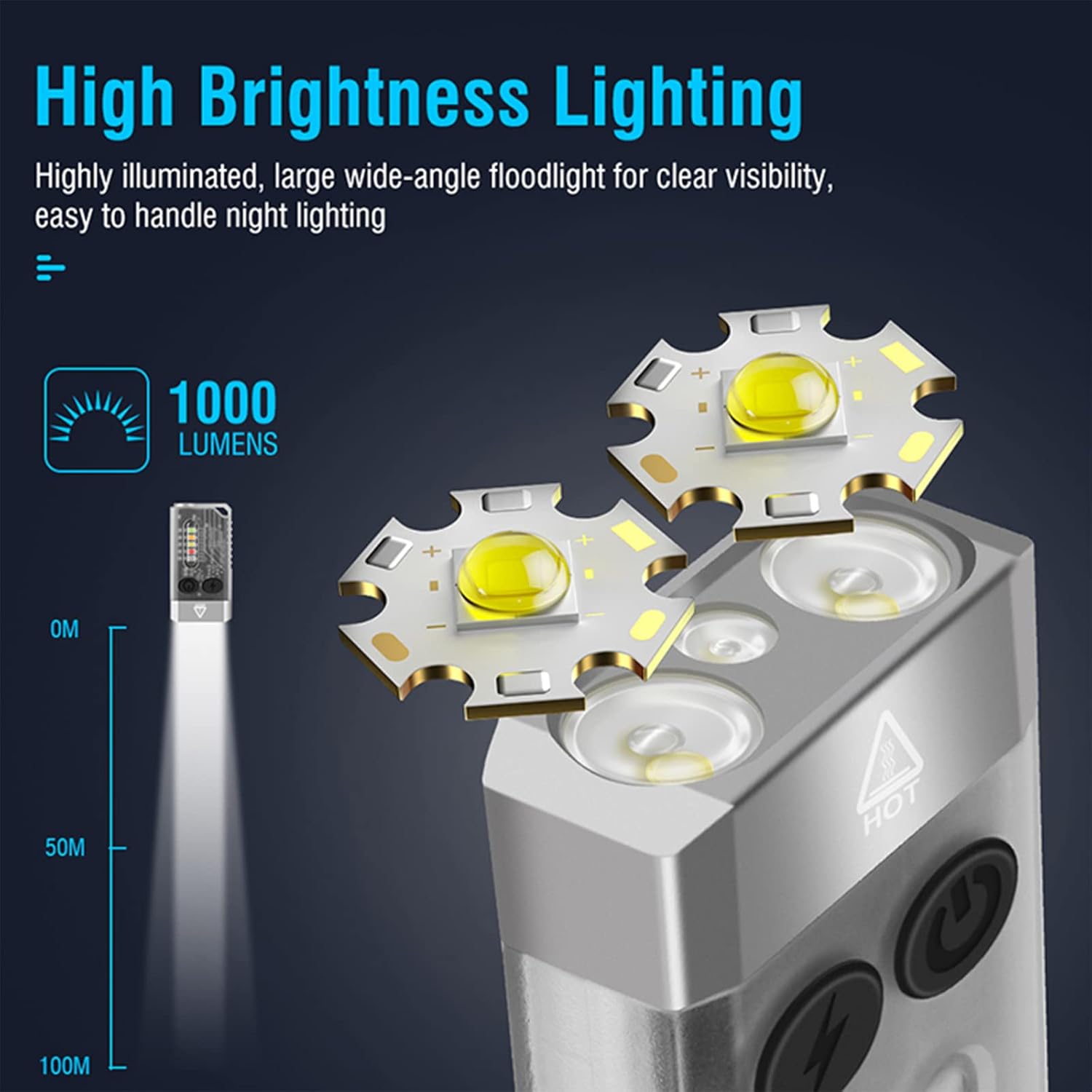
Image 4.1: Illustration of the FITORCH V10's high brightness main light, capable of 1000 lumens and projecting light up to 100 meters.
- සක්රිය / අක්රිය කරන්න: Double-click the Power button to turn the main light ON. Long press the Power button to turn it OFF.
- ස්විච් මාදිලි: While the main light is ON, click the Power button to cycle through High, Medium, Low, and Economic modes.
- ටර්බෝ මාදිලිය: Long press the Power button from any state to activate Turbo mode. Release the button to turn off Turbo mode.
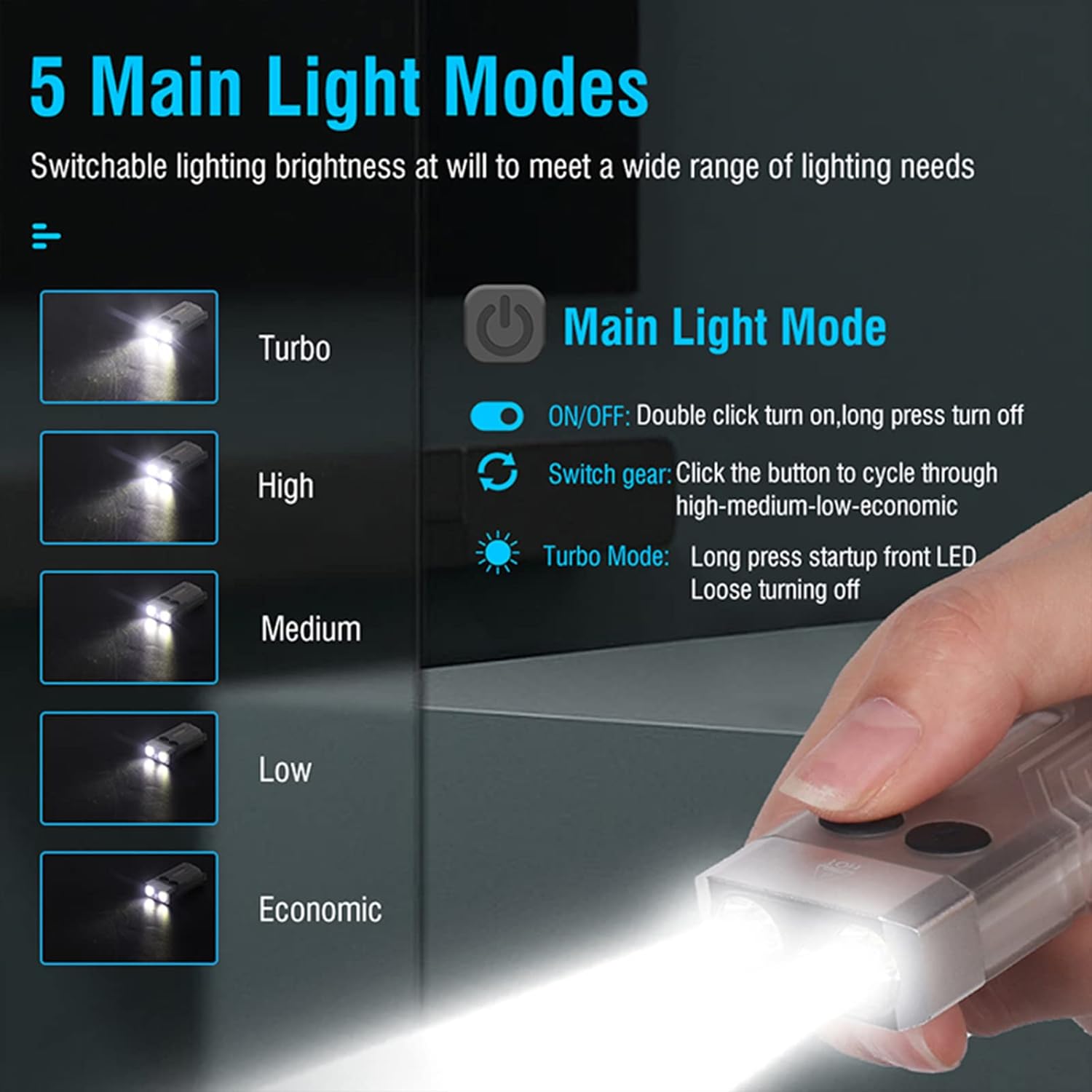
Image 4.2: Diagram illustrating the 5 main light modes (Turbo, High, Medium, Low, Economic) and their activation methods using the Power button.
4.2 Side Light Operation
The side lights offer various colors and functions, including UV light.
- සක්රිය / අක්රිය කරන්න: Double-click the Mode button to turn the side light ON. Long press the Mode button to turn it OFF.
- ස්විච් මාදිලි: While the side light is ON, click the Mode button to cycle through White, Warm, Green, Red, Blue, Red Flash, Red & Blue Flash.
- UV මාදිලිය: Triple-click the Mode button from any state to enter UV mode.

Image 4.3: Diagram illustrating the multi-source sidelights (White, Warm, Green, Red, Blue, Red Flash, Red & Blue Strobe, UV Light) and their activation methods using the Mode button.

රූපය 4.4: උදාamples of 365nm UV light applications, including money inspection, antique appraisal, fluorescent agent detection, and treasure hunt.
4.3 අනතුරු ඇඟවීමේ කාර්යය
The flashlight includes an 80dB beeping alarm with flashing red and blue lights.
- එලාමය සක්රිය කරන්න: Triple-click the Power button from any state to activate the alarm (beeping + red and blue flashing).
- අනතුරු ඇඟවීම අක්රිය කරන්න: Long press the Power button to turn off the alarm.
4.4 Magnetic Tail Cap
The FITORCH V10 features a magnetic tail cap for convenient attachment to metal surfaces, allowing for hands-free operation.
Image 4.5: The top left panel shows the FITORCH V10 attached to a metal surface via its magnetic tail cap, illuminating an engine bay.
5. නඩත්තු කිරීම
5.1 පිරිසිදු කිරීම
- ෆ්ලෑෂ් ලයිට් ශරීරය මෘදු, d ටිෂූ එකකින් පිස දමන්න.amp රෙදි.
- උල්ෙල්ඛ පිරිසිදු කරන්නන් හෝ ද්රාවණ භාවිතා නොකරන්න.
- ආරෝපණ වරාය දූවිලි හා සුන්බුන් වලින් තොරව තබා ගන්න.
5.2 ගබඩා කිරීම
- Store the flashlight in a cool, dry place away from direct sunlight.
- දිගුකාලීන ගබඩා කිරීම සඳහා, බැටරි සෞඛ්යය පවත්වා ගැනීම සඳහා සෑම මාස 3-6 කට වරක් බැටරිය ආසන්න වශයෙන් 50% දක්වා ආරෝපණය කරන්න.
5.3 බැටරි සත්කාර
- බැටරිය නිතර සම්පූර්ණයෙන්ම බැස යාමෙන් වළකින්න.
- ආරෝපණය කිරීම සඳහා සපයා ඇති USB-C කේබලය හෝ සහතික කළ සමාන එකක් පමණක් භාවිතා කරන්න.
- සාදන ලද බැටරිය ප්රතිස්ථාපනය කිරීමට උත්සාහ නොකරන්න.
6. දෝශ නිරාකරණය
- ෆ්ලෑෂ් ලයිට් ක්රියාත්මක නොවේ:
- බැටරිය ආරෝපණය කර ඇති බවට වග බලා ගන්න. බල ප්රභවයකට සම්බන්ධ කර ආරෝපණ දර්ශකය පරීක්ෂා කරන්න.
- Verify correct operation: Double-click the Power button for the main light, double-click the Mode button for side lights.
- ආලෝක ප්රතිදානය අඳුරුයි:
- බැටරිය අඩු විය හැක. ෆ්ලෑෂ් ලයිට් එක නැවත ආරෝපණය කරන්න.
- කාචය පිරිසිදුව හා බාධාවකින් තොරව තබා ගන්න.
- භාවිතයේදී ෆ්ලෑෂ් ලයිට් රත් වේ:
- It is normal for high-power LED flashlights to generate heat, especially in Turbo or High modes. This is a normal operating characteristic.
- If the flashlight becomes excessively hot, reduce the brightness mode or turn it off to allow it to cool.
- ආරෝපණය ක්රියා නොකරයි:
- USB-C කේබලයට හානි සිදුවී ඇත්දැයි පරීක්ෂා කර එය ෆ්ලෑෂ් ලයිට් එකට සහ බල ප්රභවයට නිසි ලෙස සම්බන්ධ වී ඇති බවට වග බලා ගන්න.
- වෙනස් USB-C කේබලයක් හෝ බල ඇඩැප්ටරයක් උත්සාහ කරන්න.
- ආරෝපණ වරාය පිරිසිදු බව සහතික කර ගන්න.
7. පිරිවිතර
| විශේෂාංගය | විස්තර |
|---|---|
| ආකෘතිය | V10 |
| වෙළඳ නාමය | ෆිටෝර්ච් |
| ද්රව්ය | ඇලුමිනියම් මිශ්ර ලෝහය |
| ආලෝක ප්රභවයේ වර්ගය | LED |
| දීප්තිය | 1000 ලුමෙන් දක්වා |
| බැටරි ධාරිතාව | 1000mAh (Built-in Rechargeable) |
| ආරෝපණ අතුරුමුහුණත | USB-C |
| ආරෝපණ වෙළුමtage | 4.5V-5V |
| ආරෝපණ කාලය | 120-180 විනාඩි |
| නිෂ්පාදන මානයන් | 2.6" x 1.3" x 0.6" (66මි.මී. x 33මි.මී. x 15මි.මී.) |
| අයිතමයේ බර | අවුන්ස 1.76 (ග්රෑම් 50) |
| ජල ප්රතිරෝධය | IPX4 (ඉසින-ප්රතිරෝධක) |
| විශේෂ ලක්ෂණ | UV Light, Red/Green/Blue Side Lights, Magnetic Tail, Alarm Function |
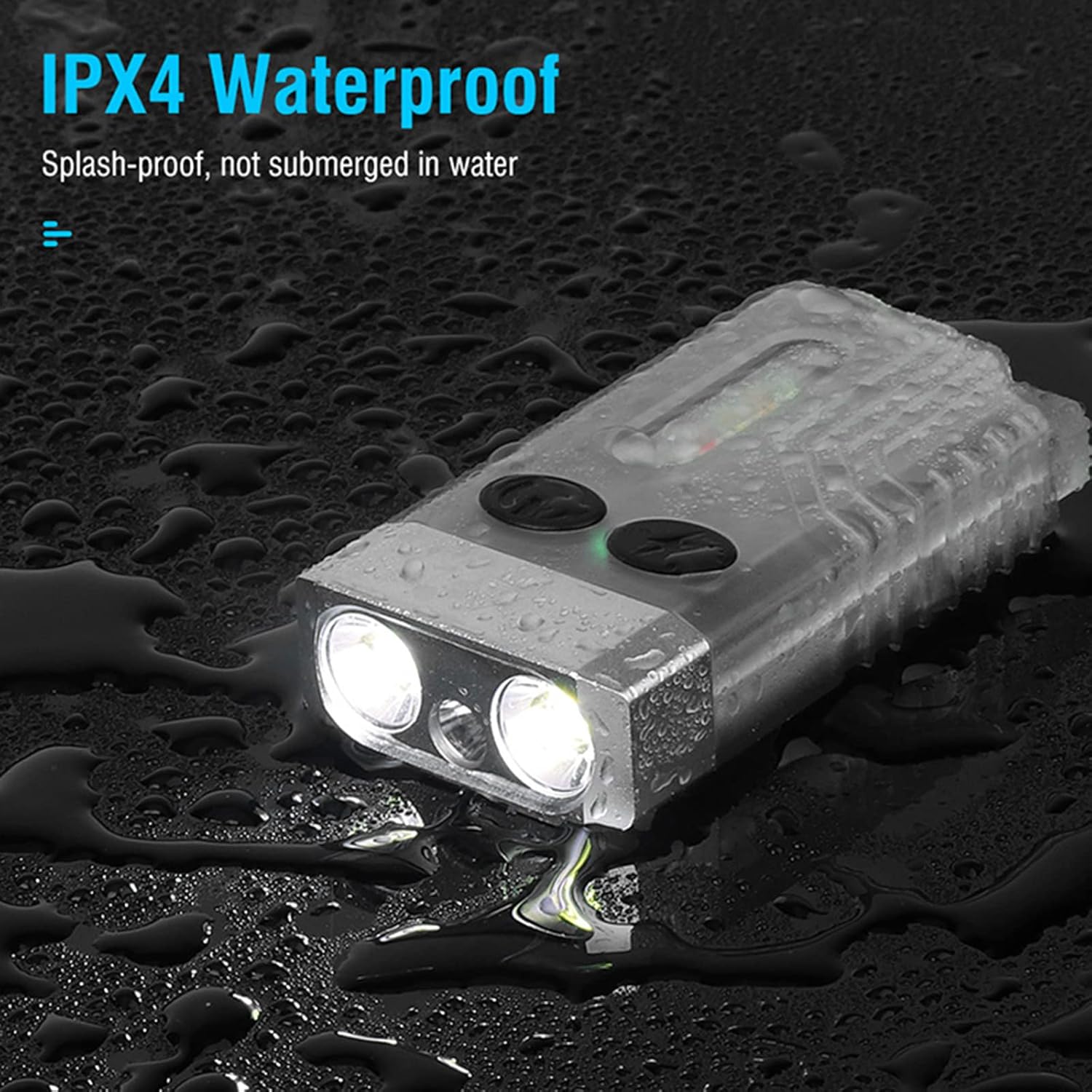
Image 7.1: The FITORCH V10 demonstrating its IPX4 splash-proof water resistance, indicating it is protected against water splashes from any direction.
8. වගකීම් සහ සහාය
FITORCH products are manufactured to high-quality standards. For warranty information or technical support, please refer to the official FITORCH webඅඩවිය හෝ ඔබේ සිල්ලර වෙළෙන්දා අමතන්න.
වගකීම් හිමිකම් සඳහා කරුණාකර ඔබගේ මිලදී ගැනීමේ සාක්ෂි තබා ගන්න.


