හැඳින්වීම
Thank you for choosing the WAMPAT Oak End Table with Charging Station. This manual provides detailed instructions for assembling, operating, and maintaining your new furniture. Please read all instructions carefully before beginning assembly and retain this manual for future reference.
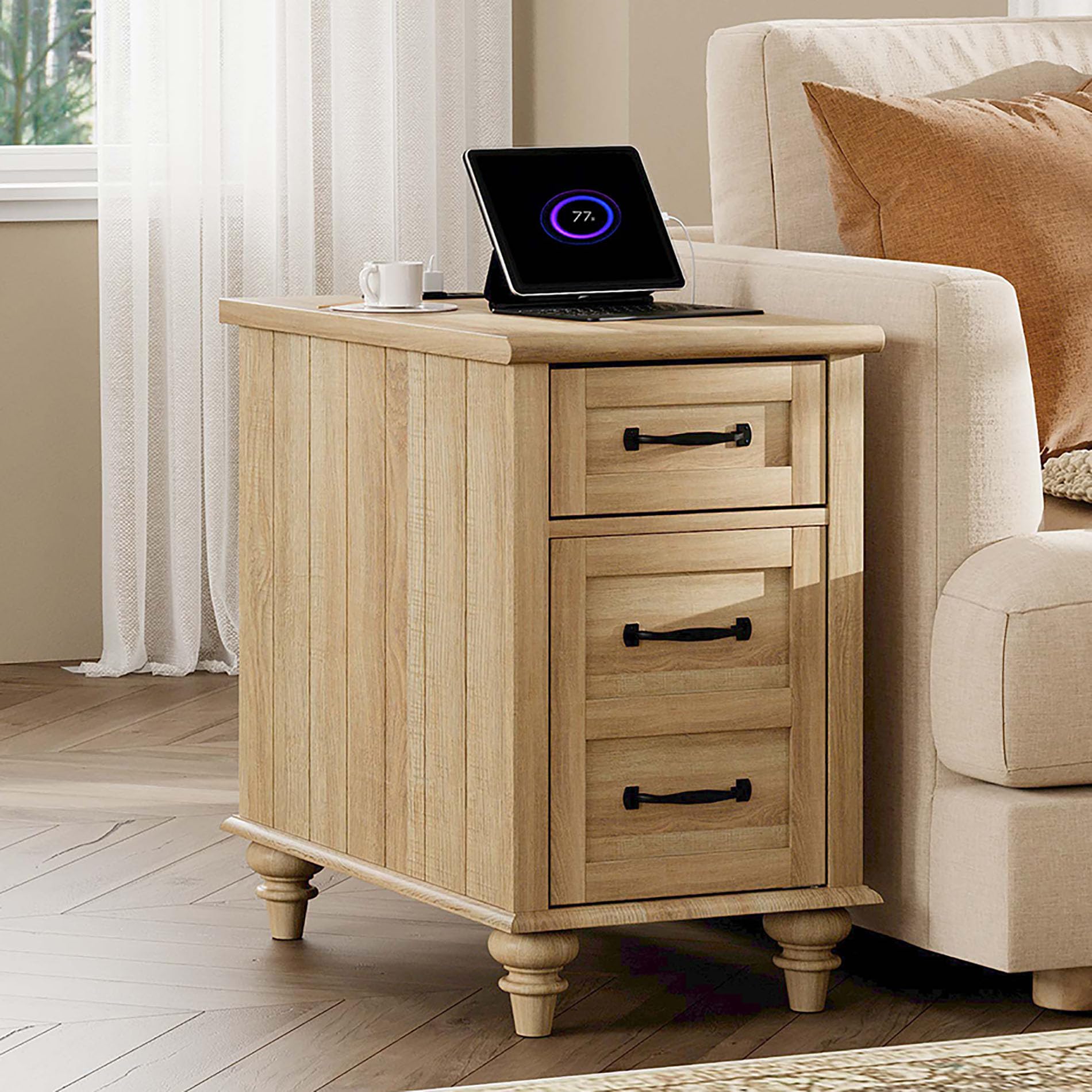
ඩබ්ලිව්AMPAT Oak End Table with Charging Station, featuring a rustic oak top and white base.
ආරක්ෂිත මාර්ගෝපදේශ
- Ensure the weight on the table does not exceed 40 pounds (18 kg) to prevent damage or instability.
- Follow all assembly instructions carefully to ensure the table is stable and secure.
- හුස්ම හිරවීමේ අනතුරු වළක්වා ගැනීම සඳහා එකලස් කිරීමේදී කුඩා කොටස් සහ ඇසුරුම් ද්රව්ය ළමයින්ගෙන් ඈත් කර තබන්න.
- Use the charging station only for indoor purposes.
- Do not attempt to open or modify the electrical components of the charging station.
පැකේජයේ අන්තර්ගතය
එකලස් කිරීමට පෙර, පහත ලැයිස්තුගත කර ඇති සියලුම කොටස් පවතින බවත් හානි වී නොමැති බවත් තහවුරු කර ගන්න. කිසියම් කොටසක් අස්ථානගත වී හෝ හානි වී ඇත්නම්, කරුණාකර පාරිභෝගික සහාය අමතන්න.
- Table Panels (various sizes)
- Drawer Panels
- Cabinet Door Panel
- Gourd-shaped Legs (4 pieces)
- Drawer Slides (2 sets)
- Handles (3 pieces)
- ආරෝපණ ස්ථාන ඒකකය (AC අලෙවිසැල් 2ක්, USB පෝට් 2ක්)
- එකලස් කිරීමේ දෘඩාංග (ඉස්කුරුප්පු, ඩෝවෙල්, කැම් අගුල් ආදිය)
- උපදෙස් අත්පොත
එකලස් කිරීමේ උපදෙස්
For a visual guide, please refer to the official assembly video below. Ensure you have a screwdriver and follow the steps carefully.
Official WAMPAT Side Table with Charging Station Assembly Video.
පියවරෙන් පියවර එකලස් කිරීම
- Prepare Panels and Dowels: Screw cam bolts (E) into panels (3, 4, 5). Insert dowels (B) into panels (3, 4) and dowels (C) into panel (6).
- Attach Slider Arms: Separate the slider bracket from the slider arm as per the diagram. Attach slider arms to panels (3, 4) with screws (S) correctly.
- පැති පැනල් එකලස් කරන්න: Attach panels (5) to panels (3, 4). Insert and secure cam locks (D) to lock them. Attach panels (3, 4) to panels (7, 16). Insert and secure cam locks (D) to lock them.
- පිටුපස පුවරුව අමුණන්න: Attach panel (2) to panels (3, 4) with screws (M) correctly.
- කකුල් සවි කරන්න: Install the legs (8) to panel (2). Stick the Footpads (J) to legs (8).
- Insert Shelf Panel: Stick stickers (X) on legs (8). Slide panel (15) into the designated area correctly.
- Prepare Door Panel: Attach hinge-top (W) to panel (9) with screws (S) correctly. Attach part (P) to panel (9) with screws (S) correctly. Attach handles (H) to panel (9) with bolts (I) correctly.
- දොර අමුණන්න: Insert door shaft support (U) into panels (2, 7). Insert Hinge-bottom (V) to panel (2). Insert panel (9) to panel (2). Attach Hinge-bottom (V) to panel (2) with screws (S).
- ලාච්චු පෙට්ටිය එකලස් කරන්න: Attach panels (11, 12) to panel (13) with screws (L) correctly. Carefully slide panel (14) into place along the bottom of the assembly.
- Attach Drawer Front: Screw cam bolts (G) into panel (10). Attach handle (H) to panel (10) with bolts (I) correctly.
- ලාච්චුව ස්ථාපනය කරන්න: Attach panel (10) to panels (11, 12). Insert and secure cam locks (F) to panels (11, 12) to lock it. Attach slider brackets to panels (11, 12) with screws (S) correctly. Assembled the drawers as per diagram.
- ආරෝපණ ස්ථානය ස්ථාපනය කරන්න: Attach socket (Y) to panel (1) with screws (S) correctly.
නිෂ්පාදන විශේෂාංග
- ඒකාබද්ධ ආරෝපණ ස්ථානය: Equipped with 2 standard AC outlets and 2 USB ports for convenient charging of electronic devices.
- Ampගබඩාව: Features a smooth-gliding drawer and a spacious storage cabinet with a magnetic door buckle to keep items organized and out of sight.
- කල් පවතින ඉදිකිරීම්: Made from high-quality, formaldehyde-free medium density fiberboard (MDF) with a waterproof wooden grain surface. The wood is FSC certified.
- අලංකාර නිර්මාණය: Modern farmhouse style with an oak body, distressed surface, and unique gourd-shaped iron legs. The top plate features a curved edge for enhanced safety.
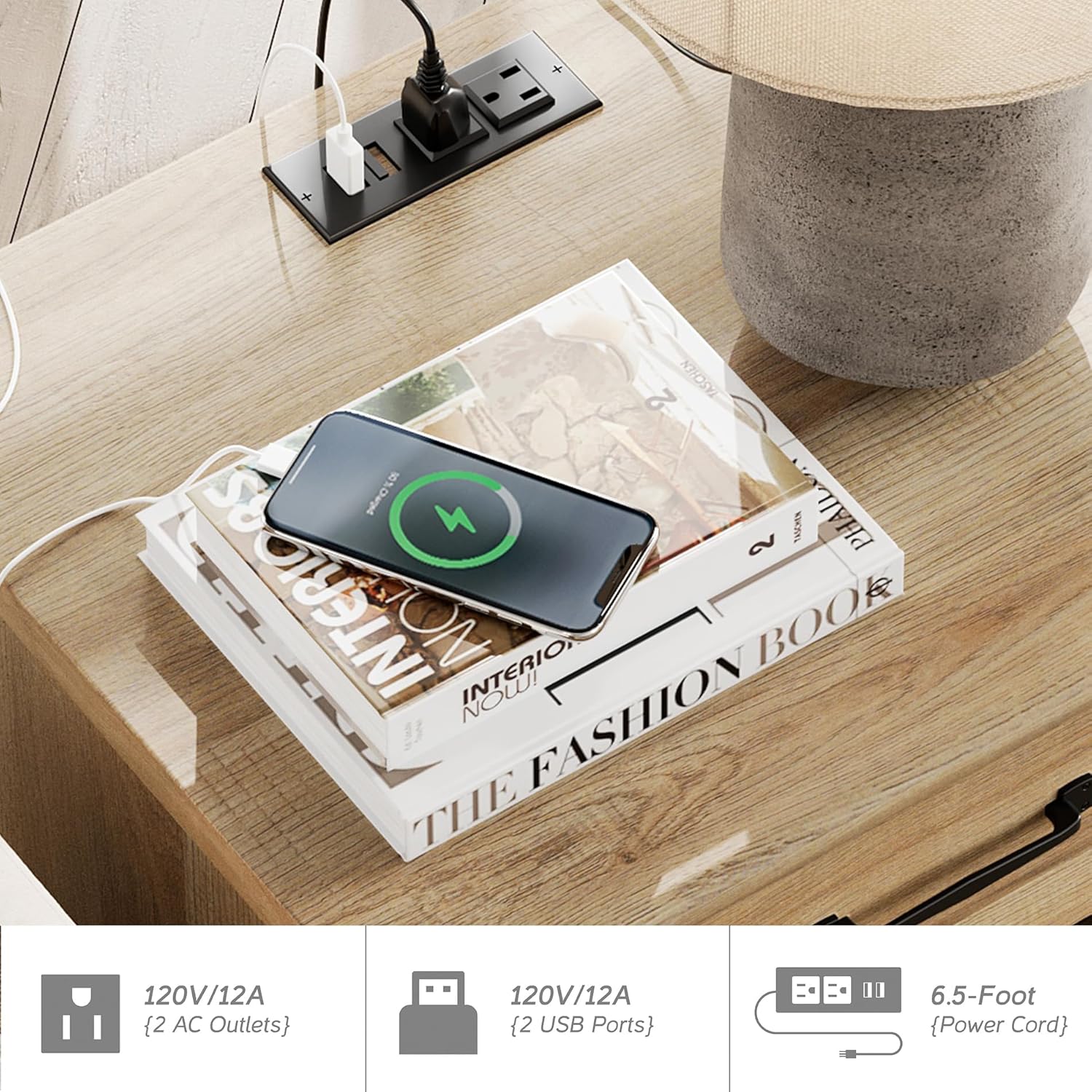
Convenient charging station on the tabletop.

සවිස්තරාත්මක view of the distressed surface finish.

Key features: gourd legs, certified MDF, and integrated power.
Operating the Charging Station
The integrated charging station allows you to power and charge your electronic devices conveniently.
- Ensure the end table is properly assembled and the power cord is securely plugged into a functional wall outlet.
- To charge devices, simply plug your device's power adapter into one of the two AC outlets or connect your USB cable directly to one of the two USB ports.
- The charging station is designed for standard electronic devices such as lamps, mobile phones, tablets, and audio equipment.
රැකවරණය සහ නඩත්තුව
- පිරිසිදු කිරීම: Wipe the table surfaces with a dry cloth. Avoid using harsh chemicals or abrasive cleaners, which can damage the finish.
- කාන්දුවීම්: Promptly wipe up any spills to prevent water damage, especially on the wooden grain surface.
- ආරක්ෂාව: Consider using coasters under drinks and protective pads under hot items to preserve the tabletop's appearance.
- ස්ථාවරත්වය: සියලුම ඉස්කුරුප්පු සහ සම්බන්ධතා තදින් සහ ආරක්ෂිතව පවතින බව සහතික කර ගැනීම සඳහා වරින් වර පරීක්ෂා කරන්න. අවශ්ය නම් නැවත තද කරන්න.
දෝෂගවේෂණය
- Drawers or Cabinet Door Not Closing Smoothly: Check that all drawer slides and hinges are correctly aligned and securely fastened. Ensure no obstructions are preventing smooth operation.
- සෙලවෙන වගුව: Verify that all legs are securely attached and all assembly hardware is tightened. Ensure the table is placed on a flat, even surface.
- ආරෝපණ ස්ථානය ක්රියා නොකරයි: Confirm the power cord is fully plugged into both the table's unit and the wall outlet. Test the wall outlet with another device to ensure it is functional. If issues persist, contact customer support.
නිෂ්පාදන පිරිවිතර
| වෙළඳ නාමය | WAMPAT |
| මාදිලියේ නම | ස්කාර්ලට් |
| නිෂ්පාදන මානයන් (D x W x H) | 23.6"D x 14.9"W x 22.9"H (60cm x 38cm x 58cm) |
| වර්ණය | ඕක් |
| ඉහළම ද්රව්ය වර්ගය | ඕක් ලී |
| රාමු ද්රව්ය | යකඩ |
| ලාච්චු ගණන | 1 |
| දොරවල් ගණන | 1 |
| නිකුතු පොල | AC අලෙවිසැල් 2ක්, USB පෝට් 2ක් |
| උපරිම බර ධාරිතාව | රාත්තල් 40 (කිලෝග්රෑම් 18) |

Detailed dimensions of the end table.
වගකීම් සහ සහාය
WAMPAT provides lifetime service for this product. If you encounter any issues or have questions regarding your end table, please contact WAMPAT customer support for assistance. Keep your purchase receipt for warranty claims.


