හැඳින්වීම
The J5create JCC157 USB-C to HDMI 2.1 8K Cable is designed to provide high-quality video and audio transmission from your USB-C enabled device to an HDMI display. Supporting resolutions up to 8K, this cable is ideal for gaming, professional presentations, and high-definition media consumption. It features a unique RGB indicator light, enhancing your setup's aesthetics and providing visual feedback.

රූපය 1: The J5create JCC157 USB-C to HDMI 2.1 8K Cable, showcasing its sleek design and RGB indicator.
විශේෂාංග
- 8K විභේදන සහාය: Experience stunning visuals with support for resolutions up to 8K, ensuring crisp and clear images.
- USB-C to HDMI 2.1: Connects modern USB-C devices to HDMI 2.1 compatible displays for high-bandwidth video and audio.
- පුළුල් අනුකූලතාව: Fully compatible with Windows, MacOS, and Chrome OS operating systems.
- RGB Indicator Light: Features an integrated RGB light, providing visual flair and status indication, especially suited for gaming setups.
- ප්ලග් සහ ප්ලේ: No drivers required for most operating systems, allowing for easy setup and immediate use.
- බහුකාර්ය සංදර්ශක මාදිලි: Supports both Extended and Mirror display modes for various productivity and entertainment needs.

රූපය 2: The RGB indicator light on the JCC157 cable, capable of displaying various colors.
සැකසුම් උපදෙස්
- Connect USB-C End: Insert the USB-C connector of the JCC157 cable into a compatible USB-C port on your source device (e.g., laptop, computer). Ensure the port supports video output (DisplayPort Alternate Mode).
- Connect HDMI End: Insert the HDMI connector of the JCC157 cable into an available HDMI input port on your display device (e.g., monitor, TV, projector).
- උපාංග බල ගැන්වීම: ඔබගේ මූලාශ්ර උපාංගය සහ සංදර්ශක උපාංගය යන දෙකම ක්රියාත්මක කර ඇති බවට සහතික වන්න.
- ආදානය තෝරන්න: On your display device, select the correct HDMI input source that the cable is connected to.
- සම්බන්ධතාවය තහවුරු කරන්න: The RGB indicator light on the cable will illuminate, indicating a successful connection and active signal. Your display should show the output from your source device.

රූපය 3: සමීප රූපයක් view of the JCC157 cable's connectors and the illuminated RGB indicator, demonstrating a ready state.
මෙහෙයුම් උපදෙස්
Once connected, your operating system will typically detect the external display automatically. You can configure the display settings to suit your needs.
- පුළුල් කළ ප්රකාරය: This mode allows you to extend your desktop across multiple screens, providing more workspace. To enable, go to your operating system's display settings and select "Extend these displays."
- Mirror Mode (Duplicate Mode): This mode duplicates your primary display onto the external monitor, showing the same content on both screens. To enable, go to your operating system's display settings and select "Duplicate these displays."

රූපය 4: Visual representation of Extended Mode (left) and Mirror Mode (right) display configurations, illustrating how the JCC157 cable facilitates both.
The RGB indicator light will remain illuminated when a signal is active. Its color may vary based on the device's status or specific J5create software settings, if applicable.
නඩත්තු කිරීම
To ensure the longevity and optimal performance of your J5create JCC157 cable, follow these maintenance guidelines:
- පරිස්සමින් හැසිරවීම: Avoid bending the cable sharply or pulling it by the cord. Always grasp the connector ends when plugging or unplugging.
- පිරිසිදුව තබාගන්න: කේබලය සහ සම්බන්ධක මෘදු ලෙස පිස දැමීමට මෘදු වියළි රෙද්දක් භාවිතා කරන්න. දියර පිරිසිදු කරන්නන් හෝ උල්ෙල්ඛ ද්රව්ය භාවිතා නොකරන්න.
- නිසි ලෙස ගබඩා කරන්න: භාවිතයේ නොමැති විට, කේබලය ලිහිල්ව දඟර කර සෘජු හිරු එළියෙන් සහ අධික උෂ්ණත්වයන්ගෙන් ඈත්ව සිසිල් වියළි ස්ථානයක ගබඩා කරන්න.
- තෙතමනය වළක්වා ගන්න: Do not expose the cable to water or high humidity, as this can damage the internal components.
දෝෂගවේෂණය
| ගැටලුව | විය හැකි හේතුව | විසඳුම |
|---|---|---|
| මොනිටරයේ සංදර්ශකයක් නොමැත. |
|
|
| Low resolution or flickering display. |
|
|
| RGB indicator not lighting up. |
|
|
පිරිවිතර
| විශේෂාංගය | විස්තර |
|---|---|
| ආදර්ශ අංකය | JCC157-1N |
| සම්බන්ධක වර්ගය | USB-C Male to HDMI 2.1 Male |
| උපරිම විභේදන සහාය | Up to 8K (7680x4320) |
| කේබල් දිග | මීටර් 1.8 (අඩි 6) |
| අනුකූල මෙහෙයුම් පද්ධති | Windows, MacOS, Chrome OS |
| විශේෂ ලක්ෂණ | RGB දර්ශක ආලෝකය |
| ගැළපෙන උපාංග | Computer, Laptop |
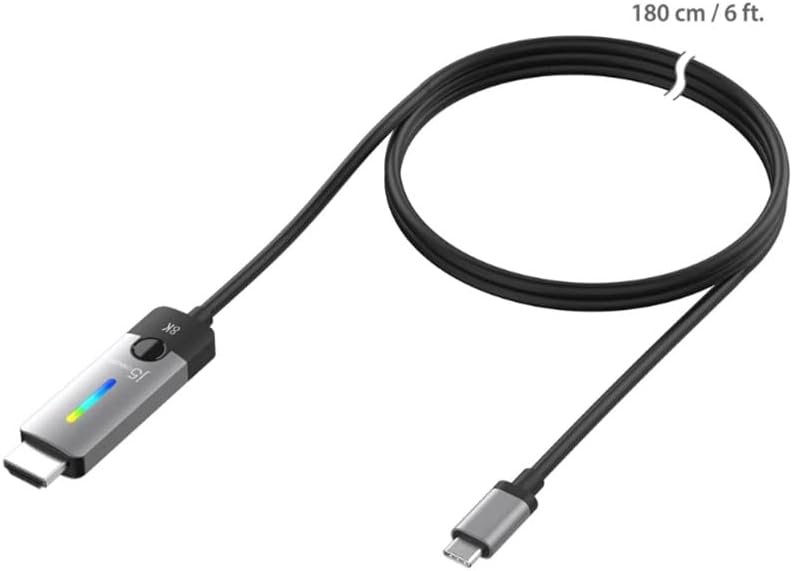
රූපය 5: The JCC157 cable, illustrating its 180 cm (6 ft) length.
වගකීම් සහ සහාය
For warranty information and technical support, please refer to the documentation included with your purchase or visit the official j5create webවෙබ් අඩවිය. වගකීම් නියමයන් සහ කොන්දේසි කලාපය සහ සිල්ලර වෙළෙන්දා අනුව වෙනස් විය හැකිය.
නිෂ්පාදකයා: J5CREATE


