1. හැඳින්වීම
This manual provides essential instructions for the safe and effective use of your FLYLINKTECH 4000A Portable Car Battery Jump Starter. Please read this manual thoroughly before operation and retain it for future reference. This device is designed to jump-start vehicles with dead or low-voltage batteries and can also function as a portable power bank and LED flashlight.
2. පෙට්ටියේ ඇති දේ
පැකේජය විවෘත කිරීමෙන් පසු සියලුම අයිතම එහි ඇති බව තහවුරු කර ගන්න:
- FLYLINKTECH CF900 Jump Starter Unit
- ස්මාර්ට් ජම්පර් කේබල්
- USB-C ආරෝපණ කේබලය
- Portable EVA Carrying Case
- පරිශීලක අත්පොත (මෙම ලේඛනය)

Image: Contents of the FLYLINKTECH CF900 package. This includes the jump starter unit, smart jumper cables, a USB-C charging cable, a portable EVA carrying case, and the user manual.
3. නිෂ්පාදන ලක්ෂණ
- High-Power Jump Starter: Delivers 4000A peak current, suitable for vehicles with up to 9.0L gas or 8.0L diesel engines. Capable of up to 30 jump starts on a single charge.
- බහුකාර්ය බලශක්ති බැංකුව: Features an 18,000mAh battery capacity and dual USB ports, including Quick Charge 3.0, for charging various electronic devices. Maintains charge for up to 24 months when not in use.
- Multi-functional LED Flashlight: Equipped with a bright 600-lumen LED light offering standard, SOS, and strobe modes for emergencies. Provides up to 48 hours of continuous illumination.
- වැඩිදියුණු කළ ආරක්ෂිත විශේෂාංග: Integrated smart protection system provides 10 layers of safety, including reverse polarity, over-current, and over-voltage protection. Ensures safe operation in extreme temperatures (-4°F to 140°F) and prevents sparks or incorrect connections.
- කල් පවතින සහ අතේ ගෙන යා හැකි නිර්මාණය: Compact and lightweight (820g) with a rugged ABS exterior for protection against impacts and scratches.

රූපය: විස්තරාත්මක view of the FLYLINKTECH CF900 jump starter, highlighting the LED display, power button, LED flashlight, USB output ports (USB1 5V/2.4A, USB2 Quick Charge 3.0), jump start socket, and 5V/2A USB-C input port.
4. පිහිටුවීම සහ ආරෝපණය කිරීම
පළමු භාවිතයට පෙර, ජම්ප් ස්ටාටරය සම්පූර්ණයෙන්ම ආරෝපණය කරන්න. ප්රශස්ත බැටරි සෞඛ්යය පවත්වා ගැනීම සඳහා සෑම මාස 3-6 කට වරක් ඒකකය නැවත ආරෝපණය කිරීම නිර්දේශ කෙරේ.
- Locate the USB-C input port on the jump starter.
- Connect the provided USB-C charging cable to the jump starter's input port.
- Connect the other end of the USB-C cable to a 5V/2A USB wall adapter (not included) or a compatible USB charging port.
- LCD සංදර්ශකය ආරෝපණ ප්රගතිය පෙන්වයි. සංදර්ශකය 100% දක්වන තුරු ආරෝපණය කරන්න.

Image: The FLYLINKTECH jump starter functioning as a portable power bank, charging a smartphone and a tablet via its USB output ports. The image highlights the 18000mAh capacity and Quick Charge 3.0 feature.
5. මෙහෙයුම් උපදෙස්
5.1. වාහනයක් පැනීම ආරම්භ කිරීම
වාහනයක් ජම්ප් ස්ටාර්ට් කිරීමට උත්සාහ කිරීමට පෙර ජම්ප් ස්ටාටරය අවම වශයෙන් 50% ක් ආරෝපණය කර ඇති බවට වග බලා ගන්න.
- Connect Smart Jumper Cables: Insert the blue plug of the smart jumper cables completely into the jump start socket on the jump starter unit. Ensure a secure connection. The indicator light on the smart clamp කොළ සහ රතු පැහැයෙන් දැල්වෙනු ඇත.
- Connect to Car Battery: රතු cl අමුණන්නamp කාර් බැටරියේ ධනාත්මක (+) පර්යන්තයට සහ කළු clamp සෘණ (-) පර්යන්තයට.
- දර්ශක ආලෝකය පරීක්ෂා කරන්න:
- ඝන කොළ: Connection is correct and safe. Proceed to start the vehicle.
- Solid Red with Beep: Reverse polarity detected. Disconnect clamps and re-attach correctly.
- දිලිසෙන කොළ: බැටරි වෙළුමtage is too low. Press the "BOOST" button on the smart clamp for 3 seconds until the light turns solid green. Start the vehicle within 30 seconds.
- No Light/No Beep: Check connections or if the car battery is severely damaged.
- වාහනය ආරම්භ කරන්න: දර්ශක ආලෝකය තද කොළ පැහැයට හැරුණු පසු, ඔබේ වාහනයේ එන්ජිම පණ ගන්වන්න.
- Cl ඉවත් කරන්නamps: As soon as the engine starts, remove the smart jumper cables from the car battery terminals first, then disconnect the blue plug from the jump starter unit.

Image: Easy operation guide for jump starting a car. Step 1: Insert the jump clamp into the booster. Step 2: Connect the clamps to the car battery. Step 3: Start your car. Step 4: Remove the clamps.
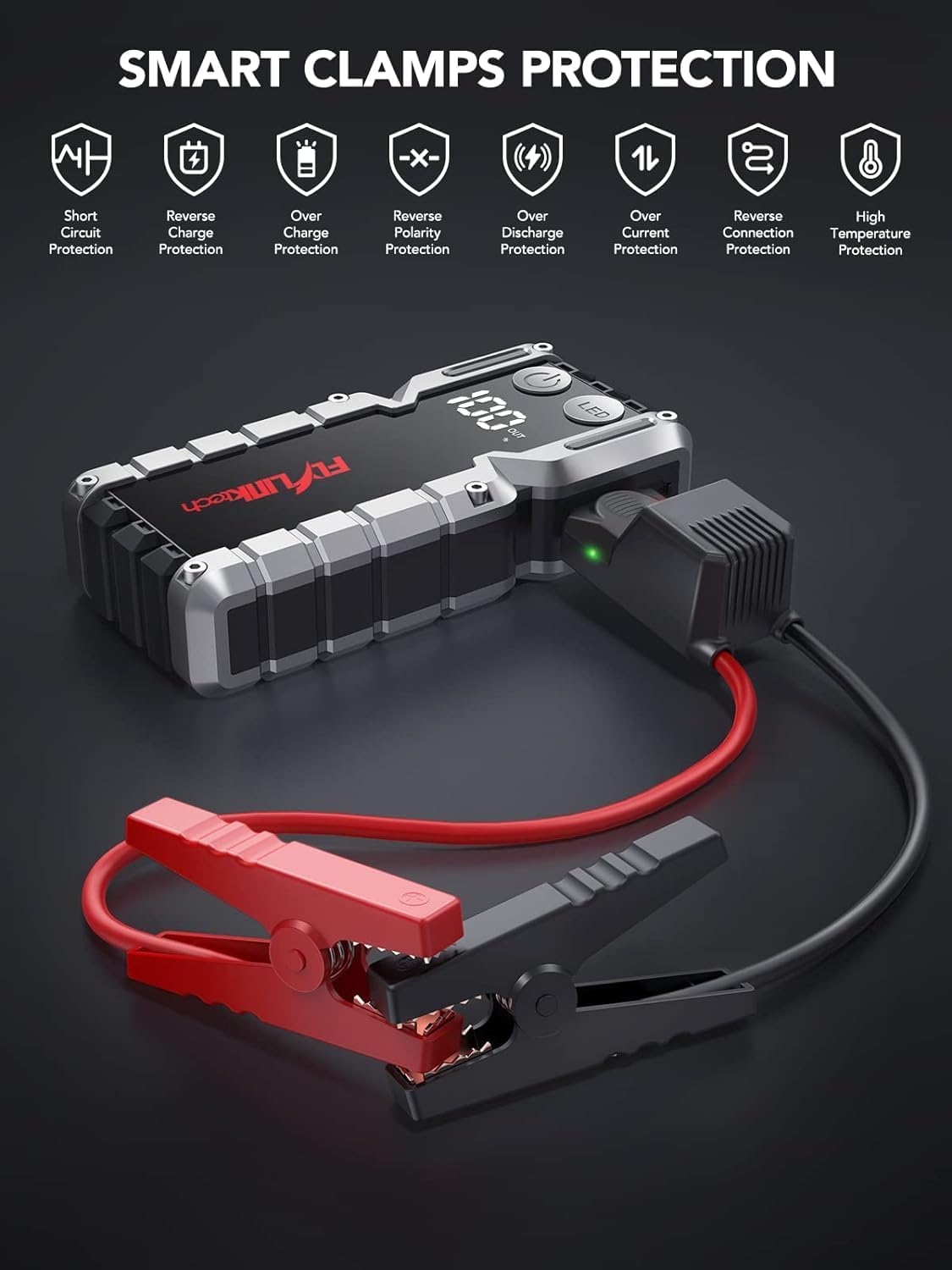
Image: Smart Clamps Protection. Icons represent various safety features including short circuit protection, reverse charge protection, over charge protection, reverse polarity protection, over discharge protection, over current protection, and high temperature protection.
5.2. බලශක්ති බැංකුවක් ලෙස භාවිතා කිරීම
The jump starter can charge various USB-powered devices.
- Connect your device's USB charging cable to one of the USB output ports (USB1 or USB2 QC3.0) on the jump starter.
- පැනීමේ ආරම්භකය ඔබගේ උපාංගය ස්වයංක්රීයව ආරෝපණය කිරීම ආරම්භ කරයි.
- LCD සංදර්ශකය ඉතිරි බැටරි ප්රතිශතය පෙන්වයි.tagපැනීමේ ආරම්භකයේ ඊ.
5.3. LED ෆ්ලෑෂ් ලයිට් භාවිතා කිරීම
The built-in LED flashlight has three modes: standard, SOS, and strobe.
- Press and hold the "LED" button for 3 seconds to turn on the standard flashlight mode.
- Press the "LED" button again to cycle through the modes: Standard > SOS > Strobe.
- Press and hold the "LED" button for 3 seconds to turn off the flashlight.

Image: The built-in LED flashlight of the FLYLINKTECH jump starter, demonstrating its three modes: standard flashlight, SOS signal, and strobe light.
6. නඩත්තු කිරීම
- Store the jump starter in its portable EVA carrying case when not in use to protect it from dust and damage.
- Recharge the unit every 3-6 months, even if not used, to maintain battery health and extend its lifespan.
- මෘදු වියළි රෙද්දකින් බාහිර පිරිසිදු කරන්න. රළු රසායනික ද්රව්ය හෝ උල්ෙල්ඛ පිරිසිදු කරන්නන් භාවිතා නොකරන්න.
- Keep the jump starter away from direct sunlight, heat sources, and moisture.
- Do not disassemble the unit. Servicing should only be performed by qualified personnel.
7. දෝශ නිරාකරණය
| ගැටලුව | විය හැකි හේතුව | විසඳුම |
|---|---|---|
| පැනීමේ ආරම්භකය ක්රියාත්මක නොවේ. | බැටරිය සම්පූර්ණයෙන්ම විසර්ජනය වී ඇත. | Charge the jump starter fully using the provided USB-C cable. |
| සම්බන්ධ කිරීමෙන් පසු වාහනය පණ ගැන්වෙන්නේ නැත. | වැරදි clamp සම්බන්ධතාවය (ප්රතිලෝම ධ්රැවීයතාව). ජම්ප් ස්ටාටර් බැටරිය ඉතා අඩුයි. Vehicle battery severely damaged. ස්මාර්ට් clamp indicator not solid green. | cl සහතික කරන්නamps නිවැරදිව සම්බන්ධ කර ඇත (රතු සිට + දක්වා, කළු සිට - දක්වා). පැනීමේ ආරම්භකය නැවත ආරෝපණය කරන්න. වෘත්තීය කාර්මිකයෙකුගෙන් විමසන්න. Follow indicator light instructions in Section 5.1. If flashing green, use BOOST function. |
| ස්මාර්ට් clamp indicator is solid red and beeping. | ප්රතිලෝම ධ්රැවීයතාව සම්බන්ධතාවය. | වහාම cl විසන්ධි කරන්නamps and re-attach correctly (red to +, black to -). |
| Flashlight does not work. | බැටරිය අඩුයි. LED button not pressed correctly. | පැනීමේ ආරම්භකය ආරෝපණය කරන්න. Press and hold the "LED" button for 3 seconds to activate. |
| Devices not charging via USB ports. | ජම්ප් ස්ටාටර් බැටරිය ඉතා අඩුයි. කේබල් සම්බන්ධතා ගැටළුව. | පැනීමේ ආරම්භකය ආරෝපණය කරන්න. Ensure USB cables are securely connected to both the jump starter and the device. Try a different cable. |
8. පිරිවිතර
| විශේෂාංගය | විස්තර |
|---|---|
| ආකෘතිය | CF900 |
| බැටරි ධාරිතාව | 18000 mAh (66.6Wh) |
| උච්ච ධාරාව | 4000A |
| ආරම්භක ප්රතිදානය පනින්න | 12V |
| USB1 ප්රතිදානය | 5V/2.4A |
| USB2 Output (QC3.0) | 5V/2.4A, 9V/2A, 12V/1.5A |
| Type-C ආදානය | 5V/2A |
| මෙහෙයුම් උෂ්ණත්වය | -20°C සිට 60°C (-4°F සිට 140°F) |
| නිෂ්පාදන මානයන් | 19 සෙ.මී. x 9 සෙ.මී. x 4 සෙ.මී. (ආසන්න වශයෙන්) |
| අයිතමයේ බර | 820 ග්රෑම් |
| එන්ජින් ගැළපුම | Up to 9.0L Gas or 8.0L Diesel |
9. වගකීම් සහ සහාය
FLYLINKTECH provides the following support for this product:
- අවුරුදු 3ක නොමිලේ වගකීමක්: සාමාන්ය භාවිතය යටතේ නිෂ්පාදන දෝෂ සහ අක්රමිකතා ආවරණය කරයි.
- ජීවිත කාලය තාක්ෂණික සහාය: නිෂ්පාදන භාවිතය, දෝශ නිරාකරණය සහ සාමාන්ය විමසීම් සඳහා සහාය වීම.
- 7/24 පාරිභෝගික සේවය: Available around the clock for any questions or concerns.
For support, please refer to the contact information provided in your product packaging or visit the official Flylinktech webඅඩවිය.


