1. හැඳින්වීම
This manual provides detailed instructions for the proper use and maintenance of your BOBLOV B4K4 Body Worn Camera. Please read this manual thoroughly before operating the device to ensure safe and effective use. The B4K4 is a high-definition body camera designed for security, law enforcement, and personal recording, featuring 4K video recording, 128GB internal storage, GPS functionality, IP67 waterproof rating, and a 4000mAh battery for extended operation.
2. පැකේජ අන්තර්ගතය
පහත ලැයිස්තුගත කර ඇති සියලුම අයිතම ඔබේ පැකේජයේ ඇති බව තහවුරු කරගන්න:

රූපය 2.1: BOBLOV B4K4 Package Contents. This image displays the complete set of items included with the camera, such as the camera unit, charging dock, various clips, and car accessories.
- BOBLOV B4K4 ශරීර කැමරාව
- ආරෝපණ ඩොක් ස්ටේෂන්
- Long Shoulder Clip
- Short Back Clip
- පරිශීලක අත්පොත (මෙම ලේඛනය)
- කාර් චූෂණ කන්ද
- චාජර් ප්ලග්
- USB කේබලය
- කාර් චාජර්
3. නිෂ්පාදන අවසන්view
The BOBLOV B4K4 features a robust design with intuitive controls and a clear display. Familiarize yourself with the camera's components and interface.
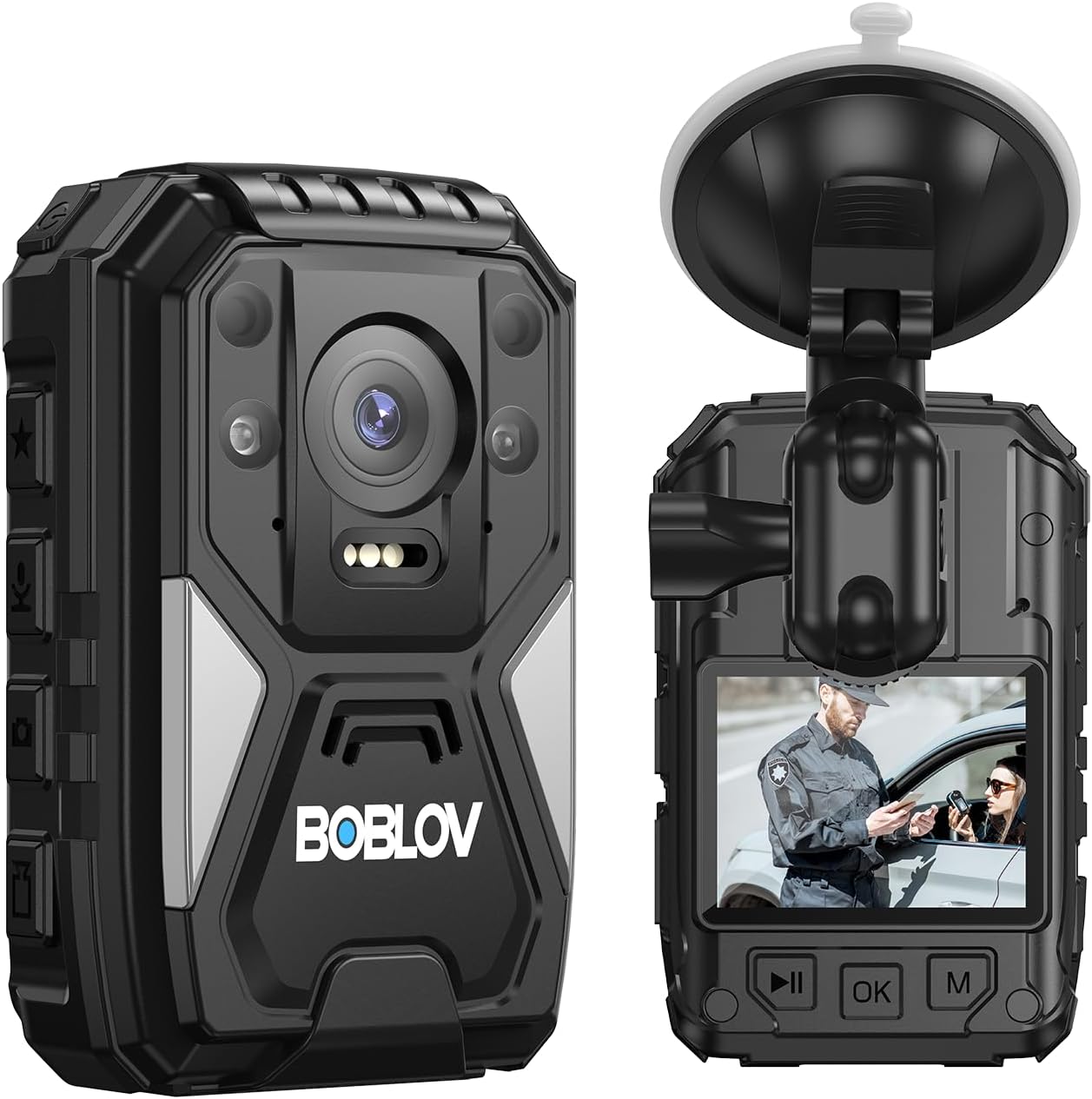
රූපය 3.1: ඉදිරිපස සහ පසුපස View of the B4K4 Camera. This image provides a detailed look at the camera's exterior, highlighting its compact design and visible features.
3.1 ප්රධාන ලක්ෂණ
- 4K වීඩියෝ පටිගත කිරීම: Capture high-resolution video at 2160P.
- 40MP Photo Capture: උසස් තත්ත්වයේ නිශ්චල රූප.
- 140° පුළුල් කෝණ කාච: Broad field of view for comprehensive recording.
- බිල්ට් GPS: Records location data with video footage.
- IP67 Waterproof & 1M Drop Resistance: Durable design for various environments.
- 4000mAh බැටරිය: Up to 15 hours of recording time (1080P, IR & screen off).
- රාත්රී දර්ශනය: Manual/Auto IR night vision for low-light conditions.
- අනතුරු ඇඟවීමේ ශබ්දය: Integrated panic button for emergency situations.
- White Flash Light: Provides illumination when needed.
- Red Beam Quick Locate: Assists in aiming or pointing.
- ආරෝපණ තටාකය: Convenient charging and data transfer.
- Dash Camera Functionality: Can be used as a dash cam with the included car suction mount.
වීඩියෝ 3.1: BOBLOV B4K4 Body Worn Camera Feature Introduction. This video provides a visual overview of the camera's main features, including 4K video, battery life, charging methods, IP67 rating, dash cam use, GPS, white flash light, alarm sound, and night vision capabilities.
4. පිහිටුවීම
4.1 බැටරිය ආරෝපණය කිරීම
Before first use, fully charge the camera's built-in 4000mAh battery. Charging can be done via the USB cable or the charging dock station.
- USB කේබලය හරහා: Connect the camera directly to a power source using the provided USB cable and charger plug. The indicator light will be steady red during charging and turn green when fully charged.
- Via Charging Dock Station: Place the camera into the charging dock station and connect the dock to a power source. The indicator light on the camera will be steady red when connected to power and charging.

රූපය 4.1: Charging the B4K4 Camera. This image illustrates both direct USB charging and charging using the included dock, along with battery performance metrics.
A full charge typically takes 4-5 hours and provides up to 15 hours of recording time (at 1080P with IR and screen off).
4.2 Attaching Clips and Mounts
The camera comes with various clips and mounts for different applications.
- Body Worn: Use the long shoulder clip or short back clip to attach the camera securely to your uniform or clothing. The clips allow for 360-degree rotation for optimal positioning.
- Dash Camera: Attach the car suction mount to your vehicle's windshield and secure the camera to it for use as a dash camera.

රූපය 4.2: Various Mounting Options and Use Cases. This image demonstrates how the camera can be worn on a person or used in different professional settings.
5. මෙහෙයුම් උපදෙස්
5.1 බලය සක්රිය / අක්රිය
- බල ගැන්වීම: තිරය ආලෝකමත් වන තුරු බල බොත්තම තත්පර කිහිපයක් ඔබාගෙන සිටින්න.
- විදුලිය විසන්ධි කිරීම: Press and hold the Power button until the shutdown prompt appears, then confirm.
5.2 වීඩියෝ පටිගත කිරීම
The B4K4 supports 4K (2160P) video recording with a 140° wide-angle lens.
- පටිගත කිරීම ආරම්භ කරන්න: In standby mode, press the Video Record button once to start recording.
- පටිගත කිරීම නවත්වන්න: Press the Video Record button again to stop recording.
- ලූප් පටිගත කිරීම: The camera supports loop recording, overwriting the oldest fileගබඩාව පිරී ඇති විට s.

රූපය 5.1: 4K Video Recording Interface. This image shows the camera's display during 4K video recording, highlighting the wide-angle view.
5.3 ඡායාරූප ගැනීම
Capture high-resolution 40MP still images.
- ඡායාරූපය ගන්න: In standby or video recording mode, press the Photo button once to take a picture.
5.4 රාත්රී දර්ශනය
The camera features manual and automatic infrared (IR) night vision for clear recording in low-light or dark conditions.
- Activate Night Vision: Refer to the camera's on-screen menu for specific settings to enable manual or automatic IR night vision.

රූපය 5.2: Night Vision Capability. This image illustrates the camera's ability to record clearly in dark conditions using night vision.
5.5 GPS ක්රියාකාරීත්වය
The built-in GPS module records location data alongside your video footage. This data can be reviewed using the dedicated GPS Player software on a computer.
- GPS Player: Download the GPS Player software from the official BOBLOV website. Connect the camera to your computer to transfer files සහ view GPS routes.

රූපය 5.3: GPS Enabled Feature. This image highlights the camera's integrated GPS for location tracking.

රූපය 5.4: GPS Playback on Computer. This image demonstrates how recorded video and GPS data can be reviewed simultaneously on a computer using the dedicated software.
5.6 අනතුරු ඇඟවීමේ ශබ්දය
The camera includes an alarm sound feature for emergency situations.
- එලාමය සක්රිය කරන්න: Press the dedicated alarm button (refer to the camera's physical layout for exact button location) to activate a loud siren sound.
5.7 White Flash Light & Red Beam
The camera is equipped with a white flash light for illumination and a red beam for quick targeting or pointing.
- ආලෝකයන් සක්රිය කරන්න: Refer to the camera's on-screen menu or dedicated buttons for activating these features.

රූපය 5.5: White Illumination Light. This image shows the camera's white LED light providing illumination.

රූපය 5.6: Red Beam Quick Locate. This image demonstrates the camera's red laser beam for quick targeting.
5.8 Dash Camera Mode
The B4K4 can function as a dash camera when mounted in a vehicle using the car suction mount and powered by the car charger.
- ස්ථාපනය: Secure the car suction mount to your windshield. Attach the camera to the mount.
- බලය: Connect the camera to the car charger. The camera will typically power on and begin recording automatically when the vehicle starts.

රූපය 5.7: B4K4 Used as a Dash Camera. This image shows the camera securely mounted on a car windshield, ready for use as a dash cam.
6. නඩත්තු කිරීම
6.1 පිරිසිදු කිරීම
- කැමරා ශරීරය පිරිසිදු කිරීම සඳහා මෘදු, වියළි රෙද්දක් භාවිතා කරන්න.
- කාචය සඳහා, සීරීම් වළක්වා ගැනීම සඳහා විශේෂිත කාච පිරිසිදු කිරීමේ රෙදි සහ ද්රාවණයක් භාවිතා කරන්න.
- දරුණු රසායනික ද්රව්ය හෝ උල්ෙල්ඛ ද්රව්ය භාවිතා නොකරන්න.
6.2 ගබඩා කිරීම
- කැමරාව සෘජු හිරු එළියෙන් සහ අධික උෂ්ණත්වයන්ගෙන් ඈත්ව සිසිල් වියළි ස්ථානයක ගබඩා කරන්න.
- දිගු කාලයක් ගබඩා කරන්නේ නම්, එහි ආයු කාලය දීර්ඝ කිරීම සඳහා බැටරිය අර්ධ වශයෙන් (50% පමණ) ආරෝපණය කර ඇති බවට වග බලා ගන්න.
7. දෝශ නිරාකරණය
| ගැටලුව | විය හැකි හේතුව | විසඳුම |
|---|---|---|
| කැමරාව ක්රියාත්මක නොවේ. | බැටරිය ක්ෂය වී ඇත. | Charge the camera using the provided charger and cable/dock. |
| වීඩියෝ පටිගත කිරීමට/ඡායාරූප ගැනීමට නොහැකිය. | ප්රමාණවත් ගබඩා ඉඩක් නොමැත. | මාරු කරන්න files to a computer and delete unnecessary fileකැමරාවෙන් එස්. |
| GPS data not recording. | GPS signal weak or disabled. | කැමරාව පැහැදිලි බව සහතික කර ගන්න view of the sky. Check GPS settings in the camera menu. |
| කැමරාව පරිගණකයෙන් හඳුනා නොගන්නා ලදී. | Faulty USB cable or port. Driver issues. | Try a different USB cable or port. Ensure necessary drivers are installed (if applicable). |
| Date/Time incorrect. | Settings not saved or battery drained. | Set the date and time in the camera's system settings. Ensure the battery is charged. |
8. පිරිවිතර
| විශේෂාංගය | විස්තර |
|---|---|
| වෙළඳ නාමය | බොබ්ලොව් |
| ආකෘතිය | B4K4 |
| වීඩියෝ ග්රහණ විභේදනය | 4K (2160P) |
| ඡායාරූප විභේදනය | 40MP |
| තිර ප්රමාණය | අඟල් 2.7 |
| බැටරි ධාරිතාව | 4000mAh |
| පටිගත කිරීමේ කාලය | Up to 15 hours (1080P, IR & screen off) |
| ආරෝපණ කාලය | පැය 4-5 |
| ජල ප්රතිරෝධක මට්ටම | IP67 ජල ආරක්ෂිත |
| ඩ්රොප් ප්රතිරෝධය | මීටර් 1 |
| විශේෂ ලක්ෂණ | GPS, Night Vision, Alarm Sound, White Flash Light, Red Beam |
| නිෂ්පාදන මානයන් | අඟල් 3.94 x 2.36 x 1.18 |
| අයිතමයේ බර | රාත්තල් 1.52 කි |
9. වගකීම් සහ සහාය
For warranty information and technical support, please refer to the official BOBLOV webවෙබ් අඩවියට හෝ ඔවුන්ගේ පාරිභෝගික සේවය අමතන්න. වගකීම් හිමිකම් සඳහා ඔබේ මිලදී ගැනීමේ රිසිට්පත තබා ගන්න.
Official BOBLOV Store: Visit the BOBLOV Store on Amazon


