1. හැඳින්වීම
Thank you for choosing the STRICH SEP-80 88-Key Digital Piano. This portable digital piano is designed for beginners and experienced musicians alike, offering a full-size, touch-sensitive keyboard with a wide range of features. Please read this manual carefully to ensure proper setup, operation, and maintenance of your instrument.

Figure 1: STRICH SEP-80 88-Key Digital Piano with included accessories.
2. පෙට්ටියේ ඇති දේ
Your STRICH SEP-80 package includes the following items:
- STRICH SEP-80 88-Key Digital Piano
- X-shaped Keyboard Stand
- සස්ටයින් පැඩල්
- ෂීට් සංගීත ස්ථාවරය
- USB බල ඇඩැප්ටරය
- උපදෙස් අත්පොත

Figure 2: All components included in the SEP-80 package.
3. පිහිටුවීම
3.1 Assembling the X-Stand
- Unfold the X-shaped keyboard stand.
- Adjust the height to your preferred playing position using the locking mechanism. Ensure the stand is stable before placing the piano.

Figure 3: The X-shaped keyboard stand.
3.2 Placing the Digital Piano on the Stand
Carefully place the SEP-80 digital piano onto the assembled X-stand. Ensure it sits securely on the stand's arms.
3.3 සම්බන්ධක උපාංග
- සස්ටේන් පැඩලය: Connect the sustain pedal cable to the 'SUS' jack on the rear panel of the piano.
- Sheet Music Stand: Insert the sheet music stand into the designated slots on the top panel of the piano.
- බලය: Connect the USB power adapter to the DC 5V port on the rear panel and plug it into a power outlet. The piano also features a built-in rechargeable battery for portable use.

රූපය 4: විවිධ සම්බන්ධතා විකල්ප සහිත පසුපස පුවරුව.

Figure 5: The included sustain pedal.

Figure 6: The sheet music stand.

Figure 7: The USB power adapter.
4. මෙහෙයුම් උපදෙස්
4.1 බලය සක්රිය/අක්රිය සහ පරිමාව
- ඔබන්න බලය button to turn the piano on or off.
- භාවිතා කරන්න - සහ + buttons next to the LED display to adjust the master volume.
4.2 ස්වර සහ රිද්ම තෝරා ගැනීම
- The SEP-80 features 128 tones and 128 rhythms.
- ඔබන්න සැකසීම button twice quickly to enter tone selection mode. Use the - සහ + buttons to browse.
- ඔබන්න සැකසීම button once to enter rhythm selection mode. Use the - සහ + buttons to browse.
4.3 විශේෂ කාර්යයන්
- බෙදීමේ මාදිලිය: Divides the keyboard into two sections, each with its own tone.
- කම්පනය: Adds a vibrato effect to the sound.
- මාරු කරන්න: Shifts the pitch of the keyboard up or down.
- ටෙම්පෝ: Adjusts the speed of rhythms and demo songs.
- මෙට්රොනොම්: පුහුණුවීම් සඳහා ස්ථාවර පහරක් සපයයි.
- වාර්තාව: Allows you to record and playback your performances.
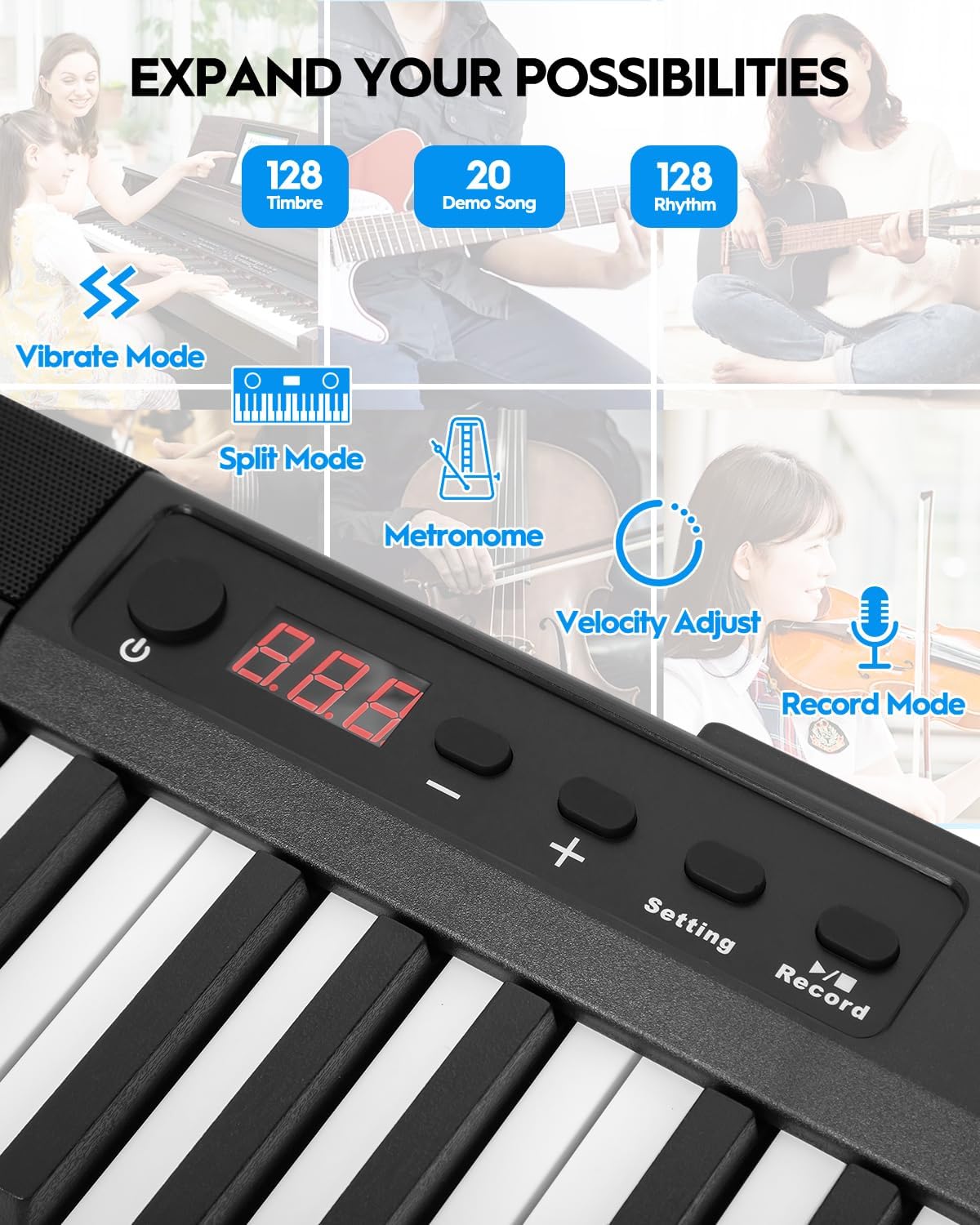
Figure 8: Control panel with various function buttons.
4.4 සම්බන්ධතාවය
- හෙඩ්ෆෝන් ජැක් (මි.මී. 3.5): For private practice.
- Audio Input (3.5mm): Connect external audio sources.
- MIDI Interface (via USB port): Connect to external software for learning and practice.
- Wireless Connect (GZUT-MUSIC): For wireless connectivity options.

රූපය 9: සවිස්තරාත්මක view of the control panel and connectivity ports.
4.5 නිෂ්පාදන වීඩියෝ
Video 1: STRICH SEP-80 Velocity-Sensitive Piano Keyboard 88 Keys DEMO. This video demonstrates the velocity-sensitive keys and overall sound of the SEP-80 digital piano.
Video 2: STRICH SEP-80 Rechargeable 88-Keys Portable Electric Piano. This video highlights the portability and rechargeable battery feature of the SEP-80.
Video 3: Sound Sample | SEP-80 Comparison of lively and gentle rhythms. This video provides audio samples demonstrating different rhythms and tones.
Video 4: SEP-80 Keyboard Playing Audition. This video showcases a performance on the SEP-80 keyboard.
5. නඩත්තු කිරීම
- පිරිසිදු කිරීම: Use a soft, dry cloth to clean the surface of the piano. Do not use abrasive cleaners or solvents.
- ගබඩා: Store the piano in a dry, cool place away from direct sunlight and extreme temperatures.
- බැටරි සත්කාර: ප්රශස්ත බැටරි ආයු කාලය සඳහා, බැටරිය නිතර නිතර සම්පූර්ණයෙන්ම විසර්ජනය කිරීමෙන් වළකින්න. දිගු කාලයක් භාවිතයේ නොතිබුණත්, එය නිතිපතා ආරෝපණය කරන්න.
6. දෝශ නිරාකරණය
- ශබ්දයක් නැත: Check if the volume is turned up. Ensure headphones are not plugged in if you intend to use the built-in speakers. Verify power connection or battery charge.
- ප්රතිචාර නොදක්වන යතුරු: පියානෝව ක්රියාත්මක කර ඇති බවට වග බලා ගන්න. නිශ්චිත යතුරු ප්රතිචාර නොදක්වන්නේ නම්, පාරිභෝගික සහාය අමතන්න.
- සම්බන්ධතා ගැටළු: For MIDI via USB, ensure the correct drivers are installed on your computer. For wireless connection, ensure Bluetooth is enabled on your device and select "GZUT-MUSIC".
7. පිරිවිතර
| විශේෂාංගය | විස්තර |
|---|---|
| වෙළඳ නාමය | දැඩි |
| මාදිලියේ නම | සසප-80 |
| යතුරු ගණන | 88 |
| යතුරු වර්ගය | Touch-Sensitive, Reduced-Weighted |
| Sounds/Tones | 128 |
| රිද්ම | 128 |
| ආදර්ශන ගීත | 20 |
| සම්බන්ධතාවය | 3.5mm Headphone Jack, 3.5mm Audio Input, USB (MIDI), Wireless Connect (GZUT-MUSIC) |
| බලශක්ති ප්රභවය | Corded Electric (USB Adapter), Built-in Rechargeable Battery |
| බැටරි ආයු කාලය | Up to 5 hours (built-in battery) |
| නිෂ්පාදන මානයන් | 14.76"D x 53.74"W x 5.31"H |
| අයිතමයේ බර | රාත්තල් 19.56 කි |
| විශේෂ ලක්ෂණ | Built-In Speaker, Portable, Recording, Touch-Sensitive Keys |

Figure 10: Dimensions of the STRICH SEP-80 Digital Piano.
8. වගකීම් සහ සහාය
The STRICH SEP-80 Digital Piano comes with a standard manufacturer's warranty. For detailed warranty information, product support, or service inquiries, please refer to the contact information provided in your product packaging or visit the official STRICH webඅඩවිය.