හැඳින්වීම
Thank you for choosing the GOBOULT Z60 Wireless Earbuds. This manual provides detailed instructions to help you set up, operate, and maintain your earbuds for an optimal audio experience. Please read this manual thoroughly before use and retain it for future reference.

Image: GOBOULT Z60 Earbuds, illustrating the brand transition from BOULT to GOBOULT, highlighting the new logo and packaging while assuring consistent product performance.
පෙට්ටියේ ඇති දේ
සියලුම අයිතම පැකේජයේ ඇති බවට වග බලා ගන්න:
- GOBOULT Z60 Wireless Earbuds (Left and Right)
- අයකිරීමේ නඩුව
- USB Type-C ආරෝපණ කේබලය
- කන් ඉඟි (විවිධ ප්රමාණ)
- පරිශීලක අත්පොත
- වගකීම් කාඩ්පත

Image: The GOBOULT Z60 Wireless Earbuds and their charging case, showcasinනිෂ්පාදනයේ සැලසුම සහ ඇතුළත් උපාංග.
නිෂ්පාදනය අවසන්view
The GOBOULT Z60 earbuds are designed for comfort and high-quality audio. Each earbud features a 13mm bass driver and multiple microphones for clear calls. The charging case provides extended battery life.
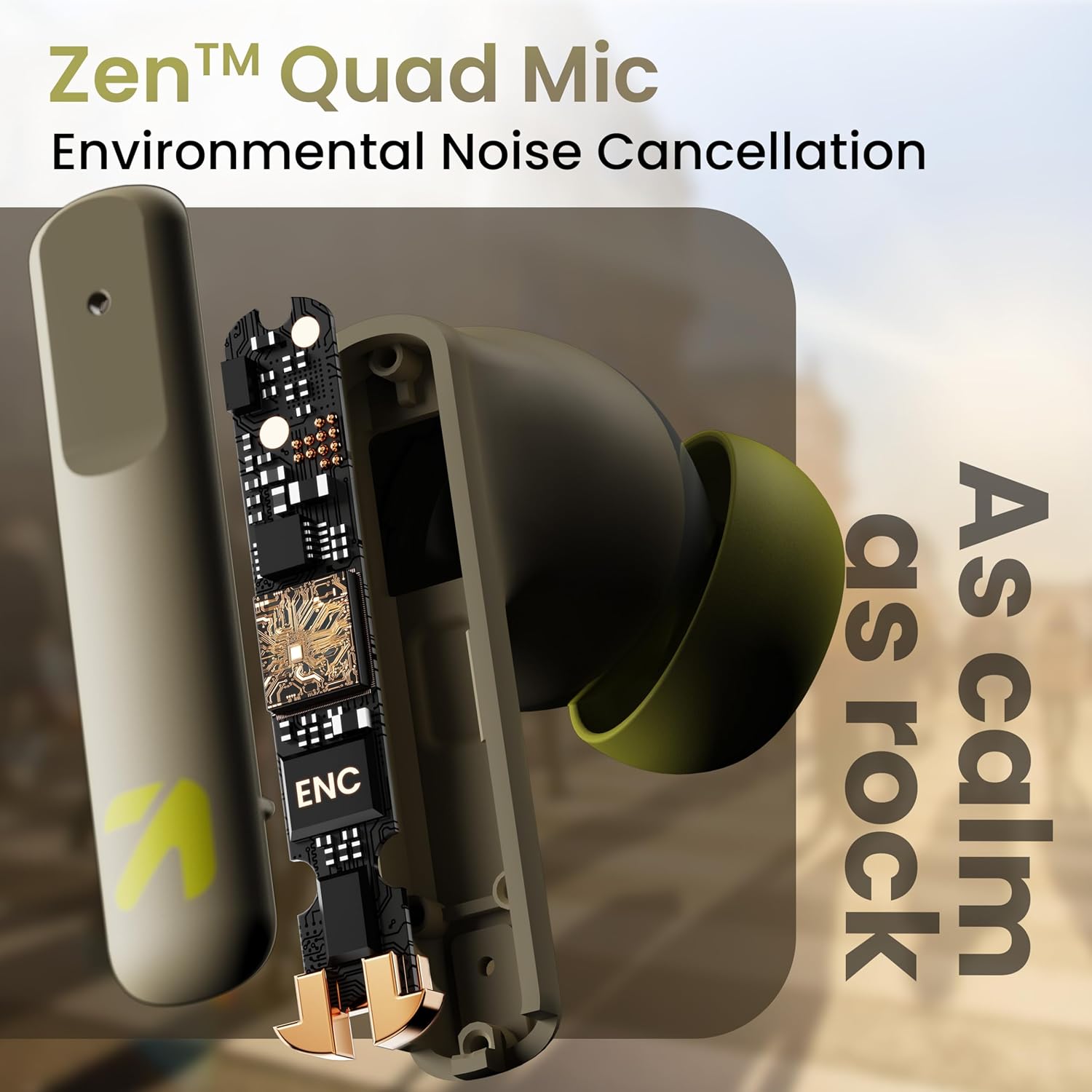
රූපය: අභ්යන්තරයක් view of a GOBOULT Z60 earbud, highlighting the Zen Quad Mic Environmental Noise Cancellation (ENC) technology for clear audio.

Image: A close-up of a GOBOULT Z60 earbud, emphasizing the 13mm BoomX Drivers responsible for rich bass and superior sound quality.
අයකිරීම
To charge your GOBOULT Z60 earbuds and charging case:
- ඉයර්බඩ් ආරෝපණ පෙට්ටියට දමන්න. ඒවා නිවැරදිව සවි කර ඇති බවට වග බලා ගන්න.
- USB Type-C ආරෝපණ කේබලය නඩුවේ ආරෝපණ වරායට සහ බල ප්රභවයකට සම්බන්ධ කරන්න.
- නඩුවේ ඇති LED දර්ශකය ආරෝපණ තත්ත්වය පෙන්වයි.
A full charge provides up to 60 hours of total playtime with the charging case. A quick 10-minute charge can provide up to 150 minutes of playtime.

Image: The GOBOULT Z60 charging case connected via a Type-C cable, illustrating the fast charging capability with indicators for 10 minutes charge yielding 150 minutes playtime.

Image: GOBOULT Z60 earbuds in their charging case, highlighting the impressive 60 hours of total playtime and 8 hours of playtime on a single earbud charge.
Setup: Pairing with Your Device
The GOBOULT Z60 earbuds utilize Bluetooth 5.3 for stable and efficient wireless connectivity.
- මූලික යුගලනය:
- ආරෝපණ පෙට්ටිය විවෘත කරන්න. ඉයර්බඩ් ස්වයංක්රීයව යුගල කිරීමේ ප්රකාරයට ඇතුළු වනු ඇත.
- ඔබගේ උපාංගයේ (ස්මාර්ට්ෆෝන්, ටැබ්ලටය, ලැප්ටොප්) බ්ලූටූත් සක්රීය කරන්න.
- ඒ සඳහා සොයන්න "GOBOULT Z60" in the list of available Bluetooth devices and select it to connect.
- Once connected, you will hear an audio prompt, and the LED indicator on the case will change.
- නැවත යුගල කිරීම: The earbuds will automatically connect to the last paired device when taken out of the case, if Bluetooth is enabled on the device.

Image: GOBOULT Z60 earbuds and their open charging case next to a smartphone, illustrating the Bluetooth 5.3 "Blink & Pair" feature for quick and stable connection.
ඔබේ ඉයර්බඩ් ක්රියාත්මක කිරීම
ස්පර්ශ පාලන
The GOBOULT Z60 earbuds feature intuitive touch controls. The specific functions are:
- සංගීත වාදනය:
- තනි තට්ටු කරන්න: වාදනය/විරාම කරන්න
- Double tap (Right earbud): Next track
- Double tap (Left earbud): Previous track
- Triple tap (Right earbud): Volume Up
- Triple tap (Left earbud): Volume Down
- ඇමතුම් කළමනාකරණය:
- Single tap: Answer/End call
- Long press: Reject call
- හ oice සහකාර: Long press (either earbud) to activate Google Assistant or Siri.
- සූදු ප්රකාරය: Tap 4 times on either earbud to activate/deactivate Combat Gaming Mode (50ms low latency).

Image: A visual guide to the GOBOULT Z60's touch controls, detailing actions for music playback (play/pause, next/back, volume), call management, activating voice assistance, and toggling game/music mode.
ක්රීඩා මාදිලිය
Activate the 50ms low latency Combat Gaming Mode for a synchronized audio-visual experience during gaming. Tap 4 times on either earbud to switch between gaming and normal modes.

Image: GOBOULT Z60 earbuds in use with a smartphone displaying a racing game, emphasizing the "Combat Gaming Mode" with 50ms ultra-low latency, activated by tapping the earbud 4 times.
හඬ සහායක
Access your device's voice assistant (Google Assistant or Siri) by long-pressing either earbud. This allows for hands-free control of your device.

Image: GOBOULT Z60 earbuds and their charging case, illustrating how to activate voice assistance (Ok Google, Hey Siri) with a long press on an earbud.
නඩත්තු කිරීම
To ensure the longevity and optimal performance of your GOBOULT Z60 earbuds:
- පිරිසිදු කිරීම: ඉයර්බඩ් සහ ආරෝපණ පෙට්ටිය මෘදු, වියළි රෙද්දකින් නිතිපතා පිරිසිදු කරන්න. රළු රසායනික ද්රව්ය හෝ උල්ෙල්ඛ ද්රව්ය භාවිතා කිරීමෙන් වළකින්න.
- ඉර්ටිප්ස්: Remove and clean the eartips periodically. Ensure they are dry before reattaching.
- ජල ප්රතිරෝධය: The earbuds are IPX5 water-resistant, meaning they can withstand sweat and light rain. Do not submerge them in water or expose them to heavy downpours. Ensure the charging port is dry before charging.
- ගබඩා: භාවිතයේ නොමැති විට, ඉයර්බඩ් ආරක්ෂා කර ගැනීමට සහ ආරෝපණය කර තබා ගැනීමට ඒවායේ ආරෝපණ පෙට්ටියේ ගබඩා කරන්න.

Image: A GOBOULT Z60 earbud with water droplets on its surface, illustrating its IPX5 water resistance, suitable for protection against sweat, rain, and splashes.
දෝෂගවේෂණය
If you encounter issues with your GOBOULT Z60 earbuds, refer to the following common solutions:
| ගැටලුව | හැකි විසඳුම |
|---|---|
| ඉයර්බඩ් යුගල නොවේ |
|
| එක් ඉයර්බඩ් එකකින් ශබ්දයක් නැත |
|
| ඉයර්බඩ් ආරෝපණය නොවේ |
|
| අඩු ශබ්දය හෝ දුර්වල ශබ්ද ගුණාත්මකභාවය |
|
පිරිවිතර
| විශේෂාංගය | විස්තර |
|---|---|
| මාදිලියේ නම | AirBass (Z60) |
| සම්බන්ධතා තාක්ෂණය | රැහැන් රහිත (බ්ලූටූත්) |
| බ්ලූටූත් අනුවාදය | 5.3 |
| බ්ලූටූත් පරාසය | මීටර් 10 |
| ශ්රව්ය ධාවක ප්රමාණය | මිලිමීටර 13 යි |
| ශ්රව්ය ධාවක වර්ගය | ගතික ධාවකය |
| බැටරි ආයු කාලය (මුළු) | පැය 60ක් දක්වා (ආරෝපණ නඩුවක් සමඟ) |
| ආරෝපණ කාලය | ආසන්න වශයෙන් 90 විනාඩි |
| වේගවත් ආරෝපණය | මිනිත්තු 10 ක ආරෝපණය = මිනිත්තු 150 ක ක්රීඩා කාලය |
| ආරෝපණ වරාය | වර්ගය-C |
| මයික්රොෆෝන | 4 ENC Mics for Clear Calling |
| ශ්රව්ය ගුප්ත විද්යාව | මිලි තත්පර 50 (ක්රීඩා ප්රකාරය) |
| ජල ප්රතිරෝධය | IPX5 (Sweatproof, Rainproof, Splashproof) |
| පාලන ක්රමය | ස්පර්ශ, හඬ |
| අයිතමයේ බර | ග්රෑම් 41.5 යි |
| මුල් රට | ඉන්දියාව |
වගකීම් සහ සහාය
Your GOBOULT Z60 Wireless Earbuds come with a වසර 1ක නිෂ්පාදකයාගේ වගකීමක් මිලදී ගත් දින සිට.
For any support, warranty claims, or technical assistance, please refer to the contact information provided on your warranty card or visit the official GOBOULT support webඅඩවිය.