1. හැඳින්වීම
This manual provides comprehensive instructions for the setup, operation, and maintenance of your Xprinter XP-Q801K Thermal Receipt Printer. This printer is designed for efficient and reliable receipt printing in various business environments, featuring high-speed direct thermal printing and a USB interface for easy connectivity.

රූපය 1: ඉදිරිපස view of the Xprinter XP-Q801K Thermal Receipt Printer, showing the paper output slot and control buttons.
2. පිහිටුවීම
2.1 ඇසිරීම
Carefully remove the printer and all accessories from the packaging. Verify that all components are present:
- Xprinter XP-Q801K Thermal Receipt Printer
- බල ඇඩැප්ටරය
- USB කේබලය
- Paper Roll (starter)
- පරිශීලක අත්පොත (මෙම ලේඛනය)
2.2 මුද්රණ යන්ත්රය සම්බන්ධ කිරීම
Before connecting, ensure the printer is powered off. Locate the ports on the rear of the printer.
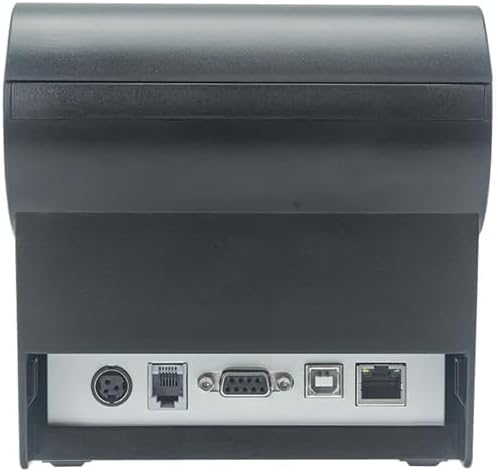
රූපය 2: පසුපස view of the printer, highlighting the power, USB, and other interface ports.
- සම්බන්ධක බලය: Insert the power adapter cable into the printer's power input port (DC 24V/2.5A) and plug the adapter into a suitable electrical outlet (AC 100-240V, 50-60Hz).
- USB සම්බන්ධ කරන්න: Connect one end of the provided USB cable to the USB port on the printer and the other end to an available USB port on your computer.
- Cash Drawer (Optional): If using a cash drawer, connect its cable to the cash drawer port (DC 24V/1A) on the printer.
2.3 කඩදාසි රෝල පූරණය කිරීම
The printer uses 80mm wide thermal paper rolls.
- Open the paper cover by pushing the cover open button (usually located on the side or front).
- Insert the thermal paper roll with the printing surface facing the print head. Ensure the roll is seated correctly in the paper compartment.
- කපනය හරහා කඩදාසි කුඩා ප්රමාණයක් අදින්න.
- කඩදාසි කවරය නිසි තැනට වැටෙන තුරු තදින් වසා දමන්න.
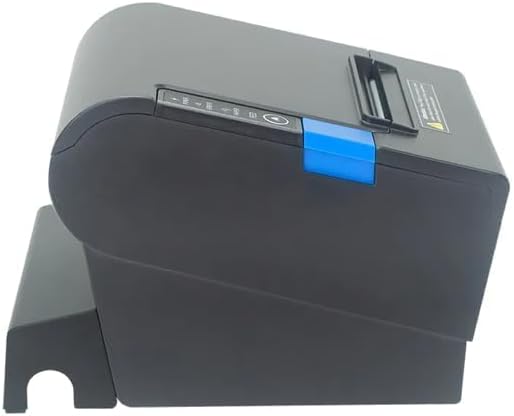
රූපය 3: පැත්ත view of the printer, illustrating the paper cover mechanism.
2.4 ධාවක ස්ථාපනය
The printer requires a driver to communicate with your computer. Drivers are typically available for Windows, Linux, Android, and Mac operating systems.
- For Windows users, the printer often supports plug-and-play installation or requires a specific Windows driver.
- For Linux, Android, and Mac, SDKs (Software Development Kits) are usually provided for integration.
නිෂ්පාදකයා වෙත යොමු වන්න website or the included driver CD/USB drive for the latest drivers and installation instructions specific to your operating system.
3. මුද්රණ යන්ත්රය ක්රියාත්මක කිරීම
3.1 බල ගැන්වීම සක්රිය / අක්රිය කිරීම
Locate the power switch on the side or rear of the printer. Flip the switch to the 'ON' position to power on the printer. The 'POWER' indicator light will illuminate. Flip to 'OFF' to power down.
3.2 Indicator Lights and Buttons
The front panel typically features several indicator lights and buttons:
- බලය: මුද්රණ යන්ත්රය ක්රියාත්මක කර ඇති බව දක්වයි.
- දෝෂය: Illuminates or flashes to indicate an error condition (e.g., paper out, print head overheating, cutter error).
- කඩදාසි: Indicates that the paper roll is low or out.
- සංග්රහ බොත්තම: Press to manually feed paper. Hold to perform a self-test print (if supported by model).
3.3 මූලික මුද්රණය
Once the printer is connected and drivers are installed, you can print receipts from your POS software or application. Ensure the printer is selected as the default or active printer in your system settings.
The printer supports various print speeds up to 300 mm/s and automatic paper cutting after each print job.
4. නඩත්තු කිරීම
නිතිපතා නඩත්තු කිරීම ප්රශස්ත ක්රියාකාරිත්වය සහතික කරන අතර ඔබේ මුද්රණ යන්ත්රයේ ආයු කාලය දීර්ඝ කරයි.
4.1 මුද්රණ ශීර්ෂය පිරිසිදු කිරීම
The print head should be cleaned regularly, especially if print quality degrades.
- මුද්රණ යන්ත්රය ක්රියා විරහිත කර බල කේබලය විසන්ධි කරන්න.
- කඩදාසි කවරය විවෘත කරන්න.
- කපු පුළුන් කැබැල්ලක් සැහැල්ලුවෙන් භාවිතා කරන්න dampened with isopropyl alcohol (ethanol) to gently wipe the thermal elements of the print head.
- කවරය වසා නැවත විදුලිය සම්බන්ධ කිරීමට පෙර මුද්රණ ශීර්ෂය සම්පූර්ණයෙන්ම වියළීමට ඉඩ දෙන්න.
4.2 කපනය පිරිසිදු කිරීම
Paper dust can accumulate around the cutter blade, affecting its performance.
- මුද්රණ යන්ත්රය ක්රියා විරහිත කර බල කේබලය විසන්ධි කරන්න.
- Carefully remove any visible paper dust or debris from around the cutter blade using a soft brush or compressed air.
- Do not use liquids on the cutter.
4.3 සාමාන්ය පිරිසිදු කිරීම
මුද්රණ යන්ත්රයේ බාහිර පෙනුම මෘදු, d රෙදි කඩකින් පිස දමන්න.amp රෙදි. දැඩි රසායනික ද්රව්ය හෝ උල්ෙල්ඛ පිරිසිදුකාරක භාවිතා කිරීමෙන් වළකින්න.
5. දෝශ නිරාකරණය
මෙම කොටසින් ඔබේ මුද්රණ යන්ත්රය සමඟ ඔබට මුහුණ දීමට සිදුවිය හැකි පොදු ගැටළු සාකච්ඡා කෙරේ.
| ගැටලුව | විය හැකි හේතුව | විසඳුම |
|---|---|---|
| මුද්රණ යන්ත්රය ක්රියාත්මක නොවේ. | විදුලි රැහැන සම්බන්ධ කර නැත; විදුලිබල පිටවාන දෝෂ සහිතයි; විදුලි ස්විචය ක්රියා විරහිතයි. | Ensure power cable is securely connected. Test power outlet. Turn power switch to 'ON'. |
| No printing. | Paper out; Paper loaded incorrectly; Driver not installed or incorrect; USB cable loose; Printer not selected. | Load new paper roll. Re-load paper correctly. Install/reinstall correct driver. Check USB connection. Select printer in software. |
| ERROR light is on/flashing. | Paper out; Paper jam; Print head overheating; Cutter error. | Load paper. Clear paper jam. Allow printer to cool down. Check cutter for obstructions. |
| දුර්වල මුද්රණ ගුණාත්මකභාවය. | Dirty print head; Low quality paper; Old paper roll. | Clean the print head (see Section 4.1). Use high-quality thermal paper. Replace old paper rolls. |
මෙම විසඳුම් උත්සාහ කිරීමෙන් පසුවත් ගැටලුව පවතින්නේ නම්, කරුණාකර පාරිභෝගික සහාය අමතන්න.
6. පිරිවිතර
| විශේෂාංගය | විස්තර |
|---|---|
| මුද්රණ ක්රමය | සෘජු තාප |
| කඩදාසි පළල | 80 මි.මී |
| මුද්රණ වේගය | 230 mm/s, 260 mm/s, 300 mm/s |
| අතුරු මුහුණත | USB |
| රේඛා පරතරය | 3.75 mm (adjustable by commands) |
| Character Size (ANK) | Font A: 1.5 × 3.0 mm (12 × 24 dots) Font B: 1.1 × 2.1 mm (9 × 17 dots) |
| Character Size (Chinese/Traditional Chinese) | 3.0 × 3.0 mm (24 × 24 dots) |
| තීරු කේත වර්ග | UPC-A / UPC-E / JAN13 (EAN13) / JAN8 (EAN8) / CODE39 / ITF / CODABAR / CODE93 / CODE128 |
| 2D තීරු කේතය | QR Code / PDF417 |
| NV Flash Memory | 256 කි.බ |
| ආදාන බලය | ඒසී 100-240V, 50-60Hz |
| ප්රතිදාන බලය | DC 24V/2.5A |
| මුදල් ලාච්චු ප්රතිදානය | DC 24V/1A |
| බර | කිලෝ ග්රෑම් 1.0 කි |
| මානයන් (D × W × H) | 194.5 × 145 × 146.4 මි.මී |
| මෙහෙයුම් උෂ්ණත්වය | 0~45°C |
| මෙහෙයුම් ආර්ද්රතාවය | 10 ~ 80% RH |
| කටර් ජීවිතය | මිලියන 1.5 ක කප්පාදුවක් |
| මුද්රණ හිස ජීවිතය | 150 කි.මී |
| OS අනුකූලතාව | Windows, Linux, Android, Mac |


