නිෂ්පාදනය අවසන්view
The PETKIT Automatic Cat Feeder is designed to simplify your pet's feeding routine with smart app control and reliable dispensing. It features a triple fresh-lock system to keep food fresh, a large 3L capacity, and dual power options for uninterrupted feeding.
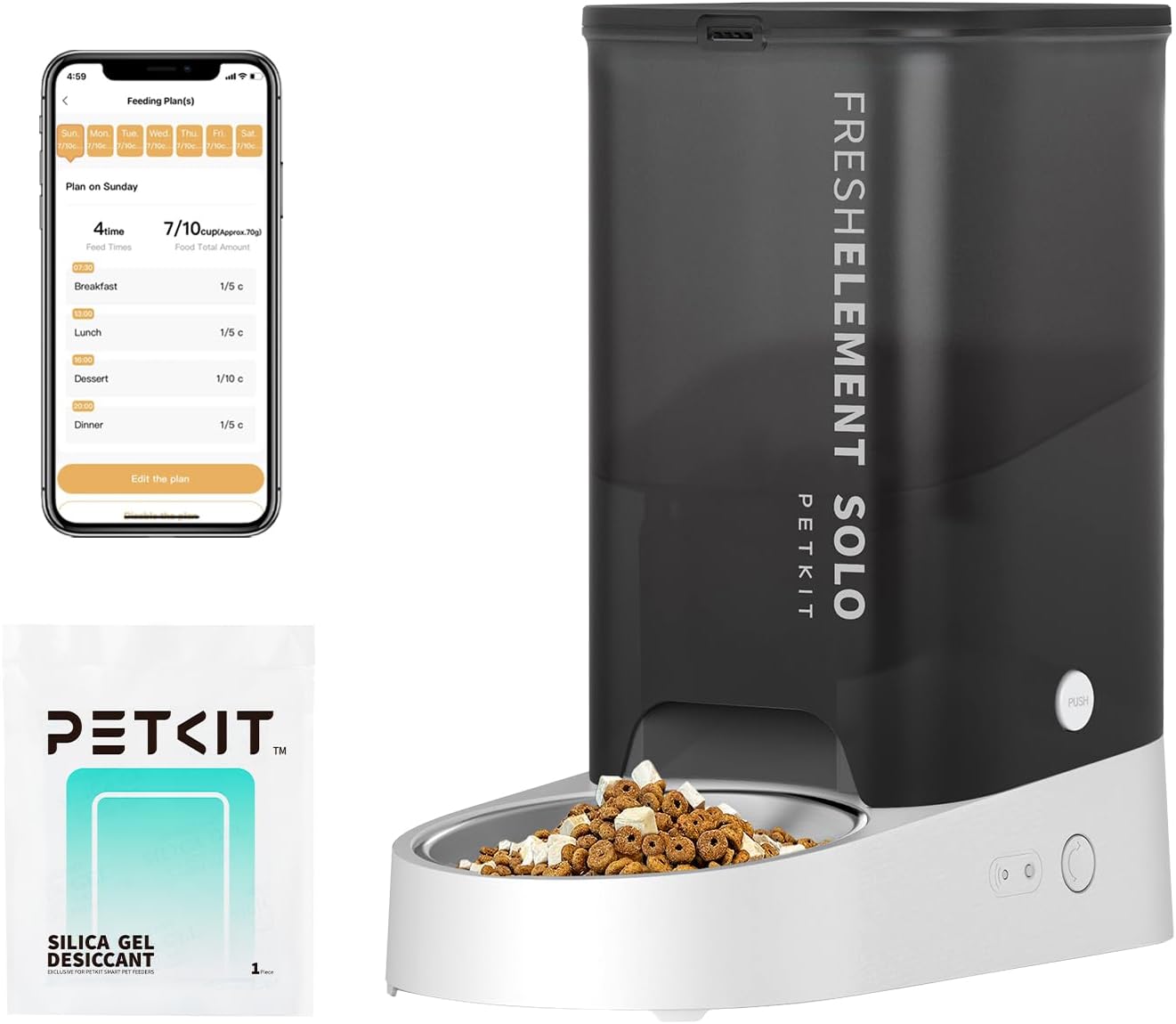
The PETKIT Automatic Pet Feeder in grey, showcasing its sleek design, food reservoir, and stainless steel bowl. An accompanying smartphone screen displays the feeding schedule interface.

An image illustrating the PETKIT app interface, highlighting features such as setting feeding schedules, extra feeding, food shortage alerts, desiccant replacement reminders, and battery shortage reminders.

A cat eating from the PETKIT Automatic Pet Feeder, emphasizing its 3L (12 cups) capacity, capable of providing up to 10 meals per day with 1-5 portions per meal, sufficient for an adult cat for up to 15 days.
පෙට්ටියේ ඇති දේ
- PETKIT Fresh Element Solo Pet Feeder
- USB කේබලය
- ඩෙසිකන්ට් බෑගය
- පරිශීලක අත්පොත

A visual representation of the components included with the PETKIT Fresh Element Solo Pet Feeder: the main feeder unit, USB cable, desiccant bag, and user manual.
සැකසුම් මාර්ගෝපදේශය
- සංරචක ඉවත් කරන්න: ඇසුරුම්කරණයෙන් සියලුම අයිතම ප්රවේශමෙන් ඉවත් කරන්න.
- Assemble Feeder: Place the stainless steel bowl into the designated slot on the feeder base.
- ඩෙසිකන්ට් බෑගය ස්ථාපනය කරන්න: Open the lid of the food reservoir and insert the desiccant bag into its holder to maintain food freshness.
- සම්බන්ධක බලය: Plug the USB cable into the feeder and connect it to a 5V/1A USB adapter (not included). For backup power, insert three 3A batteries (not included) into the battery compartment.
- Download PETKIT App: Scan the QR code on the feeder or search for "PETKIT" in your device's app store (iOS/Android) to download the official application.
- Wi-Fi වෙත සම්බන්ධ වන්න: Follow the in-app instructions to connect your feeder to your 2.4GHz Wi-Fi network. Ensure your Wi-Fi password is not excessively long or complex.
- Fill Food Reservoir: Open the top lid and pour dry pet food into the reservoir. Ensure kibble size is less than 12mm to prevent blockages.
The PETKIT Automatic Pet Feeder unit, ready for initial setup and assembly of its components.
The PETKIT mobile application interface, used for connecting the feeder to Wi-Fi and managing settings.
මෙහෙයුම් උපදෙස්
යෙදුම් පාලනය
Utilize the PETKIT app to fully customize your pet's feeding schedule:
- Schedule Feeding: Set up to 10 meals per day with 1-5 portions per meal (1/10 cup each).
- Manual Dispense: Dispense food instantly from anywhere using the app's
අදාළ ලියකියවිලි - P570

PETKIT නැවුම් මූලද්රව්ය SOLO ස්මාර්ට් සුරතල් පෝෂක පරිශීලක අත්පොත
PETKIT Fresh Element SOLO Smart Pet Feeder (Model P570) සඳහා වන සවිස්තරාත්මක උපදෙස් අත්පොත, බළලුන් සහ කුඩා බල්ලන් සඳහා සැකසීම, ක්රියාත්මක කිරීම, පිරිසිදු කිරීම, දෝශ නිරාකරණය සහ ආරක්ෂක මාර්ගෝපදේශ ආවරණය කරයි.
PETKIT නැවුම් මූලද්රව්ය SOLO ස්මාර්ට් සුරතල් පෝෂක පරිශීලක අත්පොත
PETKIT Fresh Element SOLO Smart Pet Feeder සඳහා වන පුළුල් පරිශීලක අත්පොත, සැකසුම, ක්රියාකාරිත්වය, යෙදුම් භාවිතය, පිරිසිදු කිරීම, දෝශ නිරාකරණය සහ තාක්ෂණික පිරිවිතර විස්තර කරයි.
PETKIT Fresh Element SOLO Smart Pet Feeder Instruction Manual
PETKIT Fresh Element SOLO Smart Pet Feeder (Model P570) සඳහා සවිස්තරාත්මක උපදෙස් අත්පොත. මෙම ස්වයංක්රීය සුරතල් ආහාර බෙදාහරින්නා සඳහා සැකසුම, සංරචක, ක්රියාකාරිත්වය, යෙදුම් සම්බන්ධතාවය, පිරිසිදු කිරීම, දෝශ නිරාකරණය සහ තාක්ෂණික පිරිවිතර ගැන ඉගෙන ගන්න.
PETKIT Fresh Element SOLO Smart Pet Feeder Instruction Manual
PETKIT Fresh Element SOLO Smart Pet Feeder (Model P570) සඳහා වන සවිස්තරාත්මක උපදෙස් අත්පොත, බළලුන් සහ කුඩා අභිජනන සුනඛයන් සඳහා සැකසීම, ක්රියාත්මක කිරීම, පිරිසිදු කිරීම සහ දෝශ නිරාකරණය ආවරණය කරයි.
PETKIT Fresh Element SOLO Smart Pet Feeder Instruction Manual
Instruction manual for the PETKIT Fresh Element SOLO Smart Pet Feeder, detailing setup, operation, app control, safety guidelines, and maintenance for automatic pet feeding.
PETKIT නැවුම් මූලද්රව්ය SOLO ස්මාර්ට් සුරතල් පෝෂක පරිශීලක අත්පොත
Comprehensive user manual for the PETKIT Fresh Element SOLO Smart Pet Feeder (P570), covering product summary, setup, app usage, cleaning, troubleshooting, and basic specifications.