1. හැඳින්වීම
This manual provides essential information for the safe and effective operation of your HTVRONT Auto Tumbler Heat Press Machine. Designed for sublimation printing, this machine automatically applies ideal pressure for various drinkware, ensuring efficient and high-quality results. Please read these instructions thoroughly before use.

Image: HTVRONT Auto Tumbler Heat Press Machine, showcasing එහි සංයුක්ත නිර්මාණය සහ ඇතුළත් උපාංග.
2 ආරක්ෂිත තොරතුරු
- ස්වයංක්රීයව වසා දැමීම: The machine powers down after 15 minutes of inactivity to prevent overheating and conserve energy.
- හදිසි නැවතුම: Press the 'R' button to instantly halt heating and release the heat pad, ensuring user safety and preventing burns.
- Heat-Resistant Gloves: Always use the provided heat-resistant gloves when handling hot items or the heat press components.
- වාතාශ්රය: හොඳින් වාතාශ්රය ඇති ප්රදේශයක යන්ත්රය ක්රියාත්මක කරන්න.
- මතුපිට: Place the heat press on a stable, heat-resistant surface.
- උණුසුම් මතුපිට ස්පර්ශ නොකරන්න: Avoid direct contact with the heating element during and immediately after operation.
- වෙළුමtage: Ensure the machine is connected to a 120V power outlet.
3. ඇතුළත් කර ඇති දේ
- Auto Tumbler Heat Press x1
- Heat-resistant Gloves x1 pair
- Heat-resistant Tape x1 roll
- උපදෙස් අත්පොත x1
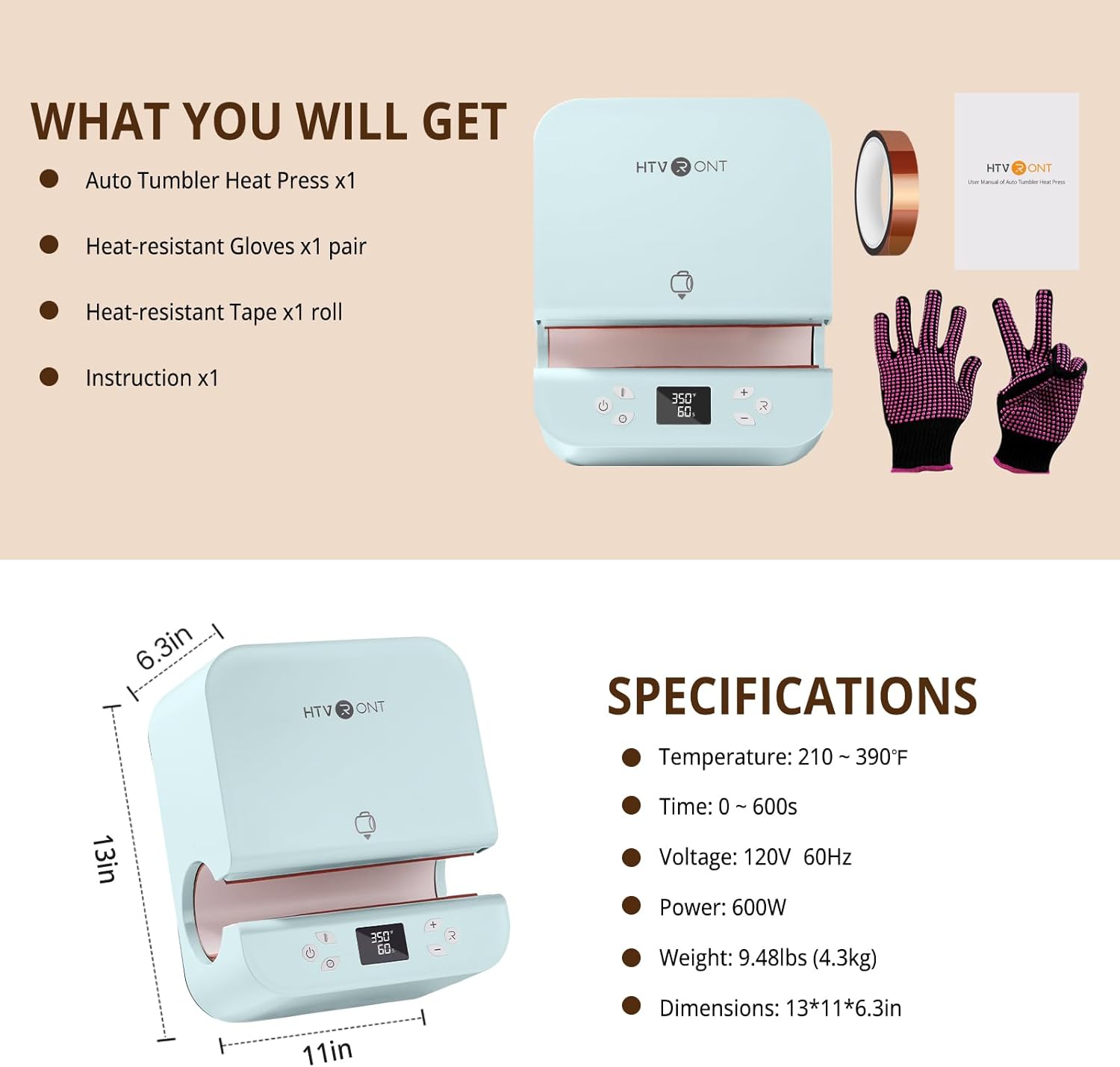
Image: The complete package contents of the HTVRONT Auto Tumbler Heat Press Machine.
4. පිරිවිතර
| විශේෂාංගය | වටිනාකම |
|---|---|
| නිර්දේශිත භාවිතයන් | Sublimation printing on drinkware (tumblers, mugs, water bottles, sippy cups) |
| ඉහළ උෂ්ණත්ව ශ්රේණිගත කිරීම | 390°F (200°C) |
| වෙළුමtage | වෝල්ට් 120 |
| වට්tage | වොට් 600 යි |
| නිෂ්පාදන මානයන් | 12.9"අඟල් x 10.9"අඟල් x 6.3"අඟල් (32.7සෙ.මී. x 27.7සෙ.මී. x 16සෙ.මී.) |
| අයිතමයේ බර | රාත්තල් 10.65 (කිලෝ ග්රෑම් 4.84) |
| Compatible Tumbler Diameter | අඟල් 2.95 (සෙ.මී. 7.5) සිට අඟල් 3.18 (සෙ.මී. 8.1) දක්වා |
| Compatible Tumbler Volume | 280ml - 850ml (11-30oz) |
| ද්රව්ය | ABS කවචය |

Image: Visual guide for compatible tumbler dimensions and sizes.
5. පිහිටුවීම
- ඇසුරුම්: ඇසුරුම්කරණයෙන් සියලුම සංරචක ප්රවේශමෙන් ඉවත් කරන්න. අනාගත ගබඩා කිරීම හෝ ප්රවාහනය සඳහා ඇසුරුම් තබා ගන්න.
- ස්ථානගත කිරීම: Position the heat press on a flat, stable, and heat-resistant surface in a well-ventilated area.
- බල සම්බන්ධතාවය: Connect the power cord to the machine's inlet and then to a standard 120V, 60Hz electrical outlet.
- මූලික බලය සක්රිය කිරීම: Flip the power switch located at the back of the machine to the 'ON' position. The digital display will illuminate.
6. මෙහෙයුම් උපදෙස්
6.1. Preparing Your Item
- Ensure your tumbler's diameter is between 2.95 and 3.18 inches.
- Wrap your sublimation design tightly around the tumbler and secure it with heat-resistant tape.
6.2. Setting Temperature and Time
- Use the 'Mode' button to cycle through preset temperature and time settings, or manually adjust using the '+' and '-' buttons for temperature and time.
- Refer to the Quick Reference Chart below for recommended settings based on material.
6.3. Pressing Cycle
- Once settings are confirmed, carefully slide the prepared tumbler into the heating chamber. The machine will automatically detect the tumbler and apply appropriate pressure.
- Press the 'Enter' button to begin the heating cycle. The machine will automatically heat and press the design.
- The digital display will show the countdown.
6.4. Removing the Tumbler
- Upon completion of the cycle, the machine will automatically release the pressure and open.
- Wearing heat-resistant gloves, carefully remove the hot tumbler from the machine.
- Allow the tumbler to cool completely before removing the sublimation paper and tape.

Image: Control panel showing temperature and time settings.
6.5. Quick Reference Chart
| මූලික ද්රව්ය | කාලය | උෂ්ණත්වය |
|---|---|---|
| මල නොබැඳෙන වානේ ටම්බලර් | 130± 20 තත් | 370°F±10°F |
| සෙරමික් ටම්බලර් | 400± 20 තත් | 385°F±10°F |
| වීදුරු ටම්බලර් | 300± 20 තත් | 370°F±10°F |
Note: These are general guidelines. Optimal settings may vary based on specific materials and sublimation paper.
7. නඩත්තු කිරීම
- පිරිසිදු කිරීම: Always unplug the machine and allow it to cool completely before cleaning. Wipe the exterior with a soft, damp රෙදි. උල්ෙල්ඛ පිරිසිදු කරන්නන් භාවිතා නොකරන්න හෝ යන්ත්රය ජලයේ ගිල්වන්න එපා.
- ගබඩා: භාවිතයේ නොමැති විට වියළි, දූවිලි රහිත පරිසරයක තාප මුද්රණ යන්ත්රය ගබඩා කරන්න.
8. දෝශ නිරාකරණය
- Uneven Heating/Ghosting: Ensure the sublimation paper is tightly wrapped around the tumbler with no gaps or wrinkles. Verify the tumbler diameter is within the recommended range (2.95-3.18 inches) for optimal pressure application.
- Tumbler Difficult to Remove: This may occur with mugs slightly larger than the recommended diameter. Ensure you are using heat-resistant gloves and carefully extract the item. Avoid forcing the tumbler.
- යන්ත්රය ක්රියාත්මක නොවේ: Check that the power cord is securely plugged into both the machine and a functioning 120V outlet. Ensure the power switch is in the 'ON' position.
- ස්වයංක්රීයව ඉවත් කිරීමේ විශේෂාංගය: If the machine powers off unexpectedly, it may be due to 15 minutes of inactivity. Simply turn it back on.
9. වගකීම් සහ සහාය
HTVRONT is committed to providing excellent customer service. Should any issues arise with your Auto Tumbler Heat Press Machine, please contact HTVRONT customer support for assistance. They will work to provide a solution to ensure your satisfaction.
For support, please refer to the contact information provided in your product packaging or visit the official HTVRONT webඅඩවිය.


