1. හැඳින්වීම
This manual provides essential information for the safe and efficient operation of your THOMSON 40FD2S13 40 Inch LED Full HD Easy TV. Please read it thoroughly before using the television and retain it for future reference.
Your THOMSON Easy TV is designed for straightforward entertainment, featuring a Full HD display, multiple connectivity options, and a triple tuner for versatile signal reception.

රූපය: ඉදිරිපස view of the THOMSON 40FD2S13 40 Inch LED Full HD Easy TV, showcasing එහි සංදර්ශකය සහ සිනිඳු නිර්මාණය.
2 ආරක්ෂිත තොරතුරු
ගින්න, විදුලි කම්පනය සහ තුවාල ඇතිවීමේ අවදානම අවම කිරීම සඳහා මෙම රූපවාහිනිය භාවිතා කරන විට සෑම විටම මූලික ආරක්ෂක පියවරයන් අනුගමනය කරන්න.
- රූපවාහිනිය වර්ෂාවට හෝ තෙතමනයට නිරාවරණය නොකරන්න.
- කැබිනට්ටුව විවෘත නොකරන්න; සියලුම සේවා සුදුසුකම් ලත් පුද්ගලයින් වෙත යොමු කරන්න.
- රූපවාහිනිය වටා නිසි වාතාශ්රය සහතික කරන්න.
- රූපවාහිනිය සෘජු හිරු එළියෙන් සහ තාප ප්රභවයන්ගෙන් ඈත් කර තබන්න.
- අකුණු කුණාටු ඇති විට හෝ දිගු කාලයක් භාවිතා නොකළ විට රූපවාහිනිය විසන්ධි කරන්න.
- Position the TV on a stable, level surface or securely wall-mount it.
3. පැකේජ අන්තර්ගතය
සියලුම අයිතම පැකේජයේ ඇති බව තහවුරු කරගන්න:
- THOMSON 40FD2S13 40 Inch LED Full HD Easy TV
- දුරස්ථ පාලකය
- බල කේබලය
- පරිශීලක අත්පොත (මෙම ලේඛනය)
- TV Stands (if applicable, check packaging)
- Screws for TV Stands (if applicable)
4. පිහිටුවීම
4.1 රූපවාහිනී ස්ටෑන්ඩ් සවි කිරීම
If you are not wall-mounting the television, attach the included stands to the bottom of the TV. Ensure the stands are securely fastened with the provided screws to prevent the TV from tipping.

Image: Diagram showing the dimensions of the THOMSON 40FD2S13 TV, including stand measurements, to assist with placement.
4.2 බිත්ති සවි කිරීම
For wall mounting, use a VESA-compatible wall mount kit (not included) that matches the TV's specifications. Follow the instructions provided with your wall mount kit carefully. Ensure the wall can support the weight of the TV.
4.3 සම්බන්ධක පර්යන්ත
Your THOMSON TV offers various connection ports for external devices. Refer to the image below for port locations and types.
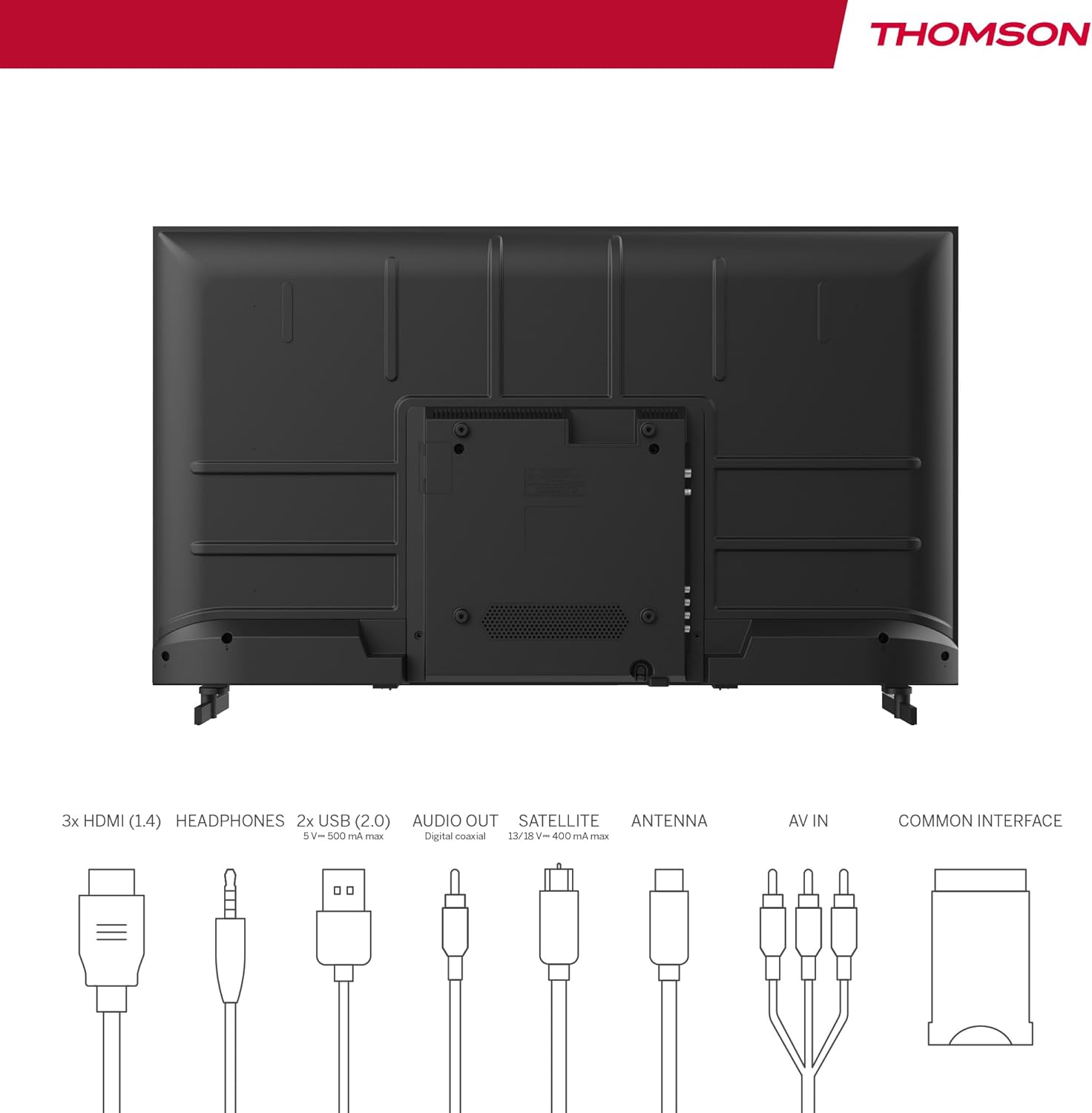
Image: Rear panel of the THOMSON 40FD2S13 TV, illustrating the location of all input and output ports, including HDMI, USB, Audio Out, Satellite, Antenna, AV IN, and Common Interface.
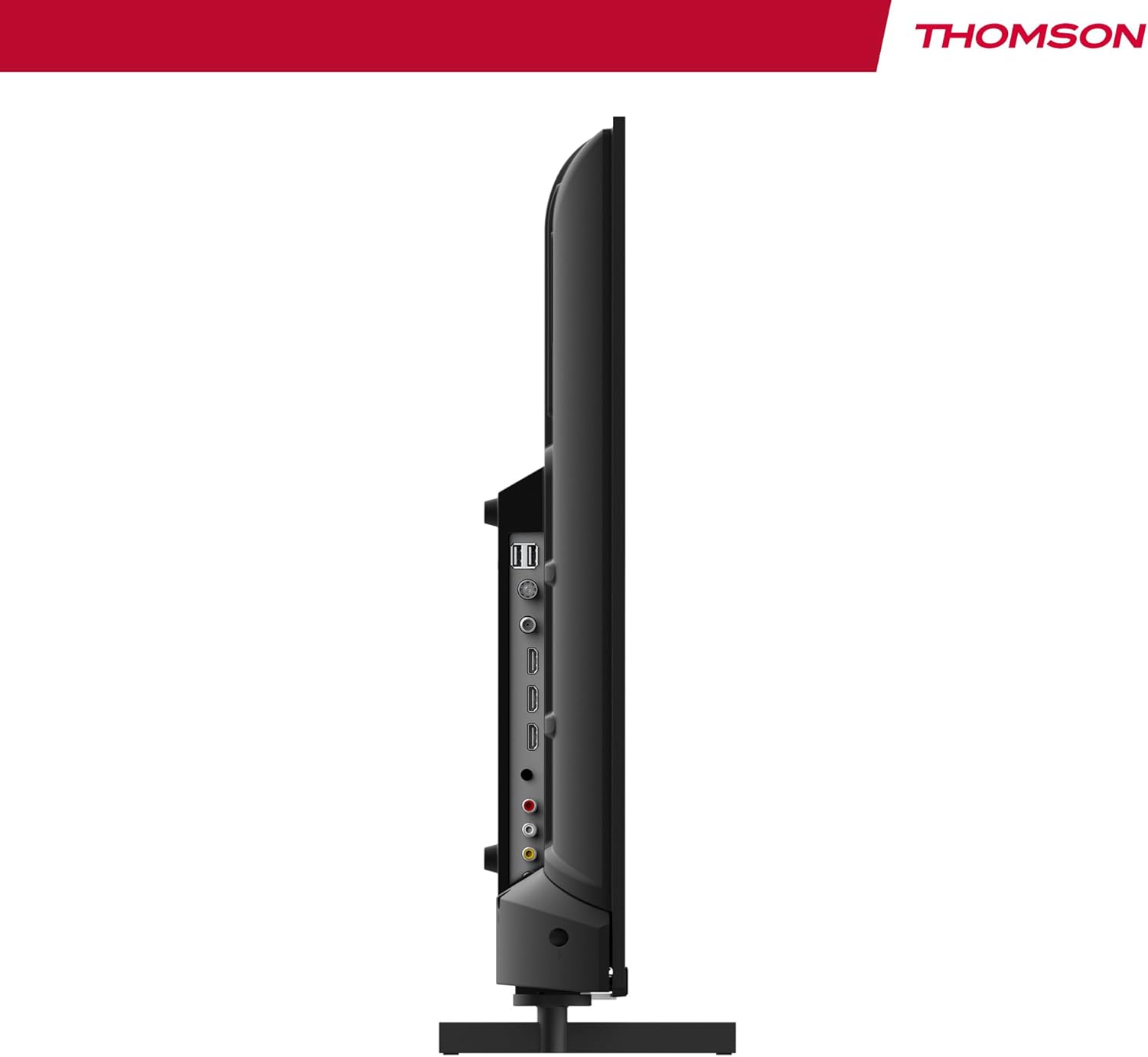
රූපය: පැත්ත view of the THOMSON 40FD2S13 TV, highlighting the conveniently located side ports for easy access.
- HDMI (x3): Blu-ray ධාවක, ක්රීඩා කොන්සෝල, සෙට්-ටොප් පෙට්ටි හෝ වෙනත් HDMI-සක්රීය උපාංග සම්බන්ධ කරන්න.
- USB (x2): මාධ්ය නැවත ධාවනය සඳහා USB ගබඩා උපාංග සම්බන්ධ කරන්න.
- AV IN: සංයුක්ත වීඩියෝ සහ ස්ටීරියෝ ශ්රව්ය කේබල් භාවිතයෙන් පැරණි උපාංග සම්බන්ධ කරන්න.
- හෙඩ්ෆෝන්: පුද්ගලික සවන්දීම සඳහා හෙඩ්ෆෝන් සම්බන්ධ කරන්න.
- ඩිජිටල් ඕඩියෝ අවුට්: Connect to an external audio system for enhanced sound.
- Antenna (DVB-T2): Connect a terrestrial antenna for digital broadcast reception.
- චන්ද්රිකාව (DVB-S2): Connect a satellite dish for satellite broadcast reception.
- CI+ තව්: Insert a Conditional Access Module (CAM) and smart card for encrypted channels.
4.4 බල සම්බන්ධතාවය
After connecting all necessary cables, plug the power cable into the TV's power input and then into a wall outlet. The TV will enter standby mode.
5. රූපවාහිනිය ක්රියාත්මක කිරීම
5.1 දුරස්ථ පාලනය
The included remote control allows you to access all TV functions. It features backlit buttons for easy navigation in dim lighting.

Image: The THOMSON TV remote control, highlighting its ergonomic design and backlit buttons for convenient use.
- බල බොත්තම: රූපවාහිනිය සක්රිය/අක්රිය හෝ ස්ටෑන්ඩ්බයි එකට දමයි.
- අංක බොත්තම්: නාලිකා කෙලින්ම තෝරන්න.
- වෙළුම +/-: ශබ්ද මට්ටම සකසන්න.
- නාලිකාව +/-: නාලිකා අනුපිළිවෙලින් වෙනස් කරන්න.
- මෙනු බොත්තම: සැකසුම් සඳහා ප්රධාන මෙනුවට පිවිසෙන්න.
- සංචාලන බොත්තම් (ඉහළ/පහළ/වම/දකුණ/හරි): මෙනු හරහා සංචාලනය කර තේරීම් තහවුරු කරන්න.
- මූලාශ්ර බොත්තම: Select input sources (HDMI, AV, Tuner).
- තොරතුරු බොත්තම: Display current channel information.
- GUIDE Button: Access the Electronic Program Guide (EPG).
- REC බොත්තම: Initiate recording to a connected USB storage device (if supported and configured).
5.2 මූලික සැකසුම සහ නාලිකා ස්කෑන් කිරීම
Upon first power-on, the TV will guide you through the initial setup process, including language selection, country, and channel scanning. Select your preferred reception type (Antenna, Cable, or Satellite) and follow the on-screen instructions to scan for available channels.

Image: Close-up of the TV's tuner inputs, indicating compatibility with DVB-T2 (terrestrial antenna), DVB-C (cable), and DVB-S2 (satellite) signals.
5.3 මීඩියා ප්ලේයර්
Connect a USB storage device to one of the USB ports to access photos, music, videos, and text files directly on your TV. Use the remote control to navigate the media player interface.
5.4 විශේෂ ලක්ෂණ
- ඉලෙක්ට්රොනික වැඩසටහන් මාර්ගෝපදේශය (EPG): View upcoming program schedules and set reminders.
- කාල ප්රමාදය: Pause live TV broadcasts (requires a connected USB storage device).
- මාපිය පාලනය: Set restrictions on channels or programs based on age ratings.
- හෝටල් මාදිලිය: Configure specific settings for use in hotel environments, such as default volume and input source.
- ඩොල්බි ඕඩියෝ: Experience enhanced sound quality with Dolby Audio technology.

Image: A family enjoying content on the THOMSON TV, with the Dolby Audio logo indicating superior sound experience.
6. නඩත්තු කිරීම
To ensure the longevity and optimal performance of your THOMSON TV, follow these maintenance guidelines:
- තිරය පිරිසිදු කිරීම: මෘදු, ලින්ට් රහිත රෙද්දකින් තිරය මෘදු ලෙස පිස දමන්න. මුරණ්ඩු සලකුණු සඳහා, තරමක් dampජලය හෝ විශේෂිත තිර පිරිසිදු කරන්නෙකු සහිත රෙදි කැබැල්ලක් මත තබන්න. කිසි විටෙකත් තිරය මත කෙලින්ම දියර ඉසින්න එපා.
- කැබිනට් මණ්ඩලය පිරිසිදු කිරීම: රූපවාහිනී කැබිනට්ටුව පිස දැමීමට මෘදු වියළි රෙද්දක් භාවිතා කරන්න. උල්ෙල්ඛ පිරිසිදු කරන්නන් හෝ ද්රාවක භාවිතා කිරීමෙන් වළකින්න.
- වාතාශ්රය: රූපවාහිනියේ පිටුපස ඇති වාතාශ්රය විවරයන් අවහිර නොවන බවට වග බලා ගන්න.
- විදුලි රැහැන්: කිසියම් හානියක් සඳහා විදුලි රැහැන නිතිපතා පරීක්ෂා කරන්න. හානි වී ඇත්නම්, ප්රතිස්ථාපනය සඳහා පාරිභෝගික සහාය අමතන්න.
7. දෝශ නිරාකරණය
If you encounter issues with your TV, consult the following common troubleshooting steps before contacting customer support.
| ගැටලුව | විය හැකි හේතුව | විසඳුම |
|---|---|---|
| බලය නැත | විදුලි රැහැන සම්බන්ධ වී නැත; විදුලිබල පිටවාන ක්රියා නොකරයි. | Ensure the power cord is securely plugged into the TV and a working wall outlet. Check the power switch on the TV (if present). |
| පින්තූරයක් නැත, නමුත් ශබ්දය පවතී | වැරදි ආදාන මූලාශ්රයක් තෝරාගෙන ඇත; පසුතල ආලෝක ගැටළුව. | Press the "Source" button on the remote to select the correct input. Try adjusting brightness/contrast settings. |
| ශබ්දයක් නැත, නමුත් පින්තූරය තිබේ | ශබ්දය නිහඬ කර ඇත හෝ ඉතා අඩුය; වැරදි ශ්රව්ය ප්රතිදාන සැකසුම්. | Press the "Volume +" button or unmute the TV. Check audio output settings in the TV menu. |
| දුරස්ථ පාලකය ක්රියා නොකරයි | බැටරි මිය ගොස් හෝ වැරදි ලෙස ඇතුළු කර ඇත; දුරස්ථ පාලකය සහ රූපවාහිනිය අතර බාධාවක්. | Replace batteries with new ones, ensuring correct polarity. Remove any obstructions. Point the remote directly at the TV's IR sensor. |
| දුර්වල පින්තූර ගුණාත්මකභාවය / සංඥා නැත | Antenna/cable/satellite connection loose or damaged; incorrect tuner settings. | Check all antenna/cable/satellite connections. Perform a channel scan again. Ensure the correct tuner input is selected. |
8. පිරිවිතර
| විශේෂාංගය | විස්තර |
|---|---|
| වෙළඳ නාමය | තොම්සන් |
| ආකෘතිය | 40FD2S13 හඳුන්වා දීම |
| තිර ප්රමාණය | අඟල් 40 (සෙ.මී. 101) |
| සංදර්ශක තාක්ෂණය | LED |
| විභේදනය | 1920 x 1080 (සම්පූර්ණ HD) |
| Refresh Rate | 60 Hz |
| සුසරක තාක්ෂණය | DVB-C, DVB-S2, DVB-T2 |
| HDMI වරායන් | 3 |
| USB Ports | 2 |
| අනෙකුත් අතුරු මුහුණත් | AV IN, Headphone, Digital Audio Out, CI+ Slot |
| ශ්රව්ය විකේතනය | DD (ඩොල්බි ඩිජිටල්) |
| ස්පීකර් වින්යාසය | 2.0 සරවුන්ඩ් ශබ්දය |
| වෙළුමtage | වෝල්ට් 230 |
| බලශක්ති කාර්යක්ෂමතා පන්තිය | E |
| නිෂ්පාදන මානයන් (W x H x D) | 72 x 42 x 8.2 cm (without stand, approx.) |
| බර | 6.9 kg (ආසන්න වශයෙන්) |
9. වගකීම් තොරතුරු
Your THOMSON 40FD2S13 TV comes with a වසර 3ක වගකීමක් from the date of purchase. This warranty covers manufacturing defects and ensures that your product meets high-quality standards. Please retain your proof of purchase for warranty claims.
For detailed warranty terms and conditions, please refer to the warranty card included with your product or visit the official THOMSON webඅඩවිය.
10. පාරිභෝගික සහාය
If you require further assistance, have questions not covered in this manual, or need technical support, please contact THOMSON customer service.
- මාර්ගගත සහාය: නිල THOMSON සහාය වෙත පිවිසෙන්න webනිතර අසන ප්රශ්න, දෝශ නිරාකරණ මාර්ගෝපදේශ සහ සම්බන්ධතා පෝරම සඳහා අඩවිය.
- දුරකථන සහාය: Refer to your product packaging or the THOMSON webකලාපීය පාරිභෝගික සේවා සම්බන්ධතා අංක සඳහා අඩවිය.
When contacting support, please have your TV model number (40FD2S13) and serial number ready.


