හැඳින්වීම
The Phox Refillable Water Filter Cartridge offers a sustainable alternative to traditional single-use water filters. Designed for compatibility with Brita Standard pitchers, this eco-friendly solution provides clean, great-tasting water while reducing plastic waste. This manual provides comprehensive instructions for the setup, operation, and maintenance of your Phox filter cartridge.
නිෂ්පාදන විශේෂාංග
- තිරසාර නිර්මාණය: The first refillable filter cartridge, significantly reducing plastic waste.
- Brita Standard Compatible: Fits seamlessly into any Standard Brita Appliance.
- ඵලදායී පෙරීම: Removes impurities and improves water taste.
- Softener Pack Included: Specifically designed to soften hard tap water and reduce chalky textures.
- BPA-නිදහස්: Made from food-safe, BPA-free plastic.
සැකසුම් මාර්ගෝපදේශය
1. Preparing the Cartridge
Your Phox filter cartridge is designed to be refilled with fresh filter granules. Follow these steps to prepare it for first use or refilling:

රූපය 1: Pouring filter granules into the Phox cartridge. The package contains one compatible filter and a one-month refill pack.
- Ensure the Phox cartridge is clean and empty.
- Open the refill pack (e.g., Softener Pack) and carefully pour the granules into the cartridge.
- Place the carbon felt pad (if included with your refill pack) on top of the granules.
- Securely close the cartridge lid.
2. Installing the Cartridge in Your Pitcher
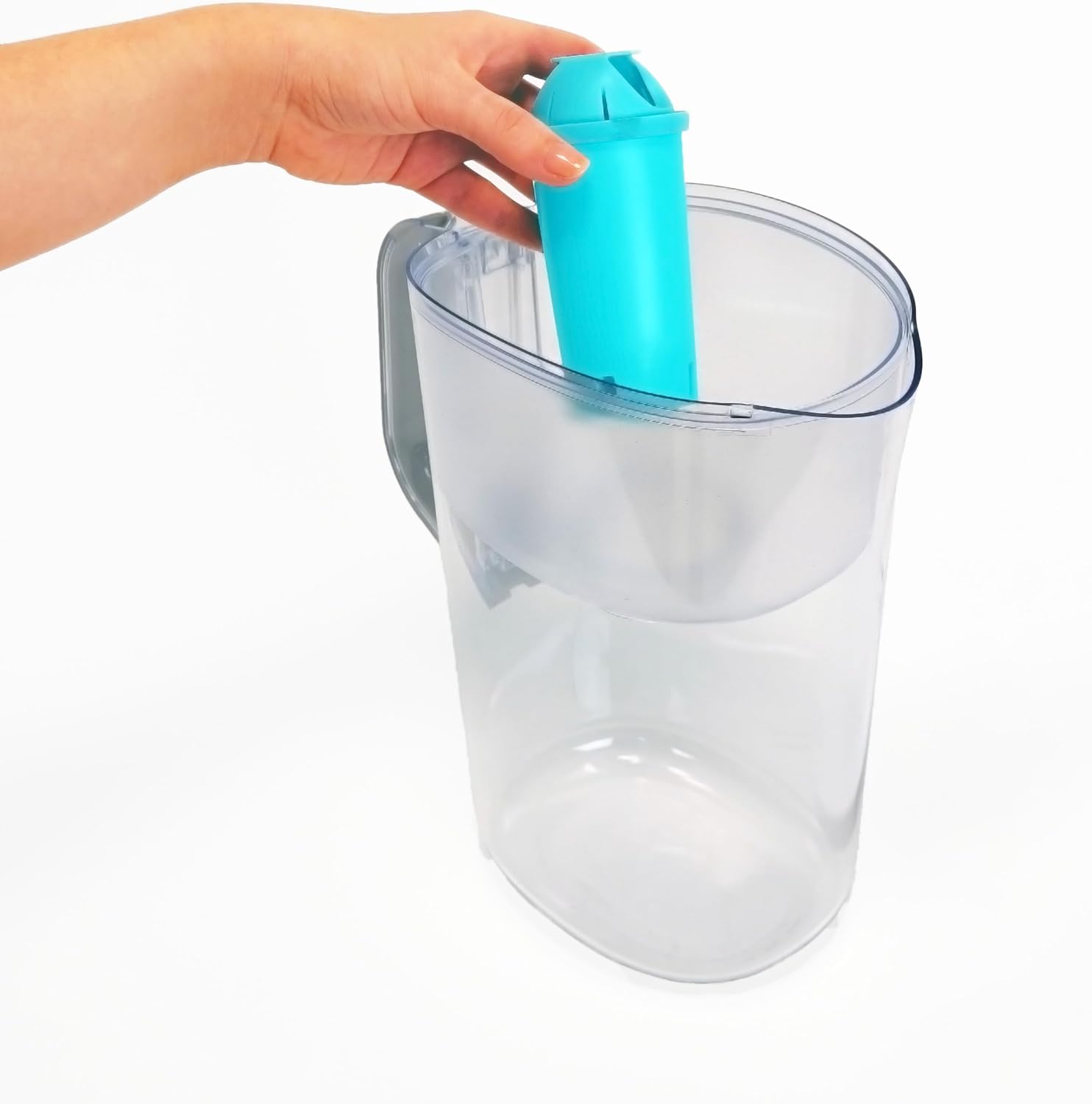
The Phox cartridge is compatible with standard Brita pitchers.

රූපය 2: Installing the Phox cartridge into a Brita pitcher. The cartridge is designed to fit standard Brita appliances.
- Insert the prepared Phox cartridge firmly into the filter slot of your Brita pitcher.
- Ensure it is seated correctly to prevent water bypass.
3. මූලික සේදීම
For optimal performance, it is recommended to rinse the filter before first use.
- Fill the pitcher with tap water.
- Allow the water to filter through completely.
- Discard the first two filtered pitchers of water. This helps to remove any loose carbon dust.
මෙහෙයුම් උපදෙස්
Using your Phox filter cartridge is straightforward:
- Fill the top reservoir of your Brita pitcher with cold tap water.
- Allow the water to slowly filter through the Phox cartridge into the main pitcher reservoir.
- Once filtered, the water is ready for consumption.
වීඩියෝ: Demonstrates the Phox compatible water filter in use, showing how it fits into a standard Brita pitcher and filters water. This video highlights the ease of installation and the product's compatibility.
නඩත්තු කිරීම
නැවත පිරවීම ආදේශ කිරීම
The Phox refill packs are designed for approximately 30 days of use. Regular replacement ensures optimal water quality.
රූපය 3: Refilling the Phox cartridge with an Alkaline pack. This process is simple and allows for continuous use of the reusable cartridge.
- When it's time to replace your refill, dispose of the used filter granules responsibly.
- Clean the cartridge thoroughly.
- Pour in the fresh filter granules from a new refill pack.
- Reassemble the cartridge and re-install it in your pitcher.
Tracking Filter Life
The Phox app can assist you in tracking when to replace your filter refills, ensuring you always have fresh, filtered water.

රූපය 4: The Phox app helps track filter expiration, reminding users when to replace their refill packs.
දෝෂගවේෂණය
මන්දගාමී පෙරීමේ අනුපාතය
If water flows through the filter slower than expected, ensure the cartridge is properly seated and not clogged. An initial rinse can help remove any fine carbon particles that might impede flow. If the issue persists, it may be time to replace the filter granules.
Water Taste/Odor Issues
If you notice a change in water taste or odor, it is likely an indication that the filter granules have reached their capacity and need to be replaced. Ensure you are using genuine Phox refill packs for optimal performance.
පිරිවිතර
| ගුණාංගය | විස්තර |
|---|---|
| ද්රව්ය | Food-safe BPA-free plastic (cartridge), Softener granules (refill pack) |
| නිෂ්පාදන මානයන් | 2.28"D x 2.28"W x 4.8"H |
| අයිතමයේ බර | ග්රෑම් 70 (ආසන්න වශයෙන් අවුන්ස 2.47) |
| බාහිර පරීක්ෂණ සහතික කිරීම | NSF (for certain aspects, as per product details) |
| නිෂ්පාදන ප්රතිලාභ | Removes impurities, improves taste, reduces chalky textures (with Softener Pack) |
| ගැළපුම | Brita Standard Pitchers |
වගකීම් සහ සහාය
For specific warranty information or technical support, please refer to the official Phox website or contact Phox customer service directly. Details are typically provided with your product packaging or on the manufacturer's official channels.
ඔබට ද නැරඹිය හැකිය Phox Store on Amazon තවත් නිෂ්පාදන තොරතුරු සහ සහාය සම්පත් සඳහා.


