1. හැඳින්වීම
Thank you for choosing the RadioShack TWS Bluetooth Wireless Earbuds, Model 100128651 (Snow). These earbuds are designed to provide a high-quality, wireless audio experience with convenience and comfort. This manual will guide you through the setup, operation, and maintenance of your new earbuds.
2. පැකේජ අන්තර්ගතය
කරුණාකර ඔබගේ පැකේජයේ සියලුම අයිතම ඇති බවට වග බලා ගන්න:
- RadioShack TWS Bluetooth Wireless Earbuds (Left and Right)
- අයකිරීමේ නඩුව
- USB Type-C ආරෝපණ කේබලය
- බහු ප්රමාණයේ කන් ඉඟි

3. නිෂ්පාදන අවසන්view
Familiarize yourself with the components of your RadioShack TWS Bluetooth Wireless Earbuds.
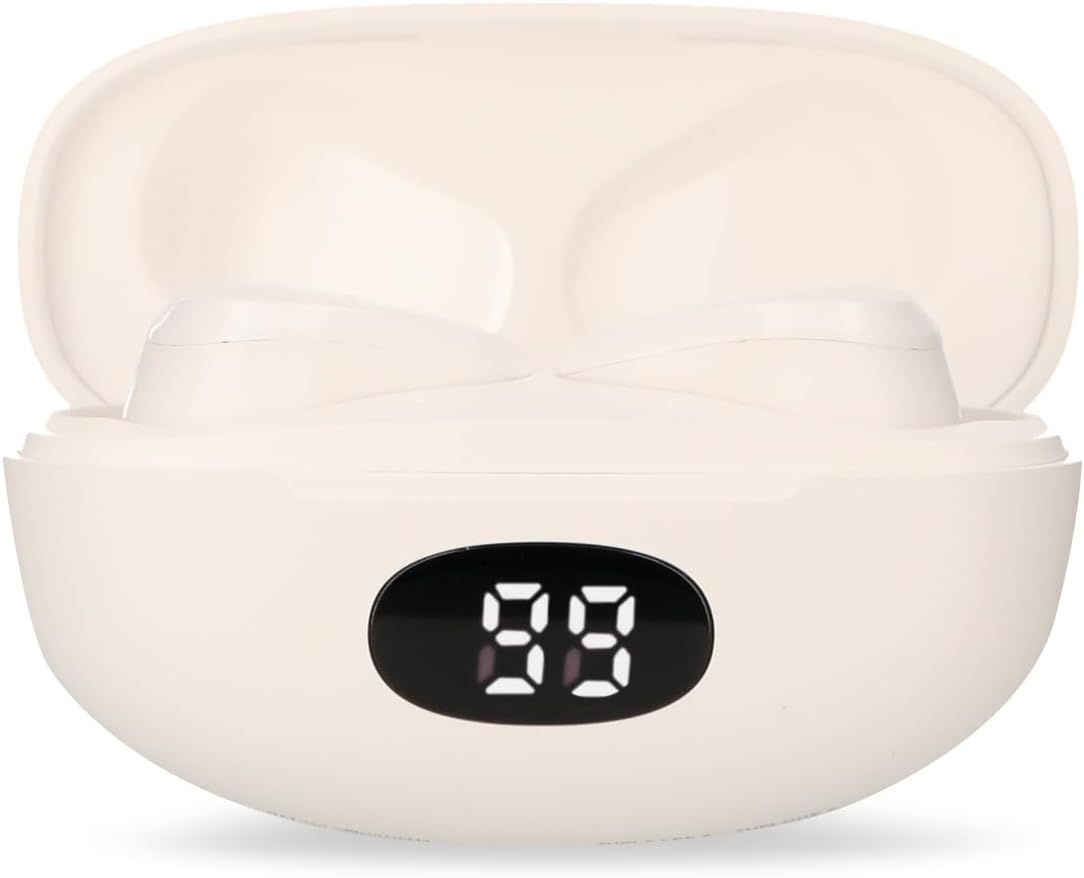


4. පිහිටුවීම
4.1 ඉයර්බඩ් සහ කේස් ආරෝපණය කිරීම
- මූලික ගාස්තුව: පළමු භාවිතයට පෙර, ඉයර්බඩ් සහ ආරෝපණ පෙට්ටිය සම්පූර්ණයෙන්ම ආරෝපණය කරන්න.
- නඩුව අයකිරීම: Connect the provided USB Type-C cable to the charging port on the case and the other end to a USB power source (e.g., computer, wall adapter). The LED display on the case will indicate charging status.
- ඉයර්බඩ් ආරෝපණය කිරීම: Place the earbuds into the charging case. Ensure they are correctly seated; the earbuds will automatically begin charging. The LED display on the case will show the earbuds' charging status.
- ආරෝපණ කාලය: A full charge for both the earbuds and case typically takes up to 1.5 hours.
4.2 බ්ලූටූත් යුගල කිරීම
- බල ගැන්වීම: Open the charging case. The earbuds will automatically power on and enter pairing mode. You may hear an audible prompt.
- බ්ලූටූත් සක්රිය කරන්න: On your mobile device (smartphone, tablet, etc.), go to the Bluetooth settings and ensure Bluetooth is enabled.
- උපාංගය තෝරන්න: ඒ සඳහා සොයන්න available Bluetooth devices. Select "RadioShack Snow" or a similar name from the list.
- සම්බන්ධ කරන්න: Once selected, your device should connect to the earbuds. A confirmation sound or message may indicate successful pairing.
- නැවත සම්බන්ධ කරන්න: After initial pairing, the earbuds will automatically connect to the last paired device when removed from the charging case and Bluetooth is active on your device.
5. මෙහෙයුම් උපදෙස්
The RadioShack TWS Earbuds feature a multifunction touch button for easy control.
5.1 බලය සක්රිය / අක්රිය
- බල ගැන්වීම: Open the charging case, and the earbuds will power on automatically. Alternatively, press and hold the touch area on both earbuds for approximately 3 seconds.
- විදුලිය විසන්ධි කිරීම: Place the earbuds back into the charging case and close the lid. They will power off automatically. Alternatively, press and hold the touch area on both earbuds for approximately 5 seconds.
5.2 සංගීත වාදනය
- වාදනය/විරාමය: ඉයර්බඩ් දෙකෙන් එකක ස්පර්ශ ප්රදේශය එක් වරක් තට්ටු කරන්න.
- ඊළඟ ධාවන පථය: දකුණු ඉයර්බඩයේ ස්පර්ශ ප්රදේශය දෙවරක් තට්ටු කරන්න.
- පෙර ධාවන පථය: වම් ඉයර්බඩයේ ස්පර්ශ ප්රදේශය දෙවරක් තට්ටු කරන්න.
5.3 ඇමතුම් කළමනාකරණය
- පිළිතුර/අවසන් ඇමතුම: ඉයර්බඩ් දෙකෙන් එකක ස්පර්ශ ප්රදේශය එක් වරක් තට්ටු කරන්න.
- ඇමතුම ප්රතික්ෂේප කරන්න: Press and hold the touch area on either earbud for approximately 2 seconds.
5.4 වෙළුම් පාලනය
- පරිමාව වැඩි කරන්න: දකුණු ඉයර්බඩයේ ස්පර්ශ ප්රදේශය තුන් වරක් තට්ටු කරන්න.
- ශබ්දය අඩු කරන්න: වම් ඉයර්බඩයේ ස්පර්ශ ප්රදේශය තුන් වරක් තට්ටු කරන්න.
5.5 හ oice සහකාර
- හ oice සහකාර සක්රිය කරන්න: Press and hold the touch area on either earbud for approximately 2 seconds (when not on a call).
6. නඩත්තු කිරීම
ඔබේ ඉයර්බඩ් වල ආයු කාලය සහ ප්රශස්ත ක්රියාකාරිත්වය සහතික කිරීම සඳහා, මෙම නඩත්තු මාර්ගෝපදේශ අනුගමනය කරන්න:
- පිරිසිදු කිරීම: ඉයර්බඩ් සහ ආරෝපණ පෙට්ටිය පිරිසිදු කිරීමට මෘදු, වියලි, ලින්ට් රහිත රෙද්දක් භාවිතා කරන්න. උල්ෙල්ඛ පිරිසිදු කරන්නන්, මධ්යසාර හෝ රසායනික ද්රාවක භාවිතා නොකරන්න.
- කන් ඉඟි: වෙළඳ දැන්වීම සමඟ කන් ඉඟි නිතිපතා ඉවත් කර පිරිසිදු කරන්න.amp රෙදි. නැවත සවි කිරීමට පෙර ඒවා සම්පූර්ණයෙන්ම වියළී ඇති බවට වග බලා ගන්න.
- ආරෝපණ සම්බන්ධතා: ආරෝපණ ගැටළු ඇති වුවහොත්, වියළි කපු පුළුන් කැබැල්ලකින් ඉයර්බඩ් දෙකෙහිම සහ කේස් එක ඇතුළත ආරෝපණ සම්බන්ධතා මෘදු ලෙස පිරිසිදු කරන්න.
- ගබඩා: භාවිතයේ නොමැති විට, දූවිලි හා හානිවලින් ආරක්ෂා වීම සඳහා ඉයර්බඩ් ඒවායේ ආරෝපණ ආවරණයේ ගබඩා කරන්න. සිසිල්, වියළි ස්ථානයක ගබඩා කරන්න.
- ජලයෙන් වළකින්න: These earbuds are not waterproof. Avoid exposure to water, moisture, or extreme temperatures.
7. දෝශ නිරාකරණය
If you encounter any issues with your earbuds, refer to the following common problems and solutions:
| ගැටලුව | විය හැකි හේතුව | විසඳුම |
|---|---|---|
| ඉයර්බඩ් යුගල නොවේ | Earbuds are not in pairing mode or Bluetooth is off on device. | Ensure earbuds are out of the case and Bluetooth is enabled on your device. Forget previous pairings and try again. |
| ඉයර්බඩ් වලින් ශබ්දයක් නැත | Volume too low, earbuds not connected, or media paused. | Increase volume on both earbuds and device. Check Bluetooth connection. Ensure media is playing. |
| එක් ඉයර්බඩ් එකක් ක්රියා නොකරයි | Low battery, connection issue, or earbud not properly seated in case. | ඉයර්බඩ් දෙකම නැවත කේස් එකට දමා, වසා, පසුව නැවත විවෘත කරන්න. දෙකම ආරෝපණය වී ඇති බවට වග බලා ගන්න. අවශ්ය නම් නැවත යුගල කරන්න. |
| ආරෝපණ නඩුව ආරෝපණය නොවේ | Faulty cable, power source, or dirty charging port. | Try a different USB-C cable and power adapter. Clean the charging port. |
| දුර්වල ශ්රව්ය ගුණාත්මක භාවය | Distance from device, interference, or low battery. | Move closer to your device. Avoid environments with strong Wi-Fi or other Bluetooth signals. Charge earbuds. |
8. පිරිවිතර
Detailed technical specifications for the RadioShack TWS Bluetooth Wireless Earbuds, Model 100128651 (Snow):
- මාදිලියේ නම: හිම
- ආදර්ශ අංකය: 100128651
- සම්බන්ධතාවය: රැහැන් රහිත, බ්ලූටූත්
- බ්ලූටූත් අනුවාදය: 5.1
- රැහැන් රහිත පරාසය: මීටර් 10 (අඩි 33) දක්වා
- ඉයර්බඩ් බැටරිය: 3.7V DC, 30 mAh (each)
- ආරෝපණ කේස් බැටරිය: 3.7V DC, 250 mAh
- Charging Input (Earbuds): 5V ඩීසී, 30 එම්ඒ
- Charging Input (Case): 5V ඩීසී, 220 එම්ඒ
- ආරෝපණ වරාය: USB Type-C
- සම්පූර්ණ ආරෝපණ කාලය: ආසන්න වශයෙන් පැය 1.5 කි
- ඉයර්බඩ් පසුධාවන කාලය: පැය 4 දක්වා (අඛණ්ඩ)
- මුළු පසුධාවන කාලය (අවස්ථාව සමඟ): පැය 12 දක්වා
- පාලන ක්රමය: ස්පර්ශ කරන්න
- මයික්රෆෝනය: Included (for hands-free calls)
- විශේෂ ලක්ෂණ: Voice Assistant support, Ergonomic Design, Passive Noise Cancellation
- ගැළපුම: iOS සහ Android උපාංග
- UPC: 7503038212252
- පැකේජ මානයන්: 17.7 x 8.5 x 4.7 සෙ.මී
- පැකේජ බර: 150 ග්රෑම්
9. වගකීම් සහ සහාය
RadioShack products are manufactured with quality and reliability in mind. For warranty information, please refer to the documentation provided at the time of purchase or visit the official RadioShack webඔබේ කලාපය සඳහා අඩවිය.
For technical support or customer service, please contact:
- Webඅඩවිය: www.radioshack.com.mx
- දුරකථනය: 55 2582 0999
සහාය සම්බන්ධ කර ගැනීමේදී කරුණාකර ඔබගේ මාදිලි අංකය (100128651) සහ මිලදී ගැනීමේ සාක්ෂි සූදානම් කර තබා ගන්න.