1. හැඳින්වීම
Welcome to the user manual for your new YISENCE 4K Underwater Camera. This compact and floatable digital camera is designed to capture high-quality photos and videos in various environments, including underwater up to 11 feet. Featuring 4K video recording, 48MP photo resolution, autofocus, and dual screens for easy selfies, this manual will guide you through its setup, operation, and maintenance to ensure optimal performance and longevity.
2. ආරක්ෂිත පූර්වාරක්ෂාවන්
- Ensure the battery compartment and all ports are securely sealed before submerging the camera in water.
- Do not exceed the maximum waterproof depth of 11 feet (3.3 meters) or the maximum submersion time of one hour per use.
- කැමරාව අධික උෂ්ණත්වයන්ට හෝ සෘජු හිරු එළියට දිගු කාලයක් නිරාවරණය කිරීමෙන් වළකින්න.
- කැමරාව ශක්තිමත් චුම්භක ක්ෂේත්රවලින් ඈත් කර තබන්න.
- කැමරාව සමඟ සපයා ඇති නිශ්චිත බැටරිය සහ ආරෝපණ කේබලය පමණක් භාවිතා කරන්න.
- Do not attempt to disassemble or repair the camera yourself. Contact customer support if issues arise.
- කුඩා කොටස් අහම්බෙන් ශරීරගත වීම වැළැක්වීම සඳහා කුඩා දරුවන්ට ළඟා විය නොහැකි ලෙස තබා ගන්න.
3. පැකේජ අන්තර්ගතය
සියලුම අයිතම පවතින බව සහතික කර ගැනීමට කරුණාකර කොටුව සලකුණු කරන්න:
- 1 x YISENCE Digital Camera
- 1 x 32GB Micro SD කාඩ්පත
- 1 x 1250mAh Li-ion බැටරිය
- 1 x චාජර්
- 1 x Type-C කේබල්
- 1 x මල්ල
- 1 x String (Lanyard)
- 1 x පරිශීලක අත්පොත
4. නිෂ්පාදන අවසන්view
Familiarize yourself with the camera's main components and controls.

රූපය 4.1: ඉදිරිපස සහ පසුපස View of the YISENCE 4K Underwater Camera. The image displays the camera's dual screens, lens, flash, and control buttons, along with a separate 32GB MicroSD card.

Figure 4.2: The camera's compact size and dimensions (4.13in length, 2.5in height, 4.58oz weight) are highlighted, demonstrating its portability.
5. පිහිටුවීම
5.1 බැටරි ස්ථාපනය සහ ආරෝපණය කිරීම
The camera uses a 1250mAh Li-ion battery. Ensure the battery is fully charged before first use.
- To open the battery compartment, firmly press the cover lock with one hand while pushing out the battery cover with the other. The battery compartment is sealed for waterproof protection.
- Insert the 1250mAh Li-ion battery into the compartment, ensuring the correct polarity.
- බැටරි කවරය නිසි තැනට ක්ලික් වන තුරු ආරක්ෂිතව වසා දමන්න.
- Connect the camera to the charger using the provided Type-C cable. The charging indicator light will illuminate.
- Once fully charged, the indicator light will change or turn off. Disconnect the charger.
5.2 මතක කාඩ්පත් ස්ථාපනය සහ ආකෘතිකරණය
The camera supports Micro SD cards up to 128GB. A 32GB card is included.
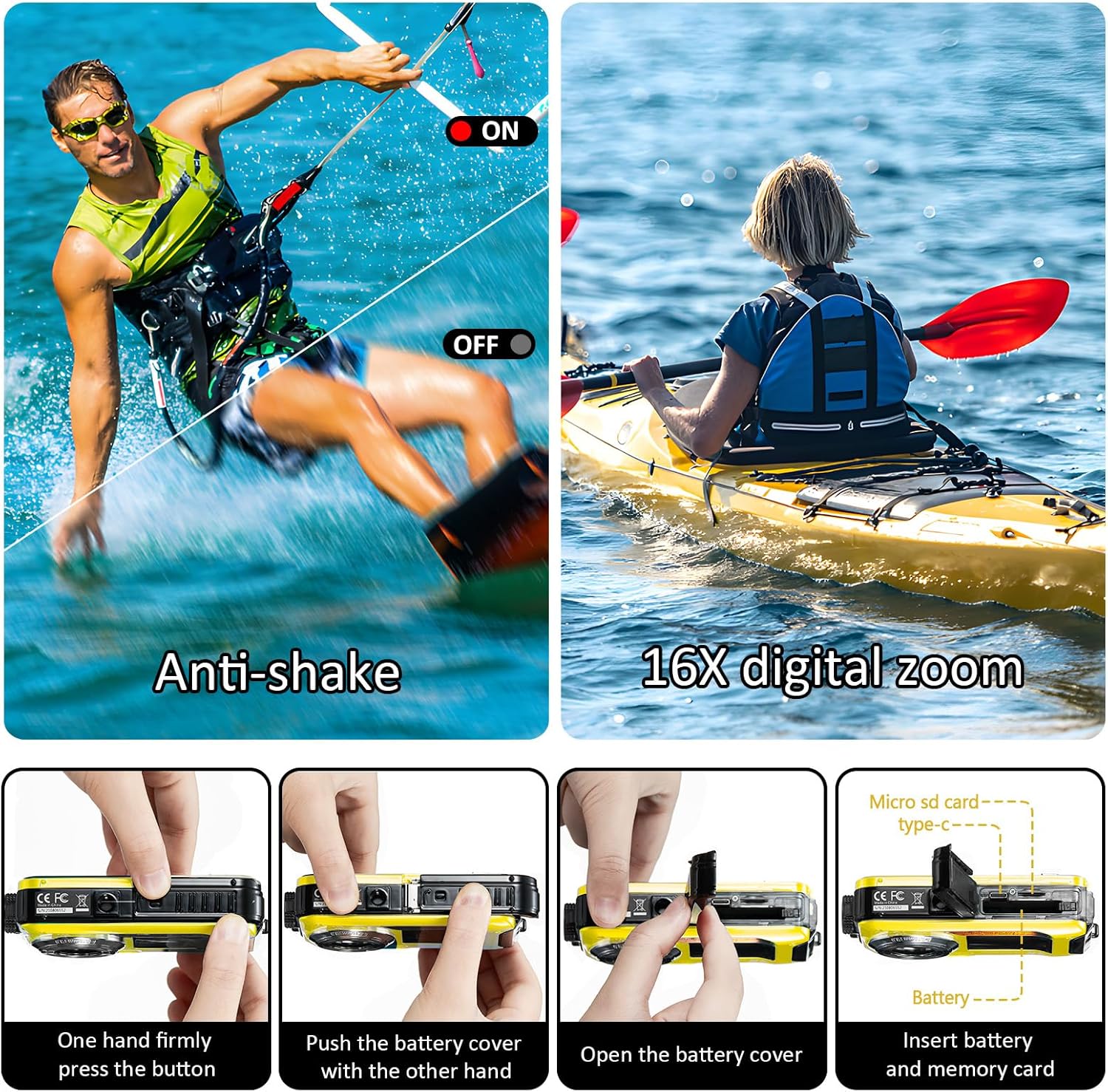
Figure 5.1: Steps for opening the battery cover and inserting the Micro SD card. This image illustrates the process of accessing the battery and memory card slots.
- Open the battery compartment as described in section 5.1.
- Locate the Micro SD card slot. Insert the Micro SD card with the gold contacts facing the correct direction until it clicks into place.
- බැටරි කවරය ආරක්ෂිතව වසා දමන්න.
- It is recommended to format the Micro SD card before first use to ensure compatibility and optimal performance. This can usually be done through the camera's menu settings (refer to section 6.6 Menu Settings).
6. මෙහෙයුම් උපදෙස්
6.1 බලය සක්රිය / අක්රිය
- To power on the camera, press and hold the Power button.
- To power off the camera, press and hold the Power button again. The camera also features an auto power-off function (configurable in settings).
6.2 මාරුවීම් මාතයන්
Press the 'MODE' button to cycle through different modes: Photo, Video, and Playback.
6.3 Taking Photos (Autofocus)
The camera features a 48MP resolution with autofocus for clear images.

Figure 6.1: Autofocus in action. The image shows how the camera identifies and focuses on subjects, indicated by a green focus frame on the screen.
- Switch to Photo mode using the 'MODE' button.
- කැමරාව ඔබේ විෂය දෙසට යොමු කරන්න.
- Half-press the Shutter button to activate autofocus. A green focus frame will appear on the screen when focus is achieved.
- Fully press the Shutter button to capture the photo.
6.4 වීඩියෝ පටිගත කිරීම
Capture moments in 4K UHD (3840x2160P) or other resolutions.

Figure 6.2: The camera's screen displaying a scene, highlighting its 4K video recording feature.
- Switch to Video mode using the 'MODE' button.
- Press the Shutter button to start recording. A recording indicator will appear on the screen.
- පටිගත කිරීම නැවැත්වීමට නැවත ෂටර් බොත්තම ඔබන්න.
6.5 Dual-Screen Selfie Function
The camera features a 2.7-inch rear screen and a 1.8-inch front screen, ideal for selfies and group photos.

Figure 6.3: The camera's front screen in use for selfies, allowing users to frame themselves easily.
- When in Photo or Video mode, the front screen can be activated for self-portraits. Refer to the camera's on-screen prompts or specific button (if available) to switch between screens.
- Use the front screen to compose your selfie or group shot before pressing the Shutter button.
6.6 ඩිජිටල් විශාලනය
කැමරාව 16X ඩිජිටල් විශාලනය සඳහා සහය දක්වයි.
- In Photo or Video mode, use the 'T' (Telephoto) button to zoom in and the 'W' (Wide) button to zoom out.
6.7 Anti-shake Function
The camera features electronic image stabilization to reduce blur from camera shake.
- This feature is typically enabled by default. Check the camera's menu settings to confirm or adjust.
6.8 පසුධාවන මාදිලිය
- Switch to Playback mode using the 'MODE' button.
- Use the navigation buttons to browse through your photos and videos.
- Press the 'OK' or Shutter button to view ඡායාරූපයක් හෝ වීඩියෝවක් වාදනය කරන්න.
6.9 මෙනු සැකසුම්
Press the 'MENU/OK' button to access the camera's settings. Use the navigation buttons to scroll and 'MENU/OK' to select.
- නිශ්චල රූප විභේදනය: Adjust photo resolution (e.g., 48M, 30M, 24M).
- වීඩියෝ විභේදනය: Select video quality (e.g., 4K, 2.7K, 1080P).
- ISO: Adjust light sensitivity (Auto, 100, 200, 400).
- සුදු ශේෂය: Set color balance (Auto, Sunny, Cloudy, Tungsten, Fluorescent).
- ස්වයං-ටයිමරය: Set a delay before taking a photo (2s, 5s, 10s).
- ස්වයංක්රීයව ක්රියා විරහිත කිරීම: Configure automatic shutdown time (Close, 60sec, 180sec, 300sec).
- ආකෘතිය: මතක කාඩ්පතේ ඇති සියලුම දත්ත මකන්න.
- දිනය/වේලාව: වත්මන් දිනය සහ වේලාව සකසන්න.
7. Waterproof Usage Guidelines
The YISENCE 4K Underwater Camera is designed to be waterproof up to 11 feet (3.3 meters) for one hour per time.
- Before each underwater use, thoroughly inspect the battery compartment cover and all port covers to ensure they are clean and free of debris, and securely sealed.
- Do not open the battery compartment or any port covers while the camera is wet or submerged.
- After using the camera in saltwater, rinse it thoroughly with fresh water and allow it to air dry completely before opening any compartments.
- Avoid sudden temperature changes, which can cause condensation inside the camera.
8. නඩත්තු කිරීම
8.1 පිරිසිදු කිරීම
- කැමරා ශරීරය මෘදු, d රෙදි කඩකින් පිස දමන්න.amp රෙදි. දරුණු රසායනික ද්රව්ය හෝ උල්ෙල්ඛ පිරිසිදු කරන්නන් භාවිතා නොකරන්න.
- For the lens, use a specialized lens cleaning cloth and solution. Avoid touching the lens directly with your fingers.
8.2 ගබඩා කිරීම
- කැමරාව සෘජු හිරු එළියෙන් සහ අධික ආර්ද්රතාවයෙන් ඈත්ව සිසිල් වියළි ස්ථානයක ගබඩා කරන්න.
- දිගු කාලයක් ගබඩා කරන්නේ නම්, බැටරිය ඉවත් කරන්න.
8.3 බැටරි සත්කාර
- භාවිතයේ නොමැති වුවද, එහි ආයු කාලය පවත්වා ගැනීම සඳහා බැටරිය නිතිපතා ආරෝපණය කරන්න.
- බැටරිය ගින්නට හෝ අධික තාපයට නිරාවරණය නොකරන්න.
9. දෝශ නිරාකරණය
ඔබේ කැමරාව සමඟ ගැටළු ඇති වුවහොත්, කරුණාකර පහත පොදු ගැටළු සහ විසඳුම් වෙත යොමු වන්න:
| ගැටලුව | විය හැකි හේතුව | විසඳුම |
|---|---|---|
| කැමරාව ක්රියාත්මක නොවේ. | Battery is low or depleted. Battery not inserted correctly. | Charge the battery fully. Reinsert the battery, ensuring correct polarity. |
| ඡායාරූප/වීඩියෝ ගත නොහැක. | Memory card is full. Memory card is not inserted or formatted. Incorrect mode selected. | අනවශ්ය මකන්න files or insert a new card. Insert and format the memory card. Switch to Photo or Video mode. |
| රූප/වීඩියෝ බොඳයි. | Lens is dirty. Camera shake. Subject too close/far for autofocus. | Clean the lens. Hold the camera steady. Ensure subject is within focal distance (0.3ft~infinity). Half-press shutter for autofocus. |
| Camera stops working after getting wet. | Battery compartment or ports not sealed properly. Exceeded depth/time limit. | Ensure all seals are clean and securely closed before water exposure. Do not exceed 11ft depth or 1 hour submersion. Allow camera to dry completely if moisture is detected. |
| Poor photo quality (e.g., yellow tint). | Incorrect White Balance setting. Low light conditions. | Adjust White Balance settings (Auto/Sunny/Cloudy/Tungsten/Fluorescent). Ensure adequate lighting. |
If the problem persists after trying these solutions, please contact YISENCE customer support.
10. පිරිවිතර
Detailed technical specifications for the YISENCE 4K Underwater Camera:
| විශේෂාංගය | පිරිවිතර |
|---|---|
| මාදිලියේ නම | 4k806 |
| තවමත් රූප විභේදනය | 48M, 30M, 24M, 20M, 16M, 12M, 8M, 7M, 5M, 2M |
| පින්තූර ආකෘතිය | JPEG |
| වීඩියෝ විභේදනය | UHD 4K 3840x2160P, FHD 2.7K 2688x1520P/20FPS, FHD 1920x1080P/30FPS, HD 1280x720P/30fps, VGA, QVGA |
| වීඩියෝ ආකෘතිය | AVI |
| ජල ආරක්ෂණ හැකියාව | 11 feet (3.3 meters) for one hour per time |
| නාභීය දුර | Autofocus (0.3ft~infinity) |
| විවරය | F/2.9 |
| ISO | ඔටෝ, 100, 200, 400 |
| Dual Screens | Rear: 2.7 inches TFT-LCD (4:3); Front: 1.8 inches TFT-LCD (4:3) |
| බාහිර මතක කාඩ්පත | Micro SD card, Max 128GB (32GB card included) |
| බැටරි ධාරිතාව | 1250mAh Li-ion බැටරිය |
| Recording Time (Underwater) | Approx. 70 minutes at 11FT |
| ප්රතිදාන අතුරුමුහුණත | මයික්රෝ USB 2.0 |
| ආදාන අතුරුමුහුණත | වර්ගය-C |
| මානයන් | අඟල් 4.13 x 2.5 x 0.97 |
| බර | අවුන්ස 4.41 (ග්රෑම් 125) |
| ෆ්ලෑෂ් ලයිට් | <4.9FT; Open/close; Automatic flash, no flash, mandatory flash |
| රූප ස්ථායීකරණය | විද්යුත් රූප ස්ථායීකරණය |
| අඛණ්ඩ වෙඩි තැබීම | ඔව් |
| මුහුණු හඳුනාගැනීම | සහාය |
11. වගකීම් සහ සහාය
YISENCE products undergo rigorous testing to ensure safety and reliability. For any product inquiries, technical support, or warranty claims, please contact YISENCE customer service through the official channels or visit the YISENCE Store on Amazon.