හැඳින්වීම
This manual provides essential instructions for the setup, operation, and maintenance of your Telefunken TDV-322 DVD Player. Please read this manual thoroughly before using the device to ensure proper functionality and to prevent damage.
The Telefunken TDV-322 is designed to play various disc formats, offering versatile entertainment options for your home. It includes multiple output options for connecting to different television and audio systems.
නිෂ්පාදනය අවසන්view
The Telefunken TDV-322 DVD Player is a compact device for playing DVDs and CDs. It features a front-loading disc tray, a digital display, and front-panel controls. Connectivity options are located on the rear panel.
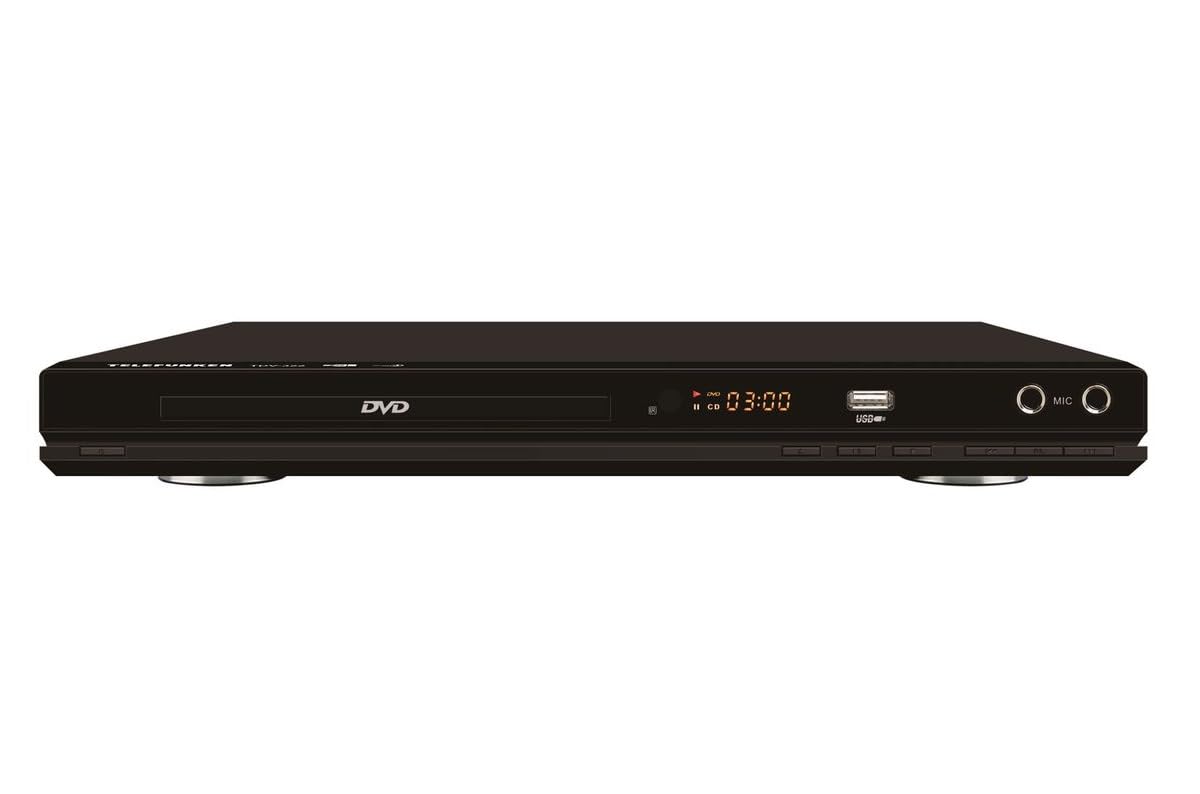
රූපය 1: ඉදිරිපස view of the Telefunken TDV-322 DVD Player. The image displays the black unit with a central disc tray, a digital time display, a USB port, and two microphone input jacks on the right side. Below the disc tray are several control buttons.
ප්රධාන ලක්ෂණ
- Full DVD player functionality for various disc types.
- පහසු ක්රියාකාරිත්වය සඳහා භාවිතයට පහසු දුරස්ථ පාලකය.
- Component video output for standard-definition television connections.
- Composite video output for older television models.
- Coaxial and optical digital audio outputs for surround sound system integration.
- Parental control features for content management.
- Compatibility with DVD, DVD-R, DVD-RW, VCD, SVCD, CD, CD-R, CD-RW, MP3, WMA, JPEG, and MPEG4 files.
සැකසුම් උපදෙස්
1. ඇසිරීම
Carefully remove the DVD player and all accessories from the packaging. Retain the packaging for future transport or storage.
2. රූපවාහිනියකට සම්බන්ධ වීම
The TDV-322 offers several video output options:
- සංරචක වීඩියෝ ප්රතිදානය: Use a component video cable (red, green, blue connectors) to connect the DVD player's component output jacks to the corresponding input jacks on your standard-definition TV.
- සංයුක්ත වීඩියෝ ප්රතිදානය: Use a composite video cable (yellow connector) to connect the DVD player's composite video output jack to the video input jack on an older TV.
Note: This DVD player does not feature an HDMI port. Ensure your television has compatible input ports.
3. ශ්රව්ය පද්ධතියකට සම්බන්ධ වීම
For enhanced audio, connect the DVD player to an external audio system:
- Coaxial Digital Audio Output: Use a coaxial digital audio cable to connect the DVD player's coaxial output to a compatible input on your surround sound receiver.
- ඔප්ටිකල් ඩිජිටල් ශ්රව්ය ප්රතිදානය: Use an optical digital audio cable to connect the DVD player's optical output to a compatible input on your surround sound receiver.
4. බල සම්බන්ධතාවය
Connect the power cord to the DVD player's power input and then plug it into a standard electrical outlet.
මෙහෙයුම් උපදෙස්
1. මූලික නැවත ධාවනය
- ඔබන්න බලය වාදකය ක්රියාත්මක කිරීමට ඉදිරිපස පුවරුවේ හෝ දුරස්ථ පාලකයේ බොත්තම.
- ඔබන්න විවෘත / වසා දමන්න තැටි තැටිය විවෘත කිරීමට බොත්තම.
- ලේබල පැත්ත ඉහළට යොමු වන පරිදි තැටියක් (DVD, CD, ආදිය) මෘදු ලෙස තැටි තැටිය මත තබන්න.
- ඔබන්න විවෘත / වසා දමන්න තැටිය වසා දැමීමට නැවත බොත්තම.
- The player will automatically begin playback or display a menu.
- භාවිතා කරන්න වාදනය / විරාමය, නවත්වන්න, ඉදිරියට, සහ ආපසු හරවන්න buttons on the remote control or front panel to manage playback.
2. දුරස්ථ පාලකය භාවිතා කිරීම
The included remote control provides full functionality for the DVD player. Refer to the remote control diagram (not provided in this manual) for specific button layouts. Ensure batteries are correctly inserted.
3. USB ප්ලේබැක්
Insert a USB flash drive into the USB port on the front panel. The player will detect the drive and allow you to browse and play compatible media files (MP3, WMA, JPEG, MPEG4).
4 මාපිය පාලන
The DVD player includes parental control features to restrict playback of certain content. Access these settings through the system menu using the remote control. A password may be required to enable or disable these features.
නඩත්තු කිරීම
- ඒකකය පිරිසිදු කිරීම: Wipe the exterior of the DVD player with a soft, dry cloth. Do not use liquid cleaners or abrasive materials.
- තැටි රැකවරණය: තැටි ඒවායේ දාරවලින් හසුරුවන්න. ඒවා පිරිසිදුව හා සීරීම් වලින් තොරව තබා ගන්න. තැටි මැද සිට පිටතට පිස දැමීමට මෘදු, ලින්ට් රහිත රෙද්දක් භාවිතා කරන්න.
- වාතාශ්රය: Ensure the DVD player has adequate ventilation. Do not block any ventilation openings.
- ගබඩා: When not in use for extended periods, disconnect the power cord and store the unit in a cool, dry place.
දෝෂගවේෂණය
| ගැටලුව | විය හැකි හේතුව | විසඳුම |
|---|---|---|
| බලය නැත | විදුලි රැහැන සම්බන්ධ කර නැත; විදුලි පිටවීම සක්රිය නොවේ. | විදුලි රැහැන ආරක්ෂිතව සම්බන්ධ කර ඇති බවට වග බලා ගන්න. වෙනත් උපාංගයක් සමඟ බල සැපයුම පරීක්ෂා කරන්න. |
| වීඩියෝ ප්රතිදානය නැත | Video cables incorrectly connected; Incorrect TV input selected. | Verify component or composite video cables are securely connected to the correct input on your TV. Select the correct input source on your TV. |
| ශ්රව්ය ප්රතිදානය නැත | Audio cables incorrectly connected; Incorrect audio input selected on receiver/TV; Volume too low. | Check coaxial/optical audio connections. Ensure the correct audio input is selected on your audio system or TV. Increase volume. |
| තැටිය වාදනය නොවේ | Disc is dirty or scratched; Disc is inserted incorrectly; Unsupported disc format. | Clean the disc. Reinsert the disc with the label side up. Verify the disc format is supported (DVD, CD, VCD, SVCD). |
| දුරස්ථ පාලකය ක්රියා නොකරයි | බැටරි ක්රියා විරහිත වී හෝ වැරදි ලෙස ඇතුළු කර ඇත; දුරස්ථ පාලකය සහ වාදකය අතර බාධාවක්. | Replace batteries. Ensure correct battery polarity. Remove any obstructions. Point remote directly at the player's sensor. |
පිරිවිතර
| විශේෂාංගය | විස්තර |
|---|---|
| ආදර්ශ අංකය | TDV-322 |
| වෙළඳ නාමය | ටෙලිෆන්කන් |
| වර්ණය | කළු |
| සහාය දක්වන තැටි ආකෘති | DVD, DVD-R, DVD-RW, VCD, SVCD, CD, CD-R, CD-RW |
| සහාය දුන්නා File ආකෘති | MP3, WMA, JPEG, MPEG4 (via USB) |
| වීඩියෝ නිමැවුම් | සංරචක වීඩියෝ, සංයුක්ත වීඩියෝ |
| ශ්රව්ය ප්රතිදාන | Coaxial Digital Audio, Optical Digital Audio |
| අතිරේක වරායන් | USB port, Microphone inputs |
වගකීම් තොරතුරු
The Telefunken TDV-322 DVD Player comes with a වසර 1ක නිෂ්පාදක වගකීම. Please retain your proof of purchase for warranty claims. For details regarding warranty terms and conditions, refer to the warranty card included with your product or contact Telefunken customer support.
පාරිභෝගික සහාය
If you encounter any issues not covered in the troubleshooting section or require further assistance, please contact Telefunken customer support. Contact information can typically be found on the product packaging, the official Telefunken webවෙබ් අඩවිය, හෝ වගකීම් ලියකියවිලි.
When contacting support, please have your model number (TDV-322) and purchase details ready.


