පරිශීලක අත්පොත
AXIS M5000-G 5 Megapixel Network Camera
Model: M5000-G | Brand: AXIS
1. හැඳින්වීම
This manual provides comprehensive instructions for the installation, operation, and maintenance of the AXIS M5000-G 5 Megapixel Network Camera. Please read this manual thoroughly before using the product to ensure proper functionality and safety.
The AXIS M5000-G is a high-performance network camera designed for surveillance applications, offering 5-megapixel resolution and PTZ capabilities for enhanced monitoring.
2 ආරක්ෂිත තොරතුරු
නිෂ්පාදනයට හානි වීම හෝ ඔබටම තුවාල වීම වැළැක්වීම සඳහා පහත සඳහන් ආරක්ෂක පියවරයන් නිරීක්ෂණය කරන්න:
- Ensure the power source matches the camera's requirements.
- කැමරාව අධික උෂ්ණත්වයකට හෝ ආර්ද්රතාවයකට නිරාවරණය නොකරන්න.
- රූප සංවේදකයට හානි විය හැකි බැවින්, ප්රබල ආලෝක ප්රභවයන්ට සෘජුවම නිරාවරණය වීමෙන් වළකින්න.
- දේශීය විදුලි කේතයන්ට අනුකූලව සුදුසුකම් ලත් පුද්ගලයින් විසින් ස්ථාපනය සිදු කළ යුතුය.
- පිරිසිදු කිරීමට හෝ සේවය කිරීමට පෙර විදුලිය විසන්ධි කරන්න.
3. පැකේජ අන්තර්ගතය
සියලුම අයිතම පැකේජයේ ඇති බව තහවුරු කරගන්න:
- AXIS M5000-G Network Camera Unit
- සවි කිරීමේ කට්ටලය (ඉස්කුරුප්පු, නැංගුරම්)
- Installation Guide (Quick Start)
- බල ඇඩැප්ටරය (ඇතුළත් කර ඇත්නම්)
Note: Specific components may vary based on region or package version.
4. නිෂ්පාදන අවසන්view
The AXIS M5000-G is a dome-style network camera designed for discreet and effective surveillance. It features a robust housing suitable for outdoor use and a PTZ (Pan-Tilt-Zoom) mechanism for flexible viewing කෝණ.

රූපය 4.1: ඉදිරිපස view of the AXIS M5000-G Network Camera. This image shows the camera's dome shape, with the lens visible through the dark transparent cover. The main body is white.
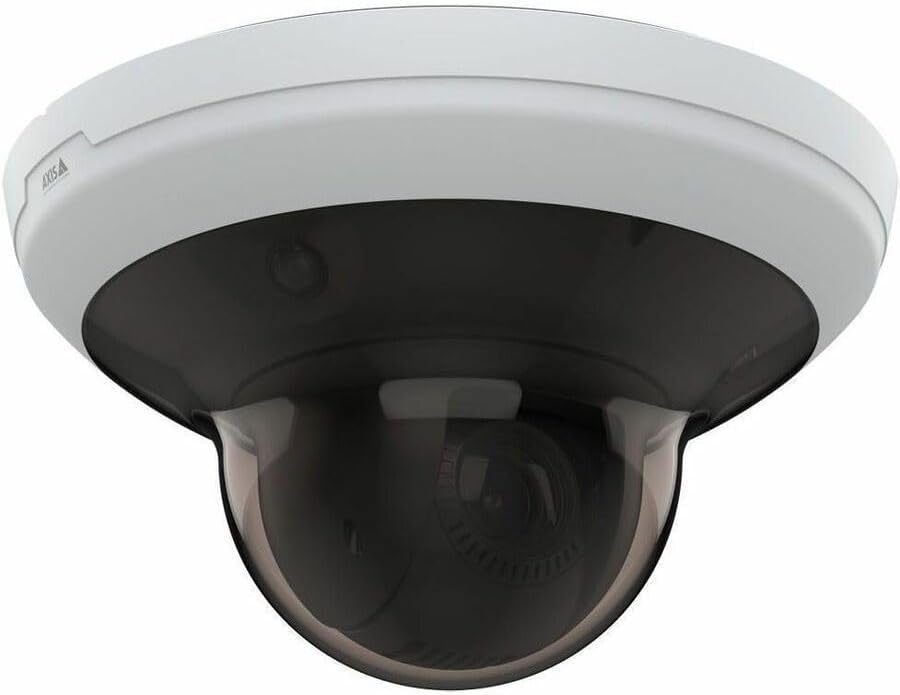
රූපය 4.2: කෝණික view of the AXIS M5000-G Network Camera. This perspective highlights the camera's compact design and the subtle AXIS logo on the side of the white base.

රූපය 4.3: තවත් කෝණික view of the AXIS M5000-G Network Camera. Similar to Figure 4.2, this image provides a slightly different angle, emphasizing the smooth contours of the camera's housing.
5. පිහිටුවීම සහ ස්ථාපනය
The AXIS M5000-G is designed for wall mount installation and requires a wired connection for network and power.
5.1 කැමරාව සවි කිරීම
- ස්ථානයක් තෝරන්න: Select an outdoor location that provides the desired field of view and is within reach of a power source and network connection. Ensure the mounting surface is sturdy enough to support the camera's weight (approximately 5.7 pounds).
- විදුම් ලකුණු සලකුණු කරන්න: Use the provided mounting template (if applicable) or the camera base to mark the drilling points on the wall.
- සිදුරු සිදුරු: Drill pilot holes at the marked points. Insert wall anchors if necessary.
- පදනම සුරක්ෂිත කරන්න: Attach the camera's mounting base to the wall using the provided screws.
- Attach Camera Unit: Secure the main camera unit to the mounted base, ensuring it clicks into place or is fastened according to the quick start guide.
5.2 බලය සහ ජාලය සම්බන්ධ කිරීම
- බල සම්බන්ධතාවය: Connect the provided power adapter to the camera's power input and then to a suitable electrical outlet. The camera operates on corded electric power.
- ජාල සම්බන්ධතාවය: Connect an Ethernet cable from your network router or switch to the camera's network port. The camera uses wired connectivity technology.
- මූලික ආරම්භය: Allow the camera a few minutes to power on and establish a network connection.
6. කැමරාව ක්රියාත්මක කිරීම
The AXIS M5000-G camera is controlled primarily through a dedicated application or network video recorder (NVR) software.
6.1 මූලික වින්යාසය
- කැමරාව සොයා ගන්න: Use the AXIS IP Utility or your network's device discovery tools to find the camera's IP address on your network.
- ප්රවේශය Web අතුරු මුහුණත: a විවෘත කරන්න web browser and enter the camera's IP address to access its web අතුරු මුහුණත.
- ඇතුල් වන්න: Enter the default username and password (refer to the quick start guide or manufacturer's documentation for default credentials). Change default credentials immediately for security.
- ජාල සැකසීම්: Configure network settings (e.g., static IP, DHCP) as required by your network environment.
- දිනය සහ වේලාව: Set the correct date and time for accurate video timestamps.
6.2 සජීවී View සහ PTZ පාලනය
- සජීවීව View: Access the live video feed through the web interface or a compatible surveillance application. The camera provides 1080p video capture resolution and 5 MP effective still resolution.
- පෑන්, ඇලවීම, විශාලනය (PTZ): Utilize the PTZ controls within the application to adjust the camera's viewing angle and zoom level. This feature allows for dynamic monitoring of large areas.
- පෙර සැකසූ තනතුරු: Configure and save specific PTZ positions for quick navigation to frequently monitored areas.
6.3 චලන අනාවරණය සහ ඇඟවීම්
- චලනය පමණක් ඇඟවීම් වර්ගය: කැමරාවේ අතුරුමුහුණත තුළ චලන හඳුනාගැනීමේ කලාප සහ සංවේදීතා සැකසුම් වින්යාස කරන්න.
- Alert Actions: Set up actions to be triggered upon motion detection, such as recording video, sending email notifications, or uploading images to an FTP server.
7. නඩත්තු කිරීම
Regular maintenance ensures optimal performance and longevity of your AXIS M5000-G camera.
- කාච පිරිසිදු කිරීම: Gently wipe the camera lens and dome cover with a soft, clean, lint-free cloth. For stubborn dirt, use a mild lens cleaning solution applied to the cloth, not directly to the lens.
- ස්ථිරාංග යාවත්කාලීන කිරීම්: Periodically check the AXIS website for firmware updates. Keeping the firmware updated ensures access to the latest features and security patches.
- කේබල් පරීක්ෂාව: Regularly inspect all cables (power and network) for any signs of wear, damage, or corrosion, especially in outdoor installations.
- පාරිසරික පරීක්ෂණ: Ensure the camera's environment remains within its specified operating temperature and humidity ranges.
8. දෝශ නිරාකරණය
This section addresses common issues you might encounter with the AXIS M5000-G camera.
| ගැටලුව | විය හැකි හේතුව | විසඳුම |
|---|---|---|
| වීඩියෝ සංග්රහයක් නැත | Power disconnected, network issue, incorrect IP address. | Check power connection. Verify network cable is securely connected. Confirm camera's IP address and network settings. Restart camera. |
| රූපයේ ගුණාත්මකභාවය දුර්වලයි | Dirty lens, low light, incorrect resolution settings. | Clean the lens. Ensure adequate lighting. Adjust video resolution settings in the camera's web අතුරු මුහුණත. |
| PTZ පාලන ප්රතිචාර නොදක්වයි | Network latency, software issue, camera malfunction. | Check network connection stability. Restart the camera and the control application. If issue persists, contact support. |
| චලන හඳුනාගැනීම ක්රියා නොකරයි | Incorrect sensitivity settings, detection zones not configured. | Review and adjust motion detection sensitivity. Ensure detection zones are properly defined in the camera's settings. |
9. පිරිවිතර
| විශේෂාංගය | විස්තර |
|---|---|
| මාදිලියේ නම | M5000-G Network Camera |
| වෙළඳ නාමය | AXIS |
| ගෘහස්ථ / එළිමහන් භාවිතය | එළිමහන් |
| බලශක්ති ප්රභවය | රැහැන්ගත විදුලි |
| සම්බන්ධතා තාක්ෂණය | රැහැන්ගත |
| වීඩියෝ ග්රහණ විභේදනය | 1080p |
| ඵලදායී නිශ්චල විභේදනය | 5 MP |
| සවිකිරීමේ වර්ගය | වෝල් මවුන්ට් |
| ඇඟවීම් වර්ගය | චලනය පමණි |
| අයිතම මානයන් (L x W x H) | අඟල් 11.9 x 12 x 8.4 |
| අයිතමයේ බර | රාත්තල් 5.7 කි |
| නිෂ්පාදකයා | AXIS COMMUNICATION INC |
10. වගකීම් සහ සහාය
For warranty information, please refer to the documentation included with your purchase or visit the official AXIS website. AXIS provides support resources, including FAQs, troubleshooting guides, and contact information for technical assistance.
You can typically find more information and support on the AXIS Store on Amazon හෝ නිෂ්පාදකයාගේ නිලධාරියා webඅඩවිය.


