1. හැඳින්වීම
The Geloo Digital GPS Speedometer G17 is a universal Head-Up Display (HUD) designed to provide essential driving information directly in your line of sight. Utilizing advanced GPS+Beidou dual-mode chips, it offers accurate and real-time data such as speed, compass direction, driving time, and altitude. This device is compatible with all vehicle types, including cars, trucks, buses, and motorcycles, and features a high-definition LED display with automatic brightness adjustment for optimal visibility in various lighting conditions.
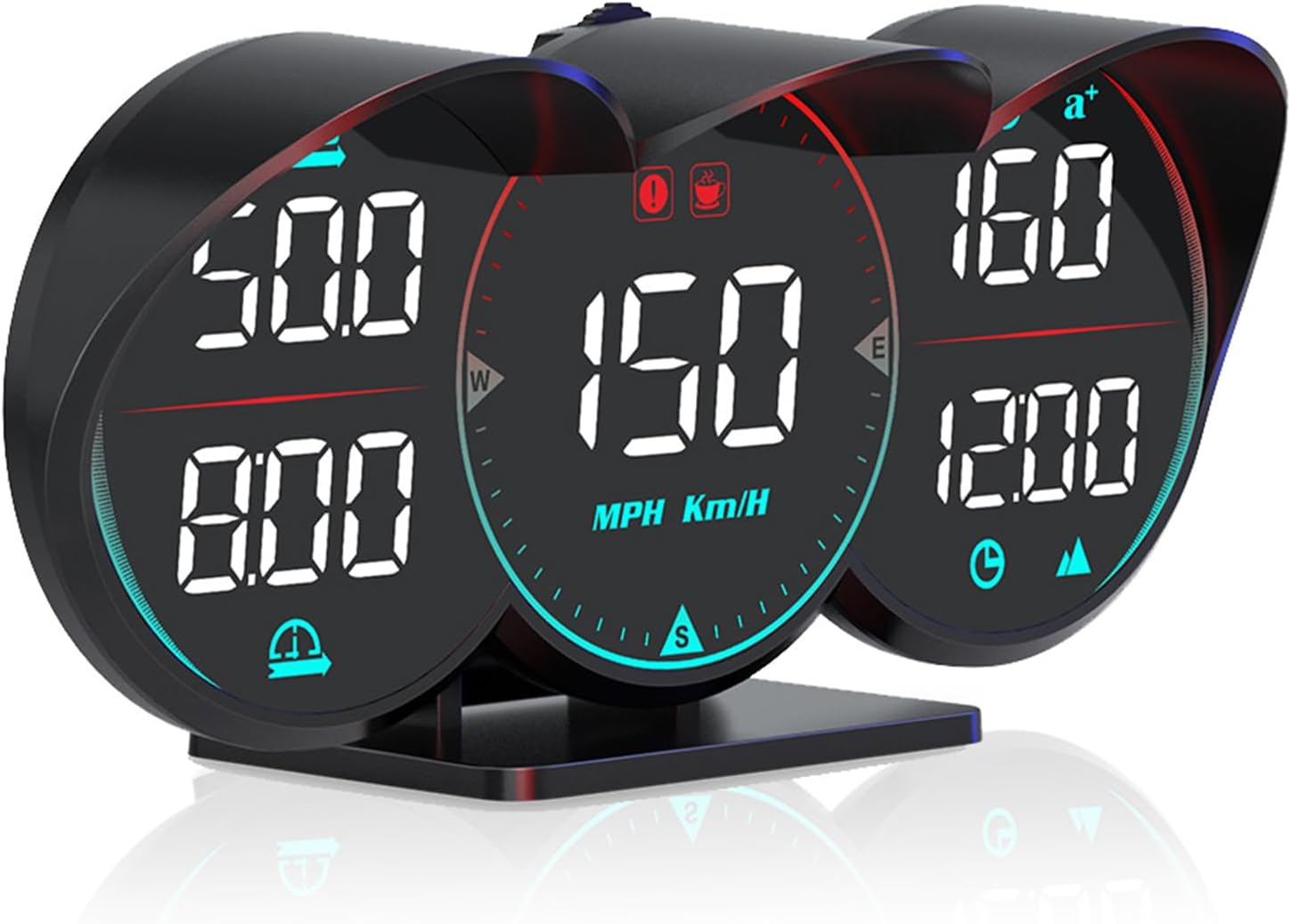
Figure 1.1: Geloo Digital GPS Speedometer G17. This image shows the front view of the G17 HUD with its three distinct display sections, showing speed, driving time, and other metrics.
2. නිෂ්පාදන ලක්ෂණ
- High Technology Processing Chips: Equipped with GPS+Beidou dual-mode chips for powerful performance, dual-running memory, and dual-core processor ensuring smooth, high-speed operation and reduced data delay.
- බහු-ක්රියාකාරී සංදර්ශකය: Displays speed (KM/H, MPH), compass, driving time/altitude, overspeed alarm, number of satellites, fatigue driving alarm, travel angle, 100km acceleration time, and decorative atmosphere light.
- විශ්ව අනුකූලතාව: Compatible with all vehicles including trucks, golf carts, buses, bicycles, and motorbikes.
- අධි-විභේදන LED සංදර්ශකය: Large HD screen with clear fonts and automatic photosensitive adjustment for optimal brightness in any light condition.
- විනාශකාරී නොවන ස්ථාපනය: Simple plug-and-play setup via USB cable.
- සකස් කළ හැකි වරහන: Features a 360° split bracket allowing adjustment of visual angle and height for varied installation methods.

Figure 2.1: Universal Compatibility. This image illustrates the broad compatibility of the Geloo G17 HUD with various vehicle types, including trucks, buses, new energy vehicles, and gas-electric hybrid vehicles, highlighting its USB (5V) power requirement.

Figure 2.2: Clear Display. This image demonstrates the high-definition display of the Geloo G17, emphasizing that it does not produce ghosting or require a film, and can be positioned at any angle without obstructing the driver's view.
3. පැකේජ අන්තර්ගතය
පැකේජය විවෘත කිරීමෙන් පසු, පහත සඳහන් සියලු අයිතම ඇතුළත් කර ඇති බවට වග බලා ගන්න:
- 1x Geloo G17 HUD with Rotating Bracket
- 1x මයික්රෝ USB කේබලය
- 1x Non-slip Mat
- 1x උපදෙස් අත්පොත
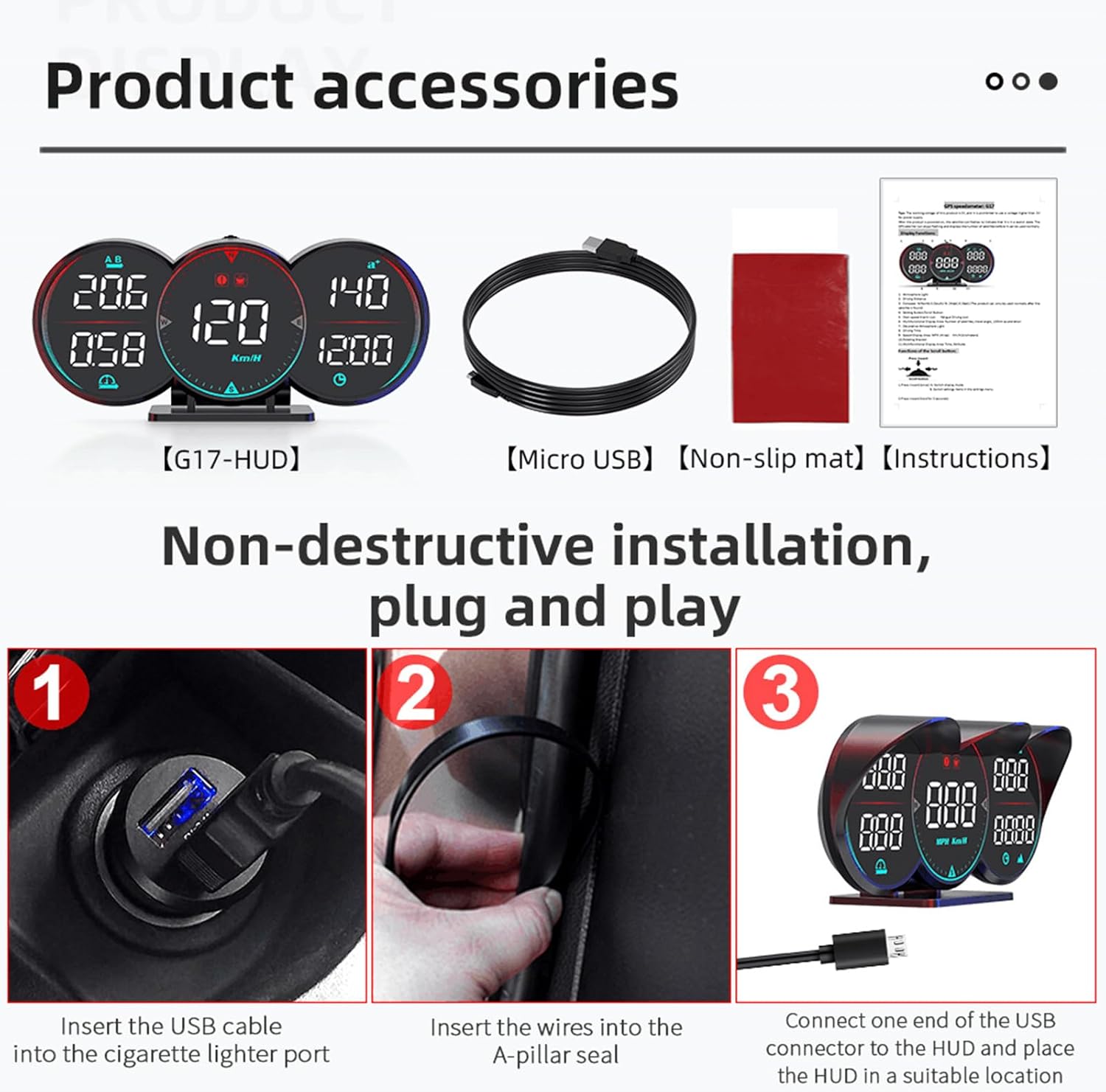
Figure 3.1: Product Accessories. This image displays the complete set of items included in the Geloo G17 package: the G17 HUD unit, a Micro USB cable, a non-slip mat, and the instruction manual.
4. පිහිටුවීම සහ ස්ථාපනය
The Geloo G17 HUD is designed for non-destructive, plug-and-play installation. Follow these steps to set up your device:
- ස්ථාපන ස්ථානය තෝරන්න: The G17 can be placed on the dashboard or hung on the windshield using its adjustable bracket. The 360° split bracket allows for flexible positioning to achieve the optimal visual angle and height.
- සම්බන්ධක බලය: Insert the USB cable into your vehicle's cigarette lighter port or any available USB power source (ensure it provides 5V).
- HUD වෙත සම්බන්ධ වන්න: Connect the other end of the Micro USB cable to the HUD unit.
- Secure the HUD: Place the HUD in your desired location, utilizing the non-slip mat to prevent movement. If routing the cable, gently insert wires into the A-pillar seal for a tidy installation.
- මූලික බල-සක්රිය: Once powered on, the satellite icon on the display will flash, indicating it is searching for GPS signals. The device is ready for normal use when the satellite icon stops flashing and displays the number of acquired satellites.

Figure 4.1: 360° Split Bracket and Installation Options. This image illustrates the adjustable nature of the G17's bracket, allowing it to be rotated for optimal viewing. It also shows two primary installation methods: hanging on the windshield and placing on the dashboard.

Figure 4.2: Non-Destructive Installation Steps. This image provides a visual guide to the installation process: 1) Inserting the USB cable into the cigarette lighter port, 2) Inserting wires into the A-pillar seal for cable management, and 3) Connecting the USB to the HUD and placing it in position.
5. මෙහෙයුම් උපදෙස්
The Geloo G17 HUD provides a variety of driving data. Familiarize yourself with the display functions and settings:
5.1 සංදර්ශක කාර්යයන්
The G17 features three main display sections, each showing different metrics:
- වේගය: Displays current speed in MPH or KM/H.
- මාලිමාව: Indicates driving direction (N, S, E, W).
- රිය පැදවීමේ වේලාව: Shows the duration of your current trip.
- Driving Distance: Displays the total distance traveled.
- උන්නතාංශය: Shows the current altitude based on satellite acquisition.
- ත්වරණ කාලය: Measures the time taken to accelerate from 0 to 100 km/h.
- ඔරලෝසුව: Satellite-synchronized clock, unaffected by natural factors.
- චන්ද්රිකා ගණන: Indicates the strength and accuracy of the GPS signal.
- අනතුරු ඇඟවීම්: Includes overspeed alarm and fatigue driving alarm.
- Decorative Lights: Ambient lighting for visual enhancement.
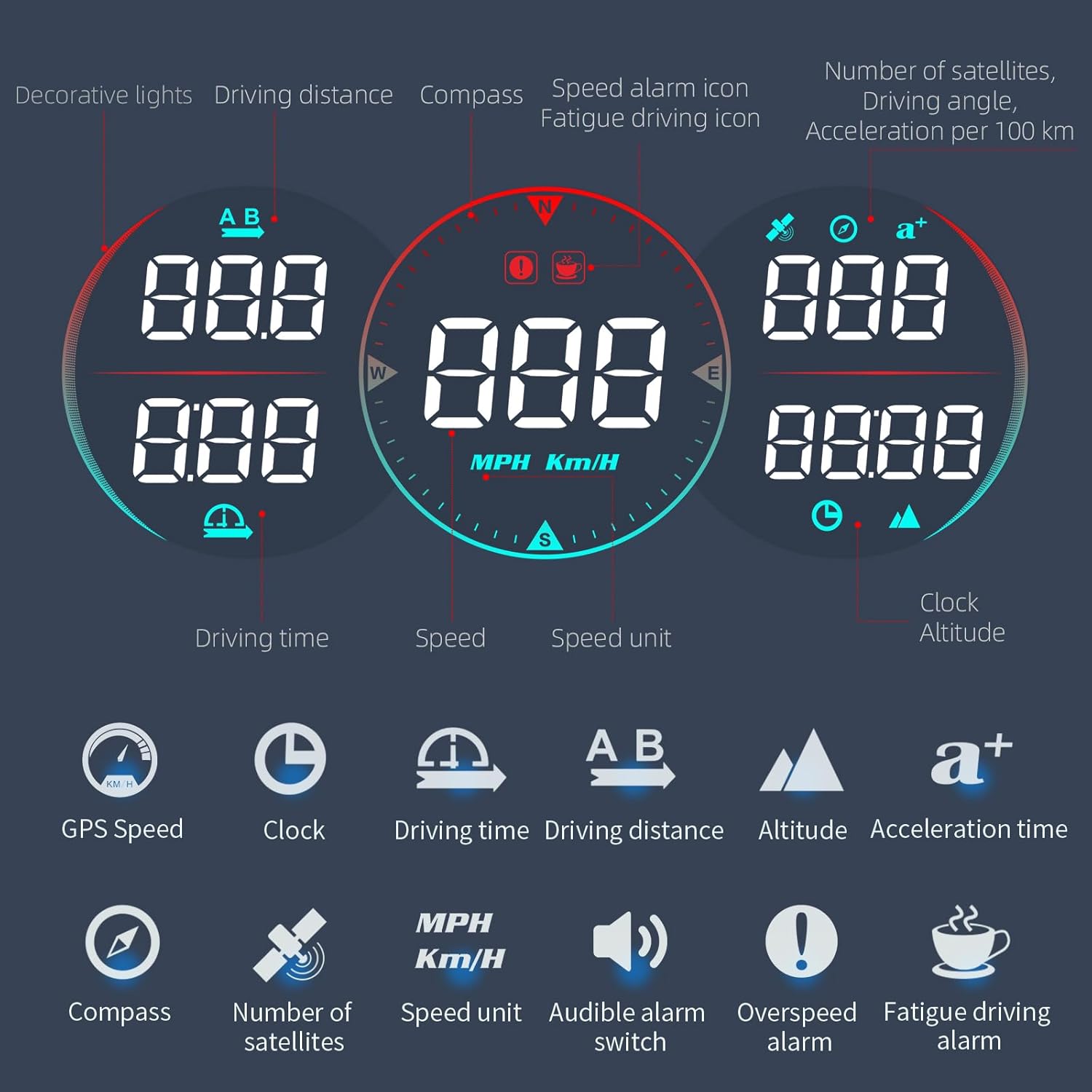
Figure 5.1: Multi-functional Display Overview. This diagram labels the various indicators and data points shown on the Geloo G17's three LCD displays, including speed, compass, driving time, altitude, and alarm icons.

Figure 5.2: Geloo G17 in Vehicle. This image demonstrates the Geloo G17 HUD installed on a vehicle's dashboard, showing its clear visibility and integration into the driving environment during both daytime and nighttime conditions.
5.2 සැකසීම් සහ ගැලපීම්
The G17 typically features buttons or a scroll wheel on the unit for navigating menus and adjusting settings. Refer to the included printed instruction manual for detailed steps on:
- Switching between MPH and KM/H.
- Setting overspeed alarm thresholds.
- Adjusting display brightness (though automatic adjustment is standard).
- Resetting driving time and distance.
6. නඩත්තු කිරීම
To ensure the longevity and optimal performance of your Geloo G17 HUD, follow these simple maintenance guidelines:
- පිරිසිදු කිරීම: Use a soft, dry cloth to wipe the display and exterior. Avoid abrasive cleaners or solvents that could damage the surface.
- ගබඩා: If storing the device for an extended period, disconnect it from power and keep it in a cool, dry place away from direct sunlight and extreme temperatures.
- කේබල් රැකවරණය: Ensure the USB cable is not kinked or pinched, as this can damage the wiring.
7. දෝශ නිරාකරණය
If you encounter issues with your Geloo G17 HUD, please refer to the following common troubleshooting steps:
| ගැටලුව | විය හැකි හේතුව | විසඳුම |
|---|---|---|
| සංදර්ශකය සක්රිය නොවේ. | No power supply; faulty USB cable; vehicle's cigarette lighter port is off. | Check USB cable connection. Ensure the vehicle's power outlet is active. Try a different USB port or cable. |
| No speed reading or inaccurate speed. | Poor GPS signal; device not acquiring satellites. | උපාංගයේ පැහැදිලි බව සහතික කර ගන්න view of the sky. Wait for the satellite icon to stop flashing and display the number of satellites. Move to an open area if indoors or in a covered parking. |
| Display shows "---" or "0" for certain values. | No data received for that function (e.g., no movement for speed, no satellite lock for altitude). | Ensure the vehicle is moving for speed readings. Verify GPS signal acquisition for location-based data. |
| Screen brightness is too dim or too bright. | Automatic photosensitive adjustment is not optimal for current conditions. | The device has an automatic light sensing system. If manual adjustment is needed, refer to the detailed instructions in the physical manual for button functions. |
If the problem persists after attempting these solutions, please contact Geloo customer support for further assistance.
8. පිරිවිතර
| ගුණාංගය | වටිනාකම |
|---|---|
| නිෂ්පාදන මාදිලි අංකය | G17 |
| නිෂ්පාදන මානයන් (L x W x H) | අඟල් 6.5 x 3.03 x 2.48 |
| අයිතමයේ බර | 7 ounces (7.04 ounces listed in flat specs) |
| ද්රව්ය | ප්ලාස්ටික් |
| දෘශ්ය තිර විකර්ණ | 5" / 12 සෙ.මී. |
| බල ආදානය | USB (5V) |
| නිෂ්පාදකයා | ගෙලූ |
| පළමු දිනය තිබේ | නොවැම්බර් 6, 2023 |

Figure 8.1: Product Dimensions and Key Features. This image provides a detailed view of the Geloo G17, including its dimensions (145mm/5.73in width, 69mm/2.73in height) and highlights features such as the LED display, 30mm deep brim, rotatable bracket, wave wheel buttons, photosensitive element, and USB interface.
9. වගකීම් සහ සහාය
Geloo provides a අලෙවියෙන් පසු මාස 12 සේවාව for the G17 GPS Speedometer. Each unit undergoes strict quality inspection before leaving the factory to ensure reliability.
For any questions or concerns regarding the product, please contact Geloo customer support. You can typically find contact information on the official Geloo webඅඩවිය හෝ ඔබේ මිලදී ගැනීමේ වේදිකාව හරහා.


