1. හැඳින්වීම
This manual provides essential information for the safe and efficient operation of your EPEVER Tracer6415AN MPPT Solar Charge Controller. The Tracer-AN series is designed for advanced solar power systems, offering high efficiency and comprehensive protection features. This 60A model supports various battery voltages and can manage up to 3000W of solar panel input for 48V systems.
ප්රධාන ලක්ෂණ:
- Advanced Maximum Power Point Tracking (MPPT) technology with tracking efficiency ≥99.5%.
- High conversion efficiency >98.6%.
- Automatic detection for 12V/24V/36V/48V battery systems.
- Support for Sealed, Gel, AGM, Flooded, and Lithium battery types.
- Real-time energy statistics and LCD display for operational data.
- බහු බර පාලන ක්රම.
- Comprehensive electronic protection against overcharge, over-discharge, overload, short circuit, reverse polarity, and overheating.
- Negative ground design.
2. ආරක්ෂිත උපදෙස්
Please read all instructions carefully before installation and operation. Failure to follow these instructions may result in serious injury, damage to the controller, or damage to other components of the system.
- සියලුම රැහැන් නිවැරදිව ධ්රැවීකරණය වී ආරක්ෂිතව සම්බන්ධ වී ඇති බවට සහතික වන්න.
- Do not attempt to repair or modify the controller. Refer to qualified service personnel.
- දැවෙන සුළු ද්රව්ය වලින් ඈත්ව, හොඳින් වාතාශ්රය ඇති ප්රදේශයක පාලකය ස්ථාපනය කරන්න.
- Disconnect all power sources (solar panel and battery) before installing or servicing the controller.
- සියලුම සම්බන්ධතා සඳහා සුදුසු පරිපථ කඩන යන්ත්ර හෝ ෆියුස් භාවිතා කරන්න.
- බැටරි සමඟ වැඩ කරන විට අක්ෂි ආරක්ෂණ පළඳින්න.
- බැටරි බැංකුවේ පරිමාව සහතික කරන්නtage පාලකයේ මෙහෙයුම් පරාසය තුළ පවතී.
3. නිෂ්පාදන සංරචක සහ විශේෂාංග
Familiarize yourself with the various parts and connections of the Tracer6415AN controller.

රූපය 3.1: ඉදිරිපස සහ පැත්ත View of the Tracer6415AN Controller with Labeled Components.
This image displays the EPEVER Tracer6415AN MPPT Solar Charge Controller, highlighting its key features and connection points. The left panel shows the front view with the LCD display and control buttons. The right panel provides a detailed perspective of the connection terminals and ports, including PV terminals, battery terminals, load control relay, RS485 port, RTS port, and grounding terminal. The image also points out the fuse, generator relay ON/OFF, and PV reverse polarity alarm indicator.
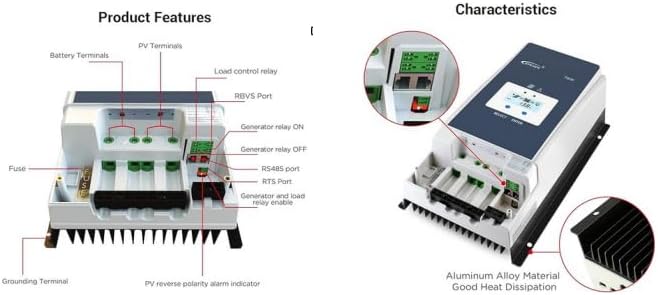
රූපය 3.2: Product Features and Characteristics Overview.
This image provides a visual breakdown of the Tracer6415AN's external features and internal characteristics. The left side details the various terminals and ports: Battery Terminals, PV Terminals, Load control relay, RBVS Port, Generator relay ON/OFF, RS485 port, RTS Port, Generator and load relay enable, Fuse, Grounding Terminal, and PV reverse polarity alarm indicator. The right side illustrates the overall characteristics, emphasizing the aluminum alloy material for good heat dissipation and showing the LCD display interface.
සංරචක හඳුනාගැනීම:
- ආරෝපණ LED දර්ශකය
- තෝරන්න බොත්තම
- ෆියුස්
- බිම් පර්යන්තය
- දෝෂ LED දර්ශකය
- LCD
- ENTER බොත්තම
- RBVS Port
- Utility/Generator relay ON
- RS485 port (5V/DC200mA)
- RTS වරාය
- Generator and load relay enable
- PV reverse polarity alarm indicator
- Load control relay
- Utility/Generator relay OFF
- PV පර්යන්ත
- බැටරි පර්යන්ත
4 ස්ථාපනය සහ රැහැන්ගත කිරීම
ඔබේ සූර්ය ආරෝපණ පාලකයේ ආරක්ෂිත සහ කාර්යක්ෂම ක්රියාකාරිත්වය සඳහා නිසි ස්ථාපනය ඉතා වැදගත් වේ. මෙම පියවර ප්රවේශමෙන් අනුගමනය කරන්න.
4.1 පාලකය සවි කිරීම
- Choose a suitable mounting location that is dry, well-ventilated, and protected from direct sunlight and moisture.
- Ensure there is sufficient clearance around the controller for proper heat dissipation.
- සුදුසු ගාංචු භාවිතයෙන් ගිනි නොගන්නා මතුපිටක් මත පාලකය සිරස් අතට සවි කරන්න.
4.2 රැහැන් සටහන
The following diagram illustrates a typical wiring setup for the Tracer6415AN controller in a solar power system.
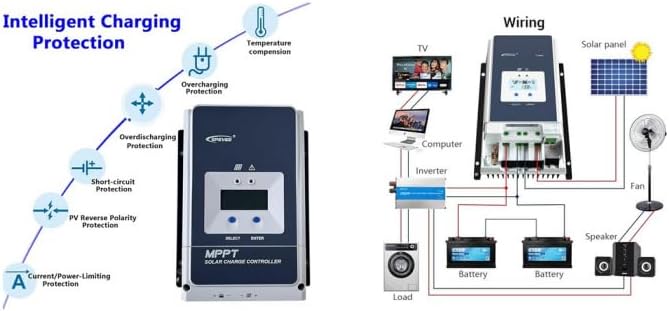
රූපය 4.1: Typical Wiring Diagram for a Solar System with Tracer6415AN.
This image presents a comprehensive wiring diagram for integrating the EPEVER Tracer6415AN MPPT Solar Charge Controller into a solar power system. It shows connections from the solar panel to the controller, from the controller to the battery bank (two batteries shown), and from the battery bank to an inverter, which then powers various AC loads like a TV, computer, and washing machine. Additionally, DC loads such as a fan and speaker are shown connected directly to the controller's load terminals. The left side of the image also illustrates the controller's intelligent charging protection features, including temperature compensation, overcharging protection, over-discharging protection, short-circuit protection, PV reverse polarity protection, and current/power-limiting protection.
4.3 සම්බන්ධතා අනුපිළිවෙල
Follow this sequence to connect the components to the controller:
- බැටරිය සම්බන්ධ කරන්න: Connect the battery to the controller's battery terminals. Ensure correct polarity. The controller will automatically detect the battery voltagඊ (12V/24V/36V/48V).
- සූර්ය පැනලය සම්බන්ධ කරන්න: පාලකයේ PV පර්යන්තවලට සූර්ය පැනලය සම්බන්ධ කරන්න. නිවැරදි ධ්රැවීයතාව සහතික කර ගන්න.
- පැටවීම සම්බන්ධ කරන්න (විකල්ප): Connect DC loads to the controller's load terminals. Ensure correct polarity.
- භූගත කිරීම: Connect the grounding terminal to an earth ground.
අවවාදයයි: Always connect the battery first and disconnect the battery last. Incorrect connection order may damage the controller.
5. මෙහෙයුම් උපදෙස්
The Tracer6415AN features an LCD display and control buttons for monitoring and configuration.
5.1 LCD ඩිස්ප්ලේ
The LCD displays real-time operating data, including battery voltage, PV වෙළුමtage, charging current, load current, and system status. Use the "SELECT" and "ENTER" buttons to navigate through the display menus and adjust settings.
5.2 බැටරි වර්ගය තේරීම
The controller supports various battery types. You can select the appropriate battery type (Sealed, Gel, AGM, Flooded, Lithium, or User-defined) through the controller's menu. For 36V systems, the battery type needs to be adjusted manually.
5.3 පැටවුම් පාලන ක්රම
The controller offers multiple load control modes, allowing you to manage when your DC loads receive power. Refer to the detailed manual for specific programming instructions for each mode.
6. ආරක්ෂණ විශේෂාංග
The Tracer6415AN is equipped with comprehensive electronic protection functions to ensure system safety and longevity.
- PV Over Current Protection: Prevents damage from excessive current from the solar array.
- PV Short Circuit Protection: Protects against short circuits in the solar array.
- PV Reverse Polarity Protection: Prevents damage if solar panel polarity is reversed.
- Battery Overcharge Protection: Stops charging when the battery reaches its full charge voltage.
- Battery Over-discharge Protection: Disconnects the load when the battery voltage drops too low, preventing deep discharge.
- බැටරි ප්රතිලෝම ධ්රැවීයතා ආරක්ෂණය: වැරදි බැටරි සම්බන්ධතාවයෙන් ආරක්ෂා කරයි.
- Load Overload Protection: Disconnects the load if current exceeds the rated value.
- Load Short Circuit Protection: Protects against short circuits in the load circuit.
- Controller Overheating Protection: Reduces charging current or disconnects if the controller temperature becomes too high.
7. පිරිවිතර
| පරාමිතිය | වටිනාකම |
|---|---|
| පද්ධති නාමික වෙළුමtage | 12V/24V/36V/48V Auto Work |
| ශ්රේණිගත ගාස්තු ධාරාව | 60A |
| උපරිම PV ආදාන වෙළුමtage | 150V |
| MPPT ලුහුබැඳීමේ කාර්යක්ෂමතාව | ≥99.5% |
| පරිවර්තන කාර්යක්ෂමතාව | >98.6% |
| උපරිම PV ආදාන බලය (12V) | 750W |
| උපරිම PV ආදාන බලය (24V) | 1500W |
| උපරිම PV ආදාන බලය (36V) | 2250W |
| උපරිම PV ආදාන බලය (48V) | 3000W |
| බැටරි වර්ග සහය දක්වයි | Sealed, Gel, AGM, Flooded, Lithium, User-defined |
| භූගත කිරීම | Gණාත්මක භූමිය |
8. නඩත්තු කිරීම
Regular maintenance ensures optimal performance and extends the lifespan of your charge controller.
- සම්බන්ධතා පරීක්ෂා කරන්න: තද බව සහ විඛාදනය සඳහා සියලුම රැහැන් සම්බන්ධතා වරින් වර පරීක්ෂා කරන්න.
- පාලකය පිරිසිදු කරන්න: පාලකය පිරිසිදුව හා දූවිලි හා සුන්බුන් වලින් තොරව තබා ගන්න. වාතාශ්රය විවරයන් අවහිර නොවන බවට වග බලා ගන්න.
- හානිය සඳහා පරීක්ෂා කරන්න: c එකට කිසියම් භෞතික හානියක් සිදුවී ඇත්දැයි පරීක්ෂා කරන්න.asing, කේබල්, හෝ පර්යන්ත.
- කාර්ය සාධනය නිරීක්ෂණය කරන්න: Regularly check the LCD display for normal operation and any error codes.
9. දෝශ නිරාකරණය
මෙම කොටසින් ඔබට මුහුණ දීමට සිදුවිය හැකි පොදු ගැටළු සඳහා විසඳුම් සපයයි.
| ගැටලුව | විය හැකි හේතුව | විසඳුම |
|---|---|---|
| LCD මත සංදර්ශකයක් නොමැත | බැටරිය සම්බන්ධ වී නැත හෝ අඩු වෝල්ටීයතාවයක් ඇතtage; ප්රතිලෝම ධ්රැවීයතාව. | බැටරි සම්බන්ධතා සහ පරිමාව පරීක්ෂා කරන්නtage. නිවැරදි ධ්රැවීයතාව සහතික කරන්න. |
| ආරෝපණ ධාරාවක් නොමැත | PV panels not connected; low sunlight; PV reverse polarity; PV short circuit. | Check PV connections and polarity. Verify sunlight conditions. Inspect PV wiring for shorts. |
| පූරණය ක්රියා නොකරයි | Load disconnected; overload; short circuit; battery low voltage. | Check load connections. Reduce load. Inspect load wiring for shorts. Charge battery. |
| පාලකය උනුසුම් වීම | Poor ventilation; excessive ambient temperature; prolonged high current. | Ensure adequate ventilation. Relocate controller if ambient temperature is too high. Reduce load or PV input if possible. |
10. නිෂ්පාදන වීඩියෝ
අමතර මග පෙන්වීම් සහ දෘශ්ය නිරූපණයන් සඳහා මෙම නිල නිෂ්පාදන වීඩියෝ නරඹන්න.
10.1 EPEVER Tracer-AN Series Overview (1:08)
මෙම වීඩියෝව සංක්ෂිප්ත විස්තරයක් සපයයිview of the EPEVER Tracer-AN series MPPT solar charge controllers, highlighting their main features, design, and applications. It offers a quick visual introduction to the product line.
10.2 EPEVER Tracer-AN Series Detailed Explanation (3:40)
This video offers a more detailed explanation of the EPEVER Tracer-AN series, delving deeper into its functionalities, advanced MPPT technology, and various protection mechanisms. It may include demonstrations of the LCD interface and settings.
11. වගකීම් සහ සහාය
EPEVER products are designed for reliability and performance. For warranty information, technical support, or service inquiries, please refer to the official EPEVER webඅඩවියට හෝ ඔබේ බලයලත් අලෙවිකරු අමතන්න.
වගකීම් හිමිකම් සඳහා මිලදී ගැනීමේ සාක්ෂියක් ලෙස ඔබේ මිලදී ගැනීමේ රිසිට්පත තබා ගන්න.


