1. හැඳින්වීම
Thank you for choosing the CrossBeats Spark Bluetooth In-Earbuds. This manual provides essential information for setting up, operating, maintaining, and troubleshooting your new wireless earphones. Please read it carefully to ensure optimal performance and longevity of your device.

Image 1.1: CrossBeats Spark In-Earbuds and Charging Case.
2. පැකේජ අන්තර්ගතය
ඔබගේ පැකේජයේ සියලුම අයිතම ඇති බවට වග බලා ගන්න:
- CrossBeats Spark In-Earbuds (Left and Right)
- අයකිරීමේ නඩුව
- USB Type-C Charging Cable (not explicitly listed but standard)
- කන් කුෂන් (විවිධ ප්රමාණ)
- වගකීම් කාඩ්පත
- පරිශීලක අත්පොත (මෙම ලේඛනය)
3. නිෂ්පාදන අවසන්view
The CrossBeats Spark In-Earbuds feature a compact design with advanced audio technology. Each earbud is equipped with a 13mm dynamic driver for clear sound and quad microphones for enhanced call quality with Environmental Noise Cancellation (ENC).
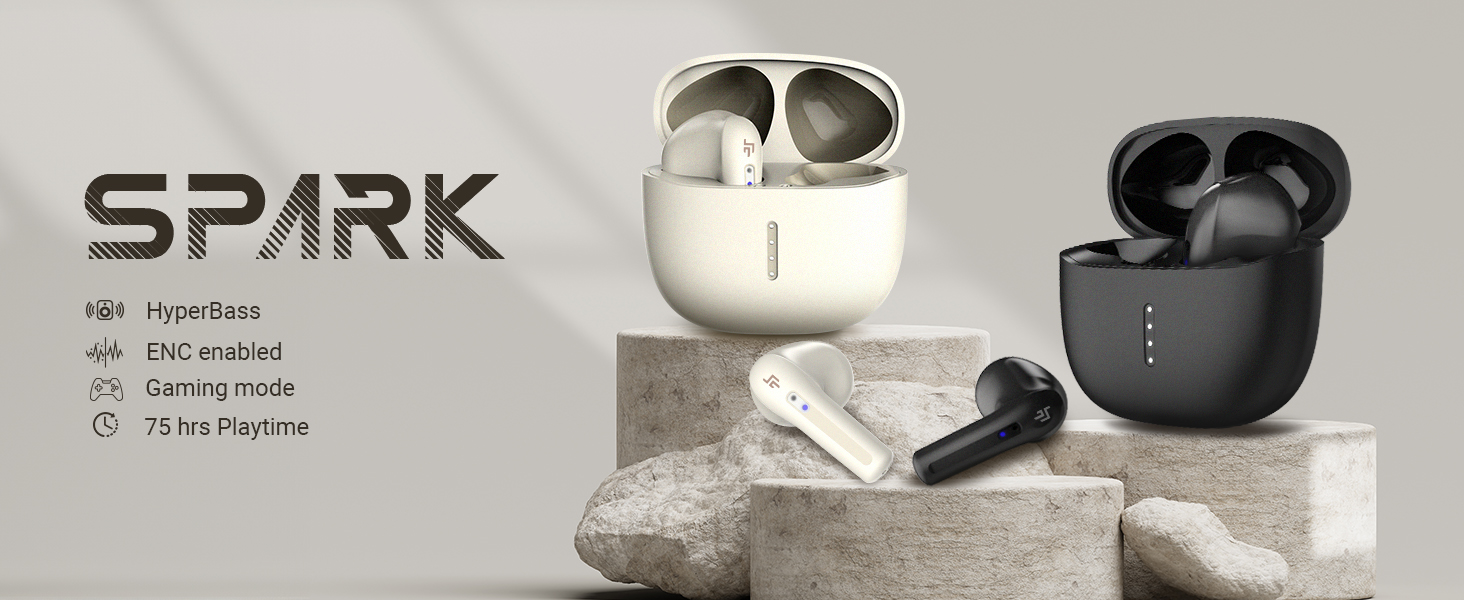
Image 3.1: Key features of CrossBeats Spark In-Earbuds.
The charging case provides additional battery life and protects the earbuds when not in use. LED indicators on the case show charging status.
4. පිහිටුවීම
4.1. ඉයර්බඩ් සහ කේස් ආරෝපණය කිරීම
- ඉයර්බඩ් ආරෝපණ පෙට්ටියට දමන්න. ඒවා නිවැරදිව සවි කර ඇති බවට වග බලා ගන්න.
- Connect the USB Type-C charging cable to the charging port on the case and to a compatible USB power source.
- The LED indicators on the case will illuminate to show charging status. A full charge for the case and earbuds takes approximately 50 minutes.
- සම්පුර්ණයෙන්ම ආරෝපණය වූ පසු, ආරෝපණ කේබලය විසන්ධි කරන්න.
4.2. උපාංගයක් සමඟ යුගල කිරීම
The CrossBeats Spark earbuds utilize Hall Switch technology for quick connection.
- මූලික යුගලනය: ආරෝපණ පෙට්ටිය විවෘත කරන්න. ඉයර්බඩ් ස්වයංක්රීයව යුගල කිරීමේ ප්රකාරයට ඇතුළු වනු ඇත, ඉයර්බඩ් මත LED ලයිට් දැල්වීමෙන් දැක්වේ.
- ඔබගේ උපාංගයේ (ස්මාර්ට්ෆෝන්, ටැබ්ලටය, ලැප්ටොප්) බ්ලූටූත් සක්රීය කරන්න.
- ඒ සඳහා සොයන්න available Bluetooth devices and select "CrossBeats Spark" from the list.
- Once connected, the earbud LEDs will stop flashing.

Image 4.2: Bluetooth 5.3 Insta Connect for quick pairing.
4.3. ඉයර්බඩ් පැළඳීම
For optimal sound quality and comfort, choose the correct size of ear cushions and insert the earbuds gently into your ear canal. Adjust them until they feel secure and comfortable.
5. මෙහෙයුම් උපදෙස්
The CrossBeats Spark earbuds feature intuitive touch controls.
5.1. ස්පර්ශ පාලන
| කාර්යය | ක්රියාව |
|---|---|
| වාදනය / විරාමය | ඉයර්බඩ් දෙකේ තනි තට්ටු කරන්න |
| ඊළඟ ධාවන පථය | දකුණු ඉයර්බඩ් එක දෙවරක් තට්ටු කරන්න |
| පෙර ධාවන පථය | වම් ඉයර්බඩ් එක දෙවරක් තට්ටු කරන්න |
| ශබ්දය වැඩි කරන්න | දකුණු ඉයර්බඩය මත තුන් වරක් තට්ටු කරන්න |
| Volume Down | වම් ඉයර්බඩය මත තුන් වරක් තට්ටු කරන්න |
| ඇමතුමට පිළිතුරු දෙන්න/අවසන් කරන්න | ඉයර්බඩ් දෙකේ තනි තට්ටු කරන්න |
| ඇමතුම ප්රතික්ෂේප කරන්න | තත්පර 2ක් සඳහා ඉයර්බඩ් එකක් ඔබා අල්ලාගෙන සිටින්න |
| හඬ සහායක සක්රිය කරන්න | තත්පර 3ක් සඳහා ඉයර්බඩ් එකක් ඔබා අල්ලාගෙන සිටින්න |
| ටොගොල් සූදු Mode | Quadruple tap on either earbud (refer to product for exact gesture) |
5.2. ඇමතුම් කළමනාකරණය
The built-in quad microphones with ENC (Environmental Noise Cancellation) ensure clear communication during calls. Use the touch controls as described above to manage incoming and outgoing calls.
5.3. ක්රීඩා මාදිලිය
Activate the low latency gaming mode (40ms) for a synchronized audio-visual experience during gaming. Refer to the touch control table for activation.

Image 5.3: Low latency for gaming.
6. නඩත්තු කිරීම
6.1 පිරිසිදු කිරීම
- මෘදු, වියලි, ලින්ට් රහිත රෙද්දකින් ඉයර්බඩ් සහ ආරෝපණ පෙට්ටිය නිතිපතා පිරිසිදු කරන්න.
- කන් කුෂන් ඉවත් කර අවශ්ය නම් මෘදු සබන් හා වතුරෙන් වෙන වෙනම පිරිසිදු කරන්න, නැවත සවි කිරීමට පෙර ඒවා සම්පූර්ණයෙන්ම වියළී ඇති බවට වග බලා ගන්න.
- දරුණු රසායනික ද්රව්ය හෝ උල්ෙල්ඛ ද්රව්ය භාවිතා නොකරන්න.
6.2. ජල ප්රතිරෝධය
The CrossBeats Spark earbuds are IPX5 rated, meaning they are resistant to splashes and sweat. They are not designed for submersion in water. Avoid exposing them to heavy rain or direct water jets.

Image 6.2: IPX5 water and dust resistance.
6.3. ගබඩා කිරීම
භාවිතයේ නොමැති විට, දූවිලි, හානිවලින් ආරක්ෂා වීමට සහ ආරෝපණය කර තබා ගැනීමට ඉයර්බඩ් ඒවායේ ආරෝපණ පෙට්ටියේ ගබඩා කරන්න.
7. දෝශ නිරාකරණය
If you encounter issues with your CrossBeats Spark earbuds, try the following solutions:
- ඉයර්බඩ් යුගල නොවේ:
- ඉයර්බඩ් දෙකම ආරෝපණය කර ඇති බව සහතික කර ගන්න.
- ඔබගේ උපාංගයේ බ්ලූටූත් අක්රිය කර නැවත ක්රියාත්මක කරන්න.
- Forget "CrossBeats Spark" from your device's Bluetooth list and attempt to pair again.
- ඉයර්බඩ් නැවත කේස් එකට දමා, පියන වසා, තත්පර කිහිපයක් රැඳී සිට, යුගල කිරීමේ ප්රකාරය නැවත ආරම්භ කිරීමට විවෘත කරන්න.
- එක ඉයර්බඩ් එකකින් ශබ්දයක් නැත:
- Ensure both earbuds are charged and connected.
- Try resetting the earbuds (refer to the product's specific reset procedure if available, usually involves holding touch sensors for a duration while in the case).
- ආරෝපණ ගැටළු:
- Check the charging cable and power adapter for damage.
- ඉයර්බඩ්වල සහ කේස් එක ඇතුළත ආරෝපණ සම්බන්ධතා පිරිසිදු හා සුන්බුන් වලින් තොර බව සහතික කර ගන්න.
- දුර්වල ඇමතුම් ගුණාත්මකභාවය:
- මයික්රෆෝන අවහිර නොවන බවට වග බලා ගන්න.
- සංඥා බාධා වළක්වා ගැනීම සඳහා ඔබේ සම්බන්ධිත උපාංගයට සමීප වන්න.
8. පිරිවිතර
| විශේෂාංගය | විස්තර |
|---|---|
| මාදිලියේ නම | Spark |
| සම්බන්ධතා තාක්ෂණය | රැහැන් රහිත (බ්ලූටූත් 5.3) |
| ශ්රව්ය ධාවක වර්ගය | 13mm ගතික ධාවකය |
| ශබ්ද පාලනය | Passive Noise Cancellation, ENC (Environmental Noise Cancellation) for calls |
| මයික්රෆෝන ආකෘතිය | Built-In Quad Microphones |
| අඩු ප්රමාදය | 40ms |
| බැටරි ආයු කාලය | පැය 42 දක්වා (ආරෝපණ පෙට්ටිය සමඟ) |
| ආරෝපණ කාලය | ආසන්න වශයෙන් විනාඩි 50 යි |
| ආරෝපණ අතුරුමුහුණත | වර්ගය-C |
| ජල ප්රතිරෝධක මට්ටම | IPX5 (ජල ප්රතිරෝධී) |
| පාලන වර්ගය | ස්පර්ශ පාලනය, ශබ්ද පාලනය |
| විශේෂ ලක්ෂණ | ENC, Fast Charging, Hall Switch Mode |
| අයිතමයේ බර | ග්රෑම් 10 යි |
| නිෂ්පාදන මානයන් | 5 x 2 x 2 සෙ.මී |
9. වගකීම් සහ සහාය
Your CrossBeats Spark In-Earbuds come with a warranty. Please refer to the included Warranty Card for detailed terms and conditions, including the warranty period and coverage.
For technical support, troubleshooting assistance beyond this manual, or warranty claims, please contact CrossBeats customer service through their official webවෙබ් අඩවිය හෝ ඔබගේ වගකීම් කාඩ්පතේ සපයා ඇති සම්බන්ධතා තොරතුරු.


