1. හැඳින්වීම
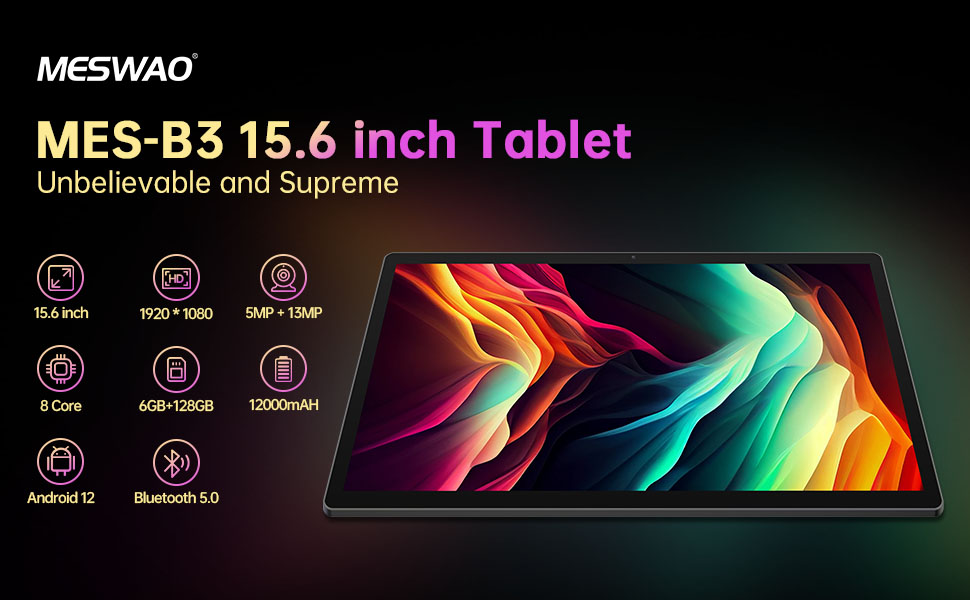
Welcome to the user manual for your MESWAO MES-B3 15.6-inch Android 13 Tablet. This document provides essential information for setting up, operating, maintaining, and troubleshooting your device. The MES-B3 tablet features a large 15.6-inch IPS HD display, an Octa-Core processor, 6GB RAM, 128GB internal storage (expandable), and a 12000mAh battery, designed for a versatile user experience.

Figure 1: MESWAO MES-B3 Tablet Overview
2 ආරක්ෂිත තොරතුරු
Please read all safety instructions carefully before using your tablet to prevent injury or damage to the device. Keep this manual for future reference.
- බැටරි ආරක්ෂාව: Do not attempt to replace the battery yourself. Do not expose the tablet to extreme temperatures, direct sunlight, or fire. Do not puncture, drop, or disassemble the battery.
- ජලය සහ තෙතමනය: This tablet is not waterproof. Avoid exposing it to water, rain, or high humidity.
- පිරිසිදු කිරීම: Use a soft, dry cloth to clean the tablet. Do not use liquid cleaners or aerosols.
- හැසිරවීම: ටැබ්ලටය බිම දැමීමෙන් හෝ දැඩි බලපෑම්වලට ලක් කිරීමෙන් වළකින්න.
- ශ්රවණ ආරක්ෂණය: When using headphones, set the volume to a moderate level to avoid hearing damage.
3. පැකේජ අන්තර්ගතය
සියලුම අයිතම පැකේජයේ ඇති බව තහවුරු කරගන්න:
- MESWAO MES-B3 15.6-inch Android 13 Tablet
- බල ඇඩැප්ටරය
- USB-C කේබලය
- පරිශීලක අත්පොත (මෙම ලේඛනය)
4. උපාංගය අවසන්view
Familiarize yourself with the physical components of your MESWAO MES-B3 tablet.

Figure 2: Buttons and Connectors
- බල බොත්තම: Press and hold to turn the tablet on or off. Press briefly to turn the screen on or off.
- වෙළුම් බොත්තම්: ශ්රව්ය පරිමාව සකසන්න.
- ඉදිරිපස කැමරාව: For video calls and selfies (5MP).
- Rear Camera with Flashlight: For taking photos and videos (13MP).
- වර්ගය-සී වරාය: ටැබ්ලටය ආරෝපණය කර පරිගණකයකට සම්බන්ධ කිරීම සඳහා.
- TF කාඩ් පත: Insert a MicroSD card to expand storage.
- ස්ටීරියෝ ස්පීකර්: ශ්රව්ය ප්රතිදානය ලබා දෙන්න.
5. පිහිටුවීම
5.1 ටැබ්ලටය ආරෝපණය කිරීම
Before first use, fully charge your tablet. Connect the USB-C cable to the tablet's Type-C port and the other end to the power adapter. Plug the adapter into a wall outlet. The battery indicator on the screen will show charging status.
5.2 බල ගැන්වීම සක්රිය / අක්රිය කිරීම
- බල ගැන්වීමට: Press and hold the Power Button until the MESWAO logo appears.
- බලය අක්රිය කිරීමට: Press and hold the Power Button until the power options appear, then select 'Power off'.
- නැවත ආරම්භ කිරීමට: Press and hold the Power Button until the power options appear, then select 'Restart'.
5.3 ආරම්භක සැකසුම් විශාරදයා
පළමු වරට බලගැන්වීමෙන් පසු, ටැබ්ලටය මූලික සැකසුම් ක්රියාවලියක් හරහා ඔබට මග පෙන්වනු ඇත:
- ඔබ කැමති භාෂාව තෝරන්න.
- Wi-Fi ජාලයකට සම්බන්ධ කරන්න.
- ඔබගේ Google ගිණුම සමඟින් පුරනය වන්න හෝ අලුත් එකක් සාදන්න.
- Review සහ නියමයන් සහ කොන්දේසි පිළිගන්න.
- තිර අගුල සකසන්න (PIN, රටාව, මුරපදය).
5.4 MicroSD කාඩ්පතක් ඇතුළු කිරීම
To expand the tablet's storage, you can insert a MicroSD card (up to 256GB, as per some product information, though 1TB is also mentioned in images, please verify with product packaging for exact maximum). Locate the TF card slot on the side of the tablet. Gently insert the MicroSD card with the gold contacts facing down until it clicks into place.

Figure 3: Storage Expansion with MicroSD Card
6. ඔබේ ටැබ්ලටය ක්රියාත්මක කිරීම
6.1 මූලික සංචාලනය
The MESWAO MES-B3 runs on Android 13, offering an intuitive touch interface.
- තට්ටු කරන්න: අයිතමයක් තෝරන්න හෝ යෙදුමක් විවෘත කරන්න.
- ස්වයිප්: Navigate through screens, scroll lists, or dismiss notifications.
- විශාලනය කිරීමට පින්ච් කරන්න: තිරයේ අන්තර්ගතය විශාල කරන්න හෝ අඩු කරන්න.
- මුල් තිරය: Access your apps and widgets. Swipe down from the top for notifications and quick settings.
රූපය 4: Android 13 අතුරුමුහුණත
6.2 Wi-Fi සම්බන්ධතාවය
- වෙත යන්න සැකසීම් > ජාලය සහ අන්තර්ජාලය > අන්තර්ජාලය.
- Wi-Fi සක්රිය කරන්න.
- ලැයිස්තුවෙන් ඔබට අවශ්ය ජාලය තෝරාගෙන විමසන්නේ නම් මුරපදය ඇතුළත් කරන්න.
6.3 බ්ලූටූත් යුගල කිරීම
The tablet supports Bluetooth 5.0 for connecting wireless accessories.
- වෙත යන්න සැකසීම් > සම්බන්ධිත උපාංග > සම්බන්ධතා මනාප > බ්ලූටූත්.
- බ්ලූටූත් ක්රියාත්මක කරන්න.
- ඔබගේ බ්ලූටූත් උපාංගය යුගල කිරීමේ මාදිලියේ ඇති බව සහතික කර ගන්න.
- Select your device from the 'Available devices' list and follow on-screen prompts to pair.
6.4 යෙදුම් කළමනාකරණය
- යෙදුම් ස්ථාපනය කරන්න: Google Play Store යෙදුම විවෘත කර, ඔබට අවශ්ය යෙදුම සොයා, 'ස්ථාපනය කරන්න' තට්ටු කරන්න.
- යෙදුම් අස්ථාපනය කරන්න: මුල් තිරයේ හෝ යෙදුම් ලාච්චුවේ යෙදුම් නිරූපකයක් ඔබා අල්ලාගෙන සිටින්න, ඉන්පසු එය 'අස්ථාපනය කරන්න' වෙත ඇද දමන්න හෝ 'යෙදුම් තොරතුරු' තෝරා 'අස්ථාපනය කරන්න' තෝරන්න.
- යෙදුම් කළමනාකරණය කරන්න: වෙත යන්න සැකසීම් > යෙදුම් දක්වා view, force stop, or clear data for installed applications.
6.5 දර්ශන සැකසුම්
ඔබේ අභිරුචිකරණය කරන්න viewඅත්දැකීම්:
- වෙත යන්න සැකසීම් > ප්රදර්ශනය කරන්න.
- සකස් කරන්න දීප්තියේ මට්ටම.
- සකසන්න තිර කාලය අවසන් වීම (sleep duration).
- වෙනස් කරන්න අකුරු ප්රමාණය සහ සංදර්ශක ප්රමාණය.
- සබල කරන්න අඳුරු තේමාව අක්ෂි ආතතිය අඩු කිරීම සඳහා.
6.6 බැටරි කළමනාකරණය
The MES-B3 features a 12000mAh battery for extended use.

රූපය 5: දිගු බැටරි ආයු කාලය
- වෙත යන්න සැකසීම් > බැටරි දක්වා view usage and optimize settings.
- සබල කරන්න බැටරි සුරැකුම mode to extend battery life when needed.
- පසුබිමේ ධාවනය වන භාවිත නොකළ යෙදුම් වසන්න.
- තිරයේ දීප්තිය අඩු කරන්න.
7. නඩත්තු කිරීම
7.1 පිරිසිදු කිරීම
- තිරය සහ ශරීරය මෘදු ලෙස පිස දැමීමට මෘදු, ලින්ට් රහිත රෙද්දක් භාවිතා කරන්න.
- මුරණ්ඩු පැල්ලම් සඳහා, තරමක් dampen ජලය සහිත රෙදි හෝ ඉලෙක්ට්රොනික උපකරණ සඳහා විෙශේෂෙයන් නිර්මාණය කර ඇති තිර පිරිසිදු කරන්නා.
- Avoid using abrasive materials, alcohol, or chemical solvents.
7.2 ගබඩා කිරීම
- ටැබ්ලටය සෘජු හිරු එළියෙන් සහ අධික උෂ්ණත්වයන්ගෙන් ඈත්ව සිසිල් වියළි ස්ථානයක ගබඩා කරන්න.
- If storing for an extended period, ensure the battery is charged to about 50% to prolong its lifespan.
7.3 මෘදුකාංග යාවත්කාලීන
ප්රශස්ත කාර්ය සාධනය සහ ආරක්ෂාව සහතික කිරීම සඳහා මෘදුකාංග යාවත්කාලීන කිරීම් සඳහා නිතිපතා පරීක්ෂා කරන්න.
- වෙත යන්න සැකසීම් > පද්ධතිය > පද්ධති යාවත්කාලීන කිරීම.
- The tablet will check for available updates. Follow the on-screen instructions to download and install any updates.
8. දෝශ නිරාකරණය
ඔබට මුහුණ දීමට සිදුවිය හැකි පොදු ගැටළු සඳහා විසඳුම් මෙන්න:
| ගැටලුව | විසඳුම |
|---|---|
| ටැබ්ලටය ක්රියාත්මක නොවේ | Ensure the tablet is charged. Connect it to the charger for at least 30 minutes, then try powering it on again. |
| Wi-Fi සම්බන්ධතා ගැටළු | Restart your Wi-Fi router and the tablet. Go to Settings > Network & internet > Internet, forget the network, and reconnect. |
| මන්දගාමී කාර්ය සාධනය | Close unused apps. Clear cache for frequently used apps (Settings > Apps > [App Name] > Storage & cache > Clear cache). Restart the tablet. |
| බැටරිය ඉක්මනින් බැස යයි | Reduce screen brightness. Disable Wi-Fi/Bluetooth when not in use. Close background apps. Check battery usage in Settings > Battery to identify power-hungry apps. |
| යෙදුම් බිඳ වැටීම හෝ කැටි වීම | Force stop the app (Settings > Apps > [App Name] > Force stop). Clear the app's cache. If the problem persists, uninstall and reinstall the app. |
9. පිරිවිතර
Detailed technical specifications for the MESWAO MES-B3 tablet:

රූපය 6: ප්රධාන විශේෂාංග සහ පිරිවිතර
| විශේෂාංගය | පිරිවිතර |
|---|---|
| වෙළඳ නාමය | මෙස්වාඕ |
| ආදර්ශ අංකය | MES-B3 |
| මෙහෙයුම් පද්ධතිය | Android 13 |
| ප්රොසෙසරය | MediaTek Octa-Core (MTK6789) |
| RAM | 6 GB |
| අභ්යන්තර ගබඩාව | 128 GB |
| පුළුල් කළ හැකි ගබඩාව | Up to 256 GB (via TF/MicroSD card) |
| තිර ප්රමාණය | අඟල් 15.6 |
| තිර විභේදනය | 1920 x 1080 Pixels (IPS HD) |
| ඉදිරිපස කැමරාව | 5 MP |
| පසුපස කැමරාව | 13 MP |
| බැටරි ධාරිතාව | 12000 mAh |
| බැටරි ආයු කාලය | ආසන්න වශයෙන් පැය 10 (භාවිතය මත රඳා පවතී) |
| සම්බන්ධතාවය | Bluetooth 5.0, Wi-Fi (802.11ac, 2.4G/5G) |
| වරායන් | USB Type-C, TF Card Slot |
| වර්ණය | අළු |
| මානයන් (L x W x H) | 36.85 x 22.25 x 0.93 සෙ.මී |
| බර | කිලෝ ග්රෑම් 1.1 යි |
10. වගකීම් සහ සහාය
Your MESWAO MES-B3 tablet is covered by a standard manufacturer's warranty. Please refer to the warranty card included in your package for specific terms and conditions, including warranty duration and coverage details.
For technical support, troubleshooting assistance beyond this manual, or warranty claims, please contact MESWAO customer service through the retailer where you purchased the product or visit the official MESWAO webසම්බන්ධතා තොරතුරු සඳහා අඩවිය.


