හැඳින්වීම
The Minolta MND65 Digital Camera is designed for capturing high-quality photos and videos in a compact, portable form. This manual provides essential information for setting up, operating, maintaining, and troubleshooting your camera. Please read this manual thoroughly before using your camera to ensure optimal performance and longevity.
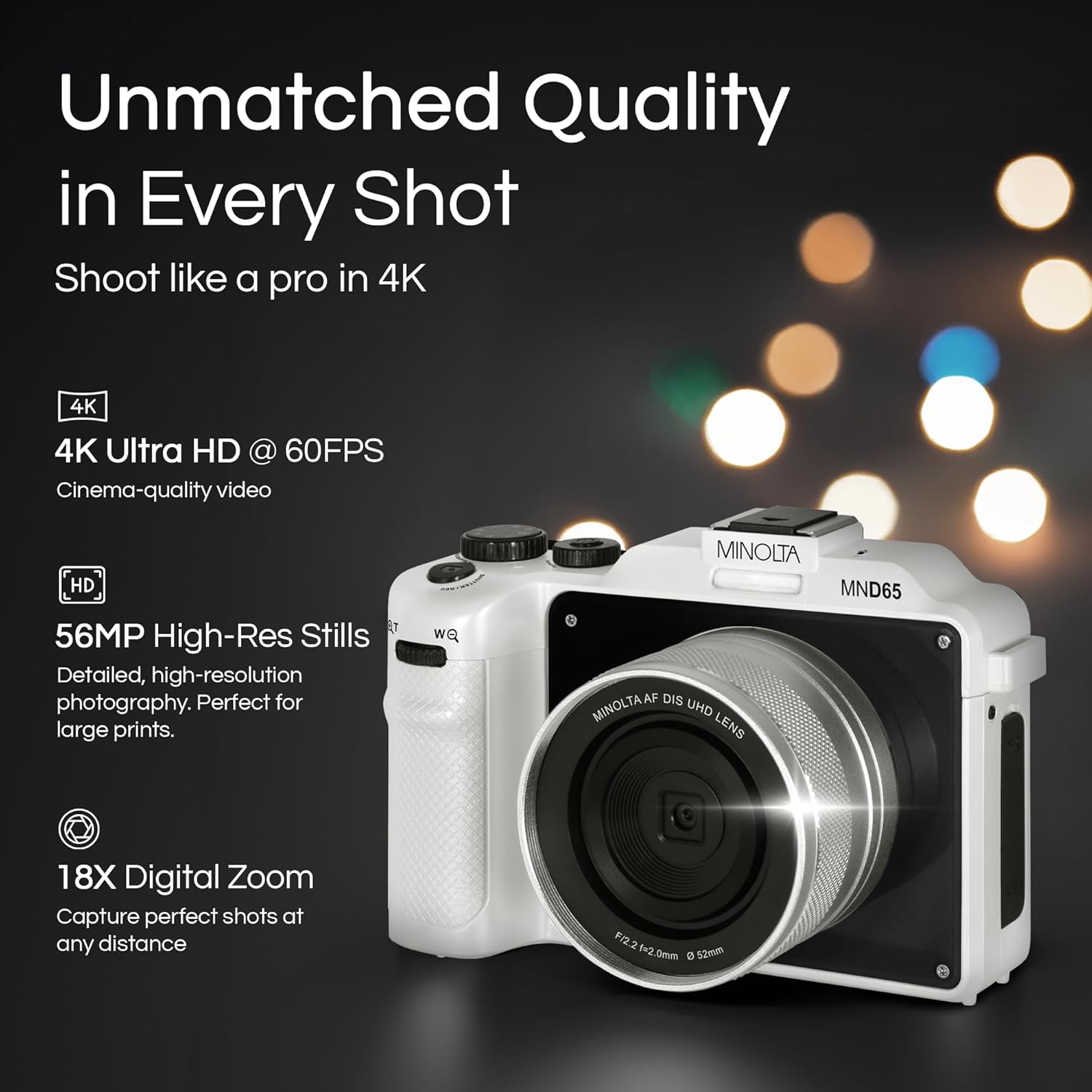
රූපය 1: ඉදිරිපස view of the Minolta MND65 Digital Camera.
පෙට්ටියේ ඇති දේ
සියලුම අයිතම පැකේජයේ ඇති බව තහවුරු කරගන්න:
- මිනොල්ටා MND65 ඩිජිටල් කැමරාව
- ආරක්ෂිත මල්ල
- USB කේබලය
- ලිතියම්-අයන බැටරි
- මැණික් කටුව
- Memory Card (16GB)
- AC ඇඩැප්ටරය
- Lens Cap & Keeper
- Screwdriver + Screws (for faceplates)
- 2 Replaceable Faceplates (Black and Teal)
සැකසුම් මාර්ගෝපදේශය
1. බැටරි ස්ථාපනය
- කැමරාවේ පතුලේ බැටරි මැදිරි කවරය සොයා ගන්න.
- මැදිරිය විවෘත කිරීම සඳහා ආවරණ අගුල ලිස්සන්න.
- Insert the Lithium-Ion battery according to the polarity indicators (+/-).
- බැටරි මැදිරි කවරය නිසි තැනට ක්ලික් කරන තුරු ආරක්ෂිතව වසා දමන්න.
2. මතක කාඩ්පත් ස්ථාපනය
- Open the memory card slot cover, usually located near the battery compartment or on the side.
- Insert the provided SD memory card with the metal contacts facing the front of the camera until it clicks.
- මතක කාඩ්පත් තව් කවරය වසන්න.
- සටහන: මතක කාඩ්පත ඇතුළු කිරීමට හෝ ඉවත් කිරීමට පෙර කැමරාව ක්රියා විරහිත කර ඇති බවට වග බලා ගන්න.
3. බැටරිය ආරෝපණය කිරීම
- Connect the USB cable to the camera's USB port.
- Connect the other end of the USB cable to the AC adaptor.
- AC ඇඩැප්ටරය බල පිටවීමකට සම්බන්ධ කරන්න.
- ආරෝපණ දර්ශක ආලෝකය දැල්වෙනු ඇත. ආරෝපණය සම්පූර්ණ වූ විට එය ක්රියා විරහිත වේ හෝ වර්ණය වෙනස් වේ.
- සම්පූර්ණ ආරෝපණයක් සාමාන්යයෙන් පැය 2-3 ක් පමණ ගතවේ.
4. මැණික් කටු පටිය සවි කිරීම
Thread the wrist strap through the strap lug on the side of the camera and secure it to prevent accidental drops.
5. Customizing Faceplates
Your camera comes with replaceable faceplates (Black and Teal) and a screwdriver kit for customization.
- Using the provided screwdriver, carefully remove the small screws securing the current faceplate.
- Gently detach the faceplate.
- Align the desired new faceplate and secure it with the screws. Do not overtighten.

Figure 2: Customizing your camera with replaceable faceplates.
ඔබේ කැමරාව ක්රියාත්මක කිරීම
කැමරා පාලනය අවසන්view

රූපය 3: පසුපස view of the camera showing LCD and control buttons.
- බල බොත්තම: කැමරාව සක්රිය/අක්රිය කරයි.
- ෂටර් බොත්තම: Press halfway to focus, fully to capture a photo or start/stop video recording.
- මාදිලි ඩයල්/බොත්තම: Selects shooting modes (e.g., Photo, Video, Playback).
- මෙනු බොත්තම: කැමරා සැකසුම් සහ විකල්ප වෙත ප්රවේශ වේ.
- සංචාලන බොත්තම් (ඉහළ/පහළ/වම/දකුණ): මෙනු හරහා සංචාලනය කර සැකසුම් සකස් කරන්න.
- OK/Set Button: තේරීම් තහවුරු කරයි.
- විශාලන ලීවරය: Controls the 18X digital zoom.
- LCD තිරය: 3.0" IPS display for framing shots, reviewපින්තූර සහ සංචාලන මෙනු.
ඡායාරූප ගැනීම
- Turn on the camera using the Power button.
- Select Photo mode using the Mode button/dial.
- Frame your shot using the 3.0" LCD screen.
- Press the Shutter button halfway to activate autofocus. The focus indicator will confirm focus.
- Press the Shutter button fully to capture the 56MP image.
- Images are saved in JPEG or RAW format, as selected in the settings.
වීඩියෝ පටිගත කිරීම
- කැමරාව සක්රිය කරන්න.
- වීඩියෝ මාදිලිය තෝරන්න.
- Frame your scene.
- Press the Shutter button fully to start recording 4K 60FPS video. A recording indicator will appear on the screen.
- Press the Shutter button fully again to stop recording.
Using the Selfie Lens
The Minolta MND65 features a dedicated front-facing selfie lens for easy self-portraits and vlogging.
- Activate the selfie lens mode (refer to your camera's on-screen menu for specific activation steps, usually a dedicated button or menu option).
- The camera will switch to the front-facing lens, and the LCD screen will display your reflection.
- Frame your selfie or video.
- Press the Shutter button to capture.

Figure 4: The dedicated selfie lens for convenient self-portraits.
Wi-Fi Connectivity and File මාරු කරන්න
The built-in Wi-Fi allows for wireless transfer of photos and videos to your smartphone or tablet.
- Download the official Minolta camera app to your mobile device (available on iOS and Android app stores).
- On the camera, navigate to the Wi-Fi settings in the menu and enable Wi-Fi.
- ඔබගේ ජංගම උපාංගයේ, කැමරාවේ Wi-Fi ජාලයට සම්බන්ධ වන්න (SSID සහ මුරපදය කැමරා තිරයේ දිස්වනු ඇත).
- Open the Minolta app. You can now browse, transfer, and share your media wirelessly.
නඩත්තු කිරීම
කැමරාව පිරිසිදු කිරීම
- කැමරා ශරීරය පිරිසිදු කිරීම සඳහා මෘදු, ලින්ට් රහිත රෙද්දක් භාවිතා කරන්න. මුරණ්ඩු අපිරිසිදුකම සඳහා, තරමක් dampජලය සමග රෙදි en.
- For the lens, use a lens brush to remove dust, then a lens cleaning cloth with a specialized lens cleaning solution if necessary. Avoid touching the lens surface with your fingers.
- Clean the LCD screen with a soft, dry microfiber cloth.
- Do not use organic solvents or strong chemical cleaners.
බැටරි සත්කාර
- භාවිතයේ නොමැති විට සිසිල් වියළි ස්ථානයක බැටරිය ගබඩා කරන්න.
- බැටරියේ ආයු කාලය දීර්ඝ කර ගැනීම සඳහා එය නිතර නිතර සම්පූර්ණයෙන්ම විසර්ජනය කිරීමෙන් වළකින්න.
- දිගු කාලයක් ගබඩා කරන්නේ නම්, බැටරිය 50% ක පමණ ධාරිතාවයකට ආරෝපණය කරන්න.
ගබඩා කිරීම
- When not in use, store the camera in its protective pouch to shield it from dust and scratches.
- Avoid storing the camera in areas with extreme temperatures, high humidity, or direct sunlight.
- කැමරාව දිගු කාලයක් භාවිතා නොකරන්නේ නම් බැටරිය ඉවත් කරන්න.
දෝෂගවේෂණය
| ගැටලුව | විය හැකි හේතුව | විසඳුම |
|---|---|---|
| කැමරාව ක්රියාත්මක නොවේ. | බැටරිය අවසන් වී හෝ වැරදි ලෙස ඇතුළත් කර ඇත. | බැටරිය සම්පූර්ණයෙන්ම ආරෝපණය කරන්න. බැටරිය නිවැරදිව නැවත ඇතුල් කරන්න. |
| ඡායාරූප ගැනීමට/වීඩියෝ පටිගත කිරීමට නොහැකිය. | මතක කාඩ්පත පිරී ඇත, අගුළු දමා ඇත, නැතහොත් ඇතුළත් කර නොමැත. | අනවශ්ය මකන්න files, unlock the memory card, or insert it correctly. |
| පින්තූර බොඳයි. | කැමරා සෙලවීම, වැරදි නාභිගත කිරීම හෝ අපිරිසිදු කාචය. | Hold the camera steady. Ensure autofocus locks before shooting. Clean the lens. |
| Wi-Fi සම්බන්ධතාවය අසාර්ථකයි. | වැරදි මුරපදයක්, කැමරා Wi-Fi සබල කර නැත, නැතහොත් යෙදුම් ගැටලුවක්. | Verify Wi-Fi password. Ensure camera Wi-Fi is active. Restart camera and mobile app. |
| Green screen appears on LCD. | Software/hardware malfunction. | Power cycle the camera. If the issue persists, contact customer support. |
| Poor image/video quality (not 56MP/4K). | Incorrect resolution settings. | Check camera settings to ensure 56MP for photos and 4K for video are selected. |
If you encounter issues not listed here or if the suggested solutions do not resolve the problem, please contact Minolta Customer Support.
පිරිවිතර
| මාදිලියේ නම | MND65-WK |
| ඡායාරූප සංවේදක විභේදනය | 56 MP |
| වීඩියෝ විභේදනය | 4K (2160p) at 60 FPS |
| ඩිජිටල් විශාලනය | 18x |
| තිර ප්රමාණය | 3 Inches (IPS LCD) |
| සම්බන්ධතාවය | Wifi |
| සහාය දුන්නා File ආකෘති | JPEG, RAW (Images); MP4 (Video) |
| රූප ස්ථායීකරණය | ඩිජිටල් |
| ඡායාරූප සංවේදක තාක්ෂණය | CMOS |
| බැටරි වර්ගය | ලිතියම් අයන |
| අවම නාභි දුර | මිලිමීටර් 18 යි |
| උපරිම විවරය | මිලිමීටර් 2.8 යි |
| ෆ්ලෑෂ් මාදිලි | ස්වයංක්රීය ෆ්ලෑෂ් |
| ගබඩා මාධ්ය | SD Card (Class 10, U1 recommended) |
වගකීම් තොරතුරු
The Minolta MND65 Digital Camera comes with a Limited 1 Year Manufacturer Warranty. This warranty covers defects in materials and workmanship under normal use. It does not cover damage caused by misuse, accident, unauthorized modification, or external causes such as drops or liquid damage.
Please retain your proof of purchase for warranty claims. For detailed terms and conditions, refer to the warranty card included in your product packaging or visit the official Minolta webඅඩවිය.
පාරිභෝගික සහාය
For technical assistance, warranty service, or general inquiries regarding your Minolta MND65 Digital Camera, please contact Minolta Customer Support.
- Webඅඩවිය: Visit the official Minolta webනිතර අසන ප්රශ්න, මෘදුකාංග යාවත්කාලීන කිරීම් සහ සහාය සම්පත් සඳහා අඩවිය.
- විද්යුත් තැපෑල: ඔබේ නිෂ්පාදන ඇසුරුම්කරණය හෝ නිල webපාරිභෝගික සේවා විද්යුත් තැපැල් ලිපින සඳහා අඩවිය.
- දුරකථනය: ඔබේ නිෂ්පාදන ඇසුරුම්කරණය හෝ නිල webපාරිභෝගික සේවා දුරකථන අංක සඳහා අඩවිය.
When contacting support, please have your camera model number (MND65-WK) and proof of purchase available.


