1. හැඳින්වීම
This user manual provides comprehensive instructions for the setup, operation, and maintenance of your IPEVO VC-Z4K UHD 4K PTZ Camera. The VC-Z4K is designed to enhance educational and worship spaces with its 4K UHD resolution and 8.29-MP Sony CMOS sensor. It features advanced pan-tilt-zoom capabilities, AI auto-tracking, and a powerful 12X Optical + 15X Digital Zoom, making it ideal for capturing detailed and engaging remote sessions. Its AI functionality helps minimize the need for additional personnel, and its easy setup allows seamless integration with popular platforms like YouTube, OBS, and Zoom.
2 ආරක්ෂිත තොරතුරු
Please read and understand all safety instructions before using the IPEVO VC-Z4K camera to prevent injury or damage to the device. Keep this manual for future reference.
- බලශක්ති ප්රභවය: Use only the provided power adapter. Ensure the power outlet meets the camera's voltagඊ අවශ්යතා.
- වාතාශ්රය: Do not block ventilation openings. Ensure adequate airflow around the camera to prevent overheating.
- පරිසරය: Avoid exposing the camera to water, moisture, extreme temperatures, or direct sunlight. Operate in a clean, dry environment.
- හැසිරවීම: Handle the camera with care. Do not drop or subject it to strong vibrations.
- පිරිසිදු කිරීම: පිරිසිදු කිරීමට පෙර විදුලිය විසන්ධි කරන්න. මෘදු, වියළි රෙද්දක් භාවිතා කරන්න. දියර හෝ එයරෙසෝල් පිරිසිදු කරන්නන් භාවිතා නොකරන්න.
- සේවා: කැමරාව ඔබම විසුරුවා හැරීමට හෝ අලුත්වැඩියා කිරීමට උත්සාහ නොකරන්න. සියලුම සේවා සුදුසුකම් ලත් පුද්ගලයින් වෙත යොමු කරන්න.
3. පැකේජ අන්තර්ගතය
පහත ලැයිස්තුගත කර ඇති සියලුම අයිතම ඔබේ පැකේජයට ඇතුළත් කර ඇති බව තහවුරු කරගන්න:
- IPEVO VC-Z4K Camera
- Power adapter (8.2 ft / 2.5 m)
- USB 3.0 cable (4.9 ft / 1.5 m)
- RS232 cable (6.5 ft / 2 m)
- දුරස්ථ පාලකය (බැටරිය ඇතුළත් නොවේ)
- පරිශීලක අත්පොත (මෙම ලේඛනය)
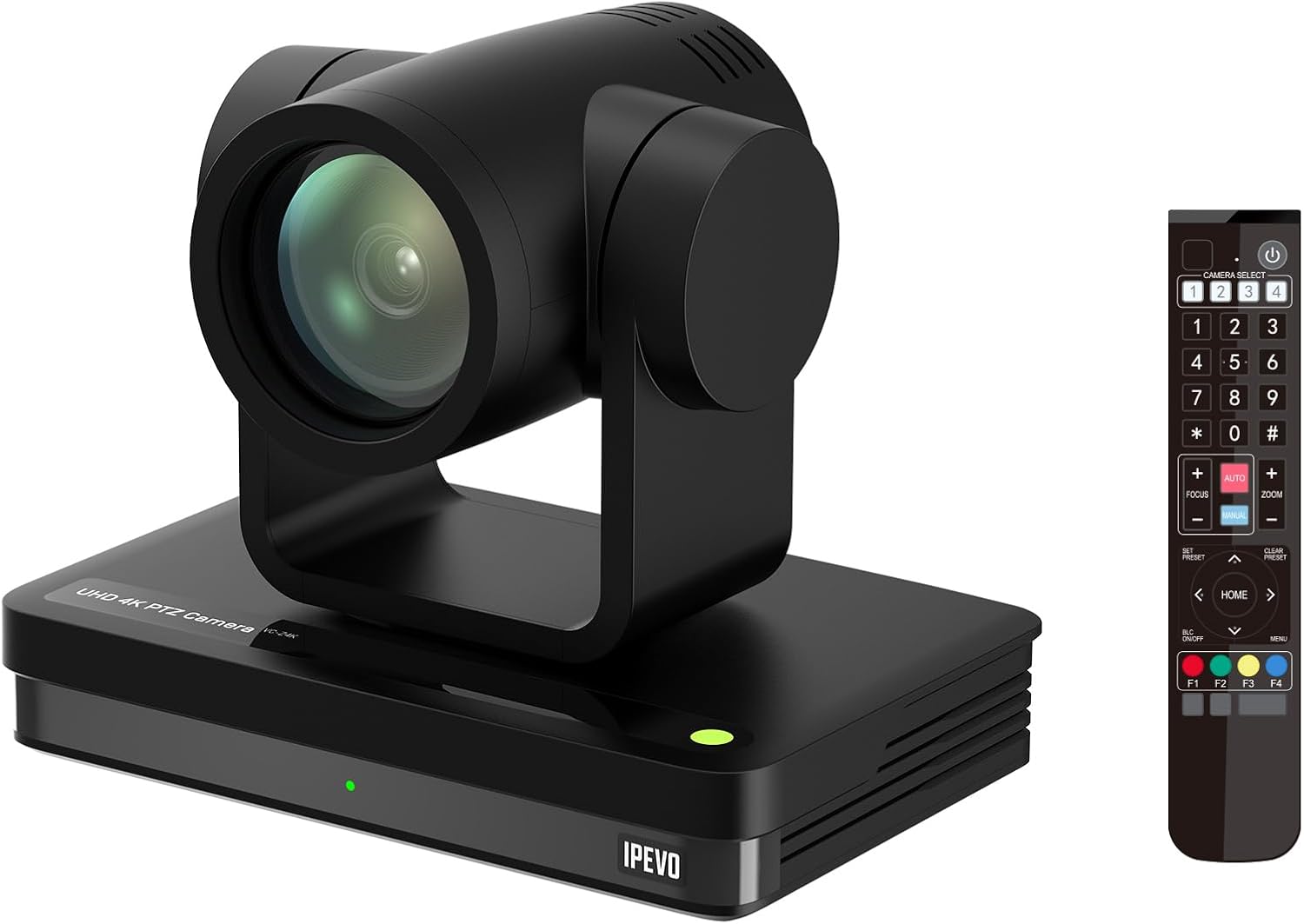
Image: The IPEVO VC-Z4K camera unit shown alongside its remote control, illustrating the main components included in the package.
4. නිෂ්පාදන අවසන්view
4.1 ප්රධාන ලක්ෂණ
- 4K Ultra HD විභේදනය: Equipped with a 1/2.8" HD CMOS sensor for stunning 4K video output.
- 12X දෘශ්ය විශාලනය: Provides clear, detailed close-ups without loss of quality.
- AI ස්වයංක්රීය ලුහුබැඳීම: Automatically follows speakers or presenters, ensuring they remain in frame.
- නම්යශීලී සම්බන්ධතාවය: Features HDMI, USB-C, LAN (PoE), and SDI outputs for versatile integration.
- Wide Pan and Tilt Range: Offers 340° pan and 120° tilt for comprehensive room coverage.
- උසස් ශබ්ද අඩු කිරීම: 2D/3D noise reduction ensures clear video in various lighting conditions.
4.2 Camera Components and Ports

රූපය: පසුපස view of the IPEVO VC-Z4K camera showing its various connectivity ports including USB 3.0, HDMI, SDI, LAN (PoE), and power input.
The VC-Z4K camera features a range of ports for diverse connectivity options:
- HDMI ප්රතිදානය: For high-definition video output to displays or capture devices.
- USB-C වරාය: For direct connection to computers for video and control.
- LAN (PoE) Port: For network connectivity and Power over Ethernet, simplifying installation.
- SDI ප්රතිදානය: For professional video workflows requiring longer cable runs.
- RS232 වරාය: For serial control via external control systems.
- බල ආදානය: ඇතුළත් කර ඇති බල ඇඩැප්ටරය සම්බන්ධ කිරීම සඳහා.
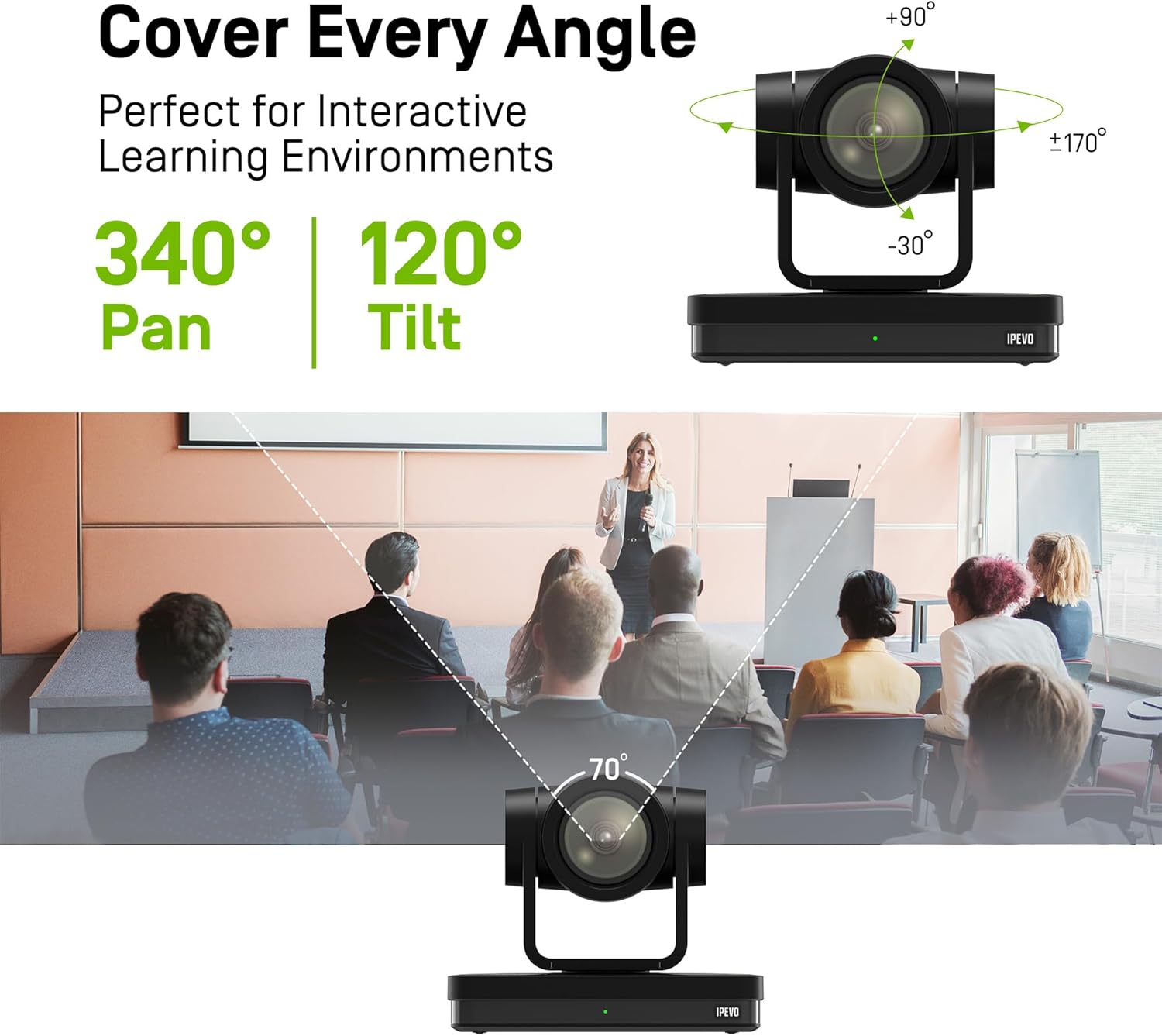
Image: Diagram illustrating the IPEVO VC-Z4K camera's pan (340°) and tilt (120°) ranges, highlighting its ability to cover a wide area.
The camera's motorized head allows for precise pan and tilt movements, enabling comprehensive coverage of your space. The pan range is 340 degrees, and the tilt range is 120 degrees (-30° to +90°).
5. පිහිටුවීම
Follow these steps for the initial setup of your IPEVO VC-Z4K camera:
- ස්ථානගත කිරීම: Choose a stable surface or mount the camera securely in your desired location. Ensure it has a clear line of sight to the area you wish to capture.
- බල සම්බන්ධතාවය:
- බල ඇඩැප්ටරය භාවිතා කිරීම: Connect the provided power adapter to the camera's power input port and then plug it into a wall outlet.
- PoE (ඊතර්නෙට් හරහා බලය) භාවිතා කිරීම: If your network switch supports PoE, connect an Ethernet cable from the PoE-enabled switch to the camera's LAN (PoE) port. This will provide both power and network connectivity.
- Video Output Connection (Choose one or more):
- HDMI: Connect an HDMI cable from the camera's HDMI output to a display, projector, or video capture card.
- USB-C: Connect the USB 3.0 cable from the camera's USB-C port to a USB 3.0 port on your computer. This enables the camera as a webවීඩියෝ සම්මන්ත්රණ යෙදුම් සඳහා cam.
- LAN: Connect an Ethernet cable from the camera's LAN port to your network router or switch for IP streaming and control.
- SDI: Connect an SDI cable from the camera's SDI output to a professional video switcher or recorder.
- දුරස්ථ පාලක සැකසුම: Insert two AAA batteries (not included) into the remote control. The remote control is essential for initial configuration and operation.
- බල ගැන්වීම: Once all connections are secure, power on the camera. The indicator light will illuminate.
6. මෙහෙයුම් උපදෙස්
6.1 Basic Camera Control (via Remote Control)
- පෑන්/ඇලවීම: Use the directional arrows on the remote control to move the camera horizontally (pan) and vertically (tilt).
- විශාලනය: Use the 'ZOOM +' and 'ZOOM -' buttons to adjust the optical zoom.
- අවධානය යොමු කරන්න: Press 'AUTO FOCUS' for automatic focus. Use 'FOCUS +' and 'FOCUS -' for manual adjustment if needed.
- පෙරසිටුවීම්: The camera supports up to 255 presets. You can save and recall up to 10 presets directly from the remote control using the number buttons (0-9). To save a preset, position the camera, then press 'PRESET' followed by a number (e.g., '1'). To recall, press the number button.

Image: The IPEVO VC-Z4K camera demonstrating its 12X optical zoom capability, highlighting its 8.29-MP Sony CMOS sensor for high-quality video.
6.2 AI ස්වයංක්රීය ලුහුබැඳීම
The VC-Z4K features advanced AI auto-tracking to keep a presenter or subject automatically in frame.
- Enabling Tracking: Refer to the remote control or camera's web interface for specific buttons or settings to activate AI tracking.
- Zone Tracking: Configure specific zones within the camera's view where tracking should occur.
- ඉදිරිපත් කරන්නා ලුහුබැඳීම: The camera can identify and follow a designated presenter as they move within the defined area.

Image: A visual representation of the IPEVO VC-Z4K's AI auto-tracking and auto-focus features, showing how it maintains focus on a moving subject in a classroom setting.
6.3 Integration with Platforms
The VC-Z4K seamlessly integrates with various video conferencing and streaming platforms:
- USB සම්බන්ධතාවය: When connected via USB-C, the camera will be recognized as a standard webcam by applications like Zoom, OBS Studio, Microsoft Teams, Google Meet, GoTo Meeting, and Skype. Select "IPEVO VC-Z4K" as your video input device within the application settings.
- LAN/IP Streaming: For advanced streaming setups, use the LAN connection to stream video via RTSP/RTMP protocols to platforms like YouTube Live or OBS Studio. Refer to the camera's web interface for IP configuration and streaming settings.
7. නඩත්තු කිරීම
Proper maintenance ensures the longevity and optimal performance of your IPEVO VC-Z4K camera.
- කාච පිරිසිදු කිරීම: Use a soft, lint-free cloth specifically designed for optical lenses. Gently wipe the lens to remove dust or smudges. Avoid using abrasive materials or harsh chemicals.
- ශරීරය පිරිසිදු කිරීම: මෘදු, වියළි රෙද්දකින් කැමරා ශරීරය පිස දමන්න. මුරණ්ඩු අපිරිසිදුකම සඳහා, තරමක් dampen the cloth with water, then wipe dry immediately. Do not allow liquids to enter the camera.
- ගබඩා: දිගු කාලයක් භාවිතයේ නොමැති විට, කැමරාව සෘජු හිරු එළියෙන් සහ අධික උෂ්ණත්වයන්ගෙන් ඈත්ව සිසිල්, වියළි ස්ථානයක ගබඩා කරන්න.
- ස්ථිරාංග යාවත්කාලීන කිරීම්: Periodically check the IPEVO official website for firmware updates. Keeping your camera's firmware up-to-date can improve performance and add new features.
8. දෝශ නිරාකරණය
If you encounter issues with your IPEVO VC-Z4K camera, refer to the following common problems and solutions:
| ගැටලුව | විය හැකි හේතුව | විසඳුම |
|---|---|---|
| බලය නැත/කැමරාව ක්රියාත්මක නොවේ | Power adapter not connected or faulty; no PoE connection. | Ensure power adapter is securely connected and plugged into a working outlet. If using PoE, verify the network switch is PoE-enabled and the Ethernet cable is functional. |
| වීඩියෝ ප්රතිදානය නැත | Incorrect cable connection; wrong input selected on display; software issue. | Check HDMI, USB-C, LAN, or SDI cable connections. Ensure the display is set to the correct input source. Restart the computer/application if connected via USB. |
| දුරස්ථ පාලකය ක්රියා නොකරයි | Batteries are dead or inserted incorrectly; IR sensor blocked. | Replace batteries (AAA). Ensure batteries are inserted with correct polarity. Point the remote directly at the camera's IR receiver. |
| AI tracking not functioning | Tracking feature not enabled; subject out of tracking range; poor lighting. | Activate AI tracking via remote or web interface. Ensure the subject is within the optimal tracking area. Improve lighting conditions if too dark. |
| Poor video quality (blurry, noisy) | Lens is dirty; focus issue; low light conditions; network bandwidth. | Clean the lens. Adjust focus manually or use auto-focus. Ensure adequate lighting. For IP streaming, check network bandwidth and camera's streaming settings. |
9. පිරිවිතර
Detailed technical specifications for the IPEVO VC-Z4K UHD 4K PTZ Camera:
| නිෂ්පාදන මානයන් | අඟල් 7.1 x 5.9 x 4.5 |
| අයිතමයේ බර | රාත්තල් 2.64 කි |
| අයිතම ආදර්ශ අංකය | CDCU-06IP |
| ඡායාරූප සංවේදක තාක්ෂණය | CMOS (1/2.8" HD CMOS Sensor) |
| වීඩියෝ ග්රහණ විභේදනය | 4K UHD |
| ඔප්ටිකල් සූම් | 12X |
| ඩිජිටල් විශාලනය | 15X |
| උපරිම විවරය | මිලිමීටර් 2.8 යි |
| සම්බන්ධතා තාක්ෂණය | USB, HDMI, LAN (PoE), SDI, RS232 |
| විශේෂ ලක්ෂණ | AI Tracking and Auto Focus, Low Noise and High SNR, Multiple Presets (up to 255) |
| වර්ණය | කළු |
| නිෂ්පාදකයා | IPEVO |
10. වගකීම් සහ සහාය
IPEVO products are designed for reliability and performance. For warranty information, technical support, or service inquiries, please visit the official IPEVO webවෙබ් අඩවියට හෝ ඔවුන්ගේ පාරිභෝගික සහාය සෘජුවම අමතන්න. වගකීම් හිමිකම් සඳහා මිලදී ගැනීමේ සාක්ෂියක් ලෙස ඔබේ මිලදී ගැනීමේ රිසිට්පත තබා ගන්න.
වැඩිදුර සහාය සඳහා කරුණාකර පිවිසෙන්න: www.ipevo.com


