1. නිෂ්පාදන අවසන්view
The iKiKin V600 OBD2 Scanner is a professional diagnostic tool designed to help identify and resolve issues with your vehicle's engine system. It provides comprehensive diagnostic functions, including reading and clearing fault codes, viewing live data, and performing various system tests. This manual will guide you through the setup, operation, and maintenance of your V600 scanner.
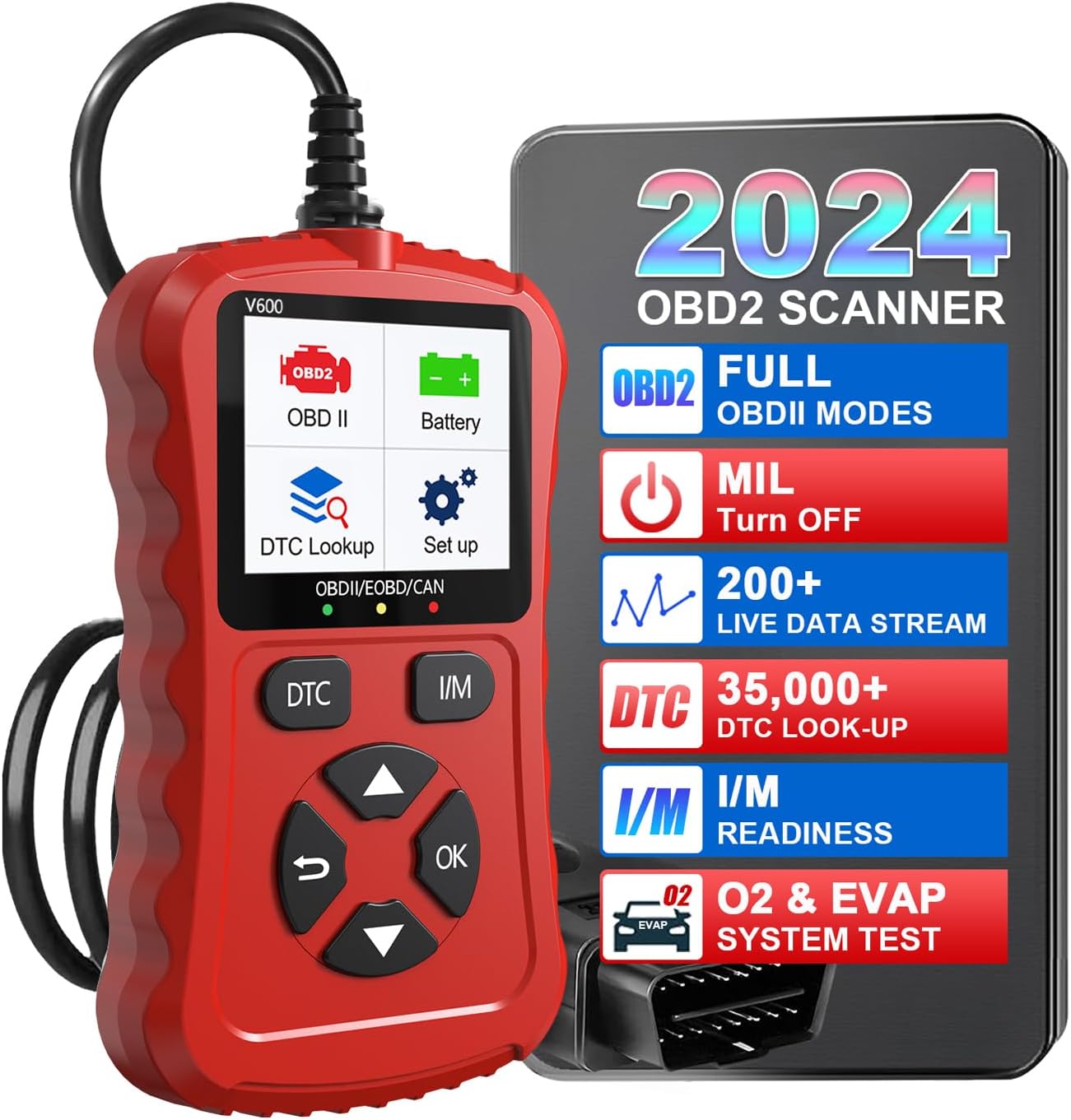
Image: The iKiKin V600 OBD2 Scanner, highlighting its main display and key features.

රූපය: විස්තරාත්මක views of the V600 scanner's physical features, including its screen, indicator lights, and ergonomic design.
2. පැකේජ අන්තර්ගතය
සියලුම අයිතම පවතින බව සහතික කර ගැනීම සඳහා විවෘත කිරීමේදී පැකේජයේ අන්තර්ගතය පරීක්ෂා කරන්න:
- OBD2 Code Scanner
- කේබල්
- පරිශීලක මාර්ගෝපදේශය
3 ප්රධාන ලක්ෂණ
- බහු කාර්යයන්: Built-in OBD2 DTC lookup library, read and erase codes, view freeze frame, I/M readiness, vehicle information, data flow, real-time curve, vehicle speed, calculate load value, engine coolant temperature, engine speed.
- OBDII අනුකූලතාව: Supports 9 protocols compatible with most 1996 US-Based, 2000 EU-Based, and Asian cars, and newer OBD II & CAN domestic or import vehicles.
- බහු භාෂා සහාය: Supports 9 languages including English, German, Dutch, Spanish, French, Italian, Russian, Chinese, Japanese, and Korean.
- පරිශීලක හිතකාමී නිර්මාණය: Clear 128 x 64 pixels LCD screen. No battery or charger needed; powered directly from the vehicle's OBDII Data Link Connector.
- භාවිතයේ පහසුව: Provides accurate and fast results, reads and clears engine trouble codes in seconds.
- Cost and Time Saving: Enables self-diagnosis of fault codes and definitions, reducing the need for mechanic visits.
4. Vehicle Compatibility and Language Support
The V600 scanner offers wide automotive compatibility, supporting vehicles from various regions and adhering to multiple communication protocols.
- US-Based Vehicles: Compatible with most vehicles manufactured since 1996.
- EU-Based Vehicles: Compatible with most vehicles manufactured since 2000.
- Asian Cars: Compatible with most vehicles manufactured since 2008.
- සහාය දක්වන ප්රොටෝකෝල: SAE J1850 PWM, SAE J1850 VPW, ISO 9141-2, ISO14230-4 KWP (5 baud init), ISO14230-4 KWP (fast init), ISO15765-4 CAN (11bit ID, 500 Kbaud), ISO15765-4 CAN (29bit ID, 500 Kbaud), ISO15765-4 CAN (11bit ID, 250 Kbaud), ISO15765-4 CAN (29bit ID, 250 Kbaud).
- සහාය දක්වන භාෂා: English, German, Dutch, Spanish, French, Italian, Russian, Chinese, Japanese, Korean.

Image: Visual representation of the V600's broad vehicle compatibility and extensive language and protocol support.
5. ආරම්භ කිරීම (සැකසුම)
Follow these steps to connect and power on your iKiKin V600 OBD2 Scanner:
- OBDII වරාය සොයා ගන්න: The OBDII (On-Board Diagnostics II) port is typically located under the dashboard on the driver's side of the vehicle. Refer to your vehicle's owner's manual if you cannot find it.
- ස්කෑනරය සම්බන්ධ කරන්න: Plug the V600 scanner's cable connector firmly into the vehicle's OBDII port.
- බල ගැන්වීම: Once connected, the scanner will automatically power on, drawing power directly from the vehicle's battery via the OBDII port. No external power source or batteries are required.
- Start Vehicle (Optional): For some diagnostic functions, it may be necessary to turn the vehicle's ignition to the 'ON' position (engine off) or start the engine. Follow the on-screen prompts of the scanner.
6. Operating the V600 Scanner
ප්රධාන මෙනු සංචාලනය
The V600 scanner features a user-friendly interface with dedicated buttons for navigation:
- ඉහළ/පහළ ඊතල: මෙනු විකල්ප හරහා සංචාලනය කරන්න.
- වම්/දකුණු ඊතල: Move cursor or change values (if applicable).
- හරි බොත්තම: තේරීම තහවුරු කරන්න හෝ උප මෙනුවක් ඇතුළත් කරන්න.
- Return Button (U-turn arrow): පෙර තිරයට ආපසු යන්න හෝ ශ්රිතයකින් පිටවන්න.
- DTC බොත්තම: Quick access to Diagnostic Trouble Codes.
- I/M බොත්තම: I/M සූදානම තත්ත්වයට ඉක්මන් ප්රවේශය.
රෝග විනිශ්චය කාර්යයන්
The V600 offers a range of diagnostic capabilities:
- කේත කියවන්න: Retrieves Diagnostic Trouble Codes (DTCs) from the vehicle's computer, indicating specific issues.
- කේත මකන්න: Clears DTCs from the vehicle's computer and turns off the Check Engine Light (MIL). Ensure the underlying issue is resolved before clearing codes.
- View කැටි රාමුව: Displays a snapshot of sensor data recorded by the vehicle's computer at the moment a fault code was set. This helps in diagnosing intermittent problems.
- මම/එම් සූදානම: Checks the status of the vehicle's emission-related monitors to determine if they have completed their diagnostic cycles. Essential for emission testing.
- දත්ත ධාරාව: Displays real-time live data from the vehicle's sensors in numerical or graphical format, such as engine RPM, vehicle speed, coolant temperature, etc.
- Real-Time Curve: Graphically displays dynamic data parameters over time, allowing for visual analysis of sensor performance.
- EVAP පද්ධති පරීක්ෂණය: වාහනයේ වාෂ්පීකරණ විමෝචන පාලන පද්ධතිය සඳහා කාන්දු පරීක්ෂණයක් ආරම්භ කරයි.
- DTC සෙවීම් පුස්තකාලය: Provides definitions for generic and manufacturer-specific Diagnostic Trouble Codes, helping you understand the meaning of each code.
- වාහන තොරතුරු: Retrieves vehicle identification number (VIN), calibration ID, and calibration verification number (CVN).
- බැටරි වෙළුමtage: Tests and displays the current voltagතථ්ය කාලය තුළ කාර් බැටරියේ ඊ අගය.
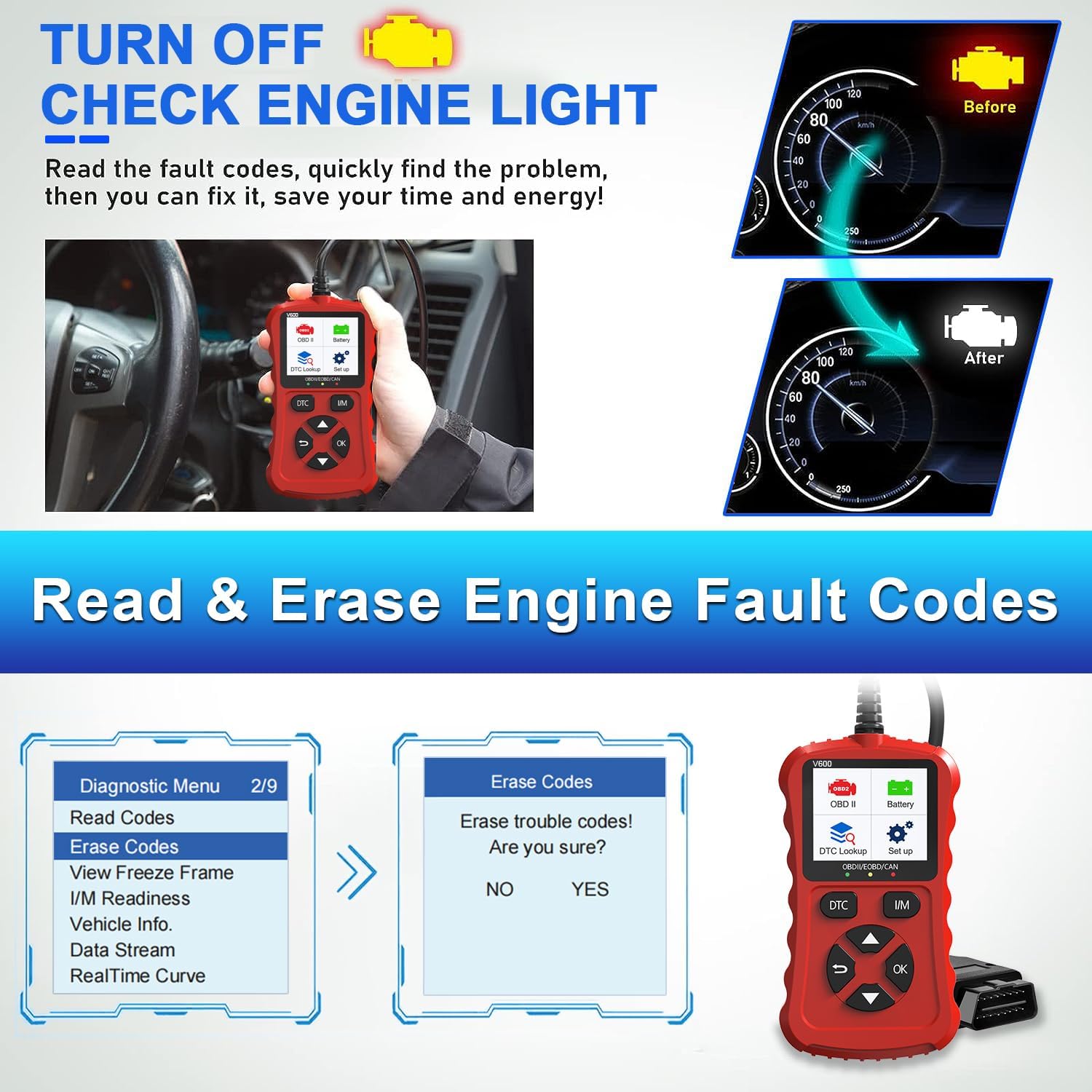
Image: Demonstrates how to read and clear engine fault codes, effectively turning off the check engine light.
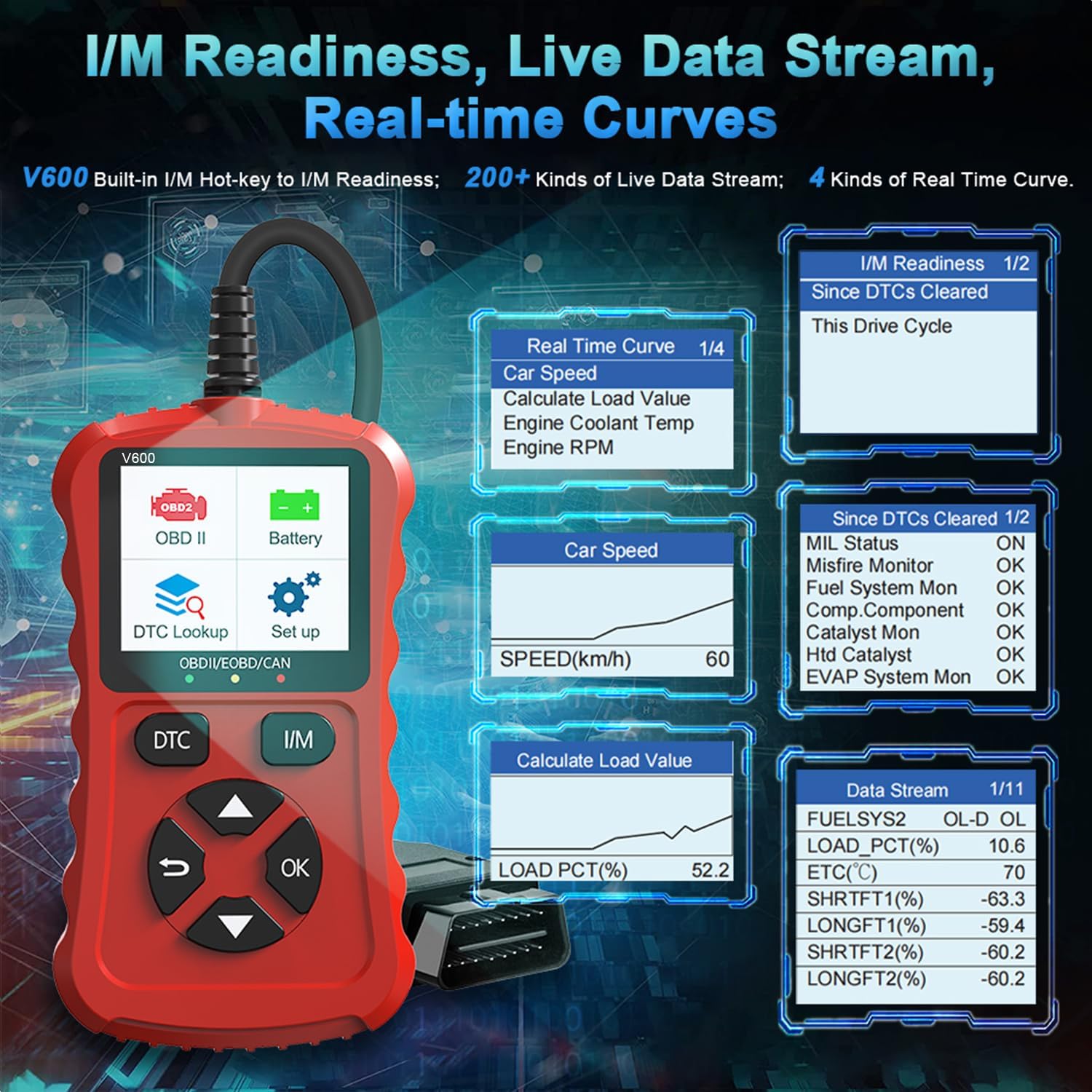
Image: Shows the I/M Readiness screen, examples of live data streams, and real-time curve displays for various vehicle parameters.
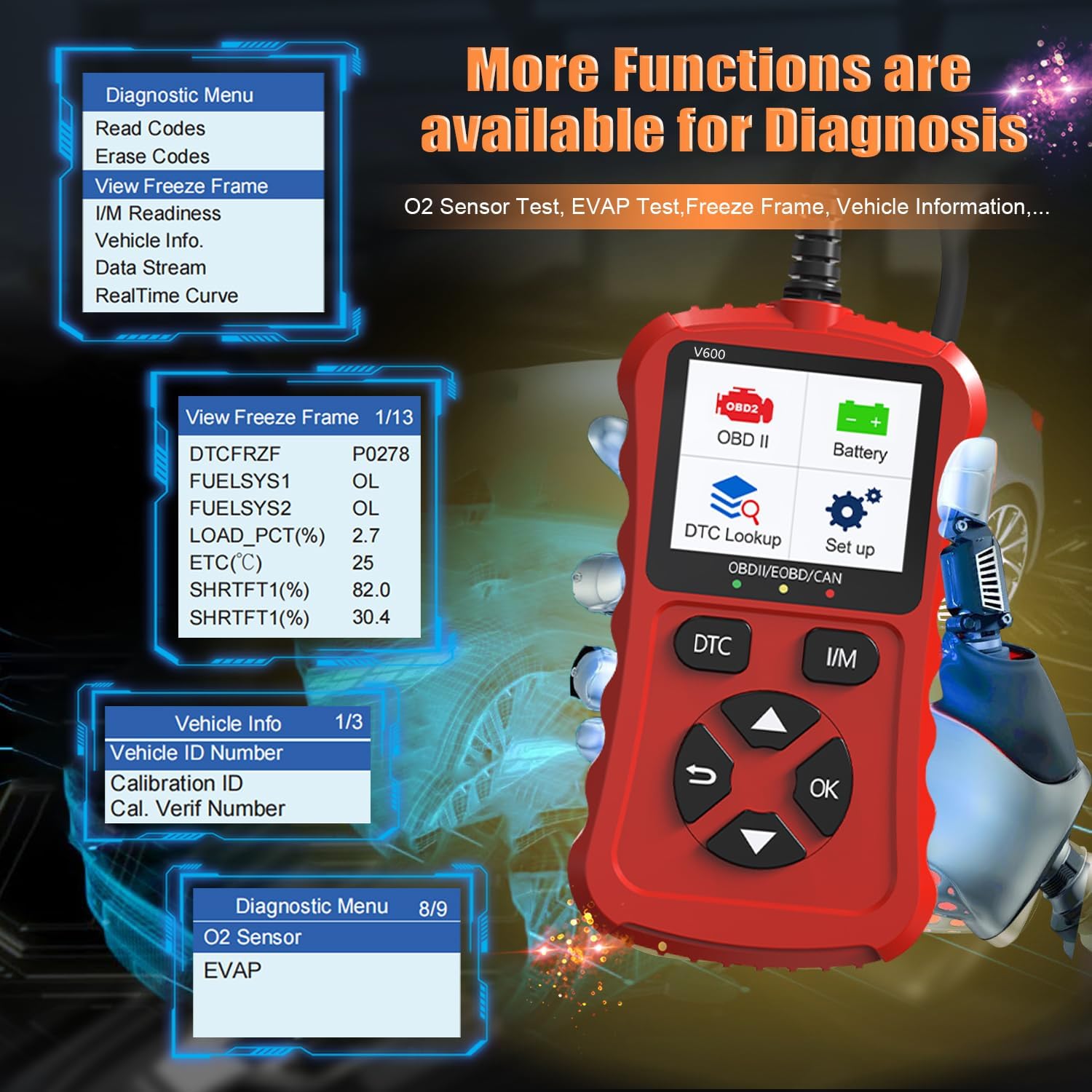
Image: Illustrates the availability of advanced diagnostic functions like Freeze Frame data, Vehicle Information retrieval, O2 Sensor tests, and EVAP system tests.
7 රැකවරණය සහ නඩත්තුව
To ensure the longevity and optimal performance of your iKiKin V600 OBD2 Scanner, follow these maintenance guidelines:
- පිරිසිදු කිරීම: ස්කෑනරයේ බාහිර කොටස පිරිසිදු කිරීම සඳහා මෘදු, වියළි රෙද්දක් භාවිතා කරන්න. උල්ෙල්ඛ පිරිසිදු කරන්නන් හෝ ද්රාවක භාවිතා නොකරන්න.
- ගබඩා: Store the scanner in a dry, cool environment, away from direct sunlight, excessive heat, or moisture. Keep it in its original packaging or a protective case when not in use.
- කේබල් රැකවරණය: Avoid bending or crimping the diagnostic cable excessively. Always grasp the connector when plugging or unplugging it from the vehicle's OBDII port.
- මෘදුකාංග යාවත්කාලීන: නිෂ්පාදකයා පරීක්ෂා කරන්න website periodically for any available software updates to ensure your scanner has the latest features and vehicle compatibility.
8. පොදු ගැටළු දෝශ නිරාකරණය
Common Scenarios Addressed by V600
The V600 scanner is designed to help diagnose and address various common vehicle issues, such as:
- Ignition ring failure
- Persistent flashing lights
- Difficulty finding car faults
- Car is difficult to start
- Engine shuts down unexpectedly

Image: Illustrates common vehicle problems that the V600 scanner can help diagnose.
No Power/Device Not Turning On
- සම්බන්ධතාවය පරීක්ෂා කරන්න: Ensure the scanner's cable is securely plugged into the vehicle's OBDII port.
- වාහන ජ්වලනය: Make sure the vehicle's ignition is turned to the 'ON' position (engine off) or the engine is running, as required by your vehicle.
- වාහන බැටරි: Verify that your vehicle's battery has sufficient charge. The scanner draws power from the vehicle.
- OBDII Port Fuse: Check the fuse for your vehicle's OBDII port. Refer to your vehicle's owner's manual for fuse box location and diagram.
සන්නිවේදන දෝෂය
- ගැළපුම තහවුරු කරන්න: Ensure your vehicle is OBDII compliant (most 1996 US-based, 2000 EU-based, and 2008 Asian vehicles and newer).
- ජ්වලන තත්ත්වය: Confirm the vehicle's ignition is in the correct position (usually 'ON' or engine running).
- කේබල් අඛණ්ඩතාව: Inspect the diagnostic cable for any signs of damage or wear.
- Try Another Vehicle: If possible, test the scanner on another OBDII-compliant vehicle to rule out an issue with your specific vehicle's port.
9. තාක්ෂණික පිරිවිතර
| පිරිවිතර | වටිනාකම |
|---|---|
| වෙළඳ නාමය | iKiKin |
| ආකෘතිය | V600 |
| අයිතම ආදර්ශ අංකය | V600 |
| නිෂ්පාදකයාගේ කොටස අංකය | V600 |
| ASIN | B0CS6F5R3N |
| මෙහෙයුම් පද්ධතිය | Android 4.0 (Note: This refers to the internal system, not user-facing OS) |
| UPC | 724873545856 |
| පළමු දිනය තිබේ | 12 ජනවාරි 2024 |
10. වගකීම් සහ පාරිභෝගික සහාය
The iKiKin V600 OBDII scan tool comes with a මාස 12ක වගකීමක් from the date of purchase. Additionally, lifetime free updates are offered to ensure your device remains current with the latest vehicle data and features.
For technical support, inquiries, or assistance, please feel free to contact our after-sale service team. You can reach us via the Q&A section on the product page, email, or hotline. Our team is dedicated to providing prompt and helpful support.


