1. හැඳින්වීම සහ ගැළපුම
This manual provides detailed instructions for the installation, operation, and maintenance of your autoabc Wireless CarPlay/Android Auto 8.9-inch Linux Touchscreen Multimedia Radio Receiver. This device is designed to upgrade your vehicle's infotainment system while retaining original car functionalities.
1.1. වාහන අනුකූලතාව
This product is specifically designed for the following BMW models with a CCC-System:
- BMW 3 Series: E90, E91, E92, E93 (2005-2010)
- BMW 5 Series: E60, E63, E64 (2005-2010)
වැදගත්: Please verify your vehicle's system is a CCC-System before purchase and installation. If you are unsure, consult a professional or contact autoabc customer support.

Image 1.1: Compatibility chart for BMW E-series models and CCC system.
2 ප්රධාන ලක්ෂණ
The autoabc Multimedia Radio Receiver offers a range of advanced features to enhance your driving experience:
- රැහැන් රහිත සහ රැහැන්ගත CarPlay/Android Auto: Seamlessly integrate your smartphone for navigation, music, calls, and more using intelligent voice assistants.
- High-Definition 8.9-inch Touchscreen: A 1920 x 720 resolution LED display provides a clear and vibrant visual experience.
- මුල් විශේෂාංග රඳවා තබා ගැනීම: රේඩියෝව ඇතුළුව සියලුම මුල් මෝටර් රථ ක්රියාකාරකම් නඩත්තු කරයි, ampලිෆයර්, ජොයිස්ටික් පාලනය, පසුපසview camera, and vehicle information display (speed, fuel, oil pressure, safety warnings).
- බහු පාලන ක්රම: Supports control via the original car knob, steering wheel buttons, and the new touchscreen interface.
- තිරයේ ප්රතිබිම්බය: Features Airplay and Autolink for mirroring your phone's screen, and supports USB media playback.
- කැමරා සහාය: Compatible with factory original reverse cameras, parking radar, and aftermarket front view DVR (AHD/CVBS).

Image 2.1: Control methods supported by the system, including original car knob, steering wheel buttons, and the new touchscreen. Also highlights camera support.

Image 2.2: Visual representation of screen mirroring capabilities (Airplay, Autolink) and USB media playback.
3. පිහිටුවීම සහ ස්ථාපනය
3.1. Pre-Installation Notice: AUX Function Activation
Due to the age of some compatible car models, the AUX function may not be active by default. It is crucial to activate the AUX function in your car before using this product to ensure audio output. You can activate the AUX function using a dedicated activator tool or by seeking assistance from a car dealership or a qualified car repair shop.
3.2. ස්ථාපනය අවසන්view
Installation involves replacing the original display screen and connecting the new unit with the provided cables. While the installation is designed to be straightforward, professional installation is recommended if you are not familiar with car electronics. An installation video may be available; please check the product page or contact customer support for guidance.
ඇතුළත් සංරචක:
- ප්රධාන සංදර්ශක ඒකකය
- බල කේබලය
- USB කේබලය
- AUX කේබල්
- පරිශීලක අත්පොත
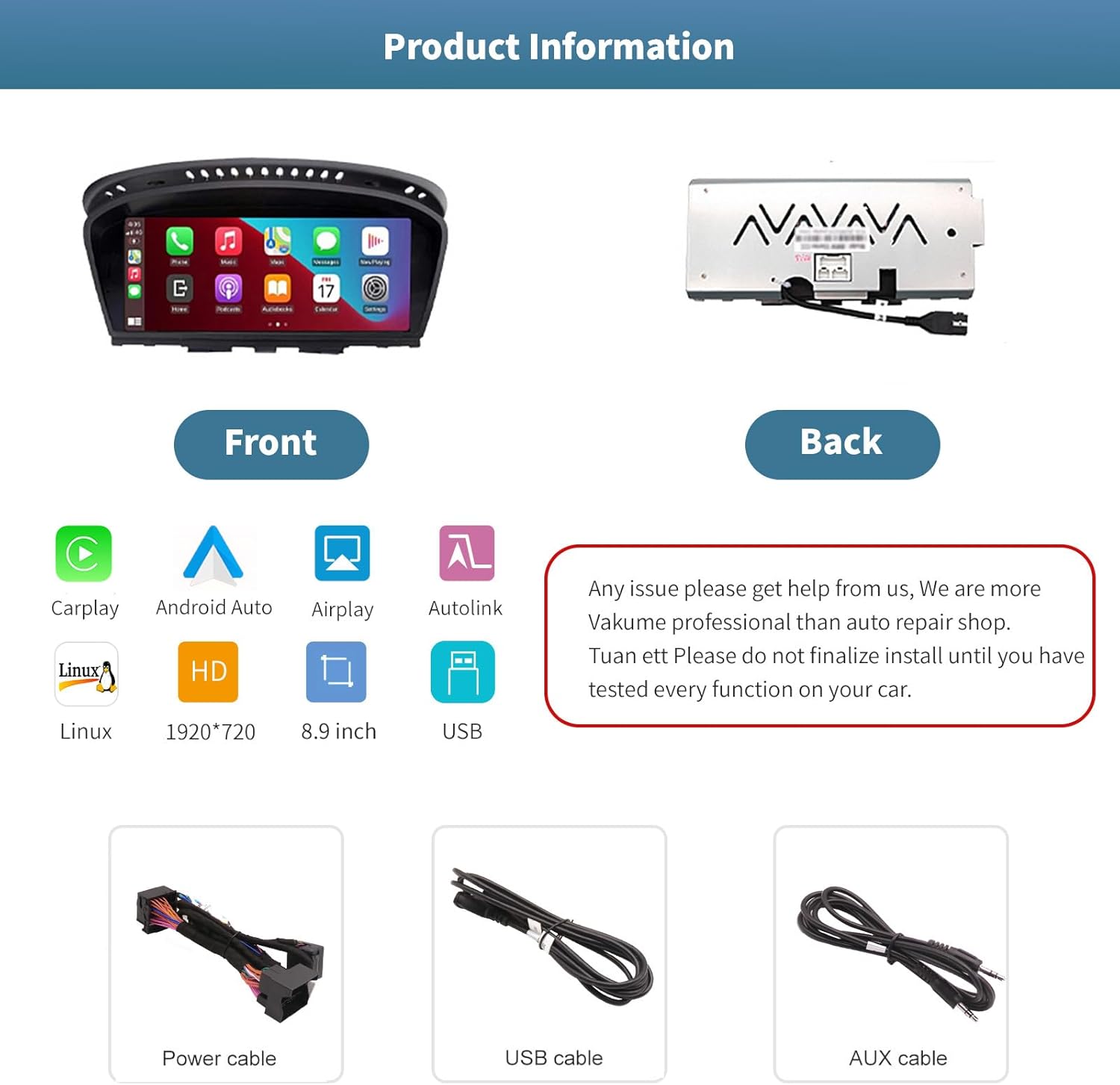
රූපය 3.1: ඉදිරිපස සහ පසුපස views of the autoabc multimedia receiver, along with the included power, USB, and AUX cables.
සටහන: Do not finalize the installation until you have tested every function on your car. For any installation issues, please contact autoabc support.
4. මෙහෙයුම
4.1. පද්ධති අතර මාරුවීම
The unit allows for one-button switching between your original BMW iDrive system and the new Linux-based multimedia system. This ensures you can access all original car functions while enjoying the new features.

Image 4.1: Interface showing the option to switch between the original car system and the new Linux system.
4.2. CarPlay සහ Android Auto භාවිතා කිරීම
Once connected wirelessly or via USB, CarPlay or Android Auto will launch, providing access to your phone's navigation, communication, and entertainment apps directly on the 8.9-inch touchscreen. Use voice commands or the touchscreen for safe operation while driving.

Image 4.2: The autoabc multimedia receiver installed in a BMW, showcasing the CarPlay/Android Auto interface.
4.3. Screen Mirroring (Airplay/Autolink)
Utilize Airplay for iOS devices or Autolink for Android devices to mirror your smartphone's screen onto the unit's display. This allows you to view photos, videos, and other content directly from your phone.
4.4. Customizing the Startup Screen
You can personalize the startup logo of your unit. Follow these steps:
- පික්සල 1920 x 720 විභේදනයක් සහිත PNG රූපයක් සාදන්න.
- රූපය නැවත නම් කරන්න file to 'updatelogo.png'.
- Place the 'updatelogo.png' file in the root directory of a USB drive.
- Insert the USB drive into the reserved USB port on the unit. A prompt will confirm the logo change is successful.
- නව ආරම්භක ලාංඡනය යෙදීමට මෝටර් රථය නැවත ආරම්භ කරන්න.

Image 4.3: Step-by-step guide for customizing the unit's startup logo.
5. නඩත්තු කිරීම
To ensure the longevity and optimal performance of your autoabc multimedia receiver, follow these general maintenance guidelines:
- තිර පිරිසිදු කිරීම: ස්පර්ශ තිරය මෘදු ලෙස පිස දැමීමට මෘදු, ලින්ට් රහිත රෙද්දක් භාවිතා කරන්න. මුරණ්ඩු පැල්ලම් සඳහා, තරමක් dampරෙදි කැබැල්ල වතුරෙන් හෝ තිර ආරක්ෂිත පිරිසිදුකාරකයකින් සෝදන්න. රළු රසායනික ද්රව්ය හෝ උල්ෙල්ඛ ද්රව්ය වලින් වළකින්න.
- අධික උෂ්ණත්වයෙන් වළකින්න: ඒකකය දිගු කාලයක් අධික තාපයට හෝ සීතලට නිරාවරණය නොකරන්න, මන්ද මෙය එහි ඉලෙක්ට්රොනික සංරචක වලට බලපෑ හැකිය.
- කේබල් කළමනාකරණය: Ensure all cables are securely connected and not pinched or strained, which could lead to damage or intermittent connectivity.
6. දෝශ නිරාකරණය
If you encounter issues with your autoabc multimedia receiver, refer to the following common problems and solutions:
- ශ්රව්ය ප්රතිදානය නැත:
- Ensure the AUX function in your car's original system is activated. This is a common requirement for audio output.
- Check all audio cable connections, especially the AUX cable.
- CarPlay/Android ස්වයංක්රීය සම්බන්ධතා ගැටළු:
- Verify your phone's Bluetooth and Wi-Fi are enabled and correctly paired with the unit.
- ඔබගේ දුරකථනය සහ මෝටර් රථයේ තොරතුරු රසාස්වාදය පද්ධතිය නැවත ආරම්භ කරන්න.
- ඔබගේ දුරකථනයේ මෙහෙයුම් පද්ධතිය යාවත්කාලීනව පවතින බවට වග බලා ගන්න.
- Microphone Echo or Poor Call Quality:
- Check for any obstructions near the microphone.
- Adjust the microphone sensitivity settings if available in the unit's menu.
- Ensure your phone's volume is not excessively high, which can cause feedback.
- Screen Not Responding to Touch:
- ඒකකය නැවත ආරම්භ කරන්න.
- තිරය පිරිසිදුව හා සුන්බුන් වලින් තොර බවට වග බලා ගන්න.
- AirPlay/Autolink Connection Failure:
- Ensure both the unit and your phone are connected to the same Wi-Fi network (if applicable for the mirroring method).
- Follow the specific connection steps for AirPlay or Autolink as detailed in the unit's on-screen instructions or a supplementary guide.
If these steps do not resolve the issue, please contact autoabc customer support for further assistance.
7. පිරිවිතර
| විශේෂාංගය | පිරිවිතර |
|---|---|
| සංදර්ශක ප්රමාණය | අඟල් 8.9 |
| සංදර්ශක විභේදනය | 1920 x 720 |
| මෙහෙයුම් පද්ධතිය | Linux (supports Android Auto, CarPlay) |
| සම්බන්ධතා තාක්ෂණය | Bluetooth, Wireless (for CarPlay/Android Auto) |
| විශේෂ ලක්ෂණය | ස්පර්ශ තිරය |
| පාලන ක්රමය | Touchscreen, Voice Command, Original Car Knob, Steering Wheel Buttons |
| සවිකිරීමේ වර්ගය | පැනල් කන්ද |
| අයිතමයේ බර | රාත්තල් 3.12 (කිලෝග්රෑම් 1.42) |
| පැකේජ මානයන් | අඟල් 11.81 x 7.24 x 6.73 |
8. වගකීම් සහ සහාය
autoabc ඔබේ නිෂ්පාදනය සඳහා විශිෂ්ට පාරිභෝගික සේවාවක් සහ සහාය ලබා දීමට කැපවී සිටී.
8.1. වගකීම් තොරතුරු
- One-Year Global Warranty: Your product is covered by a one-year global warranty from the date of purchase.
- 12 Months Replacement: Replacement is available within 12 months for eligible issues.
- 60 Days No Worry Return: Enjoy a 60-day return policy for your peace of mind.
8.2 තාක්ෂණික සහාය
- LIFETIME Technical Service Support: autoabc provides lifetime technical support for your product.
- පැය 24 කඩිනම් පිළිතුර: ඔබගේ විමසීම් වලට පැය 24ක් ඇතුළත ඉක්මන් ප්රතිචාරයක් බලාපොරොත්තු වන්න.
- අපව අමතන්න: For any questions, issues, or technical assistance, please contact us via Amazon Email. Our team is ready to provide reliable online technical support.

රූපය 8.1: ඉවරයිview of autoabc's customer support and warranty commitments.


