1. හැඳින්වීම
Welcome to the user manual for your Roborock S8 MaxV Ultra Robot Vacuum and Sonic Mop. This advanced cleaning device combines powerful vacuuming with sonic mopping capabilities, featuring an all-in-one dock for automated maintenance. This manual provides essential information for setup, operation, maintenance, and troubleshooting to ensure optimal performance and longevity of your device.

Figure 1: Roborock S8 MaxV Ultra Robot Vacuum and Sonic Mop with RockDock Ultra.
2. පිහිටුවීම
2.1 ඇසිරීම සහ ස්ථානගත කිරීම
- Carefully remove all components from the packaging: the S8 MaxV Ultra robot vacuum, the RockDock Ultra, disposable dust bag (pre-installed in dock), power cord, and user manual.
- Choose a suitable location for the RockDock Ultra. Ensure it is placed on a hard, level surface against a wall, with at least 0.5 meters (1.6 feet) of clear space on both sides and 1.5 meters (4.9 feet) in front. Avoid areas with direct sunlight or strong Wi-Fi signals from other devices.
- Connect the power cord to the RockDock Ultra and plug it into a power outlet. Ensure the dock is powered on.
2.2 මූලික ආරෝපණය
Place the robot onto the RockDock Ultra. The robot will automatically align and begin charging. For optimal battery life, fully charge the robot before its first use. The indicator light on the robot will show charging status.
2.3 යෙදුම් ස්ථාපනය සහ සම්බන්ධතාවය
- Download the Roborock app from your mobile device's app store (iOS App Store or Google Play Store).
- Open the app and follow the on-screen instructions to create an account and add your S8 MaxV Ultra. You will need to connect the robot to your home Wi-Fi network.
- Once connected, the app will guide you through the initial mapping process of your home.
3. මෙහෙයුම් උපදෙස්
3.1 පිරිසිදු කිරීමේ ක්රම
The S8 MaxV Ultra offers various cleaning modes to suit different needs:
- රික්ත කිරීම පමණි: Ideal for carpets or when mopping is not required. The mop module will lift automatically when carpets are detected.
- පිරිසිදු කිරීම පමණි: For hard floors where vacuuming is not needed. The main brush lifts during this mode.
- රික්ත කිරීම සහ පිස දැමීම: Simultaneous cleaning for hard floors.
- අභිරුචි පිරිසිදු කිරීම: Use the app to define specific areas, cleaning intensity, and sequence.
3.2 All-in-One RockDock Ultra Features
The RockDock Ultra provides comprehensive automated maintenance:
- ස්වයංක්රීය හිස් කිරීම: The robot's dustbin is automatically emptied into a disposable dust bag in the dock, holding up to 7 weeks of debris.
- උණු වතුර මොප් සේදීම: Mops are washed with 140°F (60°C) hot water to dissolve dirt and stains.
- Heated Air Drying: Mops are dried with heated air to prevent mildew and odors.
- Auto Refill: The robot's water tank is automatically refilled from the dock's clean water tank.
- ඩිටර්ජන්ට් ඩිස්පෙන්සර්: Automatically dispenses the correct amount of cleaning solution for mopping.
- තටාක ස්වයං පිරිසිදු කිරීම: The dock's base is cleaned automatically to minimize manual maintenance.

රූපය 2: අවසන්view of RockDock Ultra's 8-in-1 features.
3.3 උසස් පිරිසිදු කිරීමේ තාක්ෂණයන්
- 10,000 Pa චූෂණ බලය: Provides exceptional vacuuming performance on various floor types.
- FlexiArm Design Side Brush: Extends to reach tight corners and edges, ensuring thorough cleaning.
- VibraRise 3.0 Sonic Mopping System: Features double vibration modules for high-speed scrubbing (4000 times/minute) to remove stubborn stains.
- Intelligent Dirt Detection (DirTect Technology): The robot recognizes dirt levels and adapts cleaning intensity, including re-washing mops and re-mopping dirty areas.
- Reactive AI 2.0 Obstacle Recognition: Uses 3D structured light and an RGB camera to identify and navigate around up to 73 objects, such as shoes and pet waste.
- PreciSense LiDAR සංචාලනය: Creates detailed maps for efficient and optimized cleaning routes, supporting multi-level mapping.

Figure 3: Corner-to-Edge Cleaning with FlexiArm Design.

Figure 4: Powerful 10,000Pa Suction.

Figure 5: VibraRise 3.0 Mopping System in action.

Figure 6: Smart Obstacle Avoidance and Navigation.
3.4 Voice Assistant and Pet-Friendly Features
- Built-in Intelligent Voice Assistant ("Hello Rocky"): Initiate cleaning tasks, adjust modes, and control the robot with simple voice commands, even without an internet connection.
- Video Call & Cruise: Use the app to check on pets, schedule automated cruises, or engage in two-way video calls through the robot's camera.
- Pet Snaps: The robot can capture adorable snapshots of your pets during cleaning.
- Find Pets with One Click: The robot can roam your home to help locate your pet via the app.

Figure 7: "Hello Rocky" Intelligent Voice Assistant.
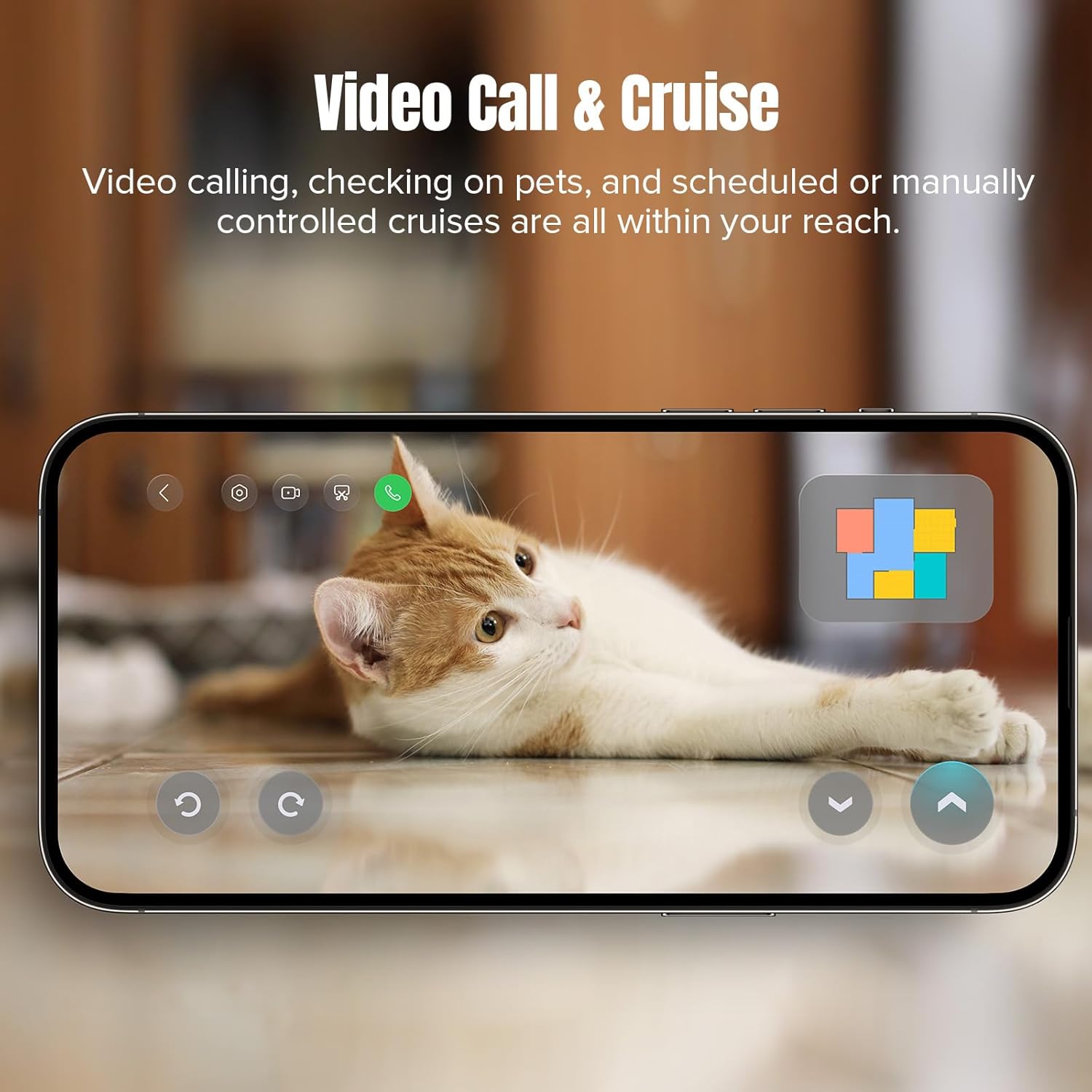
Figure 8: Video Call & Cruise Feature.
4. නඩත්තු කිරීම
Regular maintenance is crucial for the optimal performance and longevity of your Roborock S8 MaxV Ultra.
4.1 RockDock Ultra Maintenance
- Disposable Dust Bag Replacement: Replace the disposable dust bag in the dock approximately every 7 weeks, or when the app indicates it is full.
- පිරිසිදු ජල ටැංකිය: Refill the clean water tank with fresh water as needed. Use only Roborock approved cleaning solution in the detergent dispenser.
- අපිරිසිදු ජල ටැංකිය: Empty the dirty water tank regularly to prevent odors and ensure proper mop washing.
- Dock Base Cleaning: Although the dock has a self-cleaning function, periodically wipe down the dock base and charging contacts with a dry cloth to remove any residue.
4.2 රොබෝ රික්තක නඩත්තුව
- ප්රධාන බුරුසුව: Remove and clean the main brush regularly, especially if hair tangles are observed. Use the cleaning tool provided.
- පැති බුරුසු: Check the side brush for debris and ensure it rotates freely. Replace if damaged.
- මොප් පෑඩ්: Remove and wash the mop pads after each mopping session. Replace them when they show signs of wear.
- පෙරහන: The filter in the robot's dustbin is washable. Rinse it under running water and allow it to air dry completely before re-installing. Replace the filter periodically as recommended by the manufacturer.
- සංවේදක: Wipe all sensors (cliff sensors, wall sensor, charging contacts) on the robot with a soft, dry cloth to ensure accurate navigation and operation.
5. දෝශ නිරාකරණය
If you encounter issues with your Roborock S8 MaxV Ultra, refer to the following common problems and solutions. For more complex issues, consult the Roborock app or contact customer support.
| ගැටලුව | විය හැකි හේතුව | විසඳුම |
|---|---|---|
| රොබෝව ආරම්භ නොවේ හෝ ආරෝපණය නොවේ. | Power cord not connected; robot not properly docked; battery depleted. | Ensure power cord is securely plugged in. Re-dock the robot. Allow robot to charge for several hours. |
| රොබෝවරයා නිතරම හිරවෙනවා. | Obstacles (cords, small toys, rugs); dirty sensors. | Clear the cleaning area of small objects. Clean all sensors on the robot. Define no-go zones in the app for problematic areas. |
| දුර්වල පිරිසිදු කිරීමේ කාර්ය සාධනය. | Full dustbin; tangled main brush; dirty filter; worn mop pads. | Empty dustbin/replace dust bag. Clean main brush. Clean/replace filter. Wash/replace mop pads. |
| Mop washing/drying not effective. | Dirty water tank full; clean water tank empty; dock self-cleaning needed. | Empty dirty water tank. Refill clean water tank. Ensure dock self-cleaning is enabled and functioning. |
| යෙදුම් සම්බන්ධතා ගැටළු. | Weak Wi-Fi signal; incorrect Wi-Fi password; robot offline. | Ensure strong Wi-Fi signal. Re-enter Wi-Fi password in app. Restart robot and router. |
6. පිරිවිතර
| විශේෂාංගය | විස්තර |
|---|---|
| මාදිලියේ නම | S8 MaxV Ultra |
| වෙළඳ නාමය | රොබොරොක් |
| චූෂණ බලය | 10,000 Pa |
| Mopping පද්ධතිය | VibraRise 3.0 Sonic Mopping (4000 times/min, 2x Vibration Modules) |
| සංචලනය | PreciSense LiDAR සංචාලනය |
| බාධා මගහැරීම | Reactive AI 2.0 (3D structured light + RGB camera) |
| තටාක විශේෂාංග | Auto Emptying, Hot Water Mop Washing, Heated Air Drying, Auto Refill, Detergent Dispenser, Dock Self-Cleaning |
| බැටරි ධාවන කාලය | පැය 3 දක්වා (මිනිත්තු 180) |
| වෙළුමtage | වෝල්ට් 120 |
| අයිතමයේ බර | කිලෝ ග්රෑම් 20.6 කි |
| නිෂ්පාදන මානයන් | 36L x 49W x 57H Centimetres (Robot + Dock) |
| අනුකූල ස්මාර්ට් නිවස | Amazon Echo, Google Home, Siri, Smartphones, Smartwatches |
| පෙරහන් වර්ගය | සේදිය හැකි |
7. වගකීම් සහ සහාය
7.1 වගකීම් තොරතුරු
Roborock products typically come with a limited warranty covering manufacturing defects. The specific terms and duration of your warranty may vary based on your region and point of purchase. Please refer to the warranty card included with your product or visit the official Roborock webසවිස්තරාත්මක වගකීම් තොරතුරු සඳහා අඩවිය. වගකීම් හිමිකම් සඳහා ඔබේ මිලදී ගැනීමේ සාක්ෂි තබා ගන්න.
7.2 පාරිභෝගික සහාය
For technical assistance, troubleshooting beyond this manual, or service requests, please contact Roborock customer support.
- Roborock App: Many issues can be resolved directly through the support features within the Roborock app.
- නිල Webඅඩවිය: Visit the official Roborock webනිතර අසන ප්රශ්න, සහාය ලිපි සහ සම්බන්ධතා තොරතුරු සඳහා අඩවිය.
- විද්යුත් තැපෑල/දුරකථන: Specific contact details for your region can be found on the Roborock support page.
When contacting support, please have your product model (S8 MaxV Ultra) and serial number ready.


