1. වැදගත් ආරක්ෂක උපදෙස්
එකලස් කිරීමට සහ භාවිතා කිරීමට පෙර කරුණාකර සියලු උපදෙස් කියවා තේරුම් ගන්න. අනාගත යොමුව සඳහා මෙම අත්පොත තබා ගන්න.
- එකලස් කිරීමට පෙර සියලුම සංරචක පවතින බවත් හානි නොවන බවත් සහතික කර ගන්න.
- Do not overtighten screws during assembly to prevent damage to the material.
- Place the night stand on a flat, stable surface to prevent tipping.
- Do not exceed the weight capacity of the tabletop (50 lbs) or drawers/shelf (30 lbs).
- Keep liquids away from the charging station and power outlets to prevent electrical hazards.
- Unplug the power cord from the wall outlet before cleaning or moving the unit.
- Do not attempt to modify or repair the electrical components. Contact customer support for assistance.
2. පැකේජ අන්තර්ගතය
Verify that all parts listed below are included in your package. If any parts are missing or damaged, please contact customer service.
- ඉහළ පුවරුව
- පැති පැනල් (2)
- පසුපස පැනලය
- ලාච්චු ඉදිරිපස (2)
- Drawer Sides & Backs
- ලාච්චු පතුල්
- රාක්ක පැනලය
- කකුල් (4)
- ආරෝපණ ස්ථාන ඒකකය (පෙර ස්ථාපනය කර ඇති හෝ වෙනම)
- LED Light Strip with Human Sensor
- Hardware Kit (screws, dowels, drawer slides, handles, etc.)
- උපදෙස් අත්පොත
3. එකලස් කිරීමේ උපදෙස්
Follow these steps carefully for proper assembly. Each part is labeled with a number for easy identification.
- ඇසුරුම් ඉවත් කර හඳුනා ගන්න: Lay out all components on a clean, soft surface. Identify each part using the labels and the parts list.
- රාමුව එකලස් කරන්න: Attach the side panels to the bottom panel and back panel using the provided screws and dowels.
- රාක්කය ස්ථාපනය කරන්න: Insert the shelf panel into the designated slots or attach with screws.
- ලාච්චු එකලස් කරන්න: Construct the two drawers by attaching the sides, back, and bottom to the drawer front. Install drawer slides.
- ලාච්චු ඇතුළු කරන්න: Carefully slide the assembled drawers into the frame.
- ඉහළ පුවරුව අමුණන්න: එකලස් කරන ලද රාමුවට ඉහළ පුවරුව සුරක්ෂිත කරන්න.
- කකුල් සවි කරන්න: Attach the four legs to the bottom of the night stand.
- විදුලි සංරචක සම්බන්ධ කරන්න: If the charging station and LED light strip are not pre-installed, follow the specific instructions provided in the hardware kit to secure them and connect the necessary wiring. Ensure all connections are firm.
- අවසාන පරීක්ෂාව: Ensure all screws are tightened and the night stand is stable.

රූපය 3.1: Product dimensions and weight capacities for tabletop, shelf, and drawers. Dimensions are 15.75"D x 17.72"W x 23.62"H. Tabletop capacity is 50 lbs, shelf/drawer capacity is 30 lbs.
4. මෙහෙයුම් උපදෙස්
4.1 LED ආලෝකකරණ පද්ධතිය
The night stand features an integrated LED light strip with three color modes and a human sensor.
- බලය සක්රිය / අක්රිය: Locate the control button for the LED lights. A short press typically turns the lights on or off.
- වර්ණ මාදිලිය වෙනස් කරන්න: With the lights on, short press the control button repeatedly to cycle through the three available color modes: White light, Warm light, and Cold light.
- දීප්තිය සකසන්න: To adjust brightness (0-100%), press and hold the control button. The brightness will cycle up or down. Release the button when the desired brightness is reached.
- Human Sensor Function: The integrated human body sensor automatically activates the LED lights when motion is detected within 2-3 meters. The lights will turn off after a period of inactivity. This feature provides convenient illumination without manual operation.
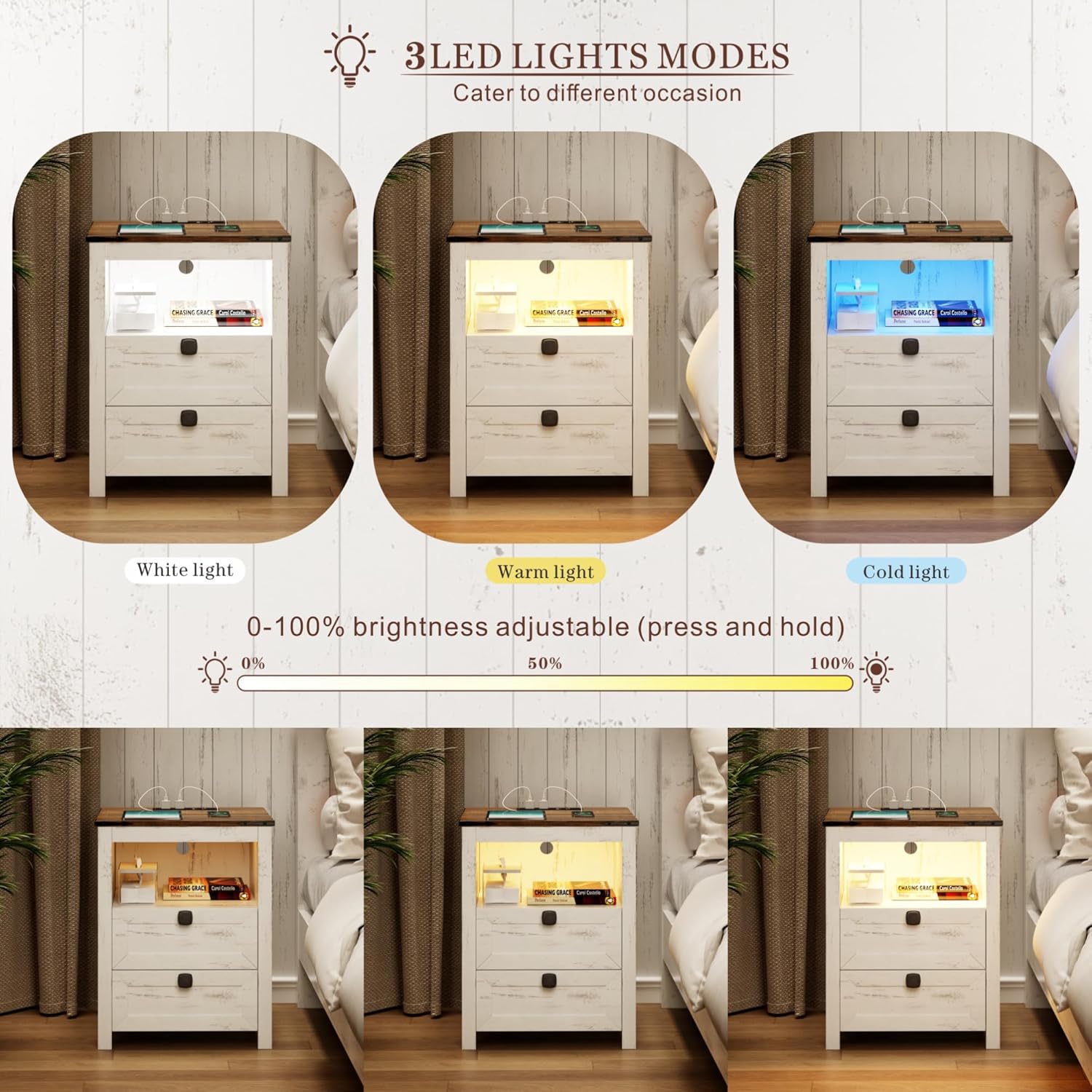
රූපය 4.1: Illustration of the three LED light modes (White, Warm, Cold) and the brightness adjustment range from 0% to 100% by pressing and holding the control button.

රූපය 4.2: Depiction of the human sensor's operation, showing it detects movement within a 2-3 meter range to automatically illuminate the night stand.
4.2 ආරෝපණ ස්ථානය
ඒකාබද්ධ ආරෝපණ මධ්යස්ථානය ඔබේ ඉලෙක්ට්රොනික උපාංග සඳහා පහසු බල ප්රවේශයක් සපයයි.
- බල සම්බන්ධතාවය: Ensure the night stand's main power cord is securely plugged into a standard 120V/12A wall outlet.
- USB Ports: Use the 1 x USB-A port (5V/2A) to charge compatible devices such as smartphones, tablets, or other USB-powered accessories.
- වර්ගය-සී වරාය: Use the 1 x Type-C port (5V/2A) for devices that utilize a USB-C connection.
- AC අලෙවිසැල්: The 2 x standard AC power outlets (120V/12A) can be used for larger electronics like laptops, lamps, or other appliances.
- කේබල් කළමනාකරණය: Route charging cables neatly to avoid clutter and potential hazards.

රූපය 4.3: සවිස්තරාත්මක view of the charging station, highlighting the 1 USB port, 1 Type-C port, and 2 AC power outlets, along with their respective power specifications.
5. නඩත්තු කිරීම
Proper care will extend the life and appearance of your night stand.
- පිරිසිදු කිරීම: මෘදු, d සමග මතුපිට පිස දමන්නamp රෙදි. නිමාවට හානි කළ හැකි රළු රසායනික ද්රව්ය හෝ උල්ෙල්ඛ පිරිසිදු කරන්නන්ගෙන් වළකින්න.
- දූවිලි දැමීම: Regularly dust the night stand, especially around the charging ports and LED light area, to prevent dust buildup.
- කාන්දුවීම්: Immediately wipe up any spills to prevent moisture damage to the wood and electrical components.
- විදුලි සංරචක: Ensure the charging station and LED lights remain dry. Do not immerse in water.
- ගාංචු තද කරන්න: ව්යුහාත්මක අඛණ්ඩතාව පවත්වා ගැනීම සඳහා වරින් වර සියලුම ඉස්කුරුප්පු සහ ගාංචු පරීක්ෂා කර තද කරන්න.
6. දෝශ නිරාකරණය
පොදු ගැටළු සහ ඒවායේ විසඳුම් සඳහා මෙම කොටස බලන්න.
| ගැටලුව | විය හැකි හේතුව | විසඳුම |
|---|---|---|
| LED විදුලි පහන් දැල්වෙන්නේ නැත. | සම්බන්ධ කර නැත; සම්බන්ධතාවය ලිහිල්යි; බලය හෝtage; දෝෂ සහිත LED තීරුව. | Ensure power cord is securely plugged into a working outlet. Check LED strip connection. Test outlet with another device. Contact customer support if faulty. |
| ආරෝපණ මධ්යස්ථානය ක්රියා නොකරයි. | Not plugged in; loose connection; device not compatible; overloaded circuit. | Verify power cord is plugged in. Check connections. Ensure device is compatible with USB/Type-C/AC specifications. Unplug some devices if overloaded. |
| Human sensor not detecting motion. | Obstruction; sensor dirty; out of range; sensor malfunction. | Ensure clear line of sight to the sensor. Clean sensor surface. Stand within 2-3 meter range. Contact customer support if malfunction persists. |
| ලාච්චු ඇලෙනවා හෝ සුමටව ලිස්සා යන්නේ නැහැ. | Improper assembly; debris in slides; damaged slides. | Review assembly steps for drawers and slides. Clear any debris. Contact customer support if slides are damaged. |
7. පිරිවිතර
- වෙළඳ නාමය: නිදහස්
- ආකෘතිය: Smart LED Night Stand
- නිෂ්පාදන මානයන්: 15.74"D x 17.71"W x 23.62"H
- වර්ණය: White (Farmhouse Style)
- මේස මුදුනේ බර ධාරිතාව: රාත්තල් 50
- Shelf/Drawer Weight Capacity: රාත්තල් 30
- LED විදුලි පහන්: 3 Color Modes (White, Warm, Cold), 0-100% Brightness Adjustable
- Human Sensor Range: මීටර් 2-3
- නිකුතු පොල:
- 1 x USB Port (5V/2A)
- 1 x Type-C Port (5V/2A)
- 2 x AC Power Outlets (120V/12A)
- විදුලි රැහැන් දිග: 4.92 අඩි
8. වගකීම් සහ සහාය
For warranty information, product support, or to report missing/damaged parts, please contact FREDEES customer service through the retailer where the product was purchased. Please have your purchase receipt and product model number (B0CSPDVKVP) available when contacting support.