හැඳින්වීම
Welcome to the Kuephom Portable CD Player Boombox. This versatile device offers multiple audio playback options including CD, MP3, FM radio, Bluetooth, USB, and TF card support. Designed for both home and portable use, it features stereo speakers and a rechargeable battery for extended listening enjoyment. Please read this manual thoroughly to ensure proper operation and care of your new device.
වැදගත් ආරක්ෂක තොරතුරු
- අවවාදයයි: මෙම උපකරණය වර්ෂාවට හෝ තෙතමනයට නිරාවරණය නොකරන්න.
- අවවාදයයි: විදුලි කම්පනය වැළැක්වීම සඳහා, c විවෘත නොකරන්න.asing. සියලුම සේවා සුදුසුකම් ලත් පුද්ගලයින් වෙත යොමු කරන්න.
- රේඩියේටර්, තාප රෙජිස්ටර්, උදුන් හෝ තාපය නිපදවන වෙනත් උපකරණ වැනි තාප ප්රභවයන් අසල ඒකකය තැබීමෙන් වළකින්න.
- නිෂ්පාදකයා විසින් නිශ්චිතව දක්වා ඇති ඇමුණුම්/උපාංග පමණක් භාවිතා කරන්න.
- විදුලි රැහැන් ඇවිදීමෙන් හෝ ඇණ ගැසීමෙන් ආරක්ෂා කරන්න, විශේෂයෙන් ප්ලග්, පහසුව සඳහා භාජන සහ ඒවා උපකරණයෙන් පිටවන ස්ථානය.
- අකුණු කුණාටු වලදී හෝ දිගු කාලයක් භාවිතා නොකළ විට මෙම උපකරණය විසන්ධි කරන්න.
- කිසිදු වාතාශ්රය විවරයක් අවහිර නොකරන්න. නිෂ්පාදකයාගේ උපදෙස් අනුව ස්ථාපනය කරන්න.
- Ensure proper ventilation when operating the unit.
- ඒකකයට විදේශීය වස්තූන් ඇතුළු නොකරන්න.
- ඒකකය ශක්තිමත් චුම්බක ක්ෂේත්ර වලින් ඈත් කරන්න.
- දේශීය රෙගුලාසිවලට අනුව බැටරි නිසි ලෙස බැහැර කරන්න.
පැකේජයේ අන්තර්ගතය
කරුණාකර සියලුම අයිතම තිබේදැයි පරීක්ෂා කරන්න:
- Kuephom Portable CD Player Boombox (Model W15)
- USB ආරෝපණ කේබලය
- බල ඇඩැප්ටරය
- පරිශීලක අත්පොත
නිෂ්පාදනය අවසන්view
Familiarize yourself with the main components and controls of your CD player boombox.

රූපය 1: ඉදිරිපස View - This image displays the main unit with its top-loading CD compartment open, revealing a CD. The front panel features control buttons for playback (play/pause, skip), a mode button, an LCD screen showing track time, and a large rotary volume knob. Two speaker grilles are visible at the bottom.

රූපය 2: පසුපස View - The rear of the boombox is shown, highlighting the extendable FM antenna. Below the antenna, from left to right, are the USB port, TF (Micro SD) card slot, DC 5V IN power input, and a headphone jack. The speaker grilles are also visible from this angle.
පාලන සහ වරාය:
- වාදනය/විරාම බොත්තම (►▮▮): Press to play or pause audio playback.
- පෙර/ආපසු හැරවීමේ බොත්තම (◀◀): Press to go to the previous track or rewind the current track.
- Next/Fast Forward Button (►►): Press to go to the next track or fast forward the current track.
- මාදිලි බොත්තම (M): Press to switch between CD, FM Radio, Bluetooth, USB, and TF card modes.
- Repeat/Random Button (↺): Press to cycle through repeat modes (repeat one, repeat all) or enable random playback (shuffle).
- Volume Knob (MIN-MAX): Rotate to adjust the volume level. Also serves as the power on/off switch.
- LCD සංදර්ශකය: Shows current mode, track number, time, and FM frequency.
- සීඩී මැදිරිය: Top-loading tray for inserting audio CDs.
- එෆ්එම් ඇන්ටෙනා: Extendable antenna for improved FM radio reception.
- USB Port: For playing MP3/WMA files from a USB flash drive (up to 32GB).
- TF කාඩ් පත: For playing MP3/WMA files from a TF (Micro SD) card (up to 32GB).
- DC 5V IN Port: Power input for charging the internal battery or operating the unit via the included power adapter.
- Headphone Jack (🎧): රැහැන්ගත හෙඩ්ෆෝන් සමඟ පුද්ගලික සවන්දීම සඳහා.
සැලසුම
1. ඒකකය බල ගැන්වීම
Your Kuephom CD player boombox comes with a built-in rechargeable Lithium Ion battery. Before first use, it is recommended to fully charge the battery.
- Connect the provided USB charging cable to the DC 5V IN port on the back of the unit.
- Connect the other end of the USB cable to the power adapter, and plug the adapter into a standard wall outlet.
- The LCD display will indicate charging status. Charging typically takes 3-4 hours for a full charge.
- Alternatively, the unit can be powered directly from the wall adapter without battery charge.

රූපය 3: ආරෝපණ විකල්ප - This image illustrates the versatility of charging the boombox. It can be charged using a standard wall charger, a car charger (via a USB car adapter, not included), or a portable power bank, making it convenient for both indoor and outdoor use.
2. සක්රිය / අක්රිය කිරීම
To turn the unit on, rotate the Volume Knob clockwise from the MIN position. To turn off, rotate the Volume Knob counter-clockwise to the MIN position until it clicks.
මෙහෙයුම් මාදිලි
ඔබන්න මාදිලිය (M) button repeatedly to cycle through the available playback modes: CD, FM Radio, Bluetooth, USB, and TF Card.

Figure 4: 5 Play Modes - This graphic highlights the five primary playback modes of the Kuephom boombox: CD Player, Bluetooth, FM Radio, TF Card, and USB Input, emphasizing its multi-functional capabilities.
1. CD නැවත ධාවනය
- සීඩී මැදිරි පියන මෘදු ලෙස එසවීමෙන් විවෘත කරන්න.
- Place an audio CD or MP3 CD onto the spindle, label side up.
- සීඩී මැදිරි පියන තදින් වසා දමන්න.
- ඔබන්න මාදිලිය (M) button until "CD" appears on the LCD display.
- සීඩී තැටිය ස්වයංක්රීයව වාදනය වීමට පටන් ගනී. එසේ නොවේ නම්, බොත්තම ඔබන්න. Play/Pause (►▮▮) බොත්තම.
- භාවිතා කරන්න පෙර (◀◀) සහ Next (►►) ධාවන පථ මඟ හැරීමට බොත්තම්.
- ඔබා අල්ලාගෙන සිටින්න පෙර (◀◀) or Next (►►) වේගයෙන් ඉදිරියට යාමට හෝ ආපසු හැරවීමට බොත්තම්.
- ඔබන්න Repeat/Random (↺) button to cycle through repeat modes (Repeat One, Repeat All) or enable random (shuffle) playback.
2. බ්ලූටූත් ප්ලේබැක්
- ඔබන්න මාදිලිය (M) button until "BT" appears on the LCD display. The unit will enter Bluetooth pairing mode, indicated by a flashing "BT".
- ඔබගේ බ්ලූටූත්-සක්රීය උපාංගයේ (උදා: ස්මාර්ට් ජංගම දුරකථනය, ටැබ්ලටය), බ්ලූටූත් ක්රියාත්මක කර පවතින උපාංග සොයන්න.
- Select "Kuephom W15" from the list of devices.
- Once paired, "BT" will stop flashing and remain solid. You can now play audio from your device through the boombox.
- Use the playback controls on your connected device or the boombox's Play/Pause (►▮▮), පෙර (◀◀), සහ Next (►►) නැවත ධාවනය පාලනය කිරීමට බොත්තම්.

Figure 5: CD Player & Bluetooth Speaker Functionality - This image demonstrates the dual functionality of the device, showing it first as a standalone CD player and then as a Bluetooth speaker, with a smartphone successfully paired to it. This highlights its versatility for different audio sources.
3. FM රේඩියෝ මෙහෙයුම
- Extend the FM antenna on the back of the unit for optimal reception.
- ඔබන්න මාදිලිය (M) button until "FM" appears on the LCD display.
- To auto-scan and save stations: Press and hold the Play/Pause (►▮▮) button. The unit will automatically scan for available FM stations and save them as presets (up to 30 stations).
- To tune to a saved preset station: Use the පෙර (◀◀) සහ Next (►►) buttons to navigate through the saved presets.
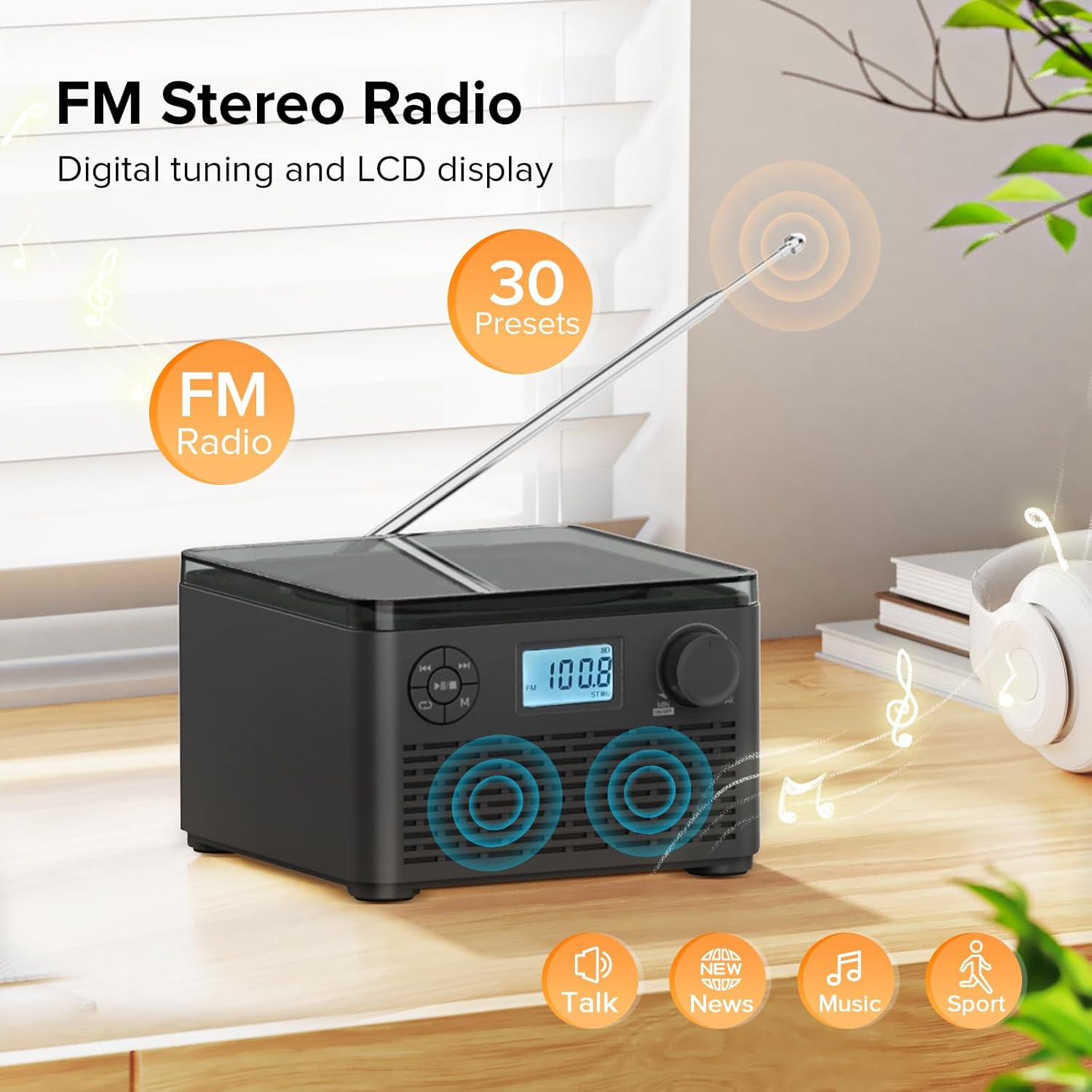
Figure 6: FM Stereo Radio - This image focuses on the FM radio feature, showing the digital display tuned to a frequency and indicating the availability of 30 presets. The extendable antenna is also visible, emphasizing its radio capabilities.
4. USB/TF කාඩ්පත් නැවත ධාවනය
The unit supports MP3 and WMA audio formats from USB flash drives and TF (Micro SD) cards up to 32GB.
- Insert a USB flash drive into the USB port or a TF card into the TF card slot on the back of the unit. Ensure the antenna is moved out of the way if necessary.
- ඔබන්න මාදිලිය (M) button until "USB" or "TF" appears on the LCD display.
- The unit will automatically detect and begin playing audio fileඇතුළත් කළ ගබඩා උපාංගයෙන් s.
- භාවිතා කරන්න Play/Pause (►▮▮), පෙර (◀◀), සහ Next (►►) නැවත ධාවනය පාලනය කිරීමට බොත්තම්.
- ඔබන්න Repeat/Random (↺) button to cycle through repeat modes or enable random playback.
5. හෙඩ්ෆෝන් භාවිතය
For private listening, connect standard 3.5mm headphones to the headphone jack on the back of the unit. The internal speakers will automatically mute when headphones are connected.
නඩත්තු කිරීම සහ රැකවරණය
- පිරිසිදු කිරීම: ඒකකයේ බාහිර පිරිසිදු කිරීම සඳහා මෘදු වියළි රෙද්දක් භාවිතා කරන්න. උල්ෙල්ඛ පිරිසිදු කරන්නන් හෝ ද්රාවක භාවිතා නොකරන්න.
- CD Care: Handle CDs by their edges. Keep them clean and free of scratches. Use a soft, lint-free cloth to wipe CDs from the center outwards.
- ගබඩා: දිගු කාලයක් භාවිතයේ නොමැති විට, සෘජු හිරු එළියෙන් සහ අධික උෂ්ණත්වයන්ගෙන් ඈත්ව සිසිල් වියළි ස්ථානයක ඒකකය ගබඩා කරන්න.
- බැටරි සත්කාර: To prolong battery life, avoid fully discharging the battery frequently. Recharge the unit regularly, even if not in constant use.
දෝෂගවේෂණය
| ගැටලුව | විය හැකි හේතුව | විසඳුම |
|---|---|---|
| ඒකකය බලය සක්රිය නොවේ. | Battery is depleted or power adapter is not connected properly. | Ensure the volume knob is rotated clockwise to turn on. Connect the power adapter and charge the unit. |
| CD is skipping or not playing. | CD තැටිය අපිරිසිදු වී, සීරීම් වී හෝ වැරදි ලෙස ඇතුළත් කර ඇත. | Clean the CD with a soft cloth. Ensure the CD is placed correctly in the compartment. Try a different CD. |
| දුර්වල FM රේඩියෝ පිළිගැනීම. | ඇන්ටෙනාව දිගු වී නැත හෝ දුර්වල සංඥාවක්. | FM ඇන්ටනාව සම්පූර්ණයෙන්ම දිගු කරන්න. වඩා හොඳ සංඥාවක් සඳහා ඒකකය නැවත ස්ථානගත කිරීමට උත්සාහ කරන්න. |
| බ්ලූටූත් උපාංගය යුගල කළ නොහැක. | ඒකකය යුගල කිරීමේ මාදිලියේ නැත නැතහොත් උපාංගය ඉතා දුරින් ඇත. | Ensure the unit is in "BT" mode and flashing. Move your Bluetooth device closer to the boombox. Disconnect other Bluetooth devices. |
| USB/TF card not recognized. | සහාය නොදක්වයි file format or card capacity. | සහතික කරන්න files are MP3 or WMA format. Check that the card capacity is 32GB or less. Reinsert the card/drive. |
පිරිවිතර
- ආකෘතිය: W15
- වෙළඳ නාමය: කූෆෝම්
- නිෂ්පාදන මානයන් (L x W x H): අඟල් 6.3 x 6.3 x 4.2
- අයිතමයේ බර: රාත්තල් 1.9 කි
- බල ආදානය: DC 5V
- බැටරි: 1 Lithium Ion බැටරි (ඇතුළත්)
- බැටරි ධාවන කාලය: 6-10 hours (approx., varies with usage)
- සහාය දක්වන තැටි ආකෘති: සීඩී, සීඩී-ආර්, සීඩී-ආර්ඩබ්ලිව්, එම්පී3 සීඩී
- Supported USB/TF Card Formats: MP3, WMA (up to 32GB)
- FM Radio Frequency Range: 87.5 - 108 මෙගාහර්ට්ස්
- ස්පීකර් වර්ගය: බිල්ට්-ස්ටීරියෝ ස්පීකර්
- හෙඩ්ෆෝන් ජැක්: 3.5 මි.මී
වගකීම් සහ සහාය
Kuephom products are designed and manufactured to the highest quality standards. For any questions, technical support, or warranty claims, please contact Kuephom customer service through the retailer where you purchased the product or visit the official Kuephom webවැඩි විස්තර සඳහා වෙබ් අඩවිය.
වගකීම් අරමුණු සඳහා කරුණාකර ඔබේ මිලදී ගැනීමේ සාක්ෂි තබා ගන්න.


