නිෂ්පාදනය අවසන්view
The BRINKS TSA recognized combination padlock is designed for securing luggage and storage cases during travel. It features a durable 32mm zinc die-cast body and a flexible braided cable shackle. This lock is lightweight, corrosion-resistant, and built to withstand typical handling. The flexible cable allows it to be threaded through standard luggage zippers, helping to keep your belongings secure. Each lock includes a resettable 3-dial combination mechanism for personalized security.
ප්රධාන ලක්ෂණ
- TSA Recognized: Approved by the Transportation Security Administration (TSA) for travel, allowing security personnel to inspect luggage without damaging the lock.
- කල් පවතින ඉදිකිරීම්: Made with a 32mm zinc die-cast body and a flexible braided cable shackle for durability, light weight, and corrosion resistance.
- නම්යශීලී කේබල්: The braided cable shackle easily threads through various luggage zippers and can secure items to luggage racks or other objects.
- 3-Dial Resettable Combination: Provides enhanced security with a personalized, resettable 3-digit code.
- බහුකාර්ය භාවිතය: Suitable for securing bags, suitcases, backpacks, and other storage cases.

Image: A blue BRINKS TSA lock with callouts for "Personalized Code", "No Key Needed", and "Flexible Shackle", illustrating its main benefits.

Image: A display of BRINKS TSA locks in red, blue, and black, indicating the assorted color options available.
සැකසුම: ඔබේ සංයෝජනය සැකසීම
Your BRINKS TSA lock comes with a factory preset combination of 0-0-0. Follow these steps to set your personal combination:
- Ensure the lock is set to the current combination (factory default is 0-0-0).
- Locate the reset button (a) on the side or bottom of the lock.
- Using a pen or a similar pointed tool, push the reset button (a) inwards until it clicks and remains depressed at a 45-degree angle.
- While the reset button is depressed, turn the dials (b) to your desired 3-digit combination. Make sure the numbers are clearly aligned in the combination window (c).
- Release the reset button (a). It should spring back to its original position.
- Scramble the dials to lock the new combination. Test your new combination to ensure it opens the lock correctly before securing your belongings.

Image: A step-by-step diagram illustrating the process of resetting the padlock's combination, highlighting the reset button (a), dials (b), and combination window (c).
වැදගත්: Remember your new combination. There is no master key or override if you forget it, other than trying all possible combinations.
මෙහෙයුම් උපදෙස්
අගූලු දැමිමට:
- Ensure the cable shackle is fully inserted into the lock body.
- Scramble the dials to a random set of numbers. The lock is now secured.
අගුළු ඇරීමට:
- Align the dials to your personal 3-digit combination.
- Pull the cable shackle out of the lock body. The lock is now open.

Image: Two BRINKS TSA locks in use, one securing a backpack zipper and another securing a suitcase zipper, demonstrating practical application.

Image: A BRINKS TSA lock displayed with the "TSA Accepted" and "Travel Sentry" logos, confirming its compliance for air travel.
නඩත්තු කිරීම
The BRINKS TSA combination padlock requires minimal maintenance. To ensure optimal performance and longevity:
- Keep the lock clean and free from dirt or debris, especially around the dials and shackle mechanism.
- අගුල අධික උෂ්ණත්වයන්ට හෝ රළු රසායනික ද්රව්යවලට නිරාවරණය වීමෙන් වළකින්න.
- If the dials become stiff, a small amount of graphite lubricant can be applied. Avoid oil-based lubricants as they can attract dirt.
- Regularly check the cable shackle for any signs of wear or damage.
දෝෂගවේෂණය
- Lock will not open with the correct combination:
- Ensure the numbers are perfectly aligned in the combination window.
- Verify you are using the correct combination. If recently changed, try both the old and new combinations.
- The dials might be stiff. Try wiggling them gently while entering the combination.
- Cannot set a new combination:
- Make sure the lock is set to the current combination (0-0-0 initially) before attempting to press the reset button.
- Ensure the reset button is fully depressed and stays at a 45-degree angle before changing the dials.
- Confirm the reset button springs back completely after setting the new combination and releasing එය.
- Shackle is difficult to insert or remove:
- Check for any obstructions in the shackle hole.
- Ensure the combination is correctly set before attempting to remove the shackle.
පිරිවිතර
| වෙළඳ නාමය | BRINKS |
| ආදර්ශ අංකය | 165-25209 |
| අගුළු වර්ගය | 3-Dial Resettable Combination Lock |
| විශේෂ ලක්ෂණය | TSA Approved |
| ද්රව්ය | Zinc Body, Flexible Cable Shackle |
| මානයන් (L x W x H) | අඟල් 2.5 x 0.63 x 3.25 |
| අයිතමයේ බර | අවුන්ස 5.3 කි |
| වර්ණය | Assorted (Blue, Red, Black) |
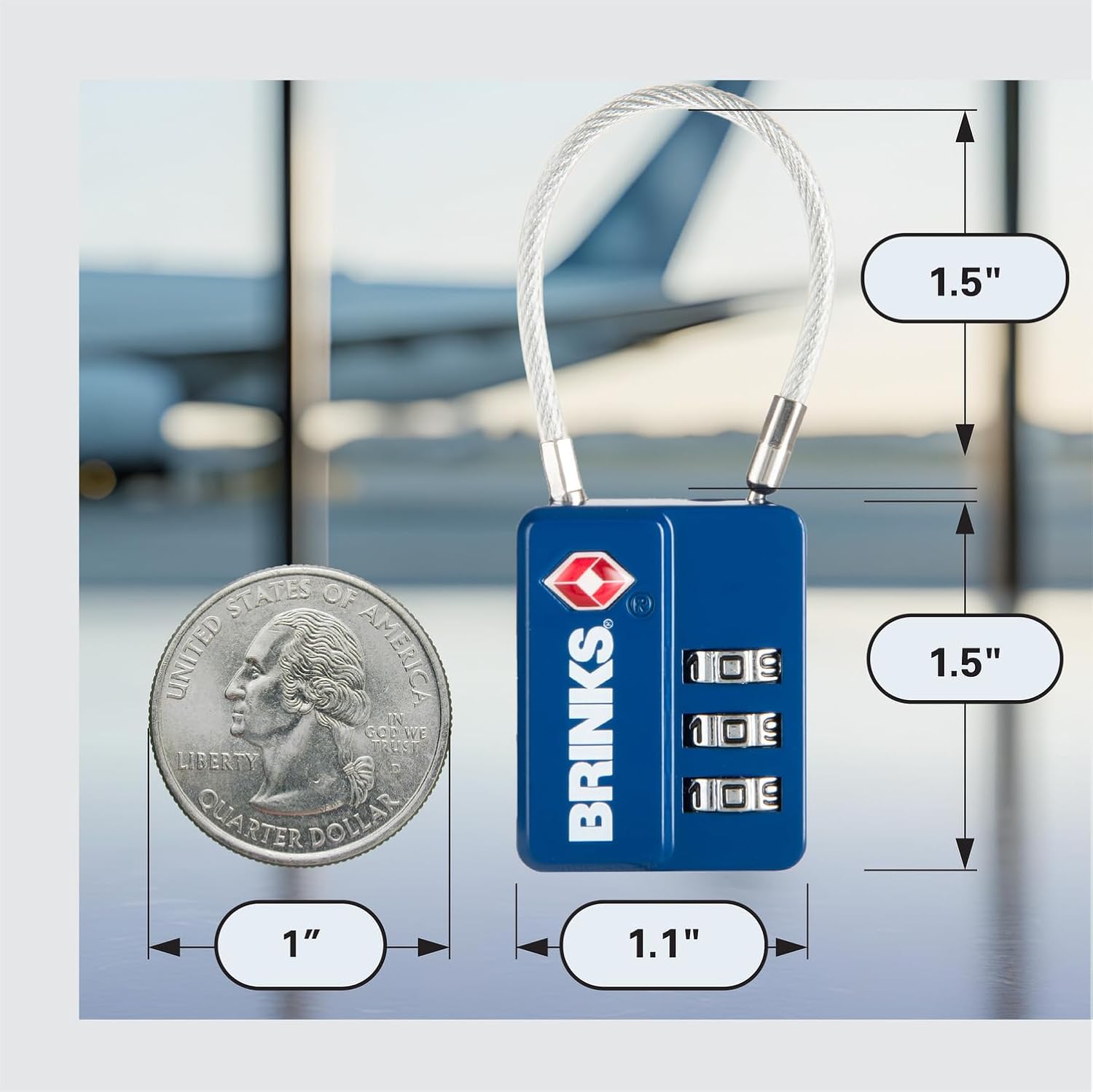
Image: A BRINKS TSA lock shown next to a US quarter coin, with dimensions indicating its compact size (1.5" height, 1.1" width, 1.5" shackle height).
වගකීම් සහ සහාය
For information regarding product warranty, returns, or technical support, please refer to the official BRINKS webවෙබ් අඩවියට පිවිසෙන්න හෝ ඔවුන්ගේ පාරිභෝගික සේවය කෙලින්ම අමතන්න. මිලදී ගැනීමේ සාක්ෂියක් ලෙස ඔබේ මිලදී ගැනීමේ රිසිට්පත තබා ගන්න.
You can typically find contact information and warranty details on the manufacturer's official webඅඩවිය: www.brinks.com


