හැඳින්වීම
This user manual provides essential information for setting up, operating, maintaining, and troubleshooting your VIBOX I-45 Gaming PC. Please read this manual thoroughly before using your new computer to ensure optimal performance and longevity.
1. පිහිටුවීම
1.1 පෙට්ටි ඉවත් කිරීම සහ පැකේජ අන්තර්ගතය
Carefully remove all components from the packaging. Ensure all items listed below are present. Retain the packaging for future transport or service needs.
- VIBOX I-45 Gaming PC (VTX-4 Black Tower)
- බල කේබලය
- Wi-Fi Network Adapter (300 Mbps)
- ලේඛන (මෙම අත්පොත)
1.2 සම්බන්ධක පර්යන්ත
Before powering on your PC, connect all necessary peripherals.
- නිරීක්ෂණය: Connect your monitor to the graphics output port (HDMI or DisplayPort) on the rear of the PC. Ensure the monitor is also connected to a power source.
- යතුරුපුවරුව සහ මූසිකය: ඔබගේ යතුරුපුවරුව සහ මූසිකය පවතින USB පෝට් වෙත සම්බන්ධ කරන්න.
- ජාලය: For wired internet, connect an Ethernet cable to the LAN port. For wireless internet, ensure the included Wi-Fi adapter is installed or connected.
- ශ්රව්ය: Connect speakers or a headset to the audio output jacks.
- බලය: Connect the power cable to the PC's power input and then to a wall outlet.

Figure 1.2.1: Rear I/O Ports for connecting peripherals.
1.3 ආරම්භක ආරම්භය සහ Windows 11 සැකසුම
After connecting all peripherals, press the power button on the front of the PC. The system will boot into Windows 11 Home. Follow the on-screen instructions to complete the initial setup, including language selection, network connection, and user account creation.

Figure 1.3.1: Windows 11 Home Operating System.
2. මෙහෙයුම් උපදෙස්
2.1 බලය සක්රිය / අක්රිය කර නැවත ආරම්භ කරන්න
- බල ගැන්වීම: ඉදිරිපස පුවරුවේ පිහිටා ඇති බල බොත්තම ඔබන්න.
- වසා දමන්න: Windows හි Start බොත්තම ක්ලික් කරන්න, ඉන්පසු Power > Shut down තෝරන්න.
- යළි අරඹන්න: Windows හි Start බොත්තම ක්ලික් කරන්න, ඉන්පසු Power > Restart තෝරන්න.
2.2 Windows 11 Home Features
Your VIBOX I-45 comes pre-installed with Windows 11 Home, offering several features designed to enhance your computing experience:
- DirectStorage: Enables faster game loading times.
- AutoHDR: Automatically enhances visuals for improved graphics.
- Xbox Game Pass Integration: Seamless access to a library of games.
- Optimized CPU Performance: Enhanced performance for various tasks.
2.3 RGB ආලෝකකරණ පාලනය
The VTX-4 case features Hex RGB Infinity 120mm fans. You can customize the lighting effects and colors using the dedicated RGB change button on the top panel or through compatible software if available.

Figure 2.3.1: Customizable RGB Fans.
3. නඩත්තු කිරීම
3.1 ඔබේ පරිගණකය පිරිසිදු කිරීම
Regular cleaning helps maintain performance and extends the lifespan of your computer.
- බාහිර: මෘදු, ඩී භාවිතා කරන්නamp බාහිර පෘෂ්ඨයන් පිස දැමීමට රෙදි. සැර රසායනික ද්රව්යවලින් වළකින්න.
- දූවිලි ඉවත් කිරීම: විදුලි පංකා විවරයන් සහ අභ්යන්තර සංරචක වලින් දූවිලි ඉවත් කිරීම සඳහා වරින් වර සම්පීඩිත වාතය භාවිතා කරන්න. පිරිසිදු කිරීමට පෙර පරිගණකය ක්රියා විරහිත කර විසන්ධි කර ඇති බවට වග බලා ගන්න.
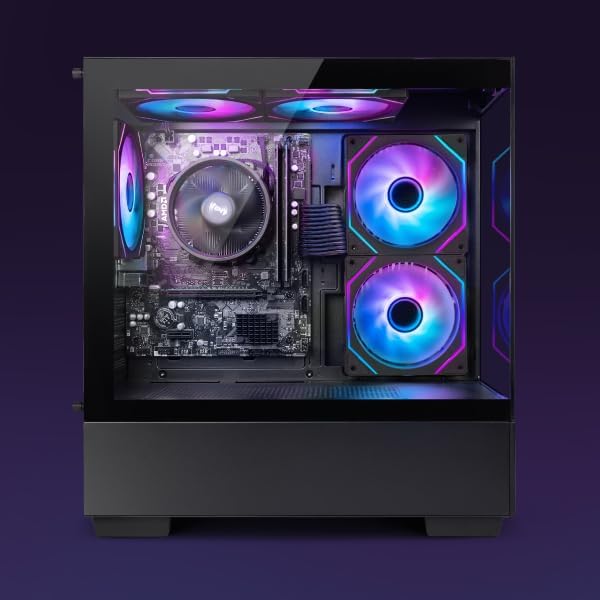
Figure 3.1.1: Internal components of the VIBOX I-45 PC.
3.2 මෘදුකාංග යාවත්කාලීන
Keep your operating system and drivers updated to ensure security, stability, and optimal performance.
- වින්ඩෝස් යාවත්කාලීන: Windows 11 automatically checks for updates. You can manually check by going to Settings > Windows Update.
- ධාවක යාවත්කාලීන: Regularly check the VIBOX support webඅඩවියේ හෝ සංරචක නිෂ්පාදකයින්ගේ websites (AMD for CPU/GPU) for the latest drivers.
3.3 පද්ධති උපස්ථය
දත්ත නැතිවීම වැළැක්වීම සඳහා ඔබේ වැදගත් දත්ත නිතිපතා බාහිර ධාවකයකට හෝ වලාකුළු ගබඩාවකට උපස්ථ කරන්න.
4. දෝශ නිරාකරණය
This section addresses common issues you might encounter. For more complex problems, please contact VIBOX support.
4.1 බලය නැත
- විදුලි රැහැන පරිගණකයට සහ බිත්ති අලෙවිසැලට ආරක්ෂිතව සම්බන්ධ කර ඇති බවට වග බලා ගන්න.
- වෙනත් උපාංගයක් සම්බන්ධ කිරීමෙන් බිත්ති පිටවීම ක්රියාකාරී බව තහවුරු කරන්න.
- Check the power supply switch on the rear of the PC (if present) is in the 'On' position.
4.2 මොනිටරයේ සංදර්ශකයක් නොමැත
- Confirm the monitor is powered on and correctly connected to the PC's graphics output port.
- ඔබගේ මොනිටරයේ නිවැරදි ආදාන ප්රභවය තෝරාගෙන ඇති බවට වග බලා ගන්න.
- Try a different display cable if available.
4.3 මන්දගාමී කාර්ය සාධනය
- පසුබිමේ ධාවනය වන අනවශ්ය යෙදුම් වසා දමන්න.
- ඕනෑම අපේක්ෂිත Windows හෝ ධාවක යාවත්කාලීන කිරීම් පරීක්ෂා කර ස්ථාපනය කරන්න.
- තැටි පිරිසිදු කිරීමක් සහ defragmentation එකක් ක්රියාත්මක කරන්න (HDD සඳහා, සාමාන්යයෙන් SSD සඳහා අවශ්ය නොවේ).
- අනිෂ්ට මෘදුකාංග හෝ වෛරස් සඳහා පරිලෝකනය කරන්න.
4.4 ජාල සම්බන්ධතා ගැටළු
- Wifi: Ensure the Wi-Fi adapter is properly installed and drivers are up to date. Check your router and internet connection.
- ඊතර්නෙට්: ඊතර්නෙට් කේබලය පරිගණකයට සහ රවුටරයට/මොඩමයට ආරක්ෂිතව සම්බන්ධ වී ඇති බව තහවුරු කර ගන්න. රවුටරයේ තත්ත්වය පරීක්ෂා කරන්න.
- Restart your router/modem and PC.
5. පිරිවිතර
| විශේෂාංගය | පිරිවිතර |
|---|---|
| වෙළඳ නාමය | VIBOX |
| ආදර්ශ අංකය | I-45 |
| වර්ණය | VTX-4 Black |
| මෙහෙයුම් පද්ධතිය | Windows 11 Home |
| ප්රොසෙසරය | AMD Ryzen 3 3200G (4 Cores, 3.6 GHz Base, up to 4.0 GHz Max) |
| ග්රැෆික්ස් | Integrated Radeon Vega 8 Graphics (2GB Shared Memory) |
| RAM | 16 GB DDR4 (3200 MHz Dual Channel) |
| ගබඩා කිරීම | 480 GB SSD |
| Max Memory Support | 128 GB |
| Wifi | 802.11n (300 Mbps adapter included) |
| HDMI වරායන් | 1 |
| USB 2.0 Ports | 3 |
| USB 3.0 Ports | 3 |
| මානයන් (L x W x H) | 36 x 20 x 41 සෙ.මී |
| ගැළපෙන උපාංග | Headset, Keyboard, Printer, Monitor, Mouse |
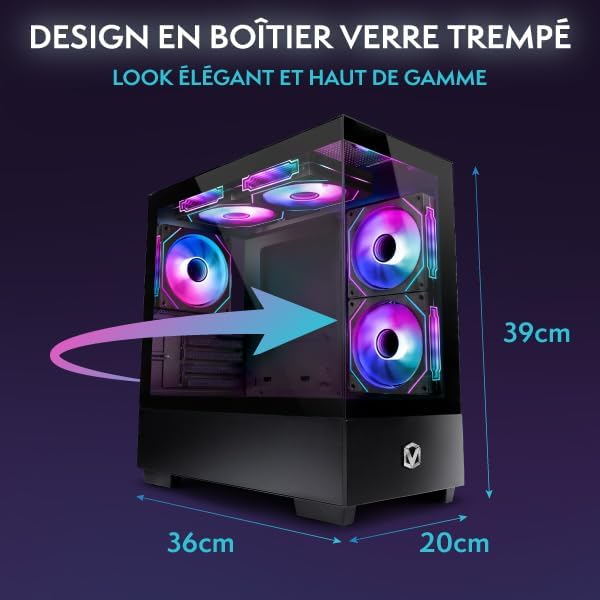
Figure 5.1.1: VIBOX I-45 PC Dimensions.
6. වගකීම් තොරතුරු
Your VIBOX I-45 Gaming PC comes with a manufacturer's warranty covering:
- කොටස්: අවුරුදු 2 යි
- ශ්රමය: ජීවිත කාලය
Please retain your proof of purchase for warranty claims. For detailed terms and conditions, refer to the warranty card included with your product or visit the official VIBOX webඅඩවිය.
7. සහාය
For technical assistance, troubleshooting beyond this manual, or warranty inquiries, please contact VIBOX customer support. You can find contact information on the official VIBOX Gaming webඅඩවියෙන් හෝ ඔබේ සිල්ලර වෙළෙන්දා හරහා.
සබැඳි සම්පත්:
- වෙත පිවිසෙන්න VIBOX Gaming Store on Amazon නිෂ්පාදන තොරතුරු සහ යාවත්කාලීන කිරීම් සඳහා.


