Noble Noble FoKus Prestige

Noble FoKus Prestige Headphones User Manual

Model: FoKus Prestige

වෙළඳ නාමය: නොබල්

1. පිහිටුවීම

1.1 පෙට්ටි ඉවත් කිරීම සහ මූලික ගාස්තුව

Your Noble FoKus Prestige headphones come with the following components:

  • ඉයර්ෆෝන් (වම සහ දකුණ)
  • අයකිරීමේ නඩුව (x1)
  • USB Charging Case (x1)
  • Ear Tips (x6 pairs)
  • උපදෙස් අත්පොත (x1)
  • ගබඩා බෑගය (x1)

Before first use, ensure the charging case and earbuds are fully charged. A 15-minute charge provides up to 70 minutes of playback time. A full charge offers approximately 10 hours of battery life per charge for the earbuds.
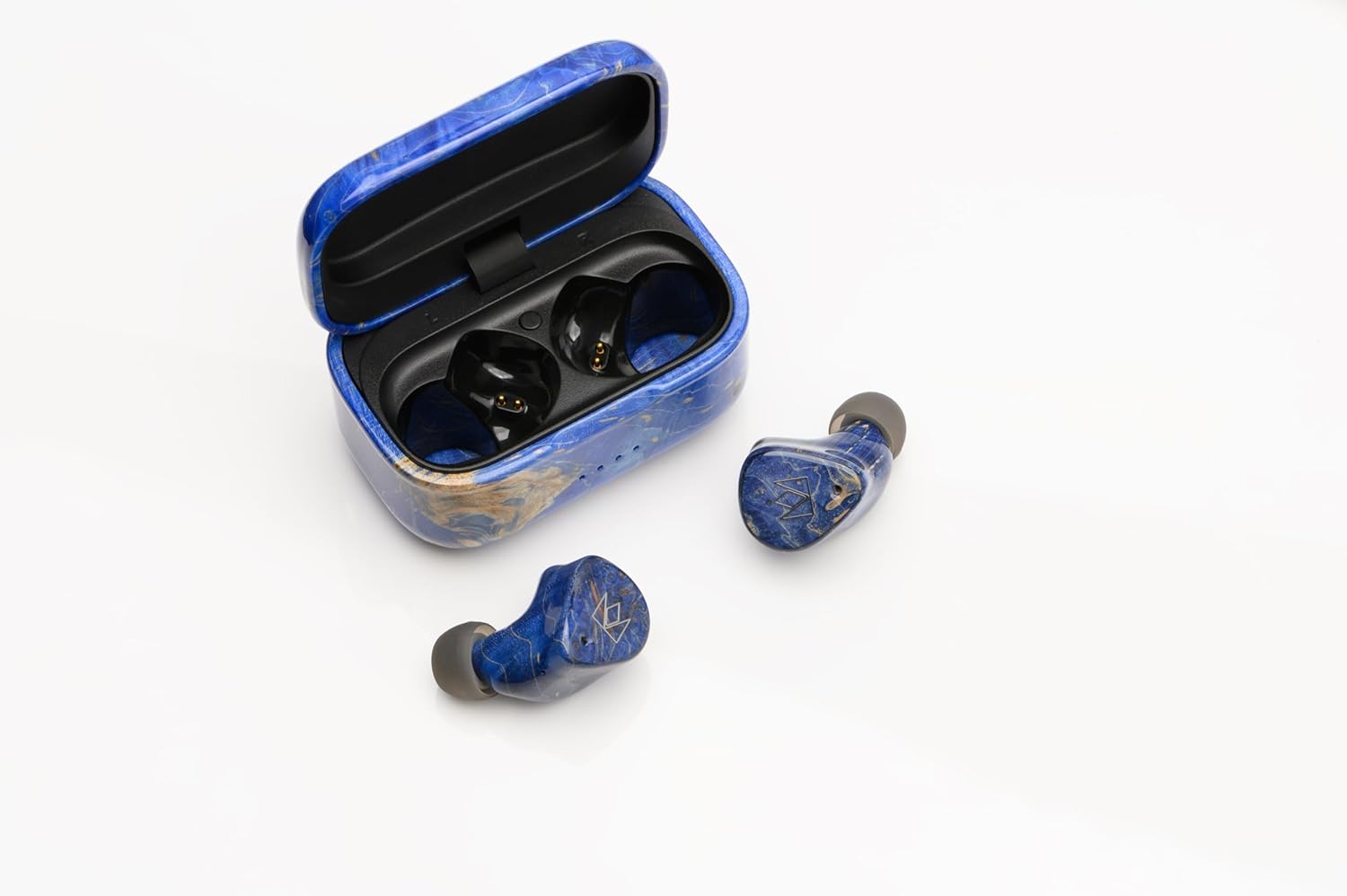
Noble FoKus Prestige earbuds in their charging case, showing the USB-C port.

Image: Noble FoKus Prestige earbuds securely placed within their elegant charging case, ready for charging via the USB-C port located at the back.

1.2 බ්ලූටූත් යුගල කිරීම

The Noble FoKus Prestige utilizes Bluetooth 5.2 and Qualcomm TrueWireless Mirroring technology for stable and efficient connectivity. To pair your earbuds with a Bluetooth-enabled device:

  1. ආරෝපණ පෙට්ටිය විවෘත කරන්න. ඉයර්බඩ් ස්වයංක්‍රීයව යුගල කිරීමේ ප්‍රකාරයට ඇතුළු වනු ඇත.
  2. On your device (smartphone, PC, laptop, tablet), navigate to the Bluetooth settings.
  3. Select "Noble FoKus Prestige" from the list of available devices.
  4. Once connected, you will hear an audio confirmation.

For optimal performance, ensure your device's Bluetooth is enabled and within range.

Video: An official product video demonstrating the Noble FoKus Prestige Headphones, showcasing their design and features relevant to setup and use.

2. මෙහෙයුම් උපදෙස්

2.1 පාලන සහ කාර්යයන්

The FoKus Prestige earbuds feature intuitive touch controls for managing playback, calls, and voice assistants:

  • සංගීත වාදනය: Tap once to play/pause, double-tap for next track, triple-tap for previous track.
  • ඇමතුම් කළමනාකරණය: Tap once to answer/end call, long press to reject call.
  • හ oice සහකාර: Long press to activate Siri or Google Assistant.
  • ශබ්ද පාලනය: ඔබගේ සම්බන්ධිත උපාංගයෙන් කෙලින්ම ශබ්දය සකසන්න.

The earbuds also support Qualcomm cVc noise-cancelling technology for clear phone calls.

2.2 ශ්‍රව්‍ය කාර්ය සාධනය

The FoKus Prestige headphones are engineered for high-resolution audio, featuring a hybrid 3-driver configuration: an 8.2mm Dynamic driver and two Knowles Balanced Armature drivers. This combination delivers rich bass, clear mids, and detailed highs across a frequency range of 20 Hz - 20,000 Hz, with an impedance of 32 Ohm.

For a personalized listening experience, the Noble FoKus app allows for sound customization with its Wizard-tuned sound signature.

Pair of Noble FoKus Prestige earbuds in blue, showcasinඔවුන්ගේ ergonomic නිර්මාණය.

Image: A pair of Noble FoKus Prestige earbuds, highlighting their ergonomic shape and premium blue finish, designed for a secure and comfortable in-ear fit.

3. නඩත්තු කිරීම

To ensure the longevity and optimal performance of your Noble FoKus Prestige headphones, follow these maintenance guidelines:

  • පිරිසිදු කිරීම: Regularly wipe the earbuds and charging case with a soft, dry cloth. For the ear tips, remove them and clean with a mild soap solution if necessary, ensuring they are completely dry before reattaching.
  • ගබඩා: When not in use, store the earbuds in their charging case. Use the provided storage bag for added protection during travel.
  • තෙතමනය වළක්වා ගන්න: The earbuds are not water-resistant. Avoid exposure to excessive moisture, sweat, or liquids.
  • ආරෝපණ වරාය: Handle the USB-C charging port with care to prevent damage.

4. දෝශ නිරාකරණය

If you encounter issues with your Noble FoKus Prestige headphones, refer to the following common solutions:

  • Earbuds Not Pairing Together: If only one earbud connects or they fail to pair with each other, try placing both earbuds back into the charging case, close the lid, wait a few seconds, then open the lid again. This often resets their connection.
  • සම්බන්ධතා ගැටළු: If the Bluetooth connection is inconsistent, ensure the earbuds are fully charged and within range of your device. Try forgetting the device in your Bluetooth settings and re-pairing.
  • ආරෝපණ ගැටළු: If the charging port is finicky or not charging, ensure the USB-C cable is fully inserted and the port is free of debris. Try a different USB-C cable and power source.
  • Poor Sound Quality/Seal: Experiment with the different sizes of ear tips provided to find the best fit for your ears. A proper seal is crucial for optimal sound performance and bass response.
  • ශබ්දයක් නැත: Check the volume levels on both your device and the earbuds. Ensure the earbuds are correctly paired and selected as the audio output on your device.

If problems persist, consult the Noble FoKus app for further diagnostics or visit the Noble Audio support webඅඩවිය.

5. පිරිවිතර

විශේෂාංගය විස්තර
මාදිලියේ නම Noble FoKus Prestige
සම්බන්ධතා තාක්ෂණය රැහැන් රහිත (බ්ලූටූත් 5.2)
ශ්රව්ය ධාවක වර්ගය Hybrid Driver (8.2mm Dynamic + 2 Knowles Balanced Armature)
බැටරි ආයු කාලය 10 Hours (earbuds per charge)
වේගවත් ආරෝපණය 15 min. charge for up to 70 min. playback
සංඛ්යාත පරාසය හර්ට්ස් 20 - හර්ට්ස් 20,000
සම්බාධනය 32 ඕම්
පාලන ක්රමය Touch, Voice (Siri/Google)
ශබ්ද පාලනය Adaptive Noise Cancellation (cVc for calls)
ද්රව්ය Plastic (with CNC machined wooden body and case)
වර්ණය නිල්
අයිතමයේ බර අවුන්ස 9.1 කි
UPC 198168403570

6. වගකීම් සහ සහාය

Noble Audio stands behind the quality of its products. For detailed warranty information, please refer to the official Noble Audio webවෙබ් අඩවිය හෝ ඔබේ නිෂ්පාදනය සමඟ ඇතුළත් වගකීම් කාඩ්පත.

දීර්ඝ ආවරණය සඳහා විකල්ප ආරක්ෂණ සැලසුම් තිබේ:

  • අවුරුදු 2ක ආරක්ෂණ සැලැස්ම
  • අවුරුදු 3ක ආරක්ෂණ සැලැස්ම
  • සම්පූර්ණ ආරක්ෂාව (මාසික දායකත්වය)

For technical support, product inquiries, or service requests, please visit the official Noble Audio support channels or contact their customer service directly.

අදාළ ලියකියවිලි - Noble FoKus Prestige

පෙරview නොබල් ෆෝකස් ට්‍රයම්ෆ් සත්‍ය රැහැන් රහිත ස්ටීරියෝ ඉයර්ෆෝන් උපදෙස් අත්පොත
Noble Fokus Triumph True Wireless Stereo Earphones සඳහා වන සවිස්තරාත්මක උපදෙස් අත්පොත, සැකසුම, යුගල කිරීම, ක්‍රියාකාරිත්වය, පිරිවිතර සහ ආරක්ෂක අනතුරු ඇඟවීම් ආවරණය කරයි.
පෙරview Noble Scepter බ්ලූටූත් කෝඩෙක් සහ RF සංඥා වර්ධක පරිශීලක අත්පොත
Official user manual for the Noble Sceptre, a Bluetooth Codec and RF Signal Enhancer. Learn how to connect, use the Noble Fokus App, manage audio codecs, enable game mode, and update firmware.
පෙරview Noble FoKus Amadeus True Wireless Stereo Earphones User Manual
Comprehensive user manual for the Noble FoKus Amadeus true wireless stereo earphones, covering setup, pairing, controls, features, specifications, and safety information.
පෙරview Noble FALCON MAX True Wireless Stereo Earbuds උපදෙස් අත්පොත
Noble FALCON MAX True Wireless Stereo Earbuds සඳහා වන සවිස්තරාත්මක උපදෙස් අත්පොත, සැකසුම, යුගල කිරීම, කාර්යයන්, ආරෝපණය කිරීම, පිරිවිතර සහ ආරක්ෂක අනතුරු ඇඟවීම් ආවරණය කරයි.
පෙරview Noble FoKus Rex5 True Wireless Stereo Earphones පරිශීලක අත්පොත
Noble FoKus Rex5 True Wireless Stereo Earphones සඳහා වන පුළුල් පරිශීලක අත්පොත, විශේෂාංග, ක්‍රියාකාරිත්වය, යුගල කිරීම, පාලනයන්, පිරිවිතරයන් සහ ආරක්ෂක තොරතුරු ආවරණය කරයි.
පෙරview Noble Fokus Apollo User Manual - Wireless Bluetooth Headphones
Detailed user manual for the Noble Fokus Apollo headphones, covering setup, Bluetooth pairing, button functions, charging, connectivity options, troubleshooting, and safety guidelines.