Muse M-980 BT Wireless Bluetooth Speaker User Manual
Model: M-980 BT
හැඳින්වීම
The Muse M-980 BT is a powerful and portable wireless Bluetooth speaker designed to deliver high-quality audio with vibrant LED lighting. Featuring 300W output, IPX6 water resistance, and over 10 hours of music playback, it's perfect for various environments. This manual provides detailed instructions on how to set up, operate, and maintain your speaker, ensuring you get the most out of its features.
වැදගත් ආරක්ෂක තොරතුරු
- නිෂ්පාදිතය භාවිතා කිරීමට පෙර මෙම උපදෙස් හොඳින් කියවන්න.
- අනාගත යොමුව සඳහා මෙම අත්පොත තබා ගන්න.
- කථිකයා අධික උෂ්ණත්වයන්ට, ආර්ද්රතාවයට හෝ සෘජු හිරු එළියට නිරාවරණය නොකරන්න.
- Do not immerse the speaker in water, despite its IPX6 rating. IPX6 protects against strong water jets, not submersion.
- ආරෝපණය කිරීම සඳහා සපයා ඇති බල කේබලය පමණක් භාවිතා කරන්න.
- කථිකයා විසුරුවා හැරීමට හෝ වෙනස් කිරීමට උත්සාහ නොකරන්න.
- දරුවන්ට ළඟා විය නොහැකි ලෙස තබා ගන්න.
- ක්රියාත්මක වන විට නිසි වාතාශ්රය සහතික කරන්න.
පැකේජයේ අන්තර්ගතය
පහත ලැයිස්තුගත කර ඇති සියලුම අයිතම ඔබේ පැකේජයට ඇතුළත් කර ඇත්දැයි කරුණාකර පරීක්ෂා කරන්න:
- Muse M-980 BT Wireless Bluetooth Speaker
- බල කේබලය
- USB-C ආරෝපණ කේබලය
- අවුක්ස්-ඉන් කේබල්
- පරිශීලක අත්පොත (මෙම ලේඛනය)
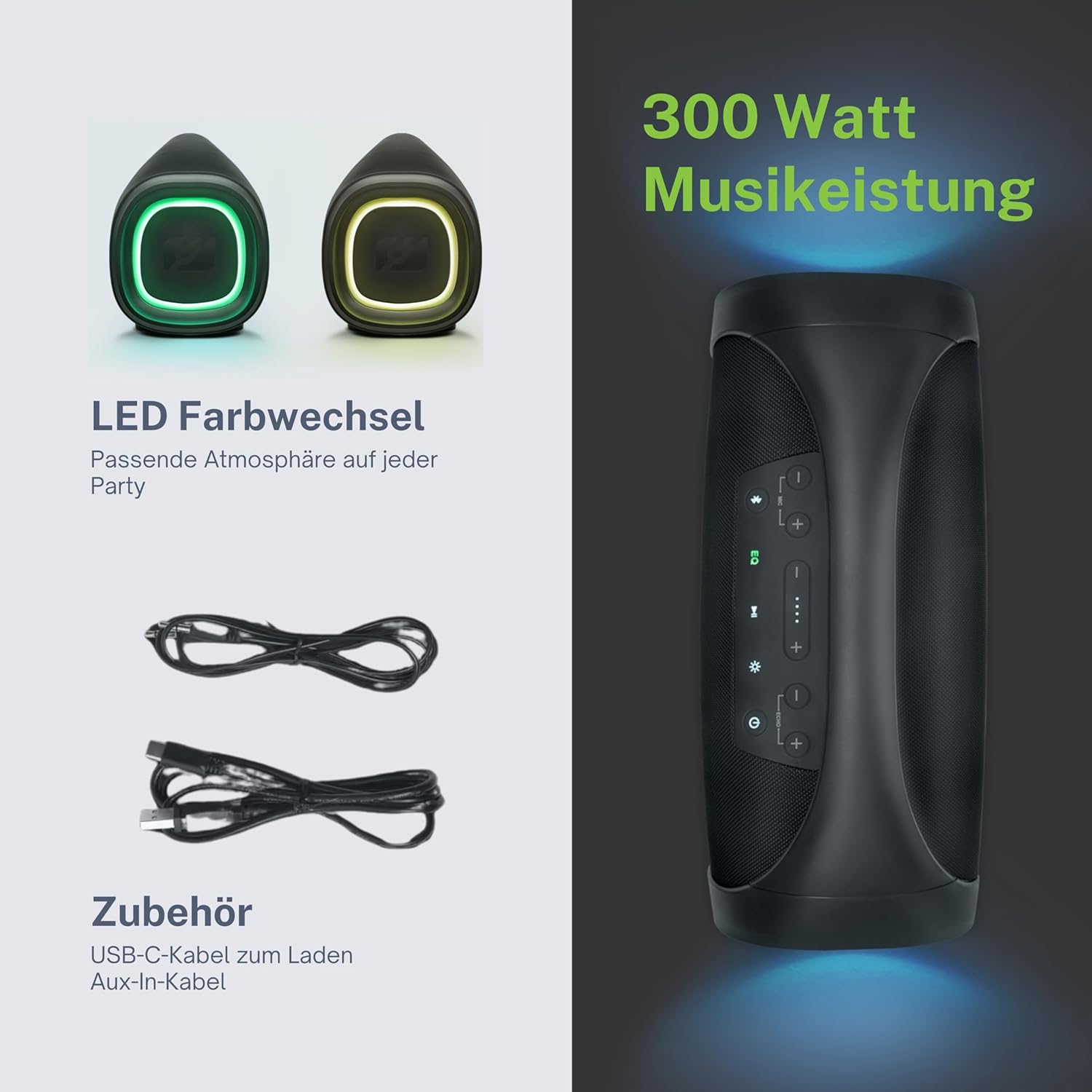
නිෂ්පාදනය අවසන්view
Familiarize yourself with the various parts and controls of your Muse M-980 BT speaker.


පාලන පුවරුව
The top panel of the speaker features various buttons for controlling playback, volume, and other functions:
- බල බොත්තම: ස්පීකරය සක්රිය හෝ අක්රිය කිරීමට ඔබා අල්ලාගෙන සිටින්න.
- බ්ලූටූත් බොත්තම: බ්ලූටූත් යුගල කිරීමේ මාදිලියට ඇතුළු වීමට ඔබන්න.
- EQ බොත්තම: Adjust equalization settings (Bass/Treble).
- ශබ්දය ඉහළ / පහළ බොත්තම්: පරිමාව වැඩි කිරීම හෝ අඩු කිරීම.
- වාදනය/විරාම බොත්තම: ශ්රව්ය නැවත ධාවනය පාලනය කරන්න.
- ආලෝක ප්රකාර බොත්තම: Cycle through different LED light modes.
Ports and Inputs
- USB-C ආරෝපණ වරාය: ස්පීකරයේ අභ්යන්තර බැටරිය ආරෝපණය කිරීම සඳහා.
- USB Port: MP3 වාදනය සඳහා fileUSB ධාවකයකින් s.
- AUX ආදානය: 3.5mm ශ්රව්ය කේබලයක් හරහා බාහිර ශ්රව්ය උපාංග සම්බන්ධ කරන්න.
- Microphone Jacks (x2): කැරෝකී හෝ පොදු ලිපිනය සඳහා මයික්රෆෝන සම්බන්ධ කරන්න.
සැලසුම
කථානායකවරයාට චෝදනා කරනවා
Before first use, fully charge the speaker. Connect the provided USB-C charging cable to the speaker's USB-C port and the other end to a suitable USB power adapter (not included) or a computer's USB port. The battery indicator display will show the charging status. A full charge provides over 10 hours of music playback.
බල ගැන්වීම / අක්රිය කිරීම
ඔබා අල්ලාගෙන සිටින්න බල බොත්තම on the top panel for a few seconds to turn the speaker on. You will hear an audible prompt. To turn off, press and hold the බල බොත්තම නැවතත්.
මෙහෙයුම් උපදෙස්
බ්ලූටූත් සම්බන්ධතාවය
- Turn on the Muse M-980 BT speaker. It will automatically enter Bluetooth pairing mode, indicated by a flashing Bluetooth indicator light.
- ඔබගේ ජංගම උපාංගයේ (ස්මාර්ට්ෆෝන්, ටැබ්ලටය, පරිගණකය), බ්ලූටූත් සක්රීය කර පවතින උපාංග සොයන්න.
- Select "M-980 BT" from the list of devices.
- සම්බන්ධ වූ පසු, බ්ලූටූත් දර්ශක ආලෝකය ඝන බවට පත් වන අතර, ඔබට තහවුරු කිරීමේ ශබ්දයක් ඇසෙනු ඇත.
- දැන් ඔබට ඔබේ උපාංගයෙන් ස්පීකරය හරහා ශ්රව්ය වාදනය කළ හැක.
AUX ආදාන ප්රකාරය
බ්ලූටූත් නොමැති උපාංගයකින් ශ්රව්ය වාදනය කිරීමට, AUX ආදානය භාවිතා කරන්න:
- Connect one end of the 3.5mm Aux-In cable to the AUX port on the speaker.
- කේබලයේ අනෙක් කෙළවර ඔබේ බාහිර උපාංගයේ හෙඩ්ෆෝන් ජැක් එකට හෝ ශ්රව්ය ප්රතිදානයට සම්බන්ධ කරන්න.
- The speaker will automatically switch to AUX mode, or you may need to press a mode button (if available).
- Control playback and volume from your connected device or the speaker's controls.
USB ප්ලේබැක්
The speaker supports playing MP3 audio files directly from a USB flash drive:
- MP3 අඩංගු USB ෆ්ලෑෂ් ධාවකය ඇතුල් කරන්න fileස්පීකරයේ USB පෝට් එකට ඇතුල් කරන්න.
- The speaker will automatically detect the USB drive and begin playing the audio files.
- Use the speaker's playback controls (Play/Pause, Next/Previous) to manage your music.
මයික්රොෆෝන භාවිතා කිරීම
The Muse M-980 BT features two microphone jacks for karaoke or public speaking:
- Connect your microphones (not included) to the MIC 1 and/or MIC 2 jacks.
- Adjust the microphone volume using the dedicated controls on the speaker (if available, or through main volume).
- Ensure the main volume of the speaker is set to a comfortable level.
LED ආලෝක මාදිලි
The speaker features dynamic LED lights that enhance your listening experience:
- ඔබන්න සැහැල්ලු මාදිලි බොත්තම to cycle through various pre-set lighting effects and colors.
- Press the button repeatedly to find your preferred light show.
Stereo Pairing (TWS)
You can pair two Muse M-980 BT speakers together for a true wireless stereo experience:
- ස්පීකර් දෙකම ක්රියාත්මක කර ඇති බවත් කිසිදු බ්ලූටූත් උපාංගයකට සම්බන්ධ වී නොමැති බවත් සහතික කර ගන්න.
- On one speaker (this will be the primary speaker), press and hold the Bluetooth button until you hear a specific pairing tone.
- The two speakers will automatically connect to each other. Once connected, the primary speaker's Bluetooth indicator will flash slowly, and the secondary speaker's will be solid.
- Now, connect your mobile device to the primary speaker via Bluetooth as described in the "Bluetooth Connection" section.
- දැන් ස්පීකර් දෙකම හරහා ශ්රව්ය ස්ටීරියෝ ආකාරයෙන් වාදනය වේ.
Bass සහ Treble ගැලපීම
භාවිතා කරන්න EQ බොත්තම on the control panel to adjust the bass and treble levels to suit your audio preference.
නඩත්තු කිරීම
පිරිසිදු කිරීම
Wipe the speaker with a soft, dry cloth. Do not use abrasive cleaners, waxes, or solvents. Ensure all ports are dry before charging or connecting devices.
ගබඩා කිරීම
දිගු කාලයක් භාවිතයේ නොමැති විට, සෘජු හිරු එළියෙන් සහ අධික උෂ්ණත්වයන්ගෙන් ඈත්ව සිසිල් වියළි ස්ථානයක ස්පීකරය ගබඩා කරන්න. එහි ආයු කාලය පවත්වා ගැනීම සඳහා අවම වශයෙන් මාස තුනකට වරක් බැටරිය ආරෝපණය කිරීම රෙකමදාරු කරනු ලැබේ.
දෝෂගවේෂණය
| ගැටලුව | විය හැකි හේතුව | විසඳුම |
|---|---|---|
| ස්පීකරය ක්රියාත්මක නොවේ. | බැටරිය ක්ෂය වී ඇත. | ලබා දී ඇති USB-C කේබලය භාවිතයෙන් ස්පීකරය ආරෝපණය කරන්න. |
| ශබ්දයක් නැත. | ශබ්දය ඉතා අඩු හෝ නිහඬ කර ඇත. වැරදි ආදාන ප්රකාරය. | Increase volume on both the speaker and the connected device. Ensure the correct input mode (Bluetooth, AUX, USB) is selected. |
| බ්ලූටූත් සම්බන්ධතාවය අසාර්ථකයි. | ස්පීකරය යුගල කිරීමේ මාදිලියේ නැත. උපාංගය බොහෝ දුරයි. බාධාව. | Ensure speaker is in pairing mode. Move device closer to speaker. Turn off other Bluetooth devices. Forget "M-980 BT" on your device and re-pair. |
| ශබ්ද විකෘතිය. | Volume too high. Audio source quality. | Lower the volume. Try a different audio source or file. Adjust EQ settings. |
| LED ලයිට් ක්රියා නොකරයි. | Light mode off or malfunction. | Press the Light Mode Button to activate or cycle through modes. If issue persists, contact support. |
පිරිවිතර
| මාදිලියේ නම | M-980 BT |
| ආදර්ශ අංකය | 322950 |
| ප්රතිදාන බලය | වොට් 300 |
| සම්බන්ධතා තාක්ෂණය | බ්ලූටූත්, USB, AUX |
| බැටරි ආයු කාලය | පැය 10 දක්වා |
| ජල ප්රතිරෝධය | IPX6 (Splashproof) |
| මානයන් (L x W x H) | 49.54 x 20.4 x 27.28 cm (19.5 x 8.0 x 10.7 අඟල්) |
| බර | කිලෝග්රෑම් 5.02 (රාත්තල් 11.07) |
| වර්ණය | කළු |
| ද්රව්ය | ප්ලාස්ටික් හෝ රබර් |

වගකීම් සහ සහාය
Your Muse M-980 BT speaker comes with a limited warranty. Please refer to the warranty card included in your package for specific terms and conditions. For technical support, troubleshooting assistance, or warranty claims, please contact Muse customer service through their official webවෙබ් අඩවිය හෝ ඔබගේ මිලදී ගැනීම සමඟ සපයා ඇති සම්බන්ධතා තොරතුරු.
For the latest information and support, visit the official MUSE webඅඩවිය: www.muse-europe.com


