හැඳින්වීම
The Baseus Spacemate Series 11-in-1 Docking Station is a versatile and compact solution designed to expand the connectivity of your laptop or compatible device. This docking station transforms a single USB-C port into a comprehensive workstation, supporting multiple displays, high-speed data transfer, network connectivity, and power delivery.
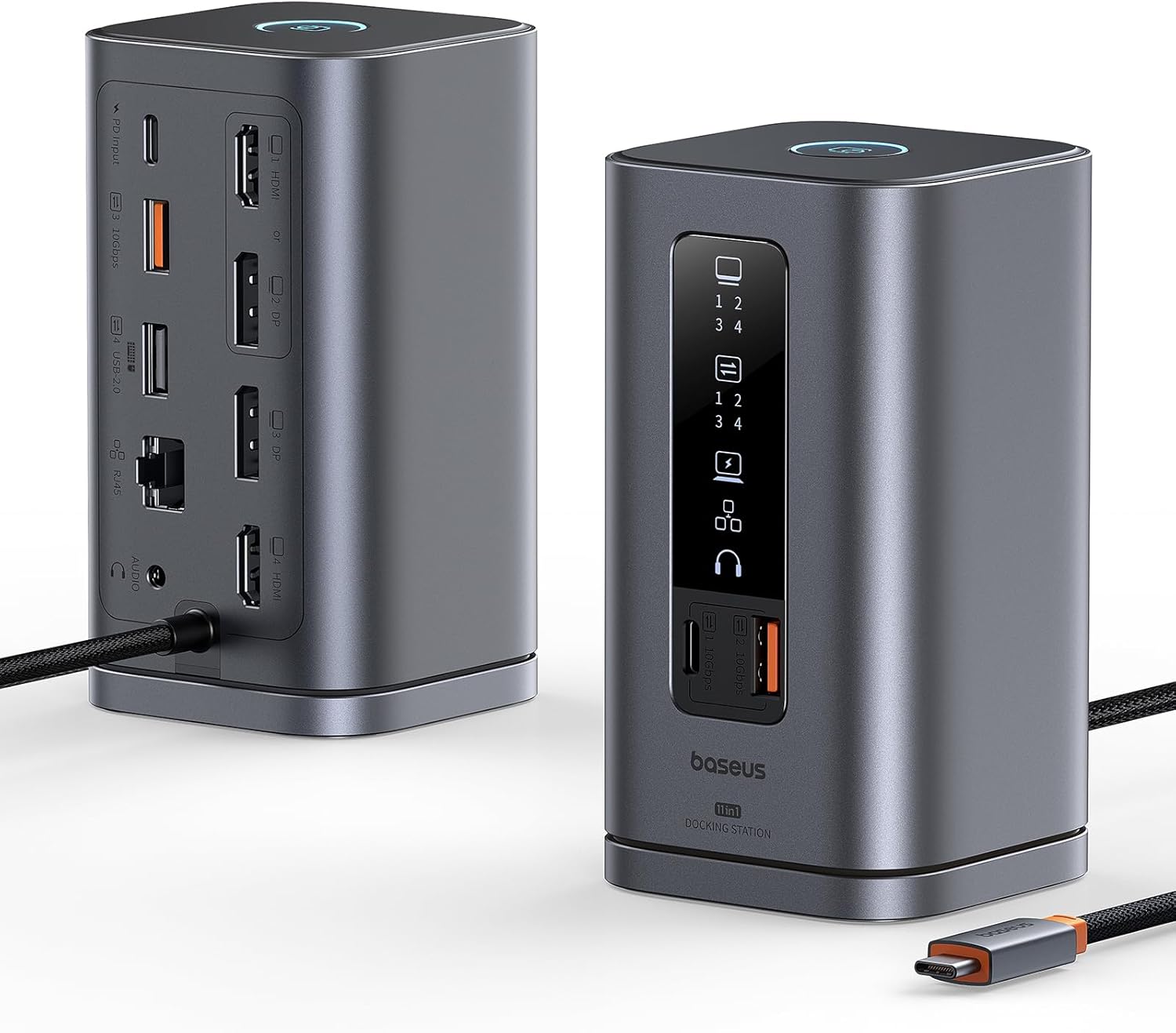
Image: The Baseus Spacemate Series 11-in-1 Docking Station, showcasing its compact vertical design and various ports.
ප්රධාන ලක්ෂණ
- 11-in-1 Multifunction Expansion: Equipped with a comprehensive array of ports to meet diverse connectivity needs.
- ත්රිත්ව සංදර්ශක සහාය: Extends your screen to up to three external monitors via HDMI and DisplayPort, supporting stunning 4K resolution for enhanced multitasking.
- 100W බල සැපයුම: Provides up to 100W of power to charge your laptop while using the docking station (power adapter not included).
- අධිවේගී දත්ත හුවමාරුව: Features USB-C and USB-A ports with up to 10Gbps data transfer speeds for rapid file මාරුවීම්.
- ගිගාබිට් ඊතර්නෙට්: Ensures a stable and fast wired network connection up to 1Gbps.
- ස්මාර්ට් ඩිජිටල් සංදර්ශකය: An intelligent LED display clearly indicates the operational status of each interface.
- Screen Lock Button: A convenient button to quickly lock your screen, protecting confidential information.
- අවකාශය ඉතිරි කිරීමේ සැලසුම: Unique vertical design with a magnetic base helps organize your desktop.

Image: Detailed diagram illustrating the 11-in-1 port expansion of the Baseus Spacemate Docking Station, including HDMI, DisplayPort, USB-A, USB-C, Ethernet, and audio ports.
සැකසුම් මාර්ගෝපදේශය
- බල සම්බන්ධතාවය: Connect a 100W PD charger (not included) and cable to the PD input port of the docking station to ensure stable performance for all ports.
- සත්කාරක සම්බන්ධතාවය: Connect the integrated USB-C cable from the docking station to a compatible USB-C port on your laptop or host device.
- අධීක්ෂණ සම්බන්ධතාවය: Connect your external monitors to the available HDMI and DisplayPort outputs on the docking station. The docking station supports up to three external displays.
- පර්යන්ත සම්බන්ධතාවය: Connect your USB devices (keyboards, mice, external drives) to the USB-A and USB-C data ports.
- ජාල සම්බන්ධතාවය: For a stable wired internet connection, connect an Ethernet cable to the Gigabit Ethernet port.
- ශ්රව්ය සම්බන්ධතාවය: If desired, connect headphones or speakers to the 3.5mm audio input/output jack.

Image: A visual comparison showing a cluttered desk before using the docking station and an organized desk after integrating the Baseus Spacemate Docking Station, highlighting its space-saving benefits.
මෙහෙයුම් උපදෙස්
සංදර්ශක මාදිලි
ඔබගේ මෙහෙයුම් පද්ධතිය අනුව ඩොකින් ස්ටේෂන් විවිධ සංදර්ශක වින්යාසයන් සඳහා සහය දක්වයි.

Image: A user working with a laptop connected to the Baseus Spacemate Docking Station, driving two external monitors for an efficient triple display setup.
Windows MST (Multi-Stream Transport) Mode
Windows systems support MST triple display, allowing for extended desktop across multiple monitors.
| සංදර්ශක මාදිලිය | HDMI 1 / DP 2 | DP 3 | HDMI 4 |
|---|---|---|---|
| තනි සංදර්ශකය | 3840x2160@60Hz ට | 3840x2160@60Hz ට | 3840x2160@60Hz ට |
| ද්විත්ව සංදර්ශකය | 3840x2160@60Hz ට | 3840x2160@60Hz ට | 3840x2160@60Hz ට |
| ත්රිත්ව සංදර්ශකය | 3840x2160@30Hz ට | 3840x2160@30Hz ට | 3840x2160@30Hz ට |
| සංදර්ශක මාදිලිය | HDMI 1 / DP 2 | DP 3 | HDMI 4 |
|---|---|---|---|
| තනි සංදර්ශකය | 3840x2160@60Hz ට | 3840x2160@60Hz ට | 3840x2160@60Hz ට |
| ද්විත්ව සංදර්ශකය | 2560x1440@60Hz ට | 2560x1440@60Hz ට | 2560x1440@60Hz ට |
| ත්රිත්ව සංදර්ශකය | 1920x1080@60Hz ට | 1920x1080@60Hz ට | 1920x1080@60Hz ට |
| සංදර්ශක මාදිලිය | HDMI 1 / DP 2 | DP 3 | HDMI 4 |
|---|---|---|---|
| තනි සංදර්ශකය | 3840x2160@30Hz ට | 3840x2160@30Hz ට | 3840x2160@30Hz ට |
| ද්විත්ව සංදර්ශකය | 1920x1080@60Hz ට | 1920x1080@60Hz ට | 1920x1080@60Hz ට |
| ත්රිත්ව සංදර්ශකය | Insufficient bandwidth may result in low resolution in triple display. | ||
MacOS Display Mode
MacOS does not support MST triple display. It typically supports extended display on one external monitor and mirrored display on others.

Image: A MacOS laptop connected to the Baseus Spacemate Docking Station, demonstrating how external monitors are typically mirrored or extended in a limited fashion due to MacOS MST limitations.
තිර අගුළු ක්රියාකාරිත්වය
The docking station features a dedicated button for screen locking. This function helps protect your privacy and sensitive information by quickly turning off connected displays.
- වින්ඩෝස් පද්ධති සඳහා: Press the screen lock button once.
- For MacOS Systems: Press the screen lock button twice.

Image: A hand pressing the screen lock button on the Baseus Spacemate Docking Station, with a laptop and external monitor in the background, illustrating the ease of activating the screen lock feature.
ස්මාර්ට් ඩිජිටල් සංදර්ශකය
The front panel of the docking station features an intelligent LED display that provides real-time status of connected ports and functions.

රූපය: සමීප ඡායාරූපයක් view of the Baseus Spacemate Docking Station's smart digital display, showing various icons that light up to indicate the active status of connected devices and ports.
නඩත්තු කිරීම
- පිරිසිදු කිරීම: Use a soft, dry cloth to clean the surface of the docking station. Avoid using liquid cleaners or abrasive materials.
- ගබඩා: ඩොකින් ස්ටේෂන් එක සෘජු හිරු එළියෙන් සහ අධික උෂ්ණත්වයන්ගෙන් ඈත්ව සිසිල් වියළි ස්ථානයක ගබඩා කරන්න.
- හැසිරවීම: උපාංගය පරිස්සමෙන් හසුරුවන්න. බිම හෙළීමෙන් හෝ දැඩි බලපෑම්වලට ලක් කිරීමෙන් වළකින්න.
- කේබල් කළමනාකරණය: Ensure cables are not excessively bent or tangled to prevent damage to the ports or cables themselves.
දෝෂගවේෂණය
- සංදර්ශක ප්රතිදානයක් නැත:
- Ensure the docking station is properly connected to your laptop's USB-C port.
- Verify that the external monitors are powered on and set to the correct input source.
- ආරක්ෂිත සම්බන්ධතා සඳහා සියලුම සංදර්ශක කේබල් (HDMI, DisplayPort) පරීක්ෂා කරන්න.
- ඔබේ ලැප්ටොප් පරිගණකය නැවත ආරම්භ කර ඩොකින් ස්ටේෂන් එක නැවත සම්බන්ධ කරන්න.
- Ensure your laptop's graphics drivers are up to date.
- Intermittent Connection/Flickering Display:
- Ensure a 100W PD charger is connected to the docking station's PD input port to provide sufficient power.
- Reduce the number of connected peripherals if the issue persists.
- Try different display cables.
- USB පෝට් ක්රියා නොකරයි:
- Ensure the docking station is receiving adequate power.
- USB උපාංගය ඩොකින් ස්ටේෂන් එකේ වෙනත් පෝට් එකකට සම්බන්ධ කිරීමට උත්සාහ කරන්න.
- Test the USB device directly on your laptop to confirm it is functional.
- ඊතර්නෙට් සම්බන්ධතා ගැටළු:
- ඊතර්නෙට් කේබලය ඩොකින් ස්ටේෂන් සහ ඔබේ රවුටරය/මොඩමය යන දෙකටම ආරක්ෂිතව සම්බන්ධ වී ඇති බව තහවුරු කර ගන්න.
- Check your network settings on your laptop.
- ඔබේ රවුටරය/මොඩමය නිවැරදිව ක්රියාත්මක වන බවට වග බලා ගන්න.
- Screen Lock Button Not Responding:
- Ensure the docking station is actively connected to your laptop.
- Confirm you are pressing the button the correct number of times for your operating system (once for Windows, twice for MacOS).
පිරිවිතර
| විශේෂාංගය | විස්තර |
|---|---|
| ආදර්ශ අංකය | Spacemate WIN |
| වෙළඳ නාමය | බේසියස් |
| වර්ණය | අළු |
| සම්පූර්ණ USB පෝට් | 5 (1x USB-C 10Gbps, 2x USB-A 10Gbps, 1x USB-A 480Mbps, 1x USB-A 2.0) |
| දත්ත හුවමාරු අනුපාතය | 10 Gbps දක්වා (USB 3.2 Gen 2) |
| වීඩියෝ ප්රතිදානය | 2x HDMI (4K@60Hz), 2x DisplayPort (4K@60Hz) |
| ඊතර්නෙට් වරාය | 1x ගිගාබිට් ඊතර්නෙට් (1Gbps) |
| බල සැපයුම (PD) | Up to 100W (Input) |
| ශ්රව්ය වරාය | 1x 3.5mm ශ්රව්ය ඇතුළත/පිටත |
| මානයන් (L x W x H) | 6.6 x 6.6 x 12.3 සෙ.මී. (ආසන්න වශයෙන් 2.6 x 2.6 x 4.8 අඟල්) |
| බර | 485 Grams (approximately 1.07 lbs) |
| මෙහෙයුම් පද්ධති අනුකූලතාව | macOS, Windows, Android |
ගැළපෙන උපාංග
The Baseus Spacemate Series 11-in-1 Docking Station is widely compatible with various devices that support USB-C Alt Mode (DisplayPort Alternate Mode) and Power Delivery. Compatible devices include, but are not limited to:
- ලැප්ටොප්: ASUS ROG Ally / Steam Deck / MacBook / MacBook Pro (2021/2020/2019/2018); MacBook Air 2018-2020, Mac mini 2018-2020, Dell XPS 9380/ XPS 13 9365/ XPS 15, Dell Latitude E7370/ E7470/ E7480/ Dell Latitude 13 7000/ E7370L/ New XPS 15 i7, Lenovo Yoga 720-13IKB/Yoga 910; Yoga15 Thinkpad Ultrabook Pro; Thinkpad E590/ Thinkpad P72/ Lenovo C930, Microsoft Surface Book 2, Surface Laptop 3; Surface Pro 7 / Surface Pro 8 / Surface Go, HP Spectre Laptop 13-af001TU/ Spectre x360 13t; Elitebook 840 G5 series/Elitebook x360 103.0 G3, ASUS Zenbook UX330UA/ Zenbook Flip ux370u, Acer Aspire 5 2019; D17w3 Aspire c24-865.
- ටැබ්ලට්: iPad Pro/ Air 2018/2020, iPad mini 6, Galaxy Tab S5e/ Galaxy Tab S4.
- ස්මාර්ට්ෆෝන්: Samsung Galaxy S10+/ S10/ S9+/ S9/ S8+/ S8 Plus; Note 10/ 9/ 8 kg.

Image: A visual representation of the wide range of compatible devices, including various laptop brands, tablets, and smartphones, that can be used with the Baseus Spacemate Docking Station.
වගකීම් සහ සහාය
Specific warranty details and direct support contact information are not provided within this manual. For warranty claims, technical support, or further inquiries, please refer to the official Baseus website or contact the retailer from whom you purchased the product. Keep your proof of purchase for any warranty-related services.


