හැඳින්වීම
This manual provides essential information for the proper installation, operation, and maintenance of the Vivotek AM-71G Outdoor Conduit Box. Please read this manual thoroughly before installation to ensure correct usage and to prevent damage to the product or associated equipment. Retain this manual for future reference.
නිෂ්පාදනය අවසන්view
The Vivotek AM-71G is an outdoor conduit box designed to provide a secure and weather-resistant enclosure for cable connections and mounting of compatible Vivotek surveillance cameras. Constructed from durable aluminum alloy and finished in white, it offers IP66 and IP67 environmental ratings, ensuring protection against dust and water ingress.
ප්රධාන ලක්ෂණ:
- Durable aluminum alloy construction.
- White finish for aesthetic integration.
- 3/4" pipe thread for standard conduit connections.
- IP66 and IP67 rated for outdoor use, providing protection against dust and powerful water jets, and temporary immersion.
- Compatible with a range of Vivotek surveillance cameras.
කොටුවේ ඇති දේ:
- Vivotek AM-71G Outdoor Conduit Box (1 unit)
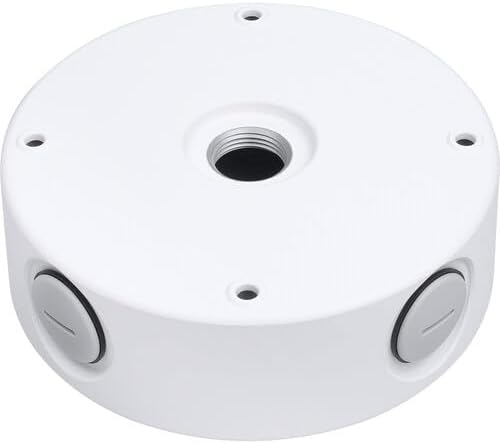
This image displays the Vivotek AM-71G Outdoor Conduit Box. It is a circular, white aluminum alloy box with a central threaded opening for conduit connection and multiple sealed ports around its circumference for cable entry. The design is robust, suitable for outdoor surveillance camera installations.
ආරක්ෂිත තොරතුරු
ස්ථාපනය සහ නඩත්තු කිරීමේදී සෑම විටම පහත සඳහන් ආරක්ෂක පියවරයන් නිරීක්ෂණය කරන්න:
- Installation should be performed by qualified personnel only and in accordance with all local electrical codes and regulations.
- කිසියම් ස්ථාපනයක් හෝ නඩත්තු ක්රියා පටිපාටියක් සිදු කිරීමට පෙර සියලුම විදුලිය විසන්ධි කර ඇති බවට සහතික වන්න.
- නිෂ්පාදනය කිසිදු ආකාරයකින් වෙනස් නොකරන්න. අනවසර වෙනස් කිරීම් වගකීම් අවලංගු කළ හැකි අතර ආරක්ෂක අවදානම් ඇති කළ හැකිය.
- Use only approved tools and accessories for installation.
- Verify that the mounting surface can support the combined weight of the conduit box and the camera.
- Ensure all connections are properly sealed to maintain the IP66/IP67 rating.
සැකසුම සහ ස්ථාපනය
The AM-71G conduit box is designed for outdoor use and provides a secure mounting point and cable management solution for compatible Vivotek cameras. Follow these steps for proper installation:
අවශ්ය මෙවලම් සහ ද්රව්ය:
- සරඹ සහ සුදුසු සරඹ බිටු
- ඉස්කුරුප්පු නියනක්
- Mounting screws and anchors (suitable for your mounting surface)
- Conduit and fittings (3/4" NPT compatible)
- Sealant (if required for additional weatherproofing)
ස්ථාපන පියවර:
- සවිකරන ස්ථානය තෝරන්න: Choose a sturdy, flat surface capable of supporting the conduit box and the camera. Ensure the location provides optimal camera coverage and allows for easy conduit routing.
- විදුම් ලකුණු සලකුණු කරන්න: Use the conduit box as a template to mark the drilling points for mounting screws. Ensure the marks are level and accurately spaced.
- සිදුරු සිදුරු: Drill pilot holes at the marked points, appropriate for your chosen mounting screws and anchors.
- Mount the Conduit Box: Secure the AM-71G conduit box to the mounting surface using appropriate screws and anchors. Ensure it is firmly attached and stable.
- සම්බන්ධක නල: Route your 3/4" NPT conduit into the central threaded opening of the conduit box. Ensure a tight and secure connection to maintain environmental integrity.
- මාර්ග කේබල්: Pass necessary camera cables through the conduit and into the conduit box. Utilize the side ports with their sealed grommets for additional cable entry if needed, ensuring proper sealing after cable insertion.
- මවුන්ට් කැමරාව: Attach the compatible Vivotek camera to the conduit box according to the camera's specific installation instructions. Ensure all camera mounting screws are tightened securely.
- Final Sealing: Verify that all openings, including unused side ports and the conduit connection, are properly sealed to maintain the IP66/IP67 rating.
Compatible Vivotek Cameras:
- FD9167-HT-v2
- FD9367-EHTV-v2
- IB9367-EHT-v2
- IB9367-EHT-v2 (5-50mm)
- FD9365-EHTV-v2
- FD9187-HT-V3
- FD9387-EHTV-V3
- FD9391-EHTV-v2
- IB9365-EHTV-v2
- IB9387-EHTV-V3
- IB9391-EHTV-v2
නඩත්තු කිරීම
The Vivotek AM-71G Outdoor Conduit Box requires minimal maintenance. Regular inspections are recommended to ensure its continued performance and integrity.
- වරින් වර පරීක්ෂා කිරීම: Annually inspect the conduit box for any signs of physical damage, corrosion, or wear. Check the integrity of all seals and connections.
- පිරිසිදු කිරීම: If necessary, clean the exterior of the conduit box with a soft, damp cloth. Do not use harsh chemicals or abrasive cleaners, as these may damage the finish or seals.
- මුද්රා අඛණ්ඩතාව: Ensure that all cable entry points and the conduit connection remain tightly sealed to prevent water and dust ingress. Replace any damaged grommets or seals immediately.
දෝෂගවේෂණය
This section addresses common issues that may arise with the Vivotek AM-71G Outdoor Conduit Box. As the conduit box is a passive component, most issues relate to installation integrity.
| ගැටලුව | විය හැකි හේතුව | විසඳුම |
|---|---|---|
| Water or dust ingress inside the box. | Improperly sealed conduit connection or cable entry points. Damaged seals or grommets. | Inspect all connections and seals. Re-tighten conduit fittings. Ensure cable grommets are properly seated. Replace any damaged seals or grommets. Apply additional weather-grade sealant if necessary. |
| Conduit box feels loose after installation. | Mounting screws are not tight enough or anchors are insufficient for the mounting surface. | Re-tighten all mounting screws. If the issue persists, consider using stronger anchors or relocating to a more secure mounting surface. |
| Camera does not mount correctly to the box. | Incompatible camera model or incorrect mounting procedure. | Verify that your camera model is listed as compatible with the AM-71G. Refer to the camera's instruction manual for specific mounting steps. |
පිරිවිතර
| ගුණාංගය | වටිනාකම |
|---|---|
| ආදර්ශ අංකය | AM-71G |
| ද්රව්ය | ඇලුමිනියම් මිශ්ර ලෝහය |
| වර්ණය | සුදු |
| පයිප්ප නූල් | 3/4" එන්පීටී |
| පාරිසරික ශ්රේණිගත කිරීම | IP66, IP67 |
| නිෂ්පාදන මානයන් | 6.77 x 6.77 x 2.12 අඟල් (17.2 x 17.2 x 5.4 cm) |
| අයිතමයේ බර | රාත්තල් 2.54 (කිලෝ ග්රෑම් 1.15) |
| නිෂ්පාදකයා | විවෝටෙක් |
වගකීම් සහ සහාය
For warranty information and technical support regarding your Vivotek AM-71G Outdoor Conduit Box, please refer to the official Vivotek webවෙබ් අඩවියට හෝ ඔවුන්ගේ පාරිභෝගික සේවයට සෘජුවම සම්බන්ධ වන්න. වගකීම් හිමිකම් සඳහා මිලදී ගැනීමේ සාක්ෂියක් ලෙස ඔබේ මිලදී ගැනීමේ රිසිට්පත තබා ගන්න.
Note: As this product is listed under a "Generic" brand on some platforms, please refer to the manufacturer "Vivotek" for official support and warranty details.


