1. වැදගත් ආරක්ෂක උපදෙස්
Please read and understand all instructions before using this product. Failure to follow these instructions may result in injury or damage.
- අවවාදයයි: Always use the chair as intended. Do not exceed the weight capacity of 350lbs.
- Be cautious when using the lift mechanism to prevent injury.
- Keep fingers and other body parts away from moving parts.
- විදුලි රැහැන ඇණ හෝ හානි නොවන බවට වග බලා ගන්න.
- Keep children and pets away from the chair's moving parts.
2. පැකේජ අන්තර්ගතය
එකලස් කිරීමට පෙර සියලුම සංරචක ඇති බව තහවුරු කර ගන්න:
- අත්වාරු (2)
- බැක්රෙස්ට් (1)
- පදනම (1)
- Accessories Box (1) - Contains power adapter, remote controls, and small parts.
- පරිශීලක අත්පොත (1)
3. එකලස් කිරීමේ උපදෙස්
Assembly is designed to be straightforward and typically takes about 20 minutes for a novice, with no tools required. It is recommended to have two people for moving the heavier parts.
- සංරචක ඉවත් කරන්න: Carefully remove all parts from the packaging. The chair comes in multiple boxes, with the base being the heaviest.
- අත්වැසුම් අමුණන්න: Slide each armrest onto the corresponding side of the chair base until they securely click into place.
- පසුපස කොටස සම්බන්ධ කරන්න: Align the backrest with the slots on the chair base and push down firmly until it locks into position.
- ප්ලග් ඉන් රැහැන්: Connect all electrical wiring according to the labels. Ensure all connections are secure.
- සම්බන්ධක බලය: Plug the power adapter into the chair and then into a wall outlet.

Figure 3.1: Main components of the recliner chair.

Figure 3.2: Attaching the backrest.
4. මෙහෙයුම් උපදෙස්
4.1 Power Lift and Recline Functions
The chair features a counter-balanced lift mechanism and a 150° maximum recline. Use the dedicated remote control for these functions.
- එසවීමට: Press and hold the 'UP' arrow button on the remote. The chair will gently tilt forward and lift, assisting you to a standing position.
- වැතිරීමට: Press and hold the 'DOWN' arrow button on the remote. The chair will recline backward, and the footrest will extend. Release the button at your desired recline angle. The chair offers a 150° recline for deep relaxation.
- සෘජු ස්ථානයට ආපසු යාමට: Press and hold the 'UP' arrow button. The chair will return to its original upright position.
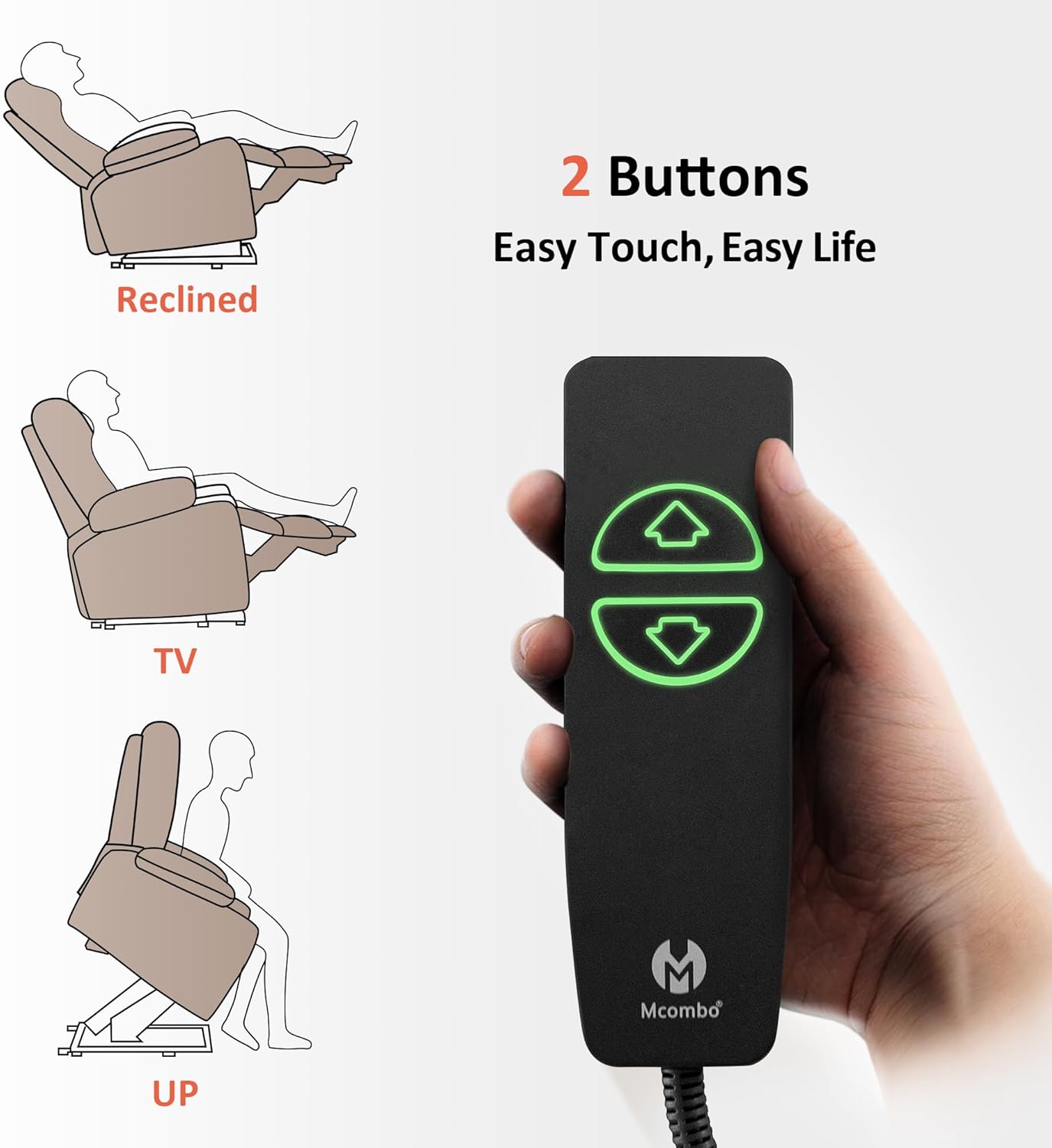
Figure 4.1: Power lift and recline remote control.

Figure 4.2: Chair in fully reclined position.
4.2 Heat and Massage Functions
The chair features lumbar heating and full-body vibration with 8 vibration nodes, 3 massage modes, and 3 intensity levels. These functions operate independently.
- To Activate Heat: Press the 'HEAT' button on the massage remote. The lumbar area will begin to warm. Press again to turn off.
- To Activate Massage: Press the 'POWER' button on the massage remote. Use the 'MODE' button to cycle through 3 massage modes. Adjust intensity with '+' and '-' buttons.
- ඉලක්කගත සම්බාහනය: Select specific areas (BACK, LUMBAR, THIGH, LEG) for massage.
- ටයිමර් කාර්යය: Set the massage/heat to automatically turn off after 10, 20, or 30 minutes using the 'TIMER' button.

Figure 4.3: Heat and massage remote control.
Video 4.1: Demonstration of the MCombo Power Lift Recliner R7092 features, including heat and massage.
4.3 Charging Ports and Storage
The chair is equipped with convenient features for your comfort and accessibility.
- USB සහ Type-C ports: Located on the side of the chair, these ports allow you to charge your electronic devices without leaving your seat.
- කුසලාන දරන්නන්: Two built-in cup holders are integrated into the armrests to keep beverages within easy reach.
- Side & Front Pockets: Convenient pockets are available on the sides and front of the chair for storing remotes, magazines, or other small items.

Figure 4.4: Integrated charging ports, cup holders, and storage pockets.
5 රැකවරණය සහ නඩත්තුව
Proper care will extend the life and appearance of your MCombo recliner chair.
- පිරිසිදු කිරීම: Spot clean the fabric as needed. Use a mild detergent and a soft cloth. Do not saturate the fabric.
- සැර රසායනික ද්රව්යවලින් වළකින්න: Do not use abrasive cleaners or strong chemicals, as they may damage the fabric or finish.
- නිතිපතා පරීක්ෂා කිරීම: සියලුම සම්බන්ධතා සහ චලනය වන කොටස් ආරක්ෂිතව සහ නිවැරදිව ක්රියාත්මක වන බව සහතික කිරීම සඳහා වරින් වර පරීක්ෂා කරන්න.
- විදුලි රැහැන්: Ensure the power cord is not tangled or placed where it can be tripped over or damaged.
6. දෝශ නිරාකරණය
ඔබේ රෙක්ලයිනර් සමඟ ඔබට කිසියම් ගැටළුවක් ඇති වුවහොත්, පහත පොදු ගැටළු සහ විසඳුම් වෙත යොමු වන්න:
- ප්රතිචාර නොදක්වන පුටුව:
- Check if the power cord is securely plugged into both the chair and the wall outlet.
- Ensure the power adapter is functioning.
- Verify that the remote control cables are properly connected to the chair.
- Heat/Massage Not Working:
- Confirm the massage remote is connected and powered on.
- Check if the timer function has automatically turned off the feature.
- මෙහෙයුම අතරතුර අසාමාන්ය ශබ්ද:
- Inspect the lift mechanism for any obstructions.
- සියලුම එකලස් කිරීමේ බෝල්ට් තද කර ඇති බවට වග බලා ගන්න.
If the issue persists, please contact MCombo Customer Support.
7. පිරිවිතර
| වෙළඳ නාමය | MCombo |
| මාදිලියේ නම | 6160-7095Fabric (R7092 Series) |
| වර්ණය | බීජ් |
| ප්රමාණය | වැඩි කරන්න |
| නිෂ්පාදන මානයන් | 37.4"D x 41.7"W x 46.9"H |
| උපරිම බර නිර්දේශ කිරීම | පවුම් 350ක් |
| ද්රව්ය | Alloy Steel, Wood, Foam (CertiPUR-US certified), Fabric (OEKO-TEX certified) |
| විශේෂ ලක්ෂණ | Power Lift Assistance, Lumbar Heat, Full-Body Vibration, Cup Holders, USB & Type C Ports |
| සැතපෙන ස්ථාන ගණන | 3 (Upright, TV Viewing, Full Recline 150°) |
| එකලස් කිරීමේ වේලාව | Approximately 20 minutes (no tools required) |

රූපය 7.1: නිෂ්පාදන මානයන්.
8. වගකීම් තොරතුරු
Your MCombo Power Lift Recliner Chair is backed by a වසර 2ක සීමිත වගකීමක්. This warranty covers free replacements for the following components:
- ඇලවීමේ/එසවීමේ යාන්ත්රණ
- විදුලි පද්ධති
- උඩු මහල සහ කුෂන්
- ලී/ලෝහ රාමු ව්යුහයන්
Please refer to the full user manual (if provided separately) or contact customer support for complete warranty terms and conditions.
9. පාරිභෝගික සහාය
For any questions, assistance, or warranty claims, please contact MCombo Customer Support:
- Webඅඩවිය: Visit the official MCombo webනිතර අසන ප්රශ්න සහ සහාය සම්පත් සඳහා අඩවිය.
- විද්යුත් තැපෑල: නිශ්චිත සම්බන්ධතා විද්යුත් තැපෑල සඳහා ඔබේ මිලදී ගැනීමේ ලියකියවිලි බලන්න.
- දුරකථනය: නිශ්චිත සම්බන්ධතා අංකය සඳහා ඔබේ මිලදී ගැනීමේ ලියකියවිලි බලන්න.
Please have your model number (R7092) and purchase date ready when contacting support.


