හැඳින්වීම
Thank you for choosing the tectake Arges Ergonomic Office Chair. This manual provides essential information for the safe and efficient assembly, operation, and maintenance of your new office chair. Please read these instructions carefully before use and retain them for future reference.
The tectake Arges office chair is designed to provide optimal seating comfort and support, helping to alleviate back issues during long periods of sitting. Its features include a height and angle-adjustable headrest, comfortable reclinable armrests, continuous height adjustment, breathable mesh fabric, and a height-adjustable lumbar support with adjustable tilt resistance.
ආරක්ෂිත උපදෙස්
- එකලස් කිරීමට පෙර සියලුම සංරචක පවතින බවත් හානි වී නොමැති බවත් සහතික කර ගන්න. කිසියම් කොටසක් අස්ථානගත වී හෝ හානි වී ඇත්නම් භාවිතා නොකරන්න.
- සීරීම් වළක්වා ගැනීම සඳහා මෘදු පිරිසිදු මතුපිටක් මත පුටුව එකලස් කරන්න.
- පුටුවේ හිටගන්න එපා.
- පුටුව පඩිපෙළ පුටුවක් ලෙස භාවිතා නොකරන්න.
- Keep children away from the chair during assembly. Small parts can be a choking hazard.
- The maximum load capacity for this chair is 120 kg (264 lbs). Do not exceed this weight limit.
- Regularly check all screws and connections to ensure they are tight. Retighten if necessary.
- දිගු වේලාවක් පුටුව සෘජු හිරු එළියට හෝ අධික උෂ්ණත්වයට නිරාවරණය වීමෙන් වළකින්න.
සැකසීම සහ එකලස් කිරීම
Follow these steps to assemble your tectake Arges office chair. It is recommended to have two people for assembly.
- සංරචක ඉවත් කරන්න: Carefully remove all parts from the packaging and lay them out on a protected surface. Verify all parts are present against the included parts list (refer to your product packaging for the complete list).
- පාදමට වාත්තු යන්ත්ර අමුණන්න: පුටු පාදයේ එක් එක් කකුලේ කෙළවරේ ඇති සිදුරුවලට වාත්තු යන්ත්ර පහ ඇතුල් කරන්න. ඒවා නිසි තැනට වැටෙන තුරු තදින් තල්ලු කරන්න.
- ගෑස් සෝපානය ඇතුළු කරන්න: ගෑස් සෝපාන සිලින්ඩරය පුටු පාදයේ මැද සිදුරට දමන්න.
- ආසනය සහ පසුපස කොටස එකලස් කරන්න: Attach the backrest to the seat using the provided screws and tools. Ensure the orientation is correct.
- අත්වැසුම් අමුණන්න: Secure the armrests to the seat and backrest assembly using the designated screws.
- Mount Mechanism: Attach the control mechanism to the underside of the seat using the appropriate screws. Ensure the lever is facing the front or right side for easy access.
- ආසනය ගෑස් සෝපානයට සම්බන්ධ කරන්න: එකලස් කරන ලද ආසනය ගෑස් සෝපාන සිලින්ඩරය මත ප්රවේශමෙන් තබන්න, එය මධ්යගතව හා ස්ථාවරව තබා ගන්න.
- හෙඩ්රෙස්ට් සවි කරන්න: Slide the headrest into the designated slots at the top of the backrest and secure it.
After assembly, sit on the chair to ensure all components are securely connected and stable.
මෙහෙයුම් උපදෙස් සහ ගැලපීම්
Your tectake Arges office chair offers several adjustment options to customize your seating experience for optimal comfort and ergonomic support.
පුටු උස ගැලපීම
To adjust the seat height (approx. 45-55 cm):
- ඉහළ නැංවීමට: Lift the lever located under the seat on the right side while taking your weight off the seat. The seat will rise automatically.
- පහත් කිරීමට: Lift the lever while seated. The seat will lower under your weight. Release the lever at the desired height.
Backrest Tilt Function
The chair features a tilt function with adjustable resistance.
- To activate/deactivate tilt: Pull out or push in the lever located under the seat (often the same lever as height adjustment, or a separate one).
- To adjust tilt resistance: Turn the round knob located under the front of the seat. Turn clockwise to increase resistance (making it harder to tilt) and counter-clockwise to decrease resistance (making it easier to tilt).
සකස් කළ හැකි ලුම්බිම් ආධාරක
The lumbar support is height-adjustable to provide targeted support for your lower back.
- Grasp the lumbar support pad on the backrest and slide it up or down to your preferred position.

Image: Close-up of the adjustable lumbar support mechanism on the chair's backrest.
සකස් කළ හැකි හෙඩ්රෙස්ට්
The headrest can be adjusted in both height and angle.
- උස ගැලපීම: Gently pull the headrest up or push it down to adjust its height.
- කෝණ ගැලපීම: Tilt the headrest forward or backward to find the most comfortable angle for your neck and head.

Image: Close-up of the adjustable headrest, showing its height and angle adjustment capabilities.
Reclinable Armrests
The armrests can be tilted backward to allow the chair to be pushed closer to a desk or for easier movement.
- Simply lift the armrests upwards to recline them. Push them back down to their original position.
නඩත්තු කිරීම සහ රැකවරණය
Proper maintenance will extend the life of your tectake office chair.
- පිරිසිදු කිරීම: දැන්වීම භාවිතා කර පුටුව පිරිසිදු කරන්නamp cloth. For stubborn stains, a mild soap solution can be used. Avoid harsh chemicals or abrasive cleaners.
- රෙදි සත්කාර: The breathable mesh fabric and padded seat can be gently wiped. Do not saturate with water.
- රාමු රැකවරණය: Wipe metal and plastic parts with a damp රෙදි.
- වාත්තු නඩත්තුව: වරින් වර කෙස් හෝ සුන්බුන් සඳහා වාත්තු යන්ත්ර පරීක්ෂා කර සුමට චලනය සහතික කිරීම සඳහා ඒවා පිරිසිදු කරන්න.
- ගාංචු පරීක්ෂාව: Regularly inspect all screws and bolts to ensure they are tight. Retighten as needed to maintain stability and safety.
- ගබඩා: If storing the chair for an extended period, keep it in a cool, dry place away from direct sunlight.
දෝෂගවේෂණය
| ගැටලුව | විය හැකි හේතුව | විසඳුම |
|---|---|---|
| පුටුව උස සකස් නොකරයි. | ගෑස් සෝපානයේ අක්රියතාව හෝ ලීවරය ක්රියා විරහිත වීම. | Ensure the lever is fully engaged. If the problem persists, the gas lift may need replacement. Contact customer support. |
| පුටුව සෙලවෙයි හෝ අස්ථාවර බවක් දැනේ. | ලිහිල් ඉස්කුරුප්පු හෝ නුසුදුසු එකලස් කිරීම. | Check and tighten all screws and bolts, especially those connecting the seat, backrest, and mechanism to the base. Ensure the gas lift is properly seated. |
| වාත්තු යන්ත්ර සුමටව පෙරළෙන්නේ නැත. | වාත්තු යන්ත්රවල සිරවී ඇති සුන්බුන් (හිසකෙස්, දූවිලි). | පුටුව පෙරළා, වාත්තු රෝදවලින් සුන්බුන් ප්රවේශමෙන් ඉවත් කරන්න. |
| Backrest tilt is too loose or too stiff. | ඇලවීමේ ආතතිය නිවැරදිව සකසා නොමැත. | Adjust the tilt tension knob located under the seat. Turn clockwise for more resistance, counter-clockwise for less. |
If you encounter issues not listed here or if the suggested solutions do not resolve the problem, please contact tectake customer support for assistance.
පිරිවිතර
| විශේෂාංගය | විස්තර |
|---|---|
| වෙළඳ නාමය | TecTake |
| ආදර්ශ අංකය | 405323 |
| වර්ණය | කළු |
| Total Dimensions (W x D x H) | approx. 68 x 63 x 121-131 cm |
| ආසන උස | ආසන්න වශයෙන් 45-55 සෙ.මී |
| Seat Surface (W x D) | ආසන්න වශයෙන් 50 x 50 සෙ.මී |
| පිරවුම් ඝණකම | ආසන්න වශයෙන් 7 සෙ.මී |
| පසුපස උස | ආසන්න වශයෙන් 55 සෙ.මී |
| උපරිම බර පැටවීමේ ධාරිතාව | 120 kg (රාත්තල් 264) |
| අයිතමයේ බර | 11.3 kg (රාත්තල් 24.9) |
| ද්රව්ය | Wood, Metal, Fabric (Frame: polypropylene, steel) |
| විශේෂ ලක්ෂණ | Adjustable headrest, Adjustable lumbar support, 360° Swivel, Double casters |
| රැකවරණ උපදෙස් | දැන්වීම සමඟ පිරිසිදු කරන්නamp රෙදි |
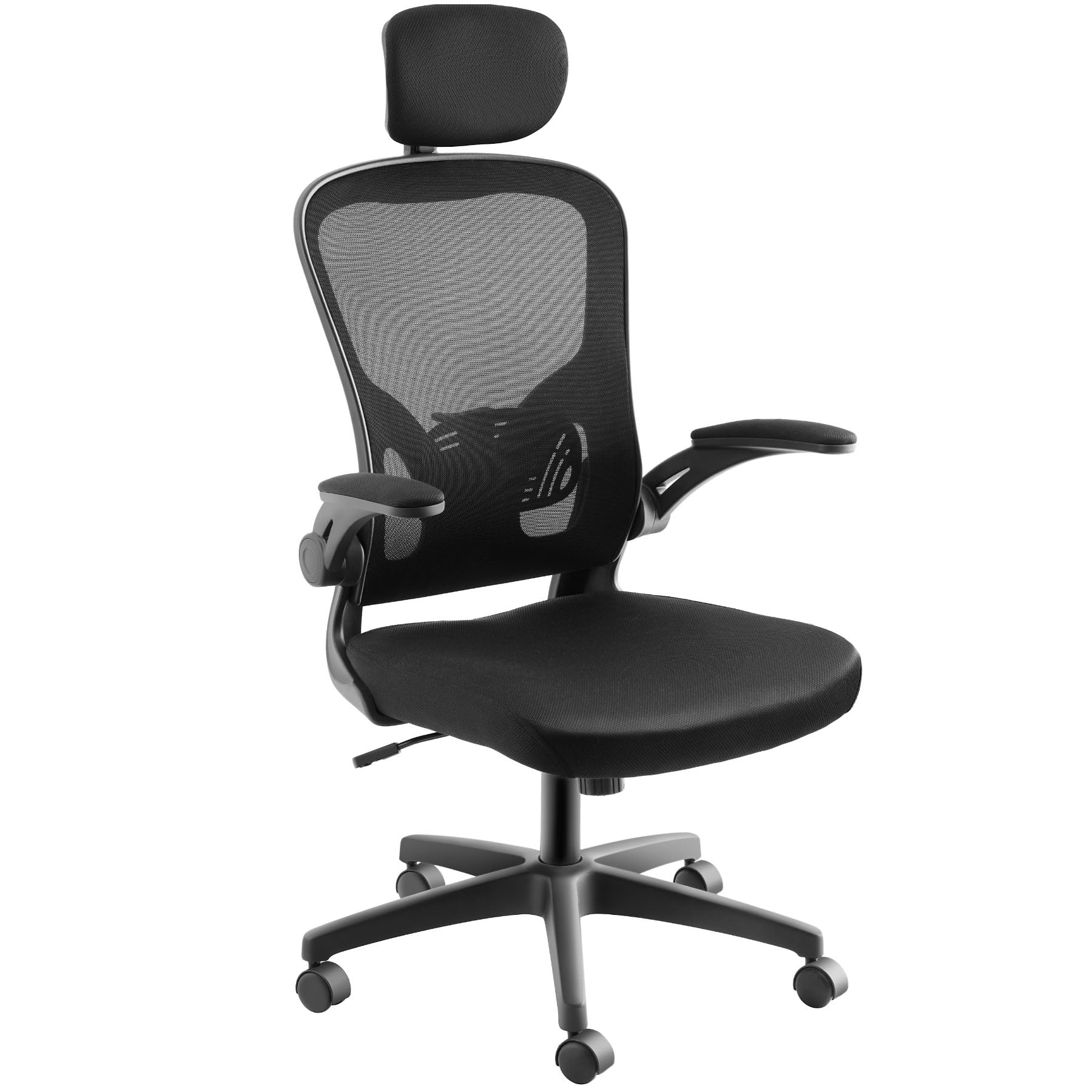
Image: Detailed dimensions of the tectake Arges office chair.
වගකීම් සහ සහාය
For warranty information or technical support, please refer to the purchase documentation or contact tectake customer service directly. Contact details can typically be found on the manufacturer's webවෙබ් අඩවිය හෝ ඔබේ මිලදී ගැනීමේ කුවිතාන්සිය.
නිෂ්පාදකයා: ටෙක්ටේක්
විකුණුම්කරු: tectake nederland
ආපසු දෙන ප්රතිපත්තිය: දින 30 යි


