1. නිෂ්පාදන අවසන්view
The Baseus Bowie E18 True Wireless Earphones offer a high-quality audio experience with a comfortable, ergonomic design. This section provides a visual guide to the components of your new earphones.
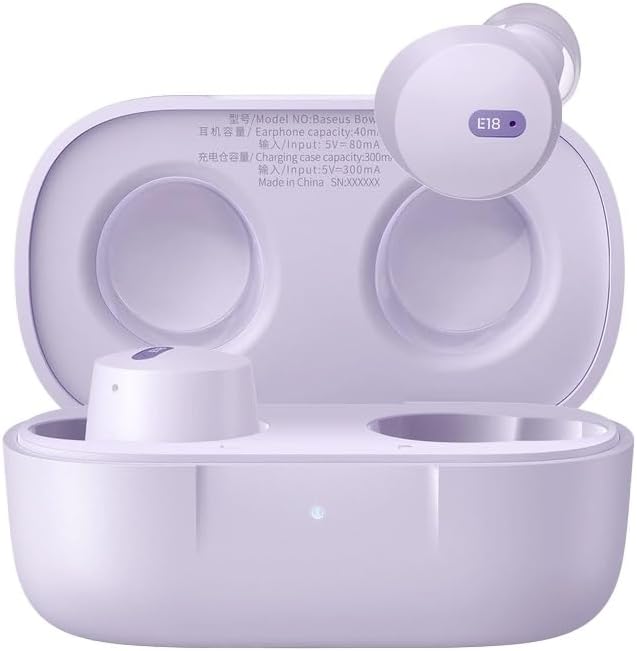
Image 1.1: Baseus Bowie E18 Earphones in their open charging case, showcasing the earbuds and charging contacts.
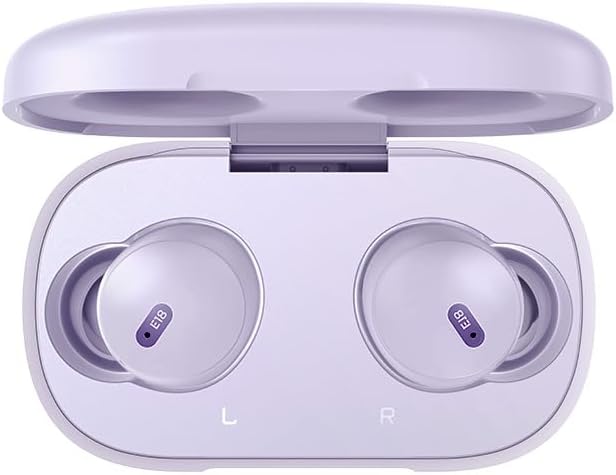
රූපය 1.2: ඉහළ-පහළ view of the Baseus Bowie E18 Earphones nestled in their charging case, showing the 'E18' model indicator on each earbud.
2. සැකසුම සහ මූලික භාවිතය
2.1 ඉයර්ෆෝන් සහ කේස් ආරෝපණය කිරීම
පළමු භාවිතයට පෙර, ඉයර්ෆෝන් සහ ආරෝපණ පෙට්ටිය සම්පූර්ණයෙන්ම ආරෝපණය කරන්න.
- Connect the charging case to a power source using a compatible USB-C cable.
- නඩුවේ දර්ශක ආලෝකය ආරෝපණ තත්ත්වය පෙන්වයි.
- ඉයර්බඩ් ආරෝපණ පෙට්ටියට දමන්න. ඒවා ස්වයංක්රීයව ආරෝපණය වීමට පටන් ගනී.

රූපය 2.1: පසුපස view of the Baseus Bowie E18 charging case, highlighting the USB-C charging port.
2.2 බ්ලූටූත් යුගල කිරීම
ඔබගේ ඉයර්ෆෝන් උපාංගයකට සම්බන්ධ කිරීමට:
- ඉයර්ෆෝන් ආරෝපණය කර ආරෝපණ පෙට්ටියේ තබා ඇති බවට වග බලා ගන්න.
- Open the charging case lid. The earphones will enter pairing mode automatically.
- ඔබගේ උපාංගයේ (ස්මාර්ට්ෆෝන්, ටැබ්ලටය, ආදිය), බ්ලූටූත් සක්රීය කරන්න.
- ඒ සඳහා සොයන්න available devices and select "Baseus Bowie E18" from the list.
- Once connected, the earphones are ready for use.

Image 2.2: Visual representation of Bluetooth 5.3 technology, emphasizing stable connection and efficient power usage.
2.3 ඉයර්ෆෝන් පැළඳීම
ප්රශස්ත ශබ්ද ගුණාත්මකභාවය සහ සුවපහසුව සඳහා, නිසි ගැළපීමක් සහතික කරන්න:
- සෑම ඉයර්බඩ් එකක්ම ඔබේ කන ඇලට මෘදු ලෙස ඇතුළු කරන්න.
- Adjust the earbud until it feels secure and comfortable.

Image 2.3: An earbud being worn, demonstrating the intended fit for the Baseus Bowie E18.
3. මෙහෙයුම් උපදෙස්
3.1 ස්පර්ශ පාලන
The Baseus Bowie E18 earphones feature intuitive touch controls for various functions:
- සංගීතය වාදනය/විරාම කරන්න: ඉයර්බඩ් දෙකෙන් එකක් මත එක තට්ටු කරන්න.
- ඊළඟ ධාවන පථය: දකුණු ඉයර්බඩ් එක දෙවරක් තට්ටු කරන්න.
- පෙර ධාවන පථය: වම් ඉයර්බඩ් එක දෙවරක් තට්ටු කරන්න.
- පිළිතුර/අවසන් ඇමතුම: ලැබෙන ඇමතුමක් අතරතුර ඉයර්බඩ් දෙකෙන් එකක් මත එක් වරක් තට්ටු කරන්න.
- ඇමතුම ප්රතික්ෂේප කරන්න: ලැබෙන ඇමතුමක් අතරතුර ඉයර්බඩ් දෙකෙන් එකක් තත්පර 2ක් ඔබාගෙන සිටින්න.
- හ oice සහකාර සක්රිය කරන්න: ඉයර්බඩ් දෙකෙන් එකක් තුන් වරක් තට්ටු කරන්න.
3.2 බලය සක්රිය / අක්රිය
- බල ගැන්වීම: Open the charging case lid, or take the earbuds out of the case. They will power on automatically.
- විදුලිය විසන්ධි කිරීම: ඉයර්බඩ් නැවත ආරෝපණ පෙට්ටියට දමා පියන වසා දමන්න. ඒවා ස්වයංක්රීයව ක්රියා විරහිත වේ.
4. නඩත්තුව සහ රැකවරණය
නිසි නඩත්තුව ඔබේ ඉයර්ෆෝන් වල ආයු කාලය සහ ක්රියාකාරිත්වය සහතික කරයි.
- පිරිසිදු කිරීම: ඉයර්බඩ් සහ ආරෝපණ පෙට්ටිය පිරිසිදු කිරීමට මෘදු, වියලි, ලින්ට් රහිත රෙද්දක් භාවිතා කරන්න. රළු රසායනික ද්රව්ය හෝ උල්ෙල්ඛ ද්රව්ය භාවිතා නොකරන්න.
- ගබඩා: භාවිතයේ නොමැති විට, දූවිලි හා හානිවලින් ආරක්ෂා වීමට ඉයර්ෆෝන් ඒවායේ ආරෝපණ පෙට්ටියේ ගබඩා කරන්න.
- බැටරි සත්කාර: Avoid fully discharging the battery frequently. Charge the earphones regularly, even if not used for extended periods, to maintain battery health.
- ජල ප්රතිරෝධය: The Baseus Bowie E18 earphones are IPX4 water resistant, meaning they are protected against splashing water from any direction. They are not designed for submersion in water or use during swimming. Avoid exposure to heavy rain or extreme moisture.

Image 4.1: Visual representation of IPX4 water resistance, indicating protection against splashes.
5. දෝශ නිරාකරණය
If you encounter issues with your Baseus Bowie E18 earphones, try the following solutions:
- යුගල නොවන ඉයර්ෆෝන්:
- ඉයර්බඩ් දෙකම ආරෝපණය කර ඇති බව සහතික කර ගන්න.
- ඔබගේ උපාංගයේ බ්ලූටූත් අක්රිය කර නැවත ක්රියාත්මක කරන්න.
- Delete "Baseus Bowie E18" from your device's Bluetooth list and attempt to re-pair.
- ඉයර්බඩ් නැවත කේස් එකට දමා, පියන වසා, තත්පර 10ක් රැඳී සිට, යුගල කිරීමේ ප්රකාරයට නැවත ඇතුළු වීමට විවෘත කරන්න.
- එක ඉයර්බඩ් එකකින් ශබ්දයක් නැත:
- ඉයර්බඩ් දෙකම ආරෝපණය කර ඇති බව සහතික කර ගන්න.
- Try placing both earbuds back in the case, closing the lid, and then taking them out again.
- Perform a factory reset (refer to manufacturer's website for specific instructions if not detailed here).
- ආරෝපණ ගැටළු:
- හානි සඳහා ආරෝපණ කේබලය සහ ඇඩැප්ටරය පරීක්ෂා කරන්න.
- ඉයර්බඩ්වල සහ කේස් එක ඇතුළත ආරෝපණ සම්බන්ධතා පිරිසිදු හා සුන්බුන් වලින් තොර බව සහතික කර ගන්න.
- Try a different charging cable and power source.
- ඉයර්බඩ් ගැලවී යාම:
- Ensure you are using the correct size ear tips for a secure fit.
- Adjust the angle of the earbuds in your ear.
6. පිරිවිතර
Detailed technical specifications for the Baseus Bowie E18 True Wireless Earphones:
| විශේෂාංගය | පිරිවිතර |
|---|---|
| මාදිලියේ නම | බෝවී E18 |
| ආදර්ශ අංකය | A00023800537-Z1 |
| බ්ලූටූත් අනුවාදය | 5.0 |
| බ්ලූටූත් පරාසය | මීටර් 10 දක්වා |
| Earbud බැටරි ධාරිතාව | Approximately 50mAh (Each Earbud) |
| ආරෝපණ කේස් බැටරි ධාරිතාව | ආසන්න වශයෙන් 500mAh |
| සංගීත ධාවන කාලය | Up to 5 Hours (Single Charge) / Up to 30 Hours (With Charging Case) |
| කතා කාලය | Up to 5 Hours (Single Charge) / Up to 30 Hours (With Charging Case) |
| ආරෝපණ කාලය | ආසන්න වශයෙන් පැය 1.5 යි |
| බර | Approximately 50g (Including Charging Case) |
| රියදුරු ඒකකය | 10 මි.මී |
| සංඛ්යාත ප්රතිචාරය | 20Hz-20kHz |
| සම්බාධනය | 32 ඕම් |
| සංවේදීතාව | 120.5 dB |
| ජල ප්රතිරෝධය | IPX4 |
| බැටරි සෛල සංයුතිය | ලිතියම් අයන |

Image 6.1: Illustration emphasizing the extended listening time provided by the Baseus Bowie E18 earphones with their charging case.
7. වගකීම් සහ සහාය
7.1 නිෂ්පාදකයාගේ වගකීම
The Baseus Bowie E18 True Wireless Earphones come with a වසර 1ක නිෂ්පාදකයාගේ වගකීම from the date of purchase. This warranty covers manufacturing defects and ensures the product meets its specified performance standards under normal use. Please retain your proof of purchase for warranty claims.
For specific terms and conditions of the warranty, please refer to the official Baseus webවෙබ් අඩවිය හෝ ඔවුන්ගේ පාරිභෝගික සේවාව අමතන්න.
7.2 පාරිභෝගික සහාය
If you require further assistance, have questions not covered in this manual, or need to make a warranty claim, please contact Baseus customer support through their official webඔබ භාණ්ඩය මිලදී ගත් ස්ථානය හෝ සිල්ලර වෙළෙන්දා.


