හැඳින්වීම
The Kogan Table Top TV Stand is designed to provide a stable and versatile mounting solution for televisions ranging from 23 inches to 75 inches. This stand offers a modern aesthetic and helps create a clutter-free entertainment area. Key features include 2-level height adjustment for optimal viewing, anti-slip padded feet to protect surfaces, and robust construction capable of supporting up to 40kg.
ආරක්ෂිත තොරතුරු
- එකලස් කිරීමට පෙර සියලුම සංරචක පවතින බවත් හානි නොවන බවත් සහතික කර ගන්න. කිසියම් කොටසක් අස්ථානගත වී හෝ කැඩී ඇත්නම් භාවිතා නොකරන්න.
- Follow all assembly instructions carefully. Incorrect assembly can lead to product failure or injury.
- උපරිම බර ධාරිතාව කිලෝග්රෑම් 40 නොඉක්මවන්න.
- Ensure the TV stand is placed on a stable, level surface to prevent tipping.
- ළමයින් සහ සුරතල් සතුන් එකලස් කරන ස්ථානයෙන් ඈත් කරන්න.
- Do not hang or climb on the TV stand.
- Regularly check all screws and connections to ensure they remain tight and secure.
පැකේජයේ අන්තර්ගතය
පහත ලැයිස්තුගත කර ඇති සියලුම අයිතම ඔබේ පැකේජයට ඇතුළත් කර ඇති බව කරුණාකර සත්යාපනය කරන්න:
- 1 x Kogan Table Top TV Stand for 23" - 75" TVs
- 1 x Installation Kit (containing all necessary screws, washers, and tools)
- 1 x පරිශීලක අත්පොත (මෙම ලේඛනය)
- 1 x වගකීම් කාඩ්පත

Image: The Kogan Table Top TV Stand components shown alongside icons indicating key features such as compatibility with 23"-75" TVs, 40kg weight capacity, VESA mountability, 2-level height adjustment, and anti-skid pads.
සැකසුම සහ ස්ථාපනය
The Kogan Table Top TV Stand is designed for easy installation. Please follow these general steps. Refer to the detailed instructions in the included Installation Kit for specific screw types and assembly sequences.
- සංරචක ඉවත් කරන්න: සීරීම් වළක්වා ගැනීම සඳහා ඇසුරුම්වලින් සියලුම කොටස් ප්රවේශමෙන් ඉවත් කර මෘදු පිරිසිදු මතුපිටක් මත තබන්න.
- Assemble Base Legs: Attach the base legs to the vertical support columns using the provided screws and tools. Ensure they are securely fastened.
- Attach VESA Brackets to TV: Identify the VESA mounting holes on the back of your television. Select the appropriate screws and spacers from the Installation Kit and attach the vertical VESA brackets to your TV. Ensure the brackets are oriented correctly for height adjustment.
- රූපවාහිනිය ස්ථාවරයට සවි කරන්න: Carefully lift your television and hook the VESA brackets onto the vertical support columns of the stand. Secure the TV to the stand using the locking mechanisms or screws as indicated in the installation guide.
- උස සකස් කරන්න: The stand features 2-level height adjustment. Once the TV is mounted, you can adjust its vertical position by selecting different mounting points on the vertical columns. Ensure both sides are adjusted to the same level for stability.
- ස්ථාවරය: Place the assembled TV stand with the television on a sturdy, level surface. The anti-slip padded feet will help protect your furniture and prevent movement.
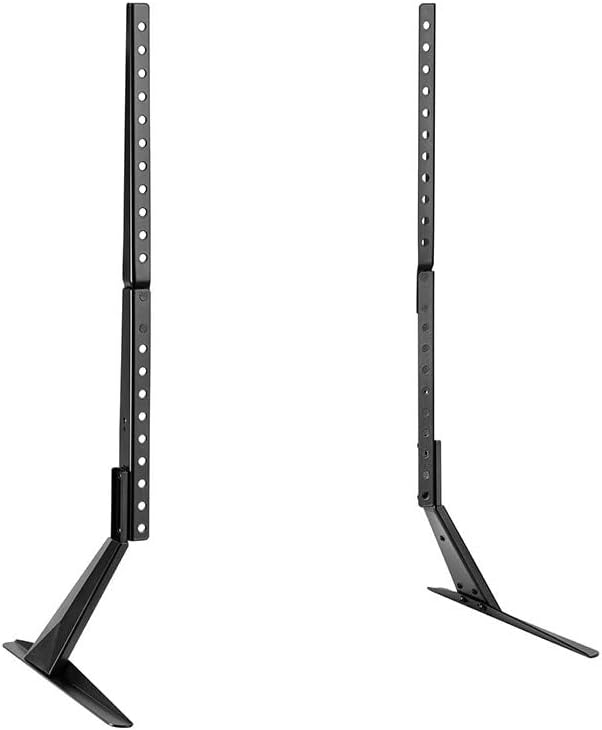
රූපය: ඉදිරිපස එකක් view of the Kogan Table Top TV Stand, disassembled into its main components: two vertical support columns and two base legs. This illustrates the primary parts involved in assembly.

රූපය: පැති වෘත්තිකයෙක්file view of the Kogan Table Top TV Stand, highlighting the angled base leg and the vertical support column with multiple adjustment holes for height customization.
මෙහෙයුම් උපදෙස්
Once assembled and positioned, the Kogan Table Top TV Stand requires minimal operation. Its primary function is to securely hold your television at an optimal viewing උස.
- උස ගැලපීම: වෙනස් කිරීමට viewing height, you will need to carefully remove the TV from the stand, adjust the mounting position on the vertical columns, and then re-mount the TV. Always ensure the TV is securely re-attached before releasing එය.
- ස්ථාවරත්වය: The anti-slip padded feet are designed to keep the stand stable and prevent scratches on your furniture. Avoid dragging the stand across surfaces; always lift it when repositioning.

Image: A Kogan Table Top TV Stand supporting a television, placed on a media console. This image shows the stand in a typical home environment, providing a clear, straight-on view of the setup.
නඩත්තු කිරීම
To ensure the longevity and appearance of your Kogan Table Top TV Stand, follow these simple maintenance guidelines:
- පිරිසිදු කිරීම: මෘදු වියළි රෙද්දකින් ස්ථාවරය පිස දමන්න. මුරණ්ඩු සලකුණු සඳහා, තරමක් damp cloth can be used, followed by immediate drying. Avoid abrasive cleaners or solvents, as they may damage the finish.
- පරීක්ෂණ: Periodically check all screws and connections to ensure they are tight. If any looseness is detected, re-tighten them immediately.
- පරිසරය: Avoid exposing the stand to extreme temperatures or high humidity, which could affect its material integrity.
දෝෂගවේෂණය
If you encounter any issues with your Kogan Table Top TV Stand, please refer to the following common problems and solutions:
| ගැටලුව | විය හැකි හේතුව | විසඳුම |
|---|---|---|
| ස්ථාවරය අස්ථායී හෝ වෙව්ලන බවක් දැනේ. | ඉස්කුරුප්පු ලිහිල්යි; ස්ටෑන්ඩ් එක අසමාන මතුපිටක් මත තබා ඇත; රූපවාහිනී බර ධාරිතාව ඉක්මවා යයි. | Ensure all assembly screws are tightened. Move the stand to a flat, level surface. Verify your TV's weight does not exceed 40kg. |
| TV is not level on the stand. | One side of the VESA bracket is mounted higher than the other; stand is on an uneven surface. | Re-check the VESA bracket attachment to ensure both sides are at the same height. Adjust the stand's position on the surface. |
| Scratches on furniture surface. | Anti-slip pads are missing or damaged; stand was dragged. | Ensure all anti-slip pads are correctly attached to the base legs. Always lift the stand when moving it, do not drag. |
පිරිවිතර
| වෙළඳ නාමය | කෝගන් |
| ආකෘතිය | KATVLTS75LA |
| අනුකූල රූපවාහිනී ප්රමාණ | අඟල් 23 - 75 |
| උපරිම බර ධාරිතාව | කිලෝ ග්රෑම් 40 කි |
| උස ගැලපීම | 2-මට්ටම |
| විශේෂාංග | Anti-slip padded feet, VESA mountable |
| පැකේජ මානයන් | 40 x 17 x 5 සෙ.මී |
| අයිතමයේ බර | කිලෝ ග්රෑම් 2.55 කි |
වගකීම් සහ සහාය
Your Kogan Table Top TV Stand comes with a Warranty Card. Please refer to this card for detailed information regarding warranty terms, conditions, and duration.
For technical support, troubleshooting assistance beyond what is provided in this manual, or to inquire about replacement parts, please visit the official Kogan support website or contact their customer service department. Keep your purchase receipt and warranty card handy for any warranty claims.
ඔබට සාමාන්යයෙන් නිෂ්පාදකයාගේ නිල වෙබ් අඩවියෙන් සහාය තොරතුරු සොයාගත හැකිය webඅඩවිය: කොගන් සහාය


