1. නිෂ්පාදන අවසන්view
The VIVOTEK FD9383-HTV is a high-performance 5-megapixel outdoor network dome camera designed for robust surveillance applications. It features a 2.8-12mm motorized varifocal lens, providing flexibility in field of view, and integrated IR LEDs for clear night vision up to 98 feet. This camera is built to withstand harsh outdoor conditions with IP66 and IK10 ratings, ensuring protection against dust, water, and vandalism. It also includes a built-in microphone for audio monitoring.
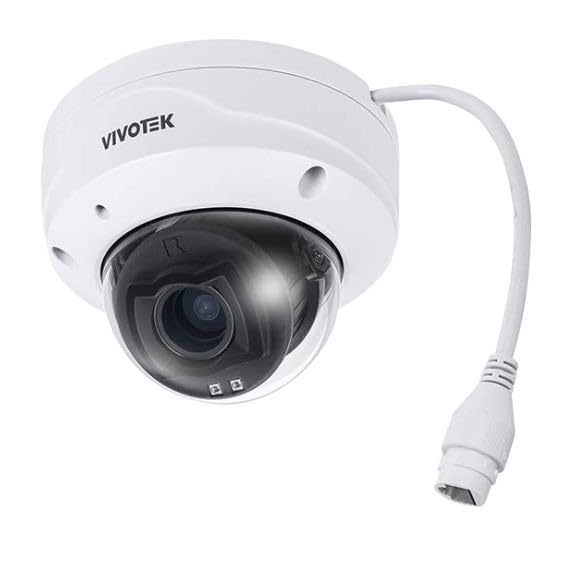
රූපය 1.1: ඉදිරිපස view of the VIVOTEK FD9383-HTV 5MP Outdoor Network Dome Camera.
ප්රධාන ලක්ෂණ:
- 2560 x 1920 Resolution at 30 fps for high-quality video.
- IR LEDs for Night Vision up to 98 feet (30 meters).
- 2.8-12mm Motorized Varifocal Lens for flexible viewing කෝණ.
- 95.4 to 28.7° Horizontal Angle of View.
- Built-In Microphone for audio capture.
- IP66-Rated for outdoor use, protecting against dust and water.
- IK10-Rated for vandal resistance.
- Supports microSD Cards up to 1TB for local storage.
- RJ45 Ethernet with Power over Ethernet (PoE) Technology.
- Complies with ONVIF Profiles G, S, T for broad compatibility.
2. පැකේජ අන්තර්ගතය
සියලුම අයිතම හොඳ තත්ත්වයේ පවතින බව තහවුරු කරගන්න. කිසියම් අයිතමයක් අස්ථානගත වී හෝ හානි වී ඇත්නම්, වහාම ඔබේ වෙළෙන්දා අමතන්න.
- VIVOTEK FD9383-HTV Network Dome Camera
- Mounting Screw Kit (screws, wall anchors)
- ජල ආරක්ෂිත සම්බන්ධක කට්ටලය
- Alignment Sticker/Drill Template
- ඉක්මන් ස්ථාපන මාර්ගෝපදේශය
- Software CD (or download link information)
3 ආරක්ෂිත තොරතුරු
Please read these safety instructions carefully before operating the device to prevent injury to yourself or others and to avoid damage to the device. Keep this manual for future reference.
- ස්ථාපනය: Installation should be performed by qualified personnel only and must comply with all local codes.
- බලශක්ති ප්රභවය: Use only the specified power source (PoE or 12V DC adapter, if applicable) to avoid fire or electric shock.
- පරිසරය: Do not expose the camera to extreme temperatures, humidity, or corrosive environments beyond its specified operating conditions.
- පිරිසිදු කිරීම: පිරිසිදු කිරීමට පෙර විදුලිය විසන්ධි කරන්න. මෘදු, වියළි රෙද්දක් භාවිතා කරන්න. දියර හෝ එයරෙසෝල් පිරිසිදු කරන්නන් භාවිතා නොකරන්න.
- සේවා: මෙම නිෂ්පාදනය ඔබම සේවය කිරීමට උත්සාහ නොකරන්න. සියලුම සේවා සුදුසුකම් ලත් සේවකයින් වෙත යොමු කරන්න.
4. පිහිටුවීම
4.1 භෞතික ස්ථාපනය
The FD9383-HTV camera is designed for wall or ceiling mounting. Ensure the mounting surface is strong enough to support the camera's weight.
- සවි කරන මතුපිට සකස් කරන්න: Use the provided drill template to mark the screw holes on the desired mounting location.
- සිදුරු සිදුරු: Drill pilot holes for the mounting screws and, if necessary, for the network cable. Insert wall anchors if mounting on drywall or masonry.
- සවි කිරීමේ වරහන අමුණන්න: සපයා ඇති ඉස්කුරුප්පු භාවිතයෙන් කැමරාවේ සවිකරන වරහන මතුපිටට සුරක්ෂිත කරන්න.
- කේබල් සම්බන්ධ කරන්න: Route the Ethernet cable through the mounting surface or cable entry point. Connect the RJ45 connector to the camera's network port. If not using PoE, connect a 12V DC power adapter (sold separately) to the power input. Ensure waterproof connections for outdoor installations.
- Secure Camera Body: Attach the camera body to the mounting bracket. Adjust the camera's orientation and angle as needed.
- ස්ථාපනය අවසන් කරන්න: Secure all covers and ensure the camera is firmly mounted and protected from the elements.

Image 4.1: Illustrative diagram of camera mounting and cable connection.
4.2 ජාල සම්බන්ධතාවය
The camera supports Power over Ethernet (PoE) for simplified installation, allowing both power and data to be transmitted over a single Ethernet cable.
- Connect the camera to a PoE-enabled switch or a PoE injector using a standard Ethernet cable.
- Alternatively, connect to a standard network switch and use a separate 12V DC power adapter.
- Ensure your network is configured to assign an IP address to the camera (DHCP recommended for initial setup).
4.3 මූලික වින්යාසය
After physical installation and network connection, you need to access the camera's web interface for initial configuration.
- කැමරාව සොයා ගන්න: Use VIVOTEK's IP Search utility (available on their website) or a network scanner to find the camera's IP address on your network.
- ප්රවේශය Web අතුරු මුහුණත: a විවෘත කරන්න web බ්රවුසරය (උදා: ක්රෝම්, ෆයර්ෆොක්ස්) වෙත ගොස් ලිපින තීරුවේ කැමරාවේ IP ලිපිනය ඇතුළත් කරන්න.
- ඇතුල් වන්න: The default username is typically 'root' and the password is 'pass'. You will be prompted to change the password upon first login for security reasons.
- මූලික සැකසුම්: Configure essential settings such as date/time, network settings (if not using DHCP), and user accounts.
5. ක්රියාත්මක වීම
5.1 Accessing the Camera Interface
Once configured, you can access the camera's live view and settings through its web interface or compatible VIVOTEK software/NVR systems.
- Enter the camera's IP address in your web බ්රවුසරය.
- Log in with your configured username and password.
- The interface provides access to live video, recording settings, motion detection, and other advanced features.
5.2 Adjusting Lens and Focus
The FD9383-HTV features a motorized varifocal lens, allowing remote adjustment of zoom and focus.
- Navigate to the 'Video' or 'Lens' settings section in the web අතුරු මුහුණත.
- Use the zoom controls to adjust the focal length (2.8mm to 12mm) to achieve the desired field of view.
- Utilize the focus controls to sharpen the image. Many VIVOTEK cameras offer a one-touch focus feature for automatic adjustment.
5.3 රාත්රී දර්ශන සැකසුම්
The camera automatically switches to night vision mode in low-light conditions using its IR LEDs.
- In the 'Image' or 'IR' settings, you can configure the IR illuminator's behavior (e.g., auto, manual on/off).
- Adjust IR intensity if available, to prevent overexposure or underexposure in specific scenarios.
5.4 පටිගත කිරීම සහ ගබඩා කිරීම
The camera supports various recording methods, including local storage on a microSD card and network video recording (NVR).
- MicroSD කාඩ්පත: Insert a compatible microSD card (up to 1TB) into the camera's slot. Format the card via the web interface. Configure recording schedules and triggers (e.g., continuous, motion-triggered).
- NVR/NAS: Connect the camera to a VIVOTEK NVR or a compatible Network Attached Storage (NAS) device. Configure recording settings on the NVR/NAS.
5.5 චලන හඳුනාගැනීම
Configure motion detection to trigger recordings, send alerts, or activate other actions.
- Access the 'Event' or 'Motion Detection' settings in the web අතුරු මුහුණත.
- Define detection zones within the camera's field of view.
- Adjust sensitivity levels to minimize false alarms.
- Set up actions to be taken when motion is detected (e.g., record video, send email notification).
6. නඩත්තු කිරීම
6.1 පිරිසිදු කිරීම
නිතිපතා පිරිසිදු කිරීම ප්රශස්ත රූපයේ ගුණාත්මක භාවය පවත්වා ගැනීමට සහ කැමරාවේ ආයු කාලය දීර්ඝ කිරීමට උපකාරී වේ.
- කාච: Gently wipe the lens with a soft, lint-free cloth. For stubborn dirt, use a lens cleaning solution specifically designed for optical surfaces. Avoid abrasive materials.
- නිවාස: දැන්වීමකින් කැමරා නිවාසය පිස දමන්නamp රෙදි. ශක්තිමත් ඩිටර්ජන්ට් හෝ ද්රාවක භාවිතා නොකරන්න.
- ඩෝම් කවරය: If applicable, carefully clean the dome cover to ensure clear visibility.
6.2 ස්ථිරාංග යාවත්කාලීන කිරීම්
Periodically check the VIVOTEK website for firmware updates. Firmware updates often include bug fixes, performance improvements, and new features.
- Download the latest firmware for your FD9383-HTV model from the official VIVOTEK support page.
- Access the camera's web interface and navigate to the 'System' or 'Maintenance' section.
- Follow the on-screen instructions to upload and install the firmware. Do not power off the camera during the update process.
7. දෝශ නිරාකරණය
This section provides solutions to common issues you might encounter with your VIVOTEK FD9383-HTV camera.
| ගැටලුව | විය හැකි හේතුව | විසඳුම |
|---|---|---|
| කැමරාව ක්රියාත්මක නොවේ | No power from PoE switch/injector; faulty power adapter; loose cable connection. | Check PoE status on switch; verify power adapter functionality; ensure all cables are securely connected. |
| ජාලය හරහා කැමරාවට ප්රවේශ විය නොහැක. | Incorrect IP address; network cable issue; firewall blocking access; camera not receiving an IP address. | Verify IP address; check network cable integrity; temporarily disable firewall; use IP Search utility to find camera. |
| දුර්වල රූප ගුණාත්මකභාවය (නොපැහැදිලි, අඳුරු) | Lens out of focus; dirty lens/dome; insufficient lighting; incorrect image settings. | හරහා අවධානය සකසන්න web interface; clean lens/dome; check IR settings; reset image settings to default. |
| චලන හඳුනාගැනීම ක්රියා නොකරයි | Detection zones not configured; sensitivity too low; event actions not set up. | Configure detection zones; increase sensitivity; ensure event actions (e.g., record, notify) are enabled. |
| මයික්රෝ එස්ඩී කාඩ්පත පටිගත නොවේ | Card not formatted; card full; recording schedule not active; faulty card. | Format microSD card in camera settings; check recording schedule; replace card if faulty. |
8. පිරිවිතර
Detailed technical specifications for the VIVOTEK FD9383-HTV camera.
| විශේෂාංගය | පිරිවිතර |
|---|---|
| රූප සංවේදකය | 1/2.8" Type CMOS |
| විභේදනය | 2560 fps දී 1920 x 30 |
| නාභි දුර | 2.8 to 12mm Motorized Varifocal Lens |
| හි තිරස් කෝණය View | 95.4 සිට 28.7° දක්වා |
| රාත්රී දර්ශනය | IR LEDs up to 98 feet (30 meters) |
| ශ්රව්ය උපකරණ | බිල්ට්-ඉන් මයික්රෆෝනය |
| ගබඩා කිරීම | Supports microSD Cards up to 1TB |
| ජාල අතුරුමුහුණත | 1x RJ45 Input (PoE) |
| පාරිසරික ශ්රේණිගත කිරීම | IP66 (දූවිලි සහ ජල ප්රතිරෝධක) |
| වැන්ඩල් ප්රතිරෝධය | IK10-Rated |
| ONVIF Compliance | Profiles G, S, T |
| නිෂ්පාදන මානයන් | 5.3 x 4.1 x 4.1 අඟල් (13.5 x 10.4 x 10.4 cm) |
| අයිතමයේ බර | රාත්තල් 1.9 (කිලෝ ග්රෑම් 0.86) |
9. වගකීම් සහ සහාය
VIVOTEK products are covered by a limited warranty. For specific warranty terms and conditions, please refer to the warranty card included with your product or visit the official VIVOTEK webඅඩවිය.
For technical support, product documentation, and software downloads, please visit the VIVOTEK official support portal:
https://www.vivotek.com/support
When contacting support, please have your camera's model number (FD9383-HTV) and serial number ready.


