1. වැදගත් ආරක්ෂක තොරතුරු
ස්ථාපනය කිරීමට සහ භාවිතා කිරීමට පෙර කරුණාකර සියලු උපදෙස් හොඳින් කියවන්න. අනාගත යොමුව සඳහා මෙම අත්පොත තබා ගන්න.
- Do not use corrosive cleaners or chemicals on the lock finish.
- Ensure all components are installed correctly and securely to prevent malfunction.
- Keep physical keys in a safe location away from the lock.
- Regularly check battery levels and replace batteries as needed to avoid lock-out situations.
- Avoid exposing the lock to extreme temperatures or direct water spray beyond its IP54 rating.
2. පැකේජ අන්තර්ගතය
Verify that all parts are present before beginning installation. If any parts are missing or damaged, contact customer support.
- බාහිර යතුරු පෑඩ් එකලස් කිරීම
- අභ්යන්තර එකලස් කිරීම
- Deadbolt Latch
- වැඩ වර්ජන තහඩුව
- සවිකරන තහඩුව
- Door Handle Set (Interior and Exterior)
- සවිකරන ඉස්කුරුප්පු
- භෞතික යතුරු (2)
- පරිශීලක අත්පොත
3. ස්ථාපන මාර්ගෝපදේශය
The Ulecoce U18 lock is designed for easy installation on standard U.S. doors with a screwdriver. No drilling is typically required for compatible doors.
3.1 දොර සකස් කිරීම
ඔබේ දොර පහත පිරිවිතරයන්ට අනුකූල වන බවට වග බලා ගන්න:
- පසුපෙළ: 2-3/8 inches or 2-3/4 inches (60mm or 70mm).
- දොර ඝණකම: 1.31 inches to 2.16 inches (35-50mm).
- හරස් සිදුරු විෂ්කම්භය: 2-1/8 inches (54mm).

රූපය 3.1: Door measurement guide for backset, door thickness, and cross bore diameter, indicating compatibility for easy installation without drilling.

රූපය 3.2: Compatibility guide illustrating different existing door lock types and their compatibility with the Ulecoce U18 lock. The lock is compatible with standard deadbolt and handle sets, but not with certain integrated or multi-point locking systems.
3.2 පියවරෙන් පියවර ස්ථාපනය
- අගුල ස්ථාපනය කරන්න: Insert the deadbolt latch into the door edge. Ensure the "UP" arrow on the latch is pointing upwards. Secure with screws.
- බාහිර එකලස් කිරීම ස්ථාපනය කරන්න: Feed the cable from the exterior keypad assembly through the cross bore hole. Align the spindle with the latch mechanism.
- අභ්යන්තර සවිකිරීමේ තහඩුව ස්ථාපනය කරන්න: Secure the interior mounting plate to the exterior assembly using the provided screws. Ensure the cable passes through the plate.
- කේබලය සම්බන්ධ කරන්න: බාහිර එකලස් කිරීමේ සිට අභ්යන්තර එකලස් කිරීම දක්වා කේබලය සම්බන්ධ කරන්න.
- අභ්යන්තර එකලස් කිරීම ස්ථාපනය කරන්න: Mount the interior assembly onto the mounting plate, ensuring the thumb turn aligns with the deadbolt mechanism. Secure with screws.
- බැටරි ස්ථාපනය කරන්න: Open the battery cover on the interior assembly and insert 4 AA alkaline batteries (not included).
- Install the Door Handle Set: Install the interior and exterior door handle components according to the separate instructions for the handle set.
- අගුල පරීක්ෂා කරන්න: Close the door and test the deadbolt operation using the thumb turn and a physical key.
4. මෙහෙයුම් උපදෙස්
The Ulecoce U18 offers multiple convenient unlocking and locking methods.
4.1 අගුළු හැරීමේ ක්රම

රූපය 4.1: Visual representation of the various unlocking methods available for the Ulecoce U18 lock, including keypad entry, one-time codes, anti-peeping function, and traditional physical key access.
- යතුරු පෑඩ් කේතය: Enter your 6-digit user code followed by the '#' key. The lock will unlock.
- Anti-peeping මුරපදය: To enhance security, you can enter random digits before or after your actual code. For example, ඔබේ කේතය 123456 නම්, ඔබට 789 ඇතුළත් කළ හැකිය123456012#. The lock will still recognize the correct sequence within the longer input.
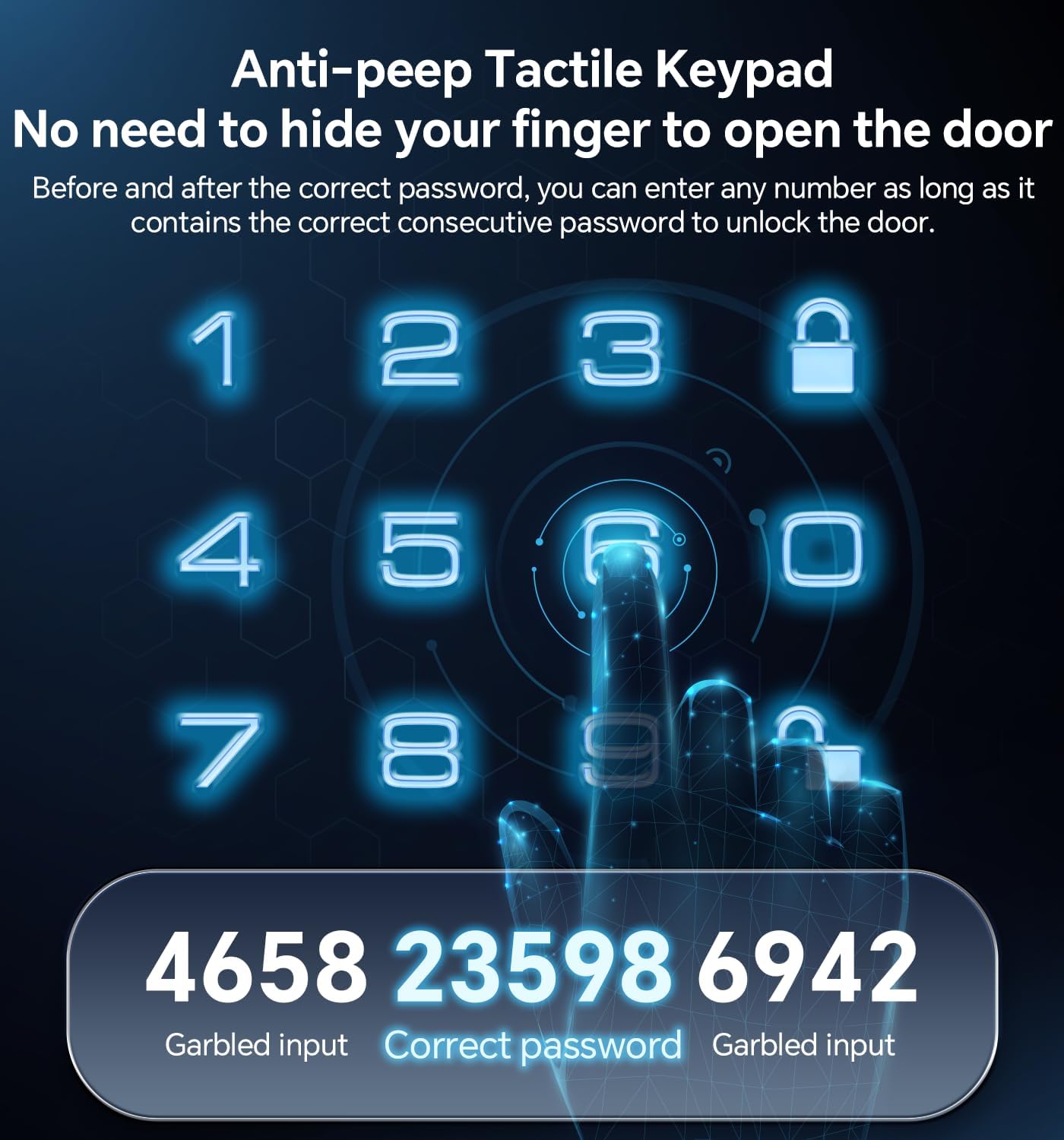
රූපය 4.2: Explanation of the anti-peep function, demonstrating how to obscure your actual PIN by adding random digits before and after it on the keypad.
- එක් වරක් PIN කේතය: Generate temporary codes for guests or service providers. These codes are valid for a single use.

රූපය 4.3: A user receiving a one-time PIN code on their mobile device, illustrating the convenience of temporary access for visitors.
- භෞතික යතුර: In case of battery failure or forgotten codes, use the provided physical keys to unlock the deadbolt.
4.2 අගුලු දැමීමේ ක්රම

රූපය 4.4: The auto-lock feature, which automatically secures the door after a customizable delay of 10-30 seconds, providing peace of mind.
- ස්වයංක්රීය අගුලු දැමීම: The lock can be configured to automatically lock after a set period (10-30 seconds) once the door is closed. Refer to programming instructions for setting this feature.
- එක්-ස්පර්ශ අගුලු දැමීම: Press and hold the '#' key on the keypad for 2 seconds to manually lock the door from the outside. From the inside, use the thumb turn.
4.3 User Management and Programming
The lock supports 3 administrator codes and up to 97 user codes. Refer to the detailed programming guide (often provided separately or via email after purchase) for instructions on:
- Adding/Deleting Administrator Codes
- Adding/Deleting User Codes (Permanent, One-Time, Scheduled)
- Setting Auto-Lock Delay
- ශබ්දය සබල කිරීම/අබල කිරීම
- කර්මාන්තශාලා යළි පිහිටුවීම
5. නඩත්තු කිරීම
- පිරිසිදු කිරීම: Wipe the lock's exterior with a soft, damp රෙදි. උල්ෙල්ඛ පිරිසිදු කරන්නන්, ද්රාවක හෝ රළු රසායනික ද්රව්ය භාවිතා නොකරන්න, මන්ද මේවා නිමාවට සහ ඉලෙක්ට්රොනික උපාංගවලට හානි කළ හැකිය.
- බැටරි ආදේශනය: The lock will provide a low battery alert. Replace all 4 AA batteries promptly. Use high-quality alkaline batteries for optimal performance.
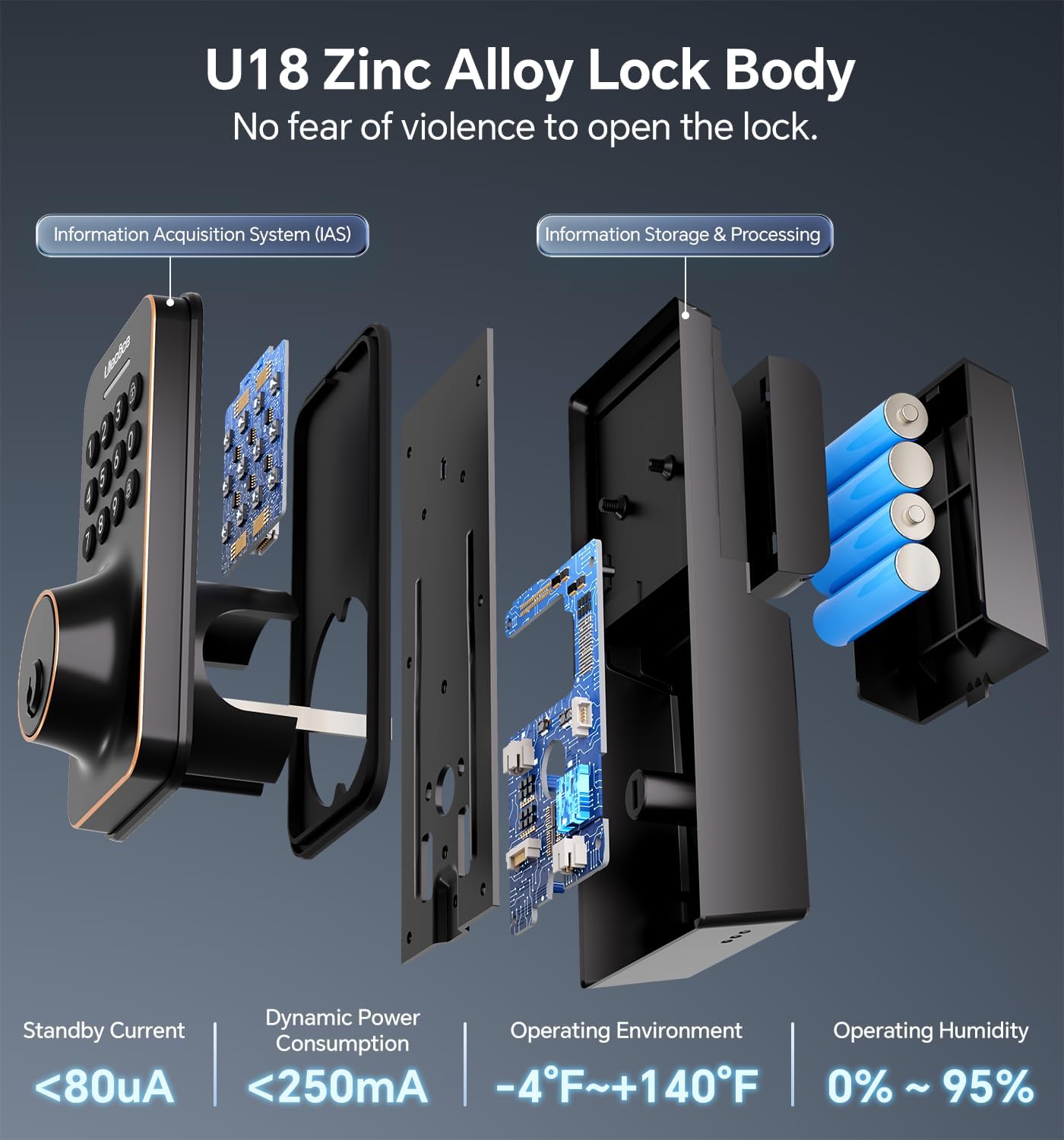
රූපය 5.1: Internal structure of the Ulecoce U18 lock, highlighting the battery compartment and electronic components, which are designed for durability and efficient power consumption.
- යාන්ත්රික පරීක්ෂාව: Periodically check that all screws are tight and that the deadbolt operates smoothly. If the deadbolt sticks, ensure the strike plate is properly aligned with the latch.
6. දෝශ නිරාකරණය
| ගැටලුව | විය හැකි හේතුව | විසඳුම |
|---|---|---|
| යතුරු පුවරුවට අගුල ප්රතිචාර නොදක්වයි. | Dead batteries; incorrect code; keypad malfunction. | Replace batteries. Re-enter code carefully. Use physical key. Contact support if issue persists. |
| ඩෙඩ්බෝල්ට් සම්පූර්ණයෙන්ම දිගු නොවේ/අත්හරිනු නොලැබේ. | Misalignment of lock components; strike plate misalignment; obstruction. | Check installation for proper alignment. Adjust strike plate. Clear any obstructions. |
| Low battery alert persists after replacement. | Poor quality batteries; incorrect battery insertion. | Ensure fresh, high-quality alkaline batteries are used and inserted correctly. |
| Cannot program new codes. | Incorrect programming steps; lock in an error state. | Review programming instructions carefully. Perform a factory reset if necessary (this will erase all existing codes). |
7. පිරිවිතර

රූපය 7.1: Detailed dimensions of the Ulecoce U18 Smart Door Lock Set, illustrating the size of both the exterior keypad and the interior handle components.
- ආකෘතිය: Ulecoce U18
- ද්රව්ය: සින්ක් මිශ්ර ලෝහය
- වර්ණය: තෙල් අතුල්ලන ලද ලෝකඩ
- Dimensions (Exterior Keypad): Approximately 6.5in (H) x 2.83in (W)
- Dimensions (Interior Assembly): Approximately 4.8in (H) x 2.6in (W)
- බලය: 4 x AA බැටරි (ඇතුළත් කර නැත)
- පරිශීලක කේත: 100 දක්වා
- ආරක්ෂක ශ්රේණිය: ANSI ශ්රේණිය 3
- කාලගුණ ප්රතිරෝධය: IP54
- මෙහෙයුම් උෂ්ණත්වය: -4°F සිට +140°F (-20°C සිට +60°C)
- මෙහෙයුම් ආර්ද්රතාවය: 0% සිට 95% දක්වා (ඝනීභවනය නොවන)
- විශේෂ ලක්ෂණ: Anti-spy password, Portable, Weather-resistant, Automatic locking, One-touch locking.
8. වගකීම් සහ පාරිභෝගික සහාය
Ulecoce door locks come with a 30-day return policy and a 1-year replacement warranty. Lifetime troubleshooting and customer service are also provided.
For assistance, please contact Ulecoce customer support. Upon receipt of your entry door lock kit, you may receive a follow-up email with additional instructions to ensure proper operation.


