හැඳින්වීම
This manual provides essential information for the installation, operation, and maintenance of your KINGMAX DDR4 3200 CL22 16GB Long Dimm memory module. Please read these instructions carefully before proceeding with installation to ensure proper functionality and system stability.
ආරක්ෂිත තොරතුරු
පරිගණක සංරචක හැසිරවීමේදී පහත සඳහන් ආරක්ෂක පියවරයන් සැමවිටම නිරීක්ෂණය කරන්න:
- Ensure your computer is powered off and unplugged from the wall outlet before opening the case.
- Discharge any static electricity from your body by touching a grounded metal object (e.g., the unpainted metal chassis of your computer) before handling components. Consider using an anti-static wrist strap.
- Handle the memory module by its edges to avoid touching the gold contacts or the integrated circuits.
- Keep memory modules away from liquids and extreme temperatures.
සැකසුම සහ ස්ථාපනය
Follow these steps to properly install your KINGMAX DDR4 memory module:
- සකස් කිරීම:
- Power down your computer completely and unplug the power cord.
- Open the computer case. Refer to your computer or motherboard manual for specific instructions on how to do this.
- Locate the DIMM slots on your motherboard. These are typically long slots near the CPU.
- Unpacking the Module:
Carefully remove the KINGMAX DDR4 memory module from its packaging. Avoid touching the gold contacts.

Image 1: KINGMAX DDR4 16GB memory module in its retail packaging. The module is visible through the clear plastic, showing the KINGMAX branding and specifications label.
- Inserting the Module:
- Identify the notch on the memory module's gold contacts. This notch must align with the key in the DIMM slot. DDR4 modules have a specific notch placement to prevent incorrect insertion.
- DIMM ස්ලොට් එකේ කෙළවර දෙකෙහිම ක්ලිප් විවෘත කරන්න.
- Hold the memory module by its edges and align the notch with the slot's key.
- Press down firmly and evenly on both ends of the module until the clips snap into place, securing the module. Do not force the module if it does not seat easily; re-check alignment.
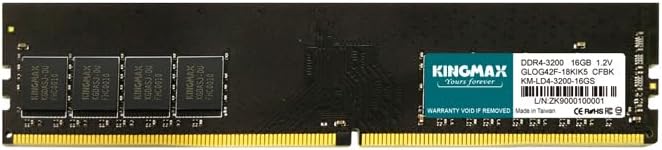
රූපය 2: සමීප රූපය view of the KINGMAX DDR4 16GB memory module. The black PCB features several memory chips and a teal label with KINGMAX logo, DDR4-3200, 16GB, 1.2V, and model number KM-LD4-3200-16GS.
- පසු ස්ථාපනය:
- පරිගණක නඩුව වසා දමන්න.
- Reconnect the power cord and power on your computer.
- Access your system's BIOS/UEFI settings (usually by pressing DEL, F2, or F10 during boot-up) to verify that the new memory is recognized and operating at the correct speed (3200MHz).
ක්රියාත්මක වෙනවා
Once properly installed and recognized by your system's BIOS/UEFI, the KINGMAX DDR4 memory module operates automatically. The operating system will utilize the installed memory for various tasks, enhancing overall system performance. No further user intervention is typically required for basic operation.
නඩත්තු කිරීම
මතක මොඩියුල සඳහා සාමාන්යයෙන් අවම නඩත්තුවක් අවශ්ය වේ. ප්රශස්ත කාර්ය සාධනය සහ කල්පැවැත්ම සහතික කිරීම සඳහා:
- Keep your computer's interior clean and free of dust to prevent overheating, which can affect memory performance.
- Avoid physical impact or bending of the module.
- ඔබේ පරිගණක ආවරණය තුළ ප්රමාණවත් වායු ප්රවාහයක් සහතික කර ගන්න.
දෝෂගවේෂණය
If you encounter issues after installing your KINGMAX DDR4 memory module, consider the following:
- පද්ධතිය ආරම්භ නොවේ / සංදර්ශකය නොමැත:
- මතක මොඩියුලය එහි ස්ලට් එකේ සම්පූර්ණයෙන්ම අසුන්ගෙන ඇති බවත් ක්ලිප් අගුළු දමා ඇති බවත් සහතික කර ගන්න.
- මොඩියුලය නැවත ස්ථාපනය කිරීමට උත්සාහ කරන්න.
- If multiple modules are installed, try booting with only one module at a time to identify a potentially faulty module or slot.
- Verify that your motherboard supports DDR4 memory and the installed capacity.
- Incorrect Memory Capacity Detected:
- Check your BIOS/UEFI settings to confirm the detected memory.
- Ensure your operating system is 64-bit to fully utilize 16GB or more of RAM.
- Update your motherboard's BIOS/UEFI to the latest version, as this can improve memory compatibility.
- පද්ධති අස්ථාවරත්වය / නිල් තිර:
- දෝෂ පරීක්ෂා කිරීමට මතක රෝග විනිශ්චය මෙවලමක් (උදා: Windows Memory Diagnostic හෝ MemTest86) ක්රියාත්මක කරන්න.
- Ensure your system's power supply unit (PSU) is sufficient for all installed components.
පිරිවිතර
| විශේෂාංගය | විස්තර |
|---|---|
| වෙළඳ නාමය | KINGMAX |
| ආදර්ශ අංකය | KM-LD4-3200-16GS |
| මතක තාක්ෂණය | DDR4 |
| ධාරිතාව | 16 GB |
| වේගය | 3200 MHz |
| CAS Latency (CL) | CL22 |
| ආකෘති සාධකය | DIMM (Long Dimm) |
| වෙළුමtage | 1.2V |
| විශේෂ ලක්ෂණ | සැහැල්ලුයි |
වගකීම් සහ සහාය
For warranty information and technical support, please refer to the official KINGMAX webවෙබ් අඩවියට පිවිසෙන්න හෝ ඔබේ සිල්ලර වෙළෙන්දා අමතන්න. වගකීම් හිමිකම් සඳහා ඔබේ මිලදී ගැනීමේ සාක්ෂි තබා ගන්න.


